1. Танилцуулга
This manual provides detailed instructions for the setup, operation, and maintenance of your VYSER F2 Projector. Please read this manual thoroughly before using the projector to ensure proper functionality and to maximize your viewing experience. The VYSER F2 Projector is a versatile device designed for various entertainment and presentation needs, offering high-definition projection with multiple connectivity options.
2. Хайрцагт юу байна
Upon unboxing your VYSER F2 Projector, please verify that all the following items are included:
- VYSER F2 Projector
- Алсын удирдлага
- Хэрэглэгчийн гарын авлага (энэ баримт бичиг)
- HDMI кабель
- Цахилгаан кабель
3. Бүтээгдэхүүн дууссанview
Familiarize yourself with the components and ports of your VYSER F2 Projector.

Figure 3.1: VYSER F2 Projector with key features highlighted.
3.1 Урд хэсэг View
- Фокус линз: Төсөөлөгдөж буй зургийн тод байдлыг тохируулна.
- IR хүлээн авагч: Алсын удирдлагаас дохио хүлээн авдаг.
3.2 Хажуу ба хойд хэсэг Views (Ports and Controls)
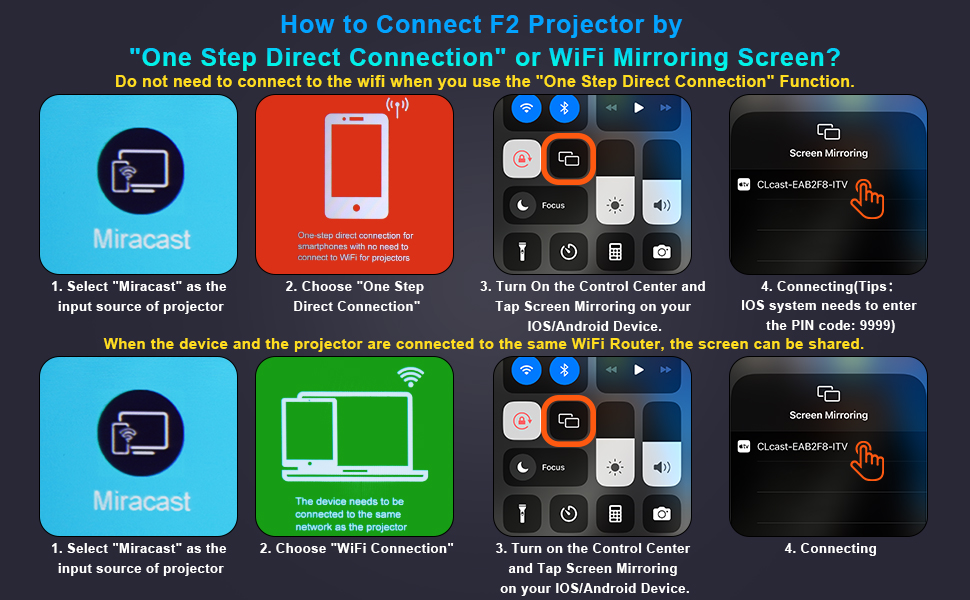
Figure 3.2: Multiple connection options on the VYSER F2 Projector.
- HDMI портууд (x2): Connect to devices like laptops, TV sticks, gaming consoles (e.g., PS5/Xbox).
- USB портууд (x2): Медиа тоглуулахын тулд USB хөтчүүдийг холбоно уу.
- AV порт: Connect to older devices using an AV cable.
- 3.5 мм аудио гаралт: Гадаад чанга яригч эсвэл чихэвчийг холбоно уу.
- Эрчим хүчний оролт: Цахилгааны кабелийг холбоно уу.
- Cooling Windows: Дулаан гадагшлуулахын тулд зохих агааржуулалтыг хангах.
- Самбар дээрх удирдлага: Buttons for power, menu, input source, and navigation.
3.3 360 Degree View Проекторын
Video 3.1: A comprehensive 360-degree view of the VYSER F2 Projector, showcasing its design and various ports from all angles.
4. Тохиргоо
Follow these steps to set up your VYSER F2 Projector for the first time.
4.1 Байршил
Place the projector on a stable, flat surface. Ensure there is adequate ventilation around the projector to prevent overheating. The projection distance can range from 5-15 feet, allowing for an adjustable screen size of 50-300 inches.
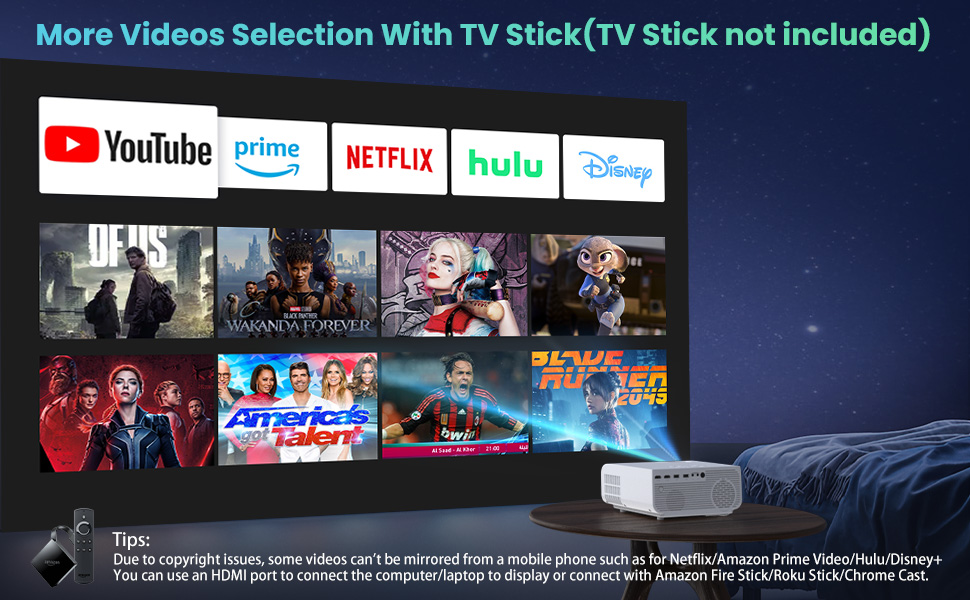
Figure 4.1: Adjustable display size from 50 to 300 inches.
The projector can be placed on a table, mounted on a tripod, or ceiling-mounted. Use the adjustable foot at the bottom of the projector to fine-tune the projection angle if needed.
4.2 Эрчим хүчний холболт
- Connect the power cable to the Power Input port on the projector.
- Цахилгааны кабелийн нөгөө үзүүрийг цахилгаан залгуурт холбоно уу.
- Press the Power button on the projector or remote control to turn it on.
4.3 Төвлөрөл ба гол чулууг засах
- Фокусын тохируулга: Rotate the focus lens ring on the front of the projector until the image appears clear and sharp.
- Түлхүүр чулууны залруулга: Use the keystone correction dial (usually on top or side) to adjust the image shape if it appears trapezoidal. The projector supports ±15° keystone correction.
5. Ашиглалтын заавар
Learn how to connect your devices and utilize the various features of your projector.
5.1 Төхөөрөмжүүдийг холбох
The VYSER F2 Projector offers multiple ways to connect your devices:
- HDMI: For high-definition video and audio from laptops, gaming consoles, TV boxes, etc.
- USB: Медиа тоглуулах зориулалттай fileUSB флаш дискнээс шууд.
- OF: For connecting older devices with AV output.
5.2 Wireless Connectivity (Screen Mirroring)
The projector supports 5G/2.4G WiFi for seamless screen mirroring from your smartphone or tablet.
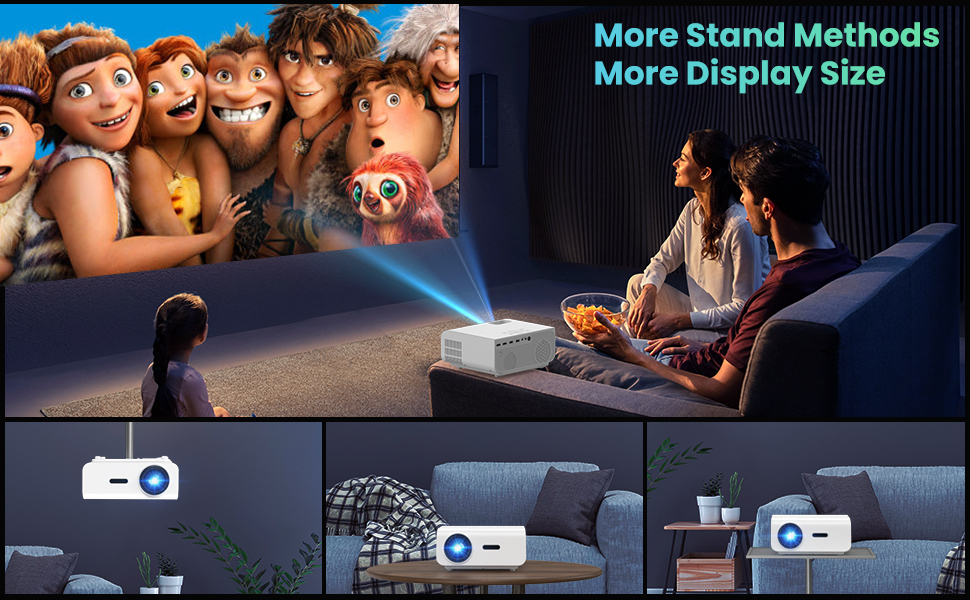
Figure 5.1: 5G/2.4G WiFi Screen Mirroring for various devices.
One-Step Direct Connection: This feature allows direct connection to your phone without needing a WiFi network. Ideal for outdoor use or when a router is unavailable.
Video 5.1: Demonstration of the F2 Projector's One-Step Direct Connection with WiFi and Bluetooth, showing quick setup for phone mirroring.
For detailed steps on screen mirroring, refer to the on-screen instructions by selecting "Miracast" from the input source menu.
Note: Due to copyright restrictions, some streaming services (e.g., Netflix, Amazon Prime Video, Hulu, Disney+) may block screen mirroring. For these services, it is recommended to use an HDMI connection with a compatible device like a Fire TV Stick, Roku Stick, or laptop.
5.3 Bluetooth холболт
The projector features Bluetooth 5.1 for connecting to external Bluetooth speakers or headphones, enhancing your audio experience.

Figure 5.2: Bluetooth connection for external audio devices.
To connect: Navigate to the Bluetooth settings on the projector, enable Bluetooth, and select your desired audio device from the list of available devices. (Note: The projector connects to Bluetooth speakers, not directly to smartphones/tablets via Bluetooth for audio input).
5.4 Цэсийн навигаци
Use the remote control or the on-board buttons to navigate the projector's menu. Options typically include input source selection, picture settings (brightness, contrast, color), sound settings, and system settings.
6. Засвар үйлчилгээ
Тохиромжтой засвар үйлчилгээ нь таны проекторын урт наслалт, оновчтой ажиллагааг баталгаажуулдаг.
- Линз цэвэрлэх: Use a soft, lint-free cloth specifically designed for optical lenses to gently clean the projector lens. Avoid abrasive materials or harsh chemicals.
- Тоос арилгах: Regularly clean the cooling vents to prevent dust buildup, which can affect performance and lifespan. Use a soft brush or compressed air.
- Хадгалах: Удаан хугацаагаар ашиглаагүй үед проекторыг сэрүүн, хуурай газар, хамгийн тохиромжтой нь анхны савлагаанд нь эсвэл хамгаалалтын гэрт нь хадгална уу.
- Зөв унтрах: Проекторыг салгах эсвэл зөөхөөсөө өмнө үргэлж асаах товчийг ашиглан унтрааж, хөргөнө үү.
7. Алдаа засах
Хэрэв та проектортой холбоотой асуудалтай тулгарвал дараах нийтлэг алдааг олж засварлах алхмуудыг үзнэ үү.
| Асуудал | Боломжит шалтгаан / шийдэл |
|---|---|
| Зураг байхгүй эсвэл "Дохио байхгүй" гэсэн мессеж |
|
| Бүдгэрсэн зураг |
|
| Trapezoidal image |
|
| Дуу чимээ байхгүй эсвэл дуу чимээ багатай |
|
| Screen mirroring issues (e.g., Netflix not working) |
|
| Projector overheating or shutting down |
|
8. Техникийн үзүүлэлтүүд
Key technical specifications for the VYSER F2 Projector:
| Онцлог | Дэлгэрэнгүй |
|---|---|
| Брэнд | ВАЙСЕР |
| Загвар | F2 проектор |
| Төрөлхийн тогтоол | 1920 x 1080 (Уугуул 1080P) |
| Гэрэлтүүлэг | 12000 Lux (350 ANSI Lumens) |
| Ялгаатай харьцаа | 10000:1 (implied from image comparison) |
| Төслийн хэмжээ | 50-300 инч |
| Проекцийн зай | 5-15 фут |
| Холболтын технологи | Wireless (5G/2.4G WiFi), Bluetooth 5.1, HDMI (x2), USB (x2), AV, 3.5mm Audio Out |
| Тулгуур чулууг засах | ±15° Гарын авлага |
| Зүйлийн жин | 4.11 фунт |
| Өнгө | White-White |
9. Баталгаат хугацаа ба дэмжлэг
VYSER is committed to providing excellent customer service and technical support for your projector.
- Насан туршийн хэрэглэгчийн үйлчилгээ: Enjoy lifetime customer service and technical support for your VYSER F2 Projector.
- For any inquiries, technical assistance, or warranty claims, please contact VYSER customer support through the platform where you purchased the product or refer to the official VYSER webхолбоо барих мэдээлэл авах сайт.


