1. Бүтээгдэхүүн дууссанview
The ProtoArc K100-A is an ultra-slim wireless Bluetooth keyboard specifically designed for Mac devices. It features a full-size layout with a numeric keypad, responsive scissor-switch keys for quiet typing, and adjustable white LED backlighting. This keyboard supports connection to up to three devices simultaneously, allowing for seamless switching between your MacBook, iMac, iPad, or iPhone. Its built-in rechargeable battery ensures long-lasting use.

Image: The ProtoArc K100-A keyboard connected to a MacBook, iPad, and iPhone, showcasing нь олон төхөөрөмжтэй ажиллах чадвартай.
2. Багцын агуулга
- ProtoArc K100-A арын гэрэлтүүлэгтэй Bluetooth гар
- USB-C цэнэглэгч кабель
- Хэрэглэгчийн гарын авлага (энэ баримт бичиг)
3. Эхлэл
3.1 Гарыг цэнэглэх
Before first use, fully charge the keyboard. Connect the provided USB-C charging cable to the keyboard's Type-C port and the other end to a USB power source (e.g., computer USB port, USB wall adapter). A full charge takes approximately 4-5 hours. The built-in 1200mAh lithium-ion battery provides a standby time of 3-4 months.

Image: The keyboard's Type-C charging port with the charging cable inserted.
3.2 Асаах/унтраах
Locate the power switch on the side or back of the keyboard. Slide it to the "ON" position to power on the keyboard. Slide it to "OFF" when not in use to conserve battery.
4. Bluetooth холболт
The ProtoArc K100-A keyboard supports connection to three different devices via Bluetooth. Follow these steps to pair your devices:
- Гар асаалттай байгаа эсэхийг шалгаарай.
- Bluetooth сувгийн товчлууруудын аль нэгийг удаан дарна уу (BT1, BT2, эсвэл BT3) харгалзах заагч гэрэл хурдан анивчих хүртэл 3-5 секундын турш. Энэ нь гарыг хослуулах горимд байгааг харуулж байна.
- On your Mac device (MacBook, iMac, iPad, iPhone), go to Системийн тохиргоо (эсвэл Системийн тохиргоо) > Bluetooth.
- Bluetooth-г асаагаад боломжтой төхөөрөмжүүдийг хайж олоорой.
- СонгохProtoArc K100-A" төхөөрөмжүүдийн жагсаалтаас.
- Follow any on-screen prompts to complete the pairing process. The indicator light will stop flashing and remain solid for a few seconds, then turn off, indicating successful pairing.
- Бусад Bluetooth сувгийн товчлууруудыг ашиглан хоёр хүртэлх нэмэлт төхөөрөмжид эдгээр алхмуудыг давтана уу.

Image: The dedicated Bluetooth channel keys (BT1, BT2, BT3) on the keyboard.
4.1 Төхөөрөмжүүдийн хооронд шилжих
To switch between paired devices, simply press the corresponding Bluetooth channel key (BT1, BT2, эсвэл BT3) once. The keyboard will connect to the selected device within a few seconds.
5. Ашиглалтын заавар
5.1 арын гэрэлтүүлгийн удирдлага
The keyboard features soft white LED backlighting with three adjustable brightness levels (low, medium, high). To adjust the backlight brightness, press the backlight key (often indicated by a sun icon or similar) located on the top right of the keyboard. Pressing it repeatedly cycles through the brightness levels and turns the backlight off.

Image: The keyboard with its white adjustable backlight at different brightness levels.
5.2 товчлол
The keyboard includes 12 shortcut keys for enhanced productivity on Mac devices. These keys provide quick access to functions such as brightness adjustment, mission control, media playback, volume control, and more. Refer to the key labels for specific functions.

Image: Detail of the keyboard's silent scissor-switch keys, designed for quiet and responsive typing.
6. Засвар үйлчилгээ, арчилгаа
- Keep the keyboard clean by wiping it with a soft, dry cloth. Avoid using harsh chemicals or abrasive materials.
- Гарыг хэт өндөр температур, чийгшил, нарны шууд тусгалд бүү тавь.
- Avoid spilling liquids on the keyboard. If a spill occurs, immediately power off the keyboard and allow it to dry completely before use.
- When not in use for extended periods, power off the keyboard to preserve battery life.
- The keyboard automatically enters sleep mode after 30 minutes of inactivity to save power. Press any key to wake it up.
7. Алдаа засах
- Keyboard not connecting/disconnecting frequently:
- Гар бүрэн цэнэглэгдсэн эсэхийг шалгаарай.
- Verify Bluetooth is enabled on your device and the keyboard is within range (up to 10 meters).
- Гараа төхөөрөмжтэйгээ дахин холбож үзнэ үү.
- Бусад хүчтэй утасгүй дохио саад болохгүй байгаа эсэхийг шалгаарай.
- Keys not responding or delayed response:
- Зайны түвшинг шалгаж, шаардлагатай бол цэнэглэ.
- Гар нь Bluetooth-ээр зөв холбогдсон эсэхийг шалгаарай.
- If the keyboard has entered sleep mode, press any key and wait a few seconds for it to reconnect.
- Арын гэрэлтүүлэг ажиллахгүй байна:
- Гар асаалттай байгаа эсэхийг шалгаарай.
- Press the backlight key to cycle through brightness levels and turn it on.
- If the battery is very low, the backlight may not function to conserve power. Charge the keyboard.
8. Техникийн үзүүлэлтүүд
| Загварын дугаар | К100-А |
| Брэнд | ProtoArc |
| Холболтын технологи | Bluetooth |
| Тохиромжтой төхөөрөмжүүд | Mac OS 12.2 or higher (MacBook, MacBook Pro, MacBook Air, iMac, iMac Pro, Mac Pro/Mini, iPad, iPhone) |
| Онцлог шинж чанарууд | Backlit, Rechargeable, Multi-Device Connection (3 devices) |
| Зайны багтаамж | 1200mAh лити-ион |
| Цэнэглэх хугацаа | 4-5 цаг |
| Зогсоолын цаг | 90-120 хоног |
| Бүтээгдэхүүний хэмжээс | 16.79" L x 4.78" W x 0.57" H |
| Зүйлийн жин | 1.59 фунт |
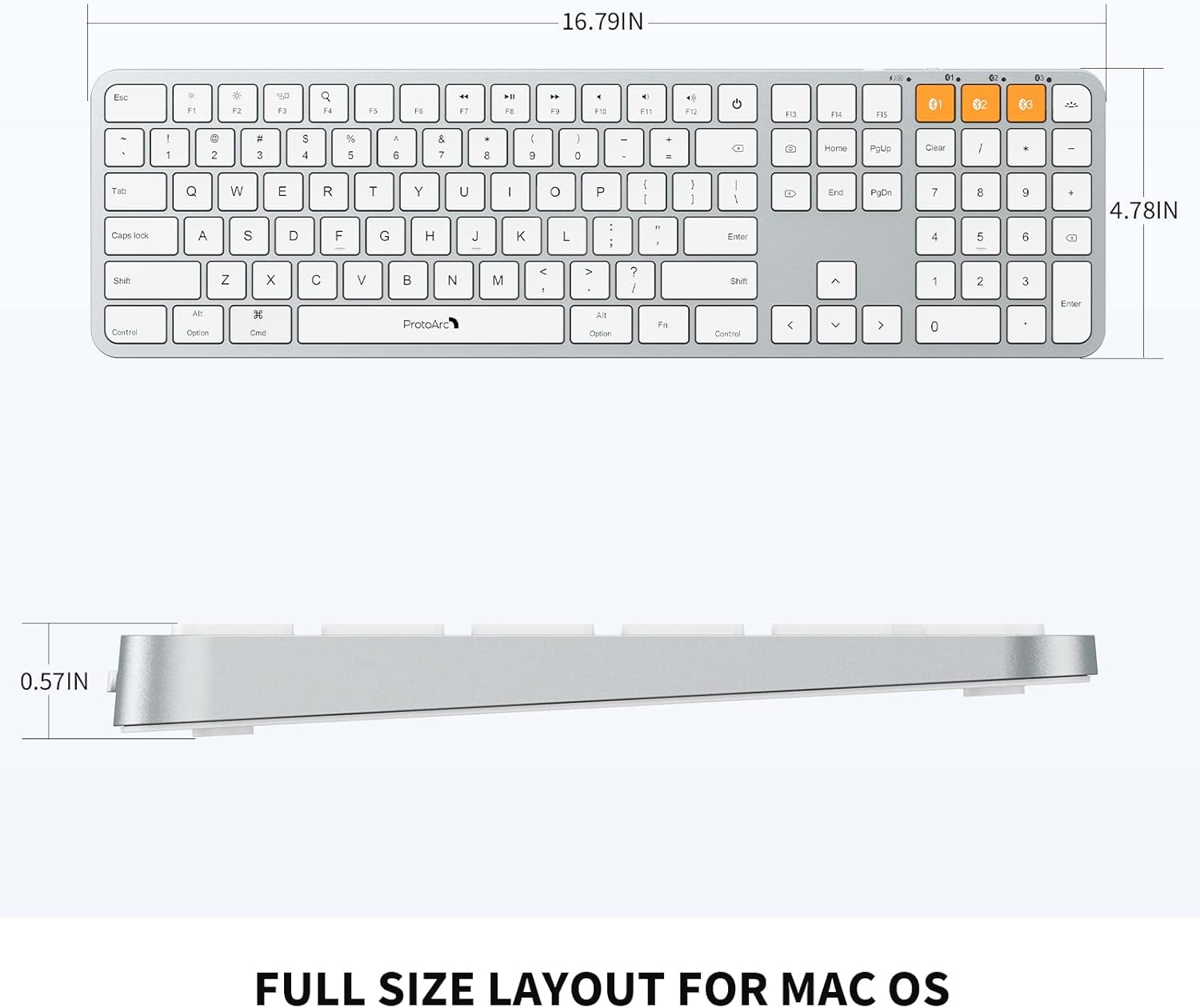
Image: Dimensional diagram of the ProtoArc K100-A keyboard.
9. Баталгаат хугацаа ба дэмжлэг
Баталгаат хугацаа болон техникийн дэмжлэг авахыг хүсвэл албан ёсны ProtoArc-аас лавлана уу. webсайт эсвэл харилцагчийн үйлчилгээтэй шууд холбогдоно уу. Баталгаат зарга авахын тулд худалдан авалтын баримтаа хадгална уу.


