1. Танилцуулга
Худалдан авалт хийсэнд баярлалааasing the LFF LDR113-EU Kitchen Radio. This manual provides essential information for the safe and efficient operation of your device. Please read it thoroughly before use and retain it for future reference.
The LFF LDR113-EU is a versatile kitchen radio featuring DAB+, FM, and Bluetooth connectivity. It includes dual alarms, a sleep timer, and 60 station presets, designed for both tabletop use and under-cabinet mounting.
2. Аюулгүй байдлын мэдээлэл
- Эрчим хүчний эх үүсвэр: Зөвхөн өгсөн тэжээлийн адаптерийг ашиглана уу. Боть байгаа эсэхийг баталгаажуулна ууtage нь таны орон нутгийн цахилгаан хангамжтай таарч байна.
- Ус ба чийг: Do not expose the device to water, rain, or excessive moisture. Avoid placing liquids near the radio.
- Агааржуулалт: Төхөөрөмжийн эргэн тойронд хангалттай агааржуулалт байгаа эсэхийг шалгаарай. Агааржуулалтын нүхийг бүү хааж болохгүй.
- Дулаан: Төхөөрөмжийг радиатор, халаалтын төхөөрөмж, зуух эсвэл бусад дулаан ялгаруулдаг төхөөрөмж зэрэг дулааны эх үүсвэрээс хол байлга.
- Цэвэрлэгээ: Цэвэрлэхийн өмнө цахилгаанаас салга. Зөөлөн, хуурай даавуу хэрэглээрэй. Шингэн цэвэрлэгч эсвэл аэрозоль цэвэрлэгч хэрэглэж болохгүй.
- Үйлчилгээ: Энэ бүтээгдэхүүнд өөрөө үйлчлэх гэж бүү оролдоорой. Бүх засвар үйлчилгээг мэргэшсэн үйлчилгээний ажилтнуудад хандаарай.
- Байршил: Place the radio on a stable, level surface or mount it securely according to the instructions.
3. Багцын агуулга
Бүх зүйл багцад байгаа эсэхийг шалгана уу:
- LFF LDR113-EU Kitchen Radio
- Эрчим хүчний адаптер
- Mounting Kit (screws, spacers, mounting template)
- Хэрэглэгчийн гарын авлага (энэ баримт бичиг)
4. Бүтээгдэхүүн дууссанview
Радиогийн бүрэлдэхүүн хэсэг болон удирдлагуудтай танилцаарай.

Зураг 4.1: Урд view of the LFF LDR113-EU Kitchen Radio, showing the LCD display on the left, control buttons in the center, and a large rotary knob on the right. The buttons include power, mode, menu, info, preset, timer/sleep, and navigation arrows. The rotary knob is for volume and selection.

Зураг 4.2: Diagram illustrating the key features of the LFF Kitchen Radio, including DAB/DAB+ radio, FM radio, two alarms, sleep timer, Bluetooth connectivity, and 60 station presets.
4.1. Удирдлага ба дэлгэц
- LCD өнгөт дэлгэц: Shows current mode, station information, time, and settings.
- Цахилгаан товч: Радиог асаах/унтраах.
- Горимын товчлуур: DAB+, FM болон Bluetooth горимуудын хооронд шилждэг.
- Цэс/Мэдээллийн товчлуур: Accesses menu options or displays station information.
- Урьдчилан тохируулсан товчлуурууд (1-5): Quick access to saved stations.
- Timer/Sleep Button: Sets sleep timer or alarm functions.
- Навигацийн товчлуурууд (дээш/доошоо/зүүн/баруун): Navigates through menus and station lists.
- Rotary Knob (Volume/Enter): Adjusts volume, scrolls through options, and confirms selections.
5. Тохиргоо
5.1. Эрчим хүчний холболт
- Цахилгаан адаптерийг радиогийн ар талд байрлах DC IN порт руу холбоно уу.
- Цахилгаан адаптерийг ханын залгуурт холбоно уу.
- Радио асах эсвэл хүлээлгийн горимд орно.
5.2. Initial Scan (DAB+ and FM)
Upon first power-on, the radio will typically perform an automatic scan for DAB+ and FM stations. If not, follow these steps:
- дээр дарна уу Горим button to select DAB+ or FM mode.
- For DAB+, the radio will usually initiate a full scan automatically. If not, navigate to the 'Full Scan' option in the DAB+ menu and press the rotary knob to confirm.
- For FM, navigate to the 'Auto Scan' option in the FM menu and press the rotary knob to confirm.
- The radio will search for available stations and store them.

Зураг 5.1: The LFF Kitchen Radio's LCD color screen displaying the main menu with icons for Digital Radio (DAB+), FM Radio, and Bluetooth, indicating available modes.
6. Ашиглалтын заавар
6.1. Асаах/унтраах
дээр дарна уу Хүч button to turn the radio on or off (standby mode).
6.2. Горим сонгох
дээр дарна уу Горим товчлуурыг дахин дахин дарж DAB+, FM болон Bluetooth горимууд руу шилжих боломжтой.
6.3. DAB+ радиогийн ажиллагаа
- DAB+ горимд, ашиглана уу Дээш/Доош navigation buttons or the rotary knob to browse available stations.
- Press the rotary knob to select a station.
- дарна уу Цэс/Мэдээлэл руу view station information (e.g., program type, signal strength).
6.4. FM радиогийн ажиллагаа
- FM горимд, ашиглана уу Дээш/Доош navigation buttons to tune to stations manually.
- -г удаан дар Дээш/Доош buttons for automatic station seeking.
- дарна уу Цэс/Мэдээлэл руу view станцын мэдээлэл.
6.5. Bluetooth холболт
Connect your smartphone or other Bluetooth-enabled device to the radio.
- дээр дарна уу Горим button to select Bluetooth mode. The display will show 'Bluetooth Pairing'.
- Мобайл төхөөрөмж дээрээ Bluetooth-г идэвхжүүлж, боломжтой төхөөрөмжүүдийг хай.
- Select 'LFF LDR113-EU' from the list of devices.
- Once connected, the radio display will show 'Bluetooth Connected'. You can now play audio from your device through the radio.
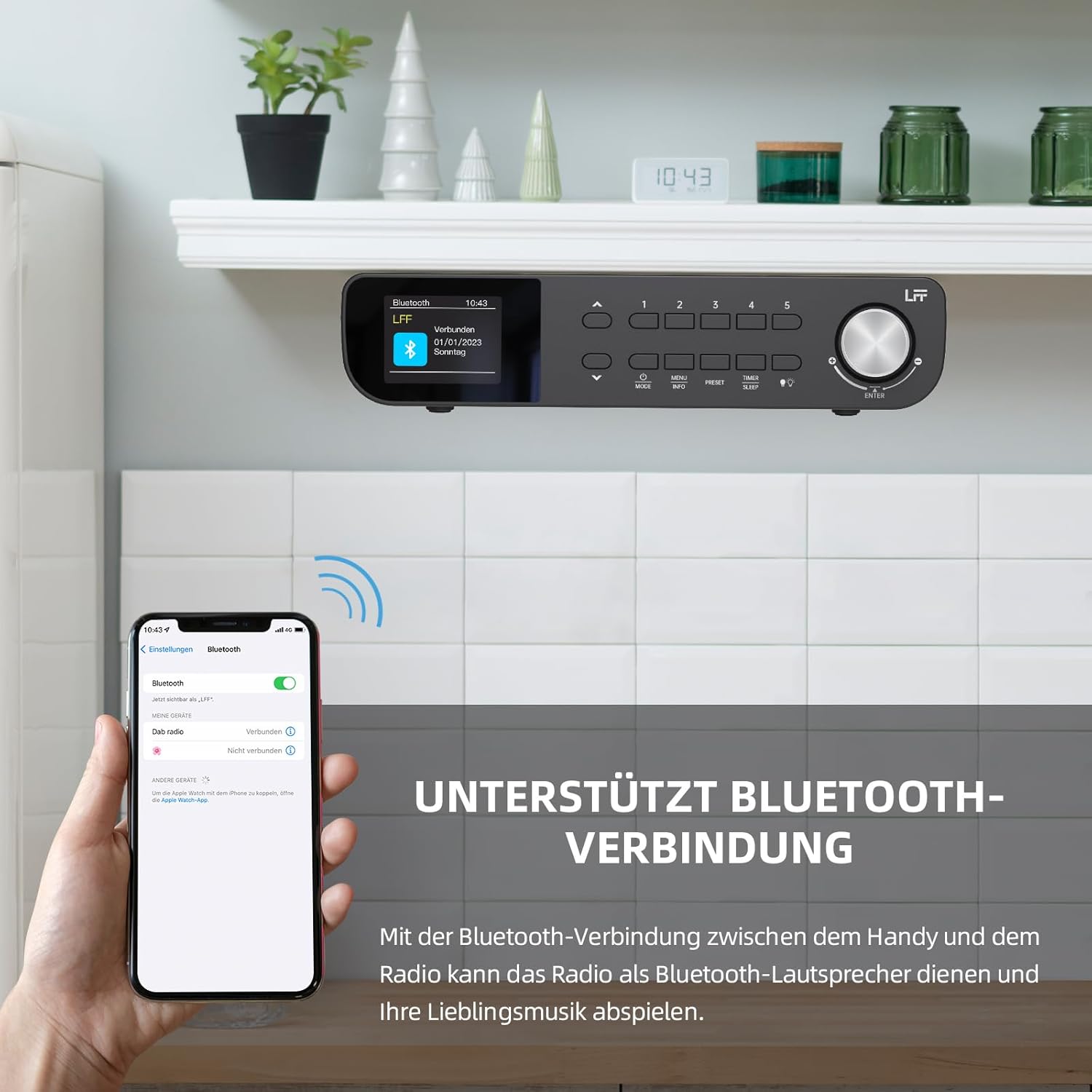
Зураг 6.1: The LFF Kitchen Radio displaying a successful Bluetooth connection, with a smartphone screen showing the radio as a connected device.

Зураг 6.2: Ойролцоогоор view of the radio's display indicating 'LFF' and 'Connected' under the Bluetooth menu, confirming a successful pairing.
6.6. Сэрүүлэг тохируулах
The radio features two independent alarms.
- дээр дарна уу Таймер/Унтах button repeatedly until 'Alarm 1' or 'Alarm 2' appears.
- Use the navigation buttons and rotary knob to set the alarm time, source (DAB+, FM, or Buzzer), and frequency (daily, weekdays, weekends, once).
- Confirm settings by pressing the rotary knob.

Зураг 6.3: Close-up of the radio's display showing the current time and options to activate or deactivate Alarm 1 and Alarm 2.
6.7. Унтах цаг
Унтах таймер нь тогтоосон хугацааны дараа радиог автоматаар унтраах боломжийг олгодог.
- дээр дарна уу Таймер/Унтах button repeatedly until 'Sleep Timer' appears.
- Use the navigation buttons or rotary knob to select the desired sleep duration (e.g., 15, 30, 60 minutes).
- Эргэдэг товчлуур дээр дарж баталгаажуулна уу.

Зураг 6.4: Close-up of the radio's display showing the 'Sleep Timer' setting, with an option to set the duration, for example, to 30 minutes.
6.8. Урьдчилсан тохируулга
Save up to 60 favorite stations for quick access.
- Урьдчилсан тохиргоог хадгалахын тулд: Tune to the desired station. Press and hold one of the Урьдчилан тохируулсан (1-5) buttons until 'Preset Saved' appears. For additional presets, use the 'Preset Store' option in the menu.
- Урьдчилсан тохиргоог эргэн санахын тулд: товчлуурын аль нэгийг нь товч дарна уу Урьдчилан тохируулсан (1-5) buttons. For other presets, navigate to 'Preset Recall' in the menu.
6.9. LED гэрэл
The radio includes an integrated LED light, useful for illuminating the area below if mounted under a cabinet.
- дээр дарна уу Гэрэл button (if available, or navigate through menu) to turn the LED light on or off.

Зураг 6.5: The LFF Kitchen Radio mounted under a kitchen cabinet, with its integrated LED light providing illumination to the countertop below.
6.10. Гэрэлтүүлгийг харуулах
Adjust the display backlight brightness to suit your environment.
- Access the 'Display' or 'Settings' menu.
- Select 'Brightness' and choose from High, Medium, or Low settings.

Зураг 6.6: A visual comparison of the LFF Kitchen Radio's display at three different backlight brightness levels: High, Medium, and Low, demonstrating the adjustable visibility.
7. Холбох заавар
The LFF LDR113-EU Kitchen Radio offers flexible placement options: tabletop or under-cabinet mounting.
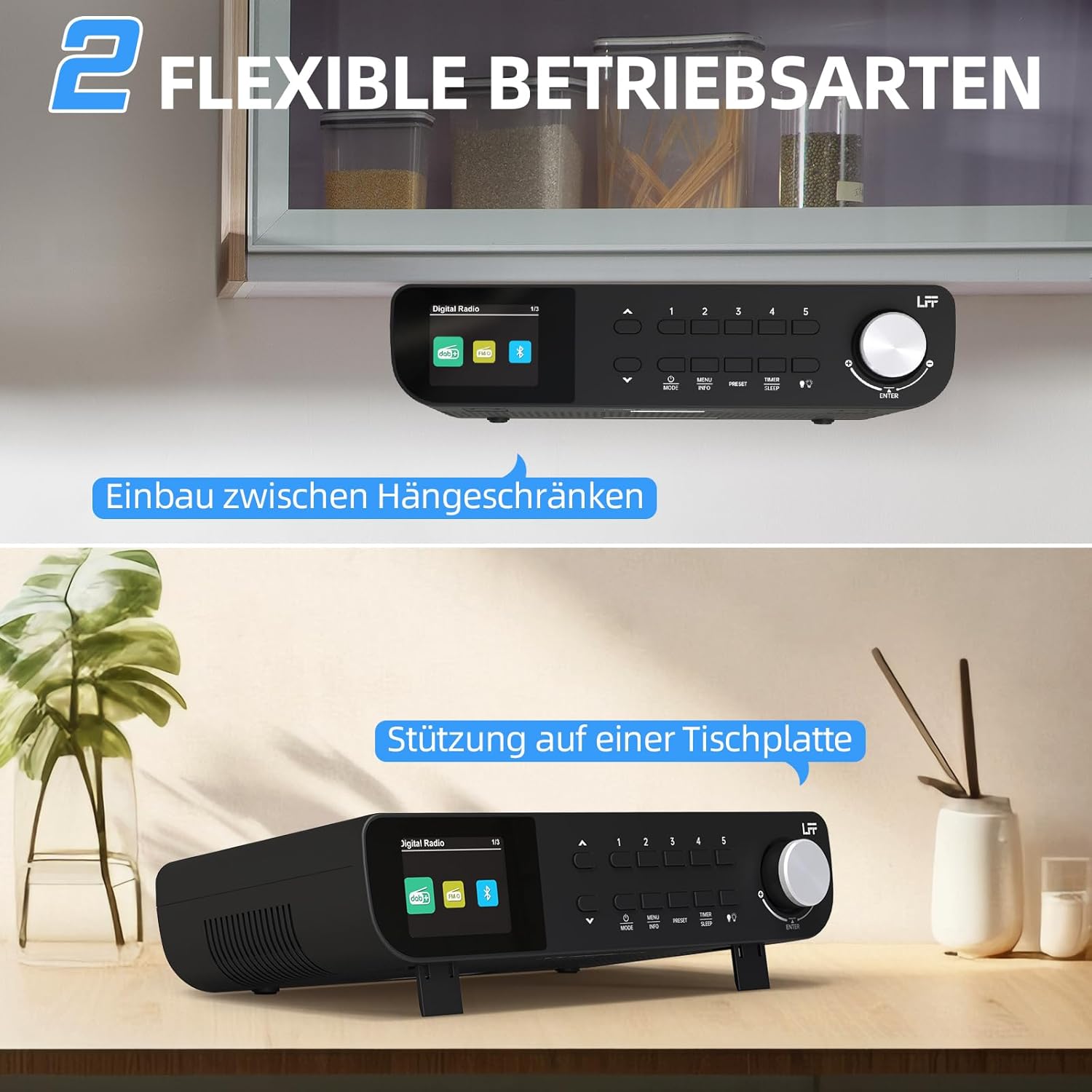
Зураг 7.1: The LFF Kitchen Radio displayed in two common installation scenarios: mounted underneath a kitchen cabinet and placed freestanding on a tabletop.
7.1. Tabletop Placement
Simply place the radio on a stable, flat surface. Ensure it is not near the edge to prevent accidental falls.
7.2. Under-Cabinet Mounting
For under-cabinet installation, use the provided mounting kit.
- Байршлыг бэлтгэх: Choose a suitable location under a kitchen cabinet, ensuring there is enough space and access to a power outlet.
- Өрөмдлөгийн нүхийг тэмдэглэх: Use the provided mounting template to mark the drill holes on the underside of the cabinet.
- Өрөмдлөгийн цооног: Тэмдэглэгдсэн байрлалд туршилтын цооног өрөмдөх.
- Attach Mounting Plate (if applicable): Some models may include a separate mounting plate. Attach this to the cabinet using the screws.
- Secure the Radio: Align the radio with the mounting holes or plate and secure it using the provided screws. Ensure it is firmly attached.
- Эрчим хүчийг холбох: Цахилгаан адаптерийг холбоно уу.

Зураг 7.2: Detailed diagram showing the steps for under-cabinet mounting, including measuring distances (e.g., 58mm) and securing the radio with screws.
8. Засвар үйлчилгээ
- Цэвэрлэгээ: To clean the radio, disconnect it from the power supply. Use a soft, dry, lint-free cloth. Do not use abrasive cleaners, waxes, or solvents.
- Антен: Ensure the antenna is extended for optimal reception in DAB+ and FM modes. Handle it gently to avoid damage.
- Хадгалах: Хэрэв радиог удаан хугацаагаар хадгалах бол цахилгаан тэжээлээс салгаад сэрүүн, хуурай газар хадгална уу.
9. Алдаа засах
| Асуудал | Боломжит шалтгаан | Шийдэл |
|---|---|---|
| Хүч чадалгүй | Цахилгаан адаптер холбогдоогүй эсвэл залгуур буруу байна. | Цахилгааны холболтыг шалгана уу. Өөр залгуураар оролдоно уу. |
| DAB+/FM хүлээн авалт муу | Антенн сунгагдаагүй, дохио сул эсвэл хөндлөнгийн оролцоотой байна. | Fully extend the antenna. Reposition the radio. Perform a full scan. |
| Bluetooth холбогдоогүй байна | Radio not in pairing mode, device too far, or already connected to another device. | Ensure radio is in Bluetooth mode. Move device closer. Disconnect from other devices. |
| Дуу алга | Volume too low, mute activated, or incorrect mode. | Increase volume. Check if mute is active. Ensure correct mode (DAB+, FM, Bluetooth). |
| Дэлгэц ажиллахгүй байна | Brightness too low or device malfunction. | Adjust display brightness. If problem persists, contact support. |
10. Техникийн үзүүлэлтүүд

Зураг 10.1: Diagram showing the dimensions of the LFF Kitchen Radio: 250mm length, 146mm width, and 55mm height.
| Онцлог | Дэлгэрэнгүй |
|---|---|
| Брэнд | LFF өргөтгөл |
| Загварын дугаар | LDR113-EU |
| Өнгө | Хар |
| Холболт | Bluetooth |
| Тааруулах технологи | DAB Plus, FM |
| Эрчим хүчний эх үүсвэр | Цахилгаан кабель |
| Давтамж | 108 МГц (FM хамгийн их) |
| Хэмжээ (L x W x H) | 250 мм x 146 мм x 55 мм |
| Урьдчилсан тохируулгууд | 60 |
| Дэлгэц | LCD өнгөт дэлгэц |
| Онцлог шинж чанарууд | Dual Alarms, Sleep Timer, Under-cabinet mounting option, LED Light |
11. Баталгаат хугацаа ба дэмжлэг
This product comes with a standard manufacturer's warranty. Please refer to the warranty card included in your package for specific terms and conditions. For technical support, troubleshooting assistance, or warranty claims, please contact your retailer or the LFF customer service department.


