Poly Edge E220 IP ширээний утасны хэрэглэгчийн гарын авлага
Your guide to setting up and using your Poly Edge E220 IP Desk Phone.
1. Танилцуулга
The Poly Edge E220 is a versatile IP desk phone designed for modern office environments, offering advanced communication features. It supports up to 16 lines with 4-line keys and includes integrated Bluetooth for seamless mobile phone and headset pairing. This manual provides detailed instructions for setup, operation, and maintenance of your device.
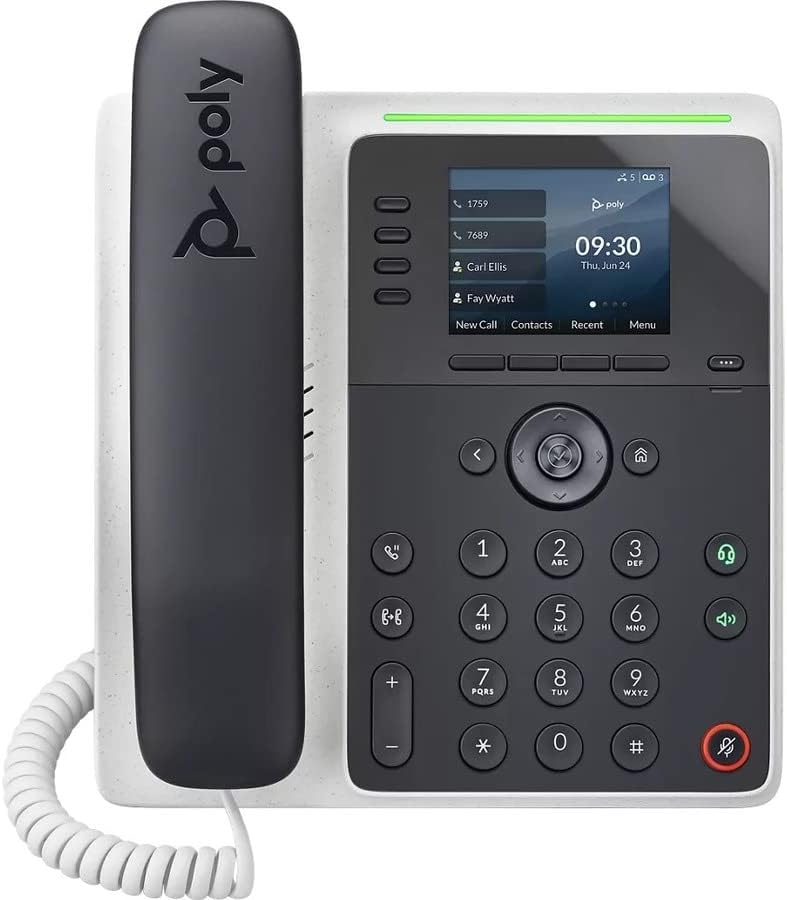
Зураг: Урд view of the Poly Edge E220 IP Desk Phone, showcasinдэлгэц, товчлуур болон гар утас.
2. Хайрцагт юу байна
Дараах бүх бүрэлдэхүүн хэсгүүд таны багцад байгаа эсэхийг шалгана уу.
- Poly Edge E220 IP Desk Phone Unit
- Гар утас
- Гар утасны ороомгийн утас
- Cat5E Ethernet Cable
- Integrated Wall Mount (pre-attached or separate)
- Суурийн тавиур
Note: A power supply is NOT included with this renewed product and must be acquired separately if Power over Ethernet (PoE) is not available.
3. Бүтээгдэхүүний онцлог
- 4-Line Keys: Supports up to 16 lines for flexible call management.
- Нэгдсэн Bluetooth: Allows for seamless pairing with mobile phones and Bluetooth headsets.
- Өндөр нарийвчлалтай дэлгэц: Provides clear visibility for call information and menu navigation.
- HD дуу хоолой: Delivers superior audio quality for clearer conversations.
- Multi-Line Operation: Manage multiple active calls simultaneously.
- Хурлын дуудлага хийх чадвар: Supports 3-way conferencing.
4. Тохиргоо ба суурилуулалт
4.1 Утсыг угсарч байна
- Attach the Base Stand: Align the tabs on the base stand with the slots on the back of the phone unit. Slide the stand into place until it clicks securely.
- Connect the Handset: Plug one end of the coil cord into the handset and the other end into the handset port on the side of the phone unit.
4.2 Кабелийг холбох
Locate the ports on the back and side of the phone unit.

Зураг: хажуу тал view of the Poly Edge E220 IP Desk Phone, highlighting the various connection ports and the adjustable stand.
- Сүлжээний холболт: Connect one end of the Cat5E Ethernet cable to the LAN port on the phone and the other end to your network switch or router. If your network provides Power over Ethernet (PoE), the phone will power on automatically.
- Power Connection (if no PoE): Хэрэв PoE байхгүй бол тохирох тэжээлийн адаптерийг (дагалдахгүй) утсан дээрх тэжээлийн порт руу, дараа нь тэжээлийн залгуурт холбоно уу.
- Нэмэлт чихэвчний холболт: If using a wired headset, connect it to the dedicated headset port.
4.3 Анхдагч асаалттай
Once connected, the phone will power on and begin its boot sequence. This may take a few moments. The display will show the Poly logo, followed by network configuration and registration status. If prompted, enter your network credentials or contact your IT administrator for setup assistance.
5. Ашиглалтын заавар
5.1 Дуудлага хийх, хүлээн авах
- Дуудлага хийхийн тулд: Pick up the handset, press the Speaker button, or press a line key. Dial the number and press the Dial soft key or wait for the call to connect.
- Дуудлагад хариулахын тулд: Pick up the handset, press the Speaker button, or press the flashing line key.
- Дуудлага дуусгахын тулд: Replace the handset, or press the End Call soft key.

Image: A man engaged in a phone call using the Poly Edge E220 IP Desk Phone in a professional office environment.
5.2 Bluetooth ашиглах
The Poly Edge E220 allows you to pair your mobile phone or Bluetooth headset for enhanced flexibility.
- Bluetooth-г идэвхжүүлэх: Navigate to the phone's menu, select Settings, then Bluetooth, and ensure Bluetooth is enabled.
- Төхөөрөмжийг холбох: Put your Bluetooth device (mobile phone or headset) into pairing mode. On the phone, select 'Add New Device' or 'Scan for Devices'. Select your device from the list and follow the on-screen prompts to complete pairing.
- Холбож байна: Once paired, your device should automatically connect when in range. You can manually connect/disconnect from the Bluetooth menu.

Image: A woman working at a desk, utilizing the Poly Edge E220 IP Desk Phone alongside her laptop, demonstrating its integration into a modern workspace.
5.3 Нарийвчилсан онцлог
- Барина: During a call, press the Hold soft key to place the call on hold. Press it again to resume.
- Шилжүүлэх: During a call, press the Transfer soft key, dial the new number, and then press Transfer again to complete.
- Бага хурал: During an active call, press the Conference soft key, dial the number of the third party, and then press Conference again to join all parties.
- Дуут шуудан: Press the Voicemail button to access your voicemail messages.
6. Засвар үйлчилгээ
To ensure the longevity and optimal performance of your Poly Edge E220 IP Desk Phone, follow these maintenance guidelines:
- Цэвэрлэгээ: Use a soft, dry, lint-free cloth to clean the phone's surface and display. For stubborn marks, slightly dampдаавуугаар усаар. Хүчтэй химийн бодис, зүлгүүрийн цэвэрлэгч, аэрозоль шүршигч хэрэглэхээс зайлсхий.
- Байгаль орчин: Утсаа хуурай, нарны шууд тусгал, хэт халуун, чийгнээс хол байлга.
- Кабелийн менежмент: Бүх кабелиуд цэвэрхэн зохион байгуулагдсан, портууд эсвэл кабелиудыг гэмтээхээс сэргийлж ачаалалгүй байгаа эсэхийг шалгаарай.
- Програм хангамжийн шинэчлэлтүүд: Periodically check with your IT administrator for available software updates to ensure your phone has the latest features and security enhancements.
7. Алдаа засах
If you encounter issues with your Poly Edge E220, refer to the table below for common problems and solutions.
| Асуудал | Боломжит шалтгаан | Шийдэл |
|---|---|---|
| Утас асахгүй байна | No power supply or PoE connection | Ensure Ethernet cable is connected to a PoE-enabled port, or connect a compatible power adapter. |
| Залгах ая байхгүй | Network issue or phone not registered | Check network cable connection. Verify network status on the phone display. Contact IT support if registration fails. |
| Дуудагчийг сонсохгүй байна / Дуудагч намайг сонсохгүй байна | Volume too low, faulty handset/headset, or network audio issue | Adjust volume. Test with speakerphone. Check handset/headset connection. Restart phone. |
| Bluetooth төхөөрөмжийг холбохгүй байна | Төхөөрөмж хослох горимд ороогүй эсвэл хүрээнээс гадуур байна | Ensure Bluetooth device is in pairing mode and within range. Restart both devices. |
If the problem persists after attempting these solutions, please contact your IT department or the product support team for further assistance.
8. Техникийн үзүүлэлтүүд
Key technical specifications for the Poly Edge E220 IP Desk Phone:
| Онцлог | Дэлгэрэнгүй |
|---|---|
| Бүтээгдэхүүний хэмжээс | 12.1 x 10.3 x 3.4 инч |
| Зүйлийн жин | 2.55 фунт |
| Утасны төрөл | Утастай IP утас |
| Эрчим хүчний эх үүсвэр | Corded Electric (Power Supply NOT Included) / Power over Ethernet (PoE) |
| Залгагчийн төрөл | Ганц товчлуур |
| Хариулах системийн төрөл | Digital (requires service provider support) |
| Хурлын дуудлага хийх чадвар | 3 чиглэлтэй |
| Олон шугамын ажиллагаа | Yes, supports up to 16 lines with 4-line keys |
| Bluetooth | Integrated for mobile phone and headset pairing |
9. Баталгаат хугацаа ба дэмжлэг
As a renewed product, the Poly Edge E220 IP Desk Phone typically comes with a limited warranty provided by the refurbisher or seller. Please refer to your purchase documentation for specific warranty terms and conditions. For technical support, troubleshooting beyond this manual, or warranty claims, please contact the seller or your IT administrator.


