1. Танилцуулга
This manual provides detailed instructions for the installation, operation, and maintenance of the PeakDo Wireless HDMI Transmitter and Receiver P3 S. This device is designed to wirelessly transmit uncompressed 1080P Full HD video and digital audio with zero latency, making it ideal for various applications including gaming, home entertainment, and professional presentations. The P3 S model features a USB-C port on the receiver for compatibility with AR smart glasses and portable monitors, in addition to standard HDMI output.

Figure 1: PeakDo Wireless HDMI Transmitter (left) and Receiver (right).
2. Бүтээгдэхүүн дууссанview
2.1 Гол онцлогууд
- Wireless AR Smart Glasses Setup: Features a Type-C port on the Receiver for direct connection to AR smart glasses (e.g., XREAL Air, Rokid Max/Air, RayNeo, VITURE One) and portable monitors, enabling cable-free AR experiences.
- Uncompressed FHD Video & Digital Audio: Transmits 1080P Full HD video and digital audio without compression, ensuring high-quality output.
- Zero Latency Transmission: Provides 0 latency for real-time applications such as live sports, synchronized gaming, and interactive meetings.
- Залгаад тоглуулах ажиллагаа: Requires no Wi-Fi connection or app installation for setup.
- Өргөн нийцтэй байдал: Transmitter (TX) connects to PC, Laptop, Xbox, PlayStation, Nintendo Switch, TV Box. Receiver (RX) connects to TVs, monitors, projectors via HDMI, and AR smart glasses/portable monitors via USB-C.
- Дамжуулах хүрээ: Effective wireless transmission up to 100 feet (approximately 30 meters).
2.2 Багцын агуулга
Бүх зүйл багцад байгаа эсэхийг шалгана уу:
- PeakDo Wireless HDMI Transmitter (TX)
- PeakDo Wireless HDMI Receiver (RX)
- USB Power Cable(s)
- Хэрэглэгчийн гарын авлага (энэ баримт бичиг)
3. Тохируулах заавар
3.1 Дамжуулагчийг холбох (TX)
- Connect the HDMI end of the Transmitter (TX) to the HDMI output port of your source device (e.g., PC, laptop, game console, TV box).
- Connect the USB power cable to the TX unit and plug the other end into a USB power source (e.g., a USB port on your source device, a USB wall adapter). Ensure the TX receives at least 5V 2A power supply.

Figure 2: Compatible input (TX) and output (RX) devices.
3.2 Хүлээн авагчийг холбох (RX)
- Чухал: First, connect the USB power cable to the RX unit and plug the other end into a USB power source (e.g., a USB wall adapter). Ensure the RX receives at least 5V 2A power supply. The RX unit requires sufficient power to function correctly.
- For HDMI displays (TV, Monitor, Projector): Connect an HDMI cable from the HDMI output port of the Receiver (RX) to the HDMI input port of your display device.
- For AR Smart Glasses or Portable Monitors: Connect a USB-C cable from the Type-C port on the Receiver (RX) to the USB-C input port of your AR smart glasses or portable monitor.
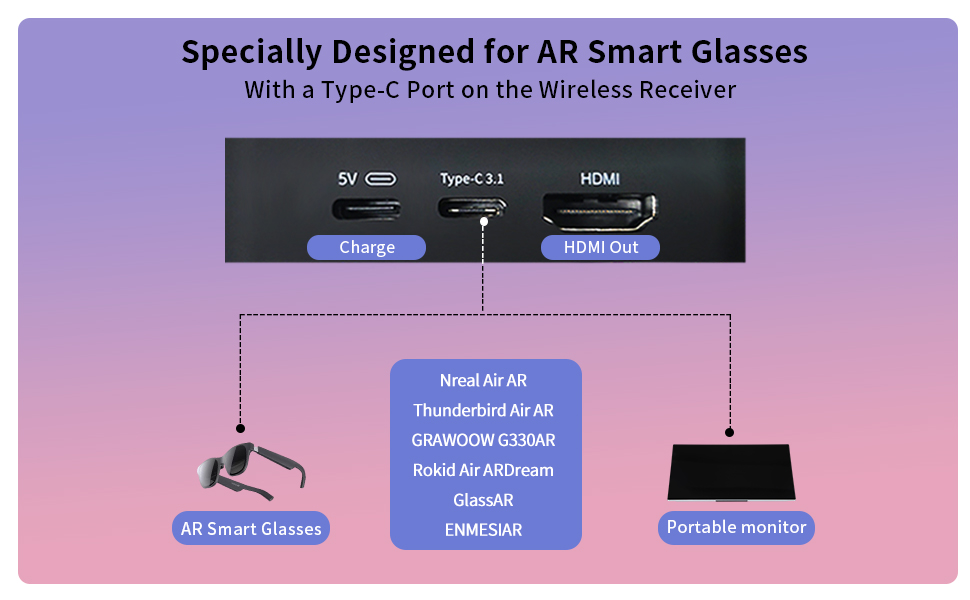
Figure 3: Receiver ports (5V power, Type-C 3.1, HDMI) and AR glasses compatibility.
Жич: For certain AR glasses like Nreal, you may need to upgrade their firmware for optimal compatibility. Refer to your AR glasses manufacturer's instructions for firmware updates.
4. Ашиглалтын заавар
4.1 Асаах болон хослуулах
Once both the Transmitter (TX) and Receiver (RX) units are connected to their respective power sources and devices, they will automatically power on and attempt to pair. The system is designed for plug-and-play operation, requiring no manual pairing steps or software installation.

Figure 4: Plug and Play setup in a meeting environment.
4.2 Хэрэглээний хувилбарууд
- Тоглоом: Experience zero-latency gaming on a large screen or through AR glasses.
- Гэрийн үзвэр: Stream movies, TV shows, or other media from your PC or TV box to any display.
- Presentations/Meetings: Share content wirelessly from your laptop to a projector or large monitor in a conference room.
- AR Experiences: Connect directly to compatible AR smart glasses for immersive gaming or productivity.
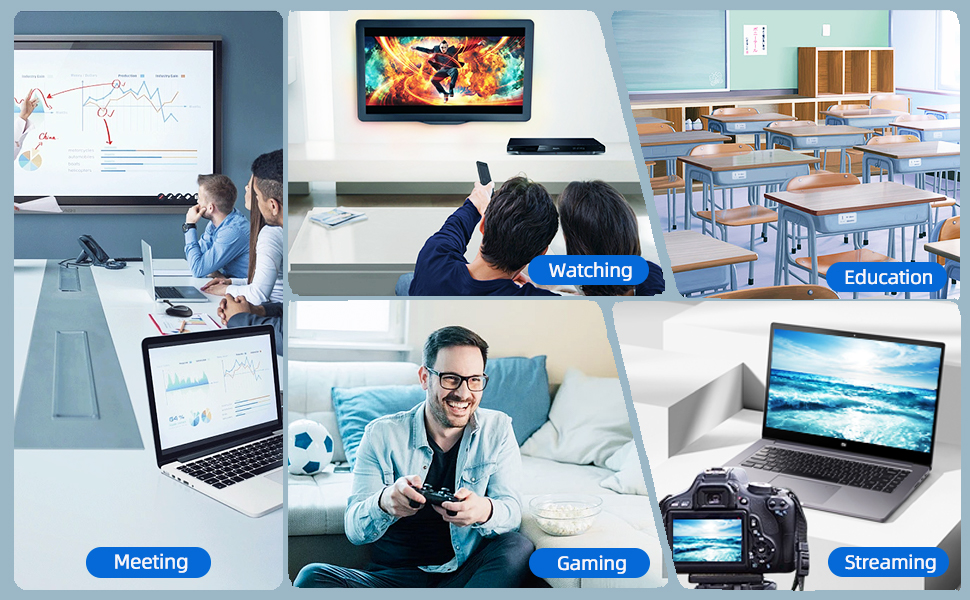
Figure 5: Diverse applications of the PeakDo Wireless HDMI system.

Зураг 6: Жишээ ньample of a wireless AR gaming setup.
5. Засвар үйлчилгээ
The PeakDo Wireless HDMI Transmitter and Receiver P3 S requires minimal maintenance.
- Цэвэрлэгээ: Зөөлөн, хуурай даавуугаар нэгжийн гадна талыг цэвэрлэ. Шингэн цэвэрлэгч, аэрозоль хэрэглэж болохгүй.
- Хадгалах: Удаан хугацаагаар ашиглаагүй үед төхөөрөмжийг сэрүүн, хуурай газар, нарны шууд тусгал болон хэт өндөр температураас хол хадгална уу.
- Эрчим хүчний хангамж: Always ensure both TX and RX units receive adequate power (5V 2A) from a stable power source.
6. Алдаа засах
6.1 Дохио байхгүй / Хар дэлгэц
- Эрчим хүчийг шалгах: Ensure both the Transmitter (TX) and Receiver (RX) units are properly powered. The RX unit specifically requires sufficient power (5V 2A) and should be powered first before connecting the HDMI/USB-C cable to the display.
- Кабелийн холболтууд: Verify that all HDMI and USB-C cables are securely connected to their respective ports on the devices and displays.
- Төхөөрөмжийн гаралтын эх үүсвэр: Confirm that your source device (PC, game console) is outputting video correctly. Try connecting the source device directly to the display with a cable to rule out issues with the source.
- Дэлгэцийн оролт: Ensure your display (TV, monitor, projector, AR glasses) is set to the correct input source (e.g., HDMI 1, USB-C).
- Төхөөрөмжүүдийг дахин эхлүүлэх: Disconnect power from both TX and RX units, then reconnect. Also, restart your source device and display.
6.2 Intermittent Signal / Flickering
- Зай ба саад бэрхшээл: Reduce the distance between the TX and RX units. Ensure there are no significant physical obstructions (walls, large furniture) between them that could interfere with the wireless signal.
- хөндлөнгийн оролцоо: Keep the units away from other wireless devices (e.g., Wi-Fi routers, cordless phones, microwave ovens) that operate on similar frequencies.
- Эрчим хүчний хангамж: Ensure stable and sufficient power supply to both units. Fluctuations in power can affect signal stability.
6.3 Аудио байхгүй
- Аудио эх үүсвэрийн тохиргоо: Аудио HDMI-ээр дамжуулагдаж байгаа эсэхийг шалгахын тулд эх үүсвэрийн төхөөрөмж дээрх аудио гаралтын тохиргоог шалгана уу.
- Display Audio: Verify that the audio on your display device (TV, monitor, AR glasses) is not muted and the volume is turned up.
- Кабелийн бүрэн бүтэн байдал: Ensure the HDMI or USB-C cable connecting the RX to the display is not damaged.
6.4 AR Glasses Compatibility Issues
- Програм хангамжийн шинэчлэлт: As mentioned in the setup, some AR glasses (e.g., Nreal) may require a firmware update to work correctly with external video sources. Consult your AR glasses manufacturer's support.
- Power to RX: Ensure the RX unit is adequately powered, especially when connecting to power-hungry AR glasses.
- USB-C кабель: Use a high-quality USB-C cable that supports video transmission.
7. Техникийн үзүүлэлтүүд
| Онцлог | Тодорхойлолт |
|---|---|
| Загварын дугаар | P3 S |
| Видео кодчилол | YUV422 or RGB444 (uncompressed 1080P) |
| Шийдвэрлэх дэмжлэг | 1080P Full HD хүртэл |
| Хоцролт | 0 Хоцролт |
| Холболтын технологи | Wireless (Millimeter Wave) |
| Дамжуулах хүрээ | 100 фут хүртэл (ойролцоогоор 30 метр) |
| Compatible Transmitter Devices | PC, Laptop, Xbox, PS4, PS5, Switch, PS3, TV Box, etc. |
| Compatible Receiver Devices | TV, Monitor, Projector (via HDMI); AR Smart Glasses, Portable Monitor (via USB-C) |
| Нийт HDMI портууд | 1 (on Receiver) |
| Холбогч төрөл | HDMI, Micro USB (for power), USB-C (on Receiver) |
| Аудио гаралтын горим | Mono (Digital Audio) |
| Хүрээлэн буй орчны дууны сувгийн тохиргоо | 2.0 |
| Эрчим хүчний хангамж | 5V 2A (for both TX and RX units) |
| Зүйлийн жин | 1.08 фунт (ойролцоогоор 0.49 кг) |
| Багцын хэмжээ | 6.73 x 5.83 x 2.48 инч (ойролцоогоор 17.1 x 14.8 x 6.3 см) |
8. Баталгаат хугацаа ба дэмжлэг
For warranty information and technical support, please refer to the official PeakDo webсайт эсвэл харилцагчийн үйлчилгээтэй шууд холбогдоно уу. Баталгаат зарга авахын тулд худалдан авалтын баримтаа хадгална уу.
- Үйлдвэрлэгч: PeakDo
- Эхний боломжтой огноо: 16 оны гуравдугаар сарын 2023
- Үйлчлүүлэгч дахинviews: 3.3 out of 5 stars (based on 6 ratings at time of data extraction)


