Танилцуулга
Thank you for choosing the HATOKU 1st Gen Stylus Pen. This manual provides essential information for setting up, operating, and maintaining your stylus pen. Please read it carefully to ensure optimal performance and longevity of your device.
Тохиромжтой байдал
The HATOKU 1st Gen Stylus Pen is designed for a wide range of iPad models released between 2018 and 2025. Please verify your iPad model number to ensure compatibility.
- Тохиромжтой: iPad 6th/7th/8th/9th/10th/11th generation, iPad Air M2/M3/3rd/4th/5th generation, iPad Mini 5th/6th/7th generation, iPad Pro 11" (1st/2nd/3rd/4th generation), iPad Pro 12.9" (3rd/4th/5th/6th generation), iPad Pro 13" M4/M5.
- нийцэхгүй байна: iPad Pro 12.9" 1st/2nd generation, iPad Pro 10.5"/9.7", iPad 1st/2nd/3rd/4th/5th generation, iPad Mini 1st/2nd/3rd/4th generation, iPad Air 1st/2nd generation. Also not compatible with iPhone, Android, or Microsoft devices.

Image: Detailed compatibility chart for HATOKU Stylus Pen with various iPad models and generations.

Image: Chart illustrating iPad models and other devices that are not compatible with the HATOKU Stylus Pen.
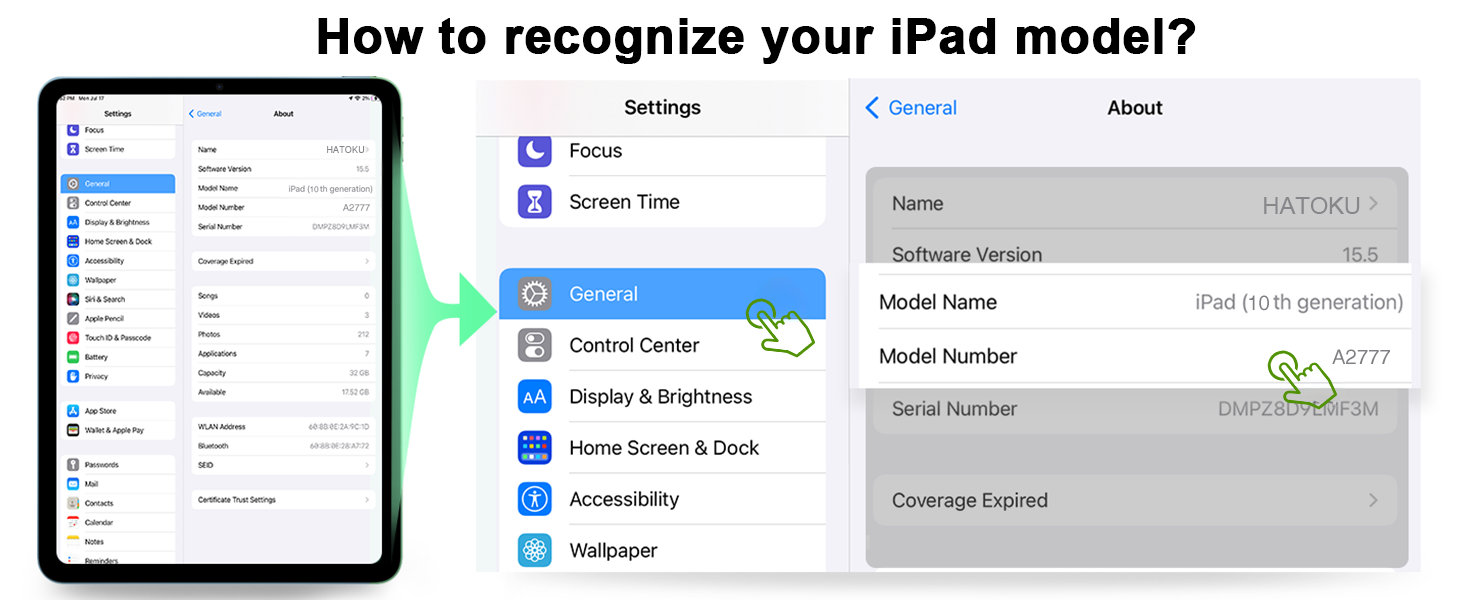
Image: Visual guide on how to find your iPad's model name and number in the device settings.
Багцын агуулга
Your HATOKU Stylus Pen package includes the following items:
- 1 x HATOKU 1st Gen Stylus Pen
- 3 x Replaceable Pen Tips
- 1 x Type-C цэнэглэгч кабель
- 1 х хэрэглэгчийн гарын авлага (энэ баримт бичиг)

Image: A visual representation of all items included in the HATOKU Stylus Pen product box.
Тохиргоо ба ажиллагаа
Асаах/унтраах
To power on the stylus, simply tap the top button. The indicator lights will illuminate. To power off, tap the top button again. The stylus will automatically turn off after 5-10 minutes of inactivity to conserve power.
Цэнэглэж байна
The HATOKU Stylus Pen features fast charging. A full charge takes approximately 15 minutes and provides up to 8 hours of continuous use. Use the included Type-C charging cable to charge the pen. The energy indicator lights will show the current power level:
- 3 lights: 70% to full charge
- 2 lights: 30% to 70% charge
- 1 light: 5% to 30% charge
- Flashing blue light: Battery remaining is less than 5%, requiring immediate charging.

Image: The stylus pen being charged via its USB-C port, with a visual guide to the power indicator lights.
Холболт
No Bluetooth pairing or app connection is required. Simply power on the pen, and it is ready to use directly with your compatible iPad.
Гол онцлогууд
- Алга модны татгалзалт: Rest your hand naturally on the iPad screen without worrying about accidental marks.
- Налалт мэдрэмж The thickness of the line depends on the angle at which you hold the pen, allowing for varied strokes. Note: This is not pressure sensitivity.
- Соронзон шингээлт: The stylus can attach magnetically to the side of compatible iPad models (iPad Pro 12.9" 3rd/4th/5th, iPad Pro 11"/13", iPad Air M2/M3/4th/5th, iPad Mini 6) for convenient storage and to prevent loss.

Image: A hand resting on an iPad screen while using the stylus, highlighting the palm rejection feature.
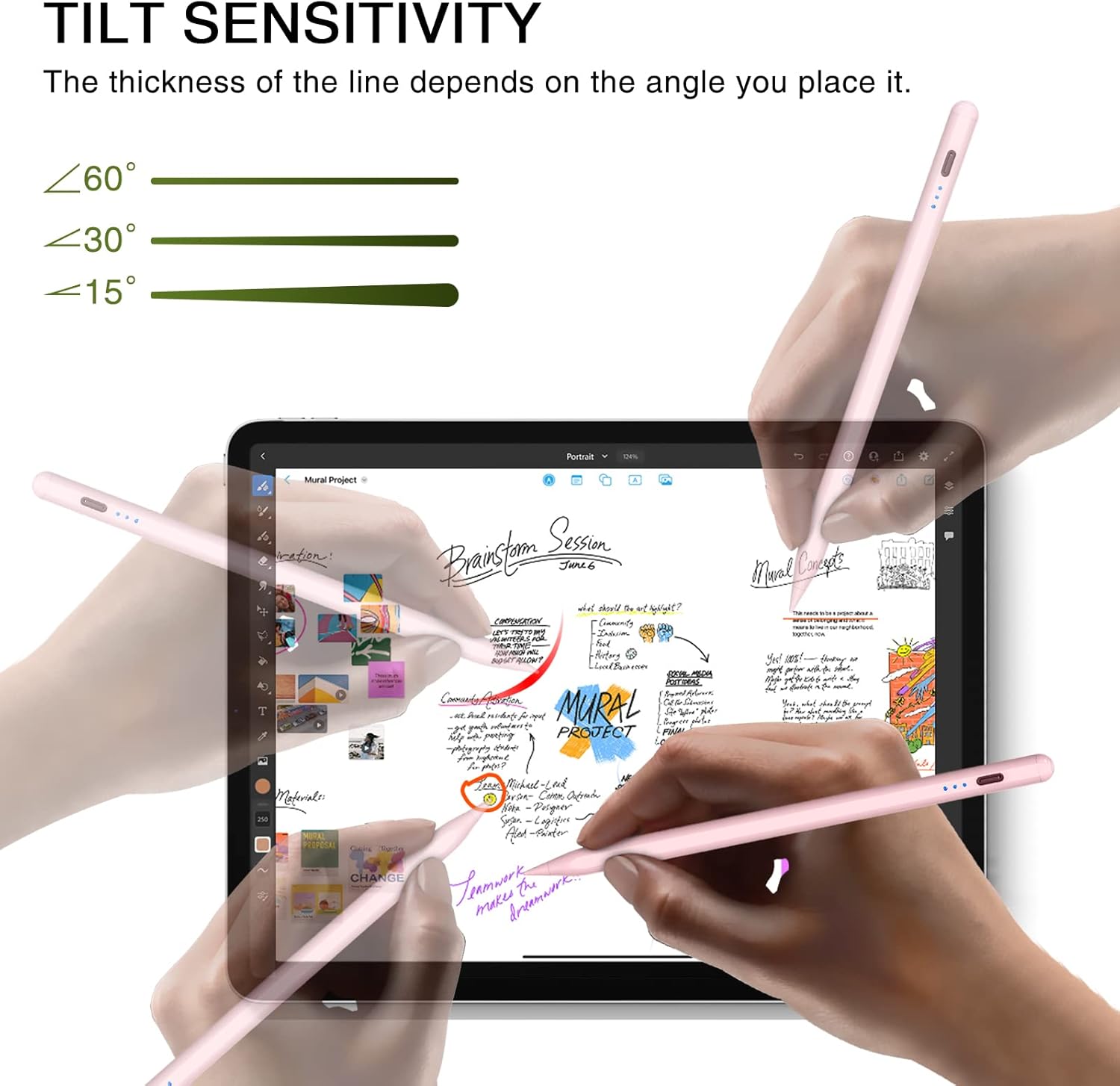
Image: The stylus pen being used at different angles to produce varying line thicknesses, illustrating tilt sensitivity.

Image: The stylus pen securely attached to the side of an iPad via its magnetic adsorption feature.
Засвар үйлчилгээ
Үзэгний зөвлөмжийг солих
The HATOKU Stylus Pen comes with 3 replaceable POM tips. If the tip becomes worn or damaged, gently twist the old tip counter-clockwise to remove it. Align a new tip and twist clockwise until it is securely in place.
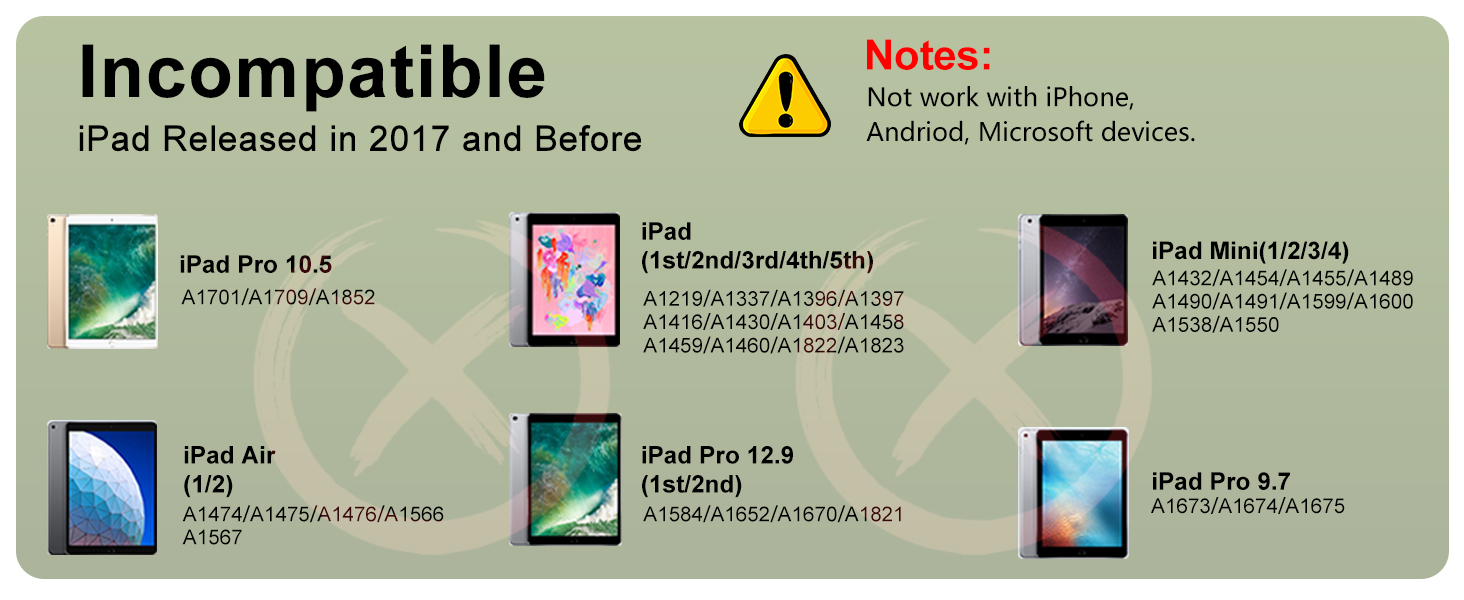
Image: A close-up diagram illustrating the process of replacing the stylus pen tip.
Алдааг олж засварлах
- Үзэг хариу өгөхгүй байна: Ensure the pen is charged and powered on. If the issue persists, try restarting your iPad.
- Inaccurate writing/drawing: Check if the pen tip is securely attached and not damaged. Replace the tip if necessary.
- Magnetic adsorption not working: Verify your iPad model is listed as compatible with the magnetic suction feature.
- Цэнэглэх асуудал: Ensure the Type-C cable is properly connected to both the pen and a power source. Check the indicator lights for charging status.
Үзүүлэлтүүд
| Онцлог | Дэлгэрэнгүй |
|---|---|
| Бүтээгдэхүүний хэмжээс | 0.28 x 0.28 x 6.54 инч |
| Зүйлийн жин | 0.49 унц |
| Загварын дугаар | ID732 |
| Батерей | 1 Лити Металл батерей шаардлагатай (дагсан) |
| Батерейны дундаж ашиглалтын хугацаа зогсолт | 8760 цаг |
| Материал | Хөнгөн цагаан |
| Өнгө | Ягаан |
Баталгаат болон дэмжлэг
HATOKU offers a 1-year warranty from the purchase date for your stylus pen. We also provide 24/7 online customer support to assist with any questions or issues you may encounter. Our goal is your complete satisfaction. If you have any concerns, please contact our support team for assistance with refunds or replacements.


