Танилцуулга
This manual provides comprehensive instructions for the installation, setup, operation, maintenance, and troubleshooting of your TEEHO TE002L Fingerprint Door Lock. Please read this manual carefully before installation and retain it for future reference.
Видео: Дууслааview of the TEEHO TE002L Fingerprint Door Lock, highlighting its key features and functionality.
Юу багтсан бэ
The TEEHO TE002L Fingerprint Door Lock package includes the following components:
- Гадна талын товчлуурын угсралт
- Дотоод угсралт
- 2 хөшүүргийн бариул
- Хамгаалалтын түгжээ
- Суурилуулах хавтан
- Ажил хаялтын хавтан
- Screws and Installation Hardware
- Нөөц түлхүүрүүд (2)
- Дахин тохируулах хэрэгсэл
- Суурилуулах заавар

Image: All components included in the TEEHO TE002L Fingerprint Door Lock package, laid out for easy identification.
Суурилуулах заавар
Follow these steps to properly install your TEEHO TE002L Fingerprint Door Lock. Ensure your door is compatible with the lock's dimensions (1-3/8" to 2" thick, 2-3/8" or 2-3/4" backset).
1. Хаалгыг бэлтгэ
- Remove any existing lock hardware from your door.
- Verify door dimensions and drill holes if necessary, according to the provided template (not included in this manual).

Image: Diagram illustrating door thickness and backset measurements for compatibility with the TEEHO TE002L lock, suitable for both left-handed and right-handed doors.
2. Түгжээг суулгана уу
- Insert the deadbolt latch into the door edge. Ensure the "TOP" indicator on the latch is facing upwards.
- Түгжээг өгөгдсөн эрэг ашиглан бэхлээрэй.
3. Гадна угсралтыг суурилуулах
- Feed the cable from the exterior keypad assembly through the door hole and under the latch.
- Сүүлний хэсгийг түгжээний гол нүхтэй зэрэгцүүлнэ.
- Press the exterior assembly firmly against the door.
4. Холбох хавтанг суулгана
- Place the mounting plate on the interior side of the door, aligning it with the exterior assembly.
- Secure the mounting plate using the long screws, ensuring the cable is not pinched.
5. Дотоод угсралтыг суурилуулах
- Гадна угсралтаас кабелийг дотоод угсралт руу холбоно.
- Ensure the thumbturn on the interior assembly is in the vertical (unlocked) position.
- Attach the interior assembly to the mounting plate and secure it with screws.
- Test the thumbturn to ensure smooth operation.
6. Install the Lever Handles
- Insert the spindle of the exterior lever handle through the latch mechanism.
- Attach the interior lever handle, ensuring it engages correctly with the spindle.
- Secure both lever handles with the provided screws.
7. Strike Plate-ийг суулгана
- Хаалганы хүрээ дээрх түгжээтэй цохилтын хавтанг тэгшлээрэй.
- Secure the strike plate with the provided screws.
Video: Detailed installation guide for the TEEHO TE002L Fingerprint Door Lock, demonstrating each step from preparing the door to securing the components.
Тохиргоо ба програмчлал
After installation, you need to set up and program your lock. The default master code is 12345678. It is required that you change it to a code of your own before programming any other features.
1. Restore to Factory Settings (Initial Setup)
- Install 3 AA batteries into the interior assembly.
- Using the reset tool (or a similar pointed object), press and hold the reset button located inside the battery compartment.
- While holding the reset button, insert the 4th AA battery.
- Continue holding the reset button for 5 seconds until you hear a long "Beep". This indicates a successful reset.
2. Мастер кодыг өөрчлөх
- Press the "TEEHO" button twice.
- Enter the current Master Code (default: 12345678).
- Press the "TEEHO" button.
- Press "1".
- Enter your new Master Code (4-10 digits).
- Press the "TEEHO" button.
- Re-enter your new Master Code.
- Press the "TEEHO" button. (A green light flash indicates success).
3. Хэрэглэгчийн код нэмэх
- Press the "TEEHO" button twice.
- Мастер кодоо оруулна уу.
- Press the "TEEHO" button.
- Press "2".
- Enter a new User Code (4-10 digits).
- Press the "TEEHO" button.
- Re-enter the new User Code.
- Press the "TEEHO" button. (A green light flash indicates success).
4. Add User Fingerprints
- Press the "TEEHO" button twice.
- Мастер кодоо оруулна уу.
- Press the "TEEHO" button.
- Press "4".
- Scan the user's fingerprint 8 times, each time succeeding with a short beep. (A green light flash indicates success).

Image: A hand demonstrating the fingerprint unlock feature on the TEEHO TE002L lock, highlighting its biometric identification capabilities.
5. Автомат түгжээний функц
- To enable/disable Auto-Lock: Press the "TEEHO" button twice, enter Master Code, press "TEEHO", then press "7". Press "1" to enable or "2" to disable.
- To set Auto-Lock time delay (10-99 seconds): Press the "TEEHO" button twice, enter Master Code, press "TEEHO", then press "0". Enter the desired duration (e.g., 30 for 30 seconds), then press "TEEHO".

Image: A woman carrying a baby and groceries, illustrating the convenience of the auto-lock feature of the TEEHO TE002L lock, which can be set to lock automatically after 10-99 seconds.
6. Нэг мэдрэгчтэй түгжээ
- To activate one-touch locking, press and hold any key on the keypad for 2 seconds. The door will lock immediately.
7. One-Time PIN Code
- To add a one-time PIN code: Press the "TEEHO" button twice, enter Master Code, press "TEEHO", then press "9". Enter the new one-time user code, press "TEEHO", re-enter the code, then press "TEEHO". This code will be automatically deleted after one use.
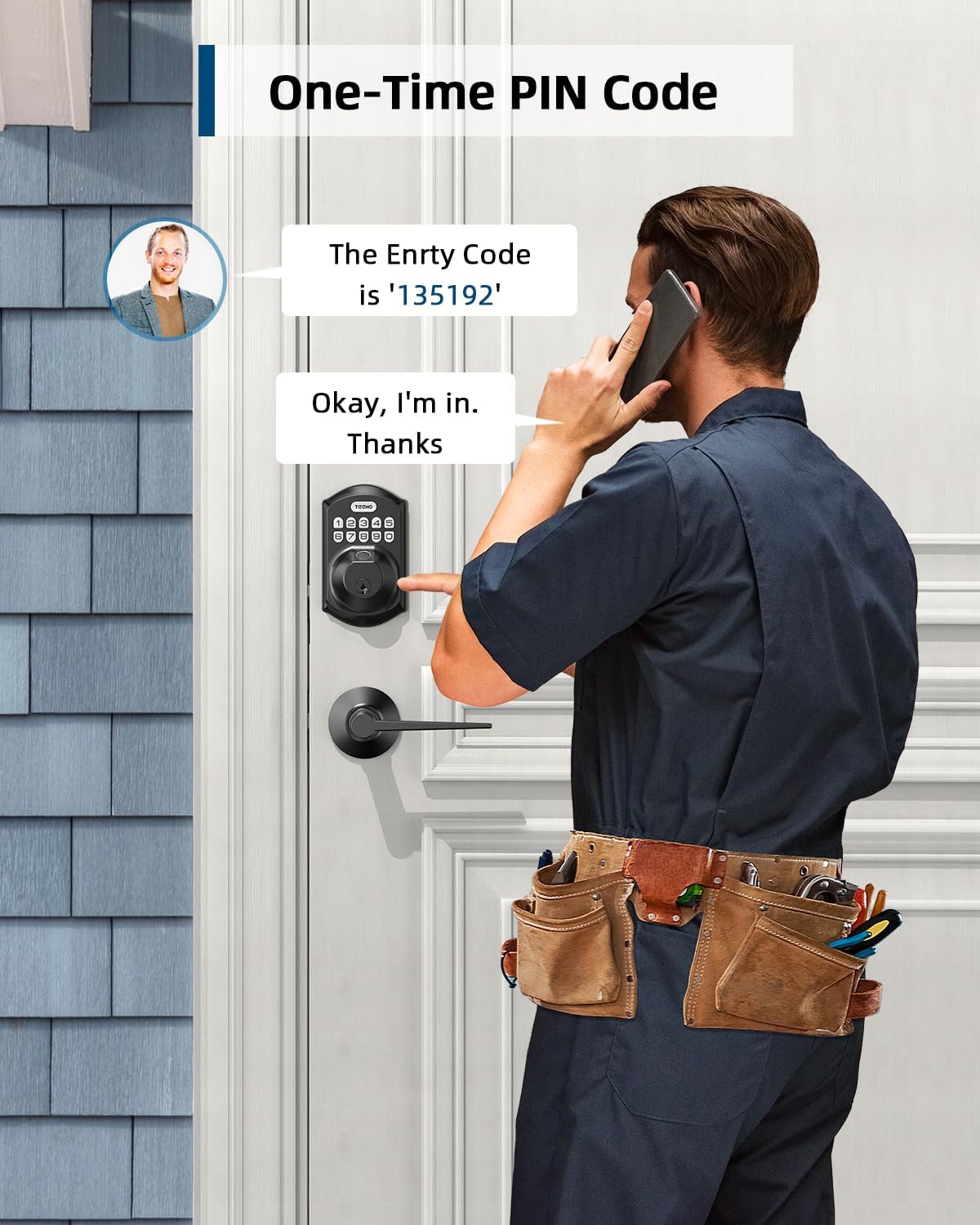
Image: A man receiving a one-time PIN code via phone, demonstrating the temporary access feature of the TEEHO TE002L lock for visitors or service providers.
8. Anti-Peeping PIN Code
- To prevent others from seeing your code, you can enter random digits before or after your actual PIN code. The lock will still recognize the correct sequence within the longer entry.

Image: A hand entering an anti-peeping PIN code on the TEEHO TE002L keypad, showing how random digits can be added before or after the actual code for privacy.
9. Амралтын горим
- To enable/disable Vacation Mode: Press the "TEEHO" button twice, enter Master Code, press "TEEHO", then press "8". (A green light flash indicates Vacation Mode is enabled). In this mode, all user codes and fingerprints are temporarily disabled, and only the Master Code or physical key can unlock the door.
10. Чимээгүй горим
- To enable/disable Silent Mode: Press the "TEEHO" button twice, enter Master Code, press "TEEHO", then press "6". Press "1" to enable or "2" to disable. This mutes all beeps and sounds from the lock.
Video: Programming guide for the TEEHO TE002L Smart Lock, detailing steps for changing the master code, adding user codes, adding fingerprints, and setting various modes.
Онцлогууд ба функцууд
- 3D Fingerprint Unlock: 99.99% biometric fingerprint recognition rate, unlocks in 0.3 seconds.
- Түлхүүргүй нэвтрэх: Supports up to 20 access codes (4-10 digits) and fingerprints. One-time PIN codes can be set for temporary access.
- Автоматаар түгжих: Can be set to lock automatically in 10-99 seconds.
- Нэг мэдрэгчтэй түгжээ: Press and hold any key on the keypad for 2 seconds to lock the door.
- Буруу код оруулах хязгаар: Keypad deactivates for 3 minutes after 10 unsuccessful attempts with an invalid password.
- Security Deadbolt: ANSI Grade 3 rated, made with sturdy lock cylinder and alloy.
- Эрчим хүч: Powered by 4 AA batteries, providing over 1 year of battery life. Features a low battery indicator.
- Цаг агаарын эсэргүүцэл: IP54 rating, operates well in temperatures from -22°F to 158°F.

Зураг: Дууслааview of the TEEHO TE002L lock's key features, including support for multiple fingerprints and user codes, auto-lock, IP54 weather resistance, one-time PIN codes, one-touch locking, and a low battery indicator.
Засвар үйлчилгээ
- Зай солих: Replace all four AA batteries when the low battery indicator appears. Use alkaline batteries for optimal performance.
- Цэвэрлэгээ: Wipe the keypad and lock body with a soft, dry cloth. Avoid abrasive cleaners or solvents.
- Тосолгоо: Periodically lubricate the latch mechanism with a silicone-based lubricant to ensure smooth operation.
- Програм хангамжийн шинэчлэлтүүд: Check the TEEHO website or app (if applicable) for any available firmware updates to ensure optimal performance and security.
Алдааг олж засварлах
| Асуудал | Боломжит шалтгаан | Шийдэл |
|---|---|---|
| Түгжээ хариу өгөхгүй байна / Цахилгаан байхгүй | Дууссан батерейнууд. | Дөрвөн АА батерейг бүгдийг нь солино. |
| Keypad deactivated | 10 incorrect code entries. | Wait 3 minutes for the keypad to reactivate. |
| Хурууны хээ танигдаагүй | Хуруу бохир, нойтон эсвэл буруу байрлуулсан байна. Хурууны хээ бүртгэгдээгүй байна. | Хуруу цэвэр, хуурай байгаа эсэхийг шалгаарай. Хуруугаа мэдрэгч дээр тэгшхэн байрлуулна уу. Шаардлагатай бол хурууны хээг дахин бүртгүүлнэ үү. |
| Auto-lock not working | Auto-lock feature is disabled or time delay is too long. | Enable Auto-Lock and set the desired time delay in programming. |
| Lock does not lock/unlock smoothly | Түгжээний эд анги эсвэл хаалганы хүрээг буруу байрлуулах. | Суурилуулалтын зөв байрлалыг шалгана уу. Хаалганы хүрээний цохиурын хавтанг зөв байрлуулсан эсэхийг шалгана уу. |
Үзүүлэлтүүд
- Брэнд: ТЕЕХО
- Загварын нэр: Fingerprint Door Lock with 2 Lever Handles
- Загварын дугаар: TE002L
- Түгжээний төрөл: Биометр
- Онцлог шинж чанар: Fingerprint, Keypad, Auto-Lock, One-Touch Lock, One-Time PIN Code, Anti-Peeping Code, Silent Mode, Vacation Mode
- Материал: Хайлш ган
- Өнгө: Матт хар
- Хэмжээ (L x W x H): 1 x 1 x 1 инч
- Барааны жин: 3.7 фунт (1.68 килограмм)
- Эрчим хүчний эх үүсвэр: 4 АА батерей (оруулаагүй)
- Зайны хугацаа: 1 жилээс дээш
- Цаг агаарын эсэргүүцэл: IP54
- Ашиглалтын температур: -22°F-ээс 158°F хүртэл
- Security Rating: ANSI 3-р зэрэг
- Холболтын протокол: Холбогдоогүй
Баталгаат болон дэмжлэг
TEEHO offers a 1-year warranty on all parts and lifetime customer service for the TE002L Fingerprint Door Lock. This includes online phone support from Monday to Friday, 9 AM to 5 PM PST, and 24/7 online email service.
For assistance, please contact TEEHO customer support:
- Утасны дэмжлэг: Даваа - Баасан, 9:00 - 18:00 PST
- Имэйл тусламж: 24/7 online service


