1. Танилцуулга
The ULANZI VL49 Pro RGB Video Light is a compact and versatile lighting solution designed for photography and videography. It features 60 high color rendering LED beads, offering a wide illumination angle of up to 120°. With a brightness of up to 800LUX@0.5m and a CRI95+ rating, it ensures natural and lifelike lighting. This portable light supports full 360° RGB color, adjustable color temperature, and various dynamic light effects, making it suitable for diverse creative needs.

Figure 1: ULANZI VL49 Pro RGB Video Light. This image displays the compact design of the light, highlighting its bright output.
2. Багцын агуулга
Бүх зүйл байгаа эсэхийг шалгахын тулд багцыг шалгана уу:
- ULANZI VL49 Pro RGB Video Light
- USB-C цэнэглэгч кабель
- Хүйтэн гутлын адаптер
- Silicone Soft Cover
- Honeycomb Spotlight Cover
- Хэрэглэгчийн гарын авлага
3. Бүтээгдэхүүн дууссанview
Familiarize yourself with the main components of the VL49 Pro:
- LED самбар: Front light source with 60 LED beads.
- LCD дэлгэц: Shows current settings (CCT, RGB, Scene, Brightness, Battery).
- Хяналтын товчлуурууд: Power switch, mode selection, and adjustment buttons.
- USB-C порт: Дотоод зайг цэнэглэхэд зориулагдсан.
- 1/4" шурагны нүх: Гурван хөлтэй штатив эсвэл бусад дагалдах хэрэгсэлд суурилуулах зориулалттай.
- Соронзон нуруу: Allows attachment to metal surfaces.

Figure 2: Close-up of the ULANZI VL49 Pro's LCD display and control interface. This image illustrates the screen showing settings and the physical buttons for operation.
4. Тохиргоо
4.1 Төхөөрөмжийг цэнэглэх
The VL49 Pro is equipped with a 2500mAh rechargeable battery. Use the provided USB-C cable to connect the light to a compatible power source (e.g., USB wall adapter, computer USB port). A full charge typically takes approximately 2 hours. The light can be used while charging.
4.2 Суурилуулах сонголтууд
- 1/4" Шураг бэхэлгээ: The light features a standard 1/4" screw hole, allowing it to be mounted on tripods, light stands, or other camera accessories.
- Cold Shoe Adapter: Attach the included cold shoe adapter to the 1/4" screw hole to mount the light directly onto a camera's hot shoe or cold shoe mount.
- Соронзон таталт: The back of the light has a magnetic design, enabling it to be adsorbed onto most metal surfaces for quick and flexible scene setup.

Figure 3: The magnetic attraction feature of the VL49 Pro. This image shows the light adhering to a metal surface, illustrating its versatile placement options.
5. Ашиглалтын заавар
5.1 Асаах/унтраах
Locate the power switch on the side of the device. Slide it to the 'ON' position to power on the light. Slide it to 'OFF' to power off.
5.2 горимын сонголт
The VL49 Pro offers three main lighting modes: CCT (Correlated Color Temperature), RGB (Hue, Saturation, Brightness), and Scene Mode. Use the mode selection button to cycle through these options.
5.2.1 CCT Mode (Color Temperature)
In CCT mode, you can adjust the color temperature from 2500K (warm light) to 9000K (cold light) and the brightness from 0% to 100%. Use the up/down buttons to navigate between settings and the plus/minus buttons to adjust values.

Figure 4: CCT Mode functionality. This image shows the light producing various color temperatures, from warm to cool, indicating its adjustability.
5.2.2 RGB Mode (Full Color)
In RGB mode, you have access to 360° full-color adjustment. You can control the Hue (H), Saturation (S), and Brightness (I) to achieve any desired color. Use the navigation and adjustment buttons to fine-tune your color settings.

Figure 5: Full RGB Color capabilities. This image showcases the light's ability to produce a wide range of colors, demonstrating its versatility for creative lighting.
5.2.3 Scene Mode (Dynamic Light Effects)
The VL49 Pro includes 20 dynamic light effects to enhance your creative shots. These effects include Cop Car, Fireworks, Fault Bulb, Paparazzi, Green Flash, Blue Flash, Fire Engine, Candle, Strobe, H/L Beam, HSI Slow, Lightning, Party, RGB Strobe, Red Flash, and HSI Fast. Cycle through the scenes using the navigation buttons.
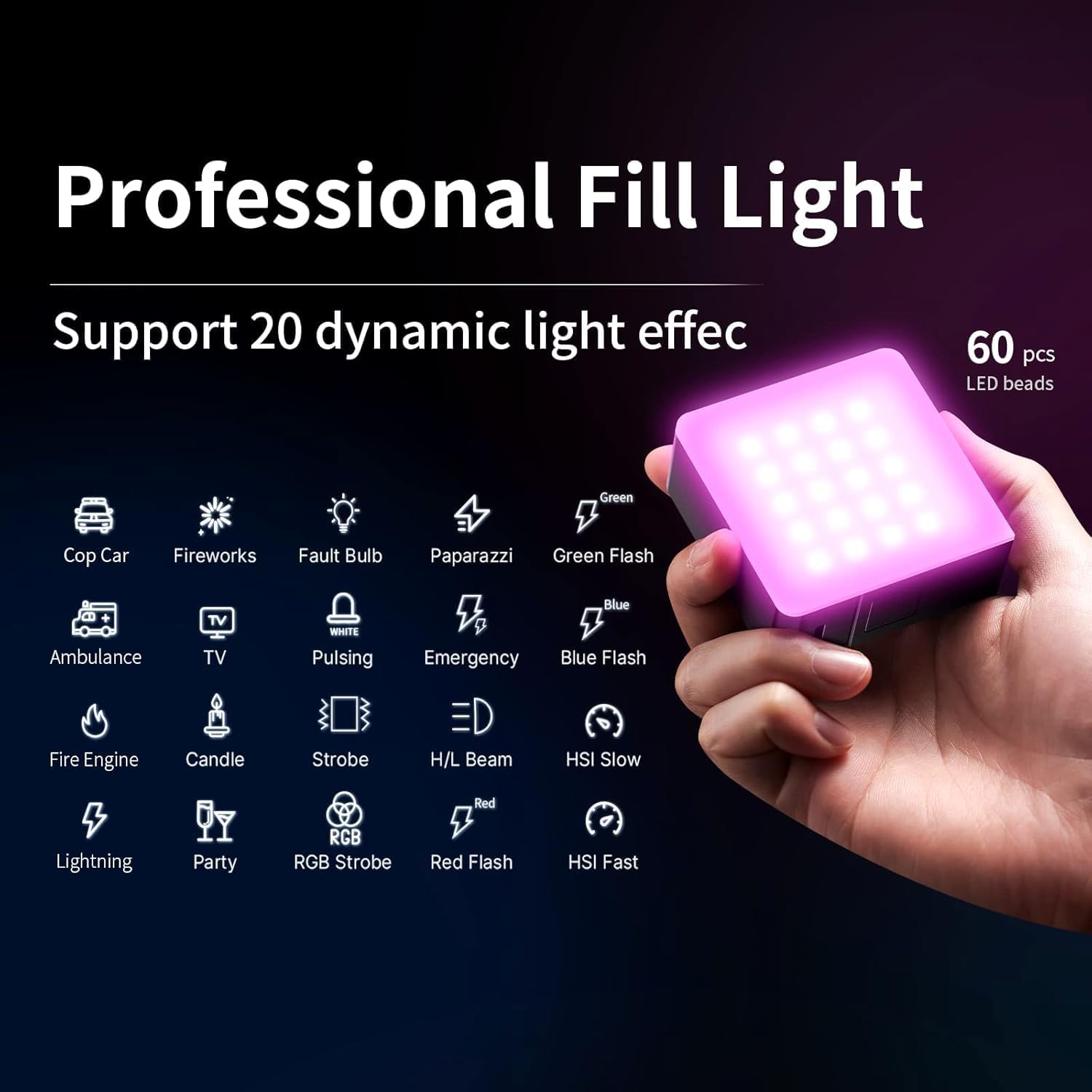
Figure 6: Dynamic Light Effects. This image displays the light cycling through various pre-programmed scene modes, such as police car lights and fireworks.
5.3 Using the Diffusers
The light comes with two covers: a silicone soft cover and a honeycomb spotlight cover. The silicone cover softens the light output, reducing harsh shadows, while the honeycomb cover helps control light spill and create more focused lighting effects.

Figure 7: Included accessories: silicone soft cover and honeycomb spotlight cover. These accessories modify the light's output for different effects.
6. Техникийн үзүүлэлтүүд
| Онцлог | Тодорхойлолт |
|---|---|
| Бүтээгдэхүүний хэмжээс | 3.94 x 3.78 x 3.15 инч |
| Зүйлийн жин | 8.8 унц |
| Загварын дугаар | VL49 PRO |
| Батерей | 1 лити ион батерей шаардлагатай (дагсан) |
| Зайны ашиглалт | Over 90 minutes at maximum power, 10 hours at minimum |
| Холболтын технологи | USB |
| Тоног төхөөрөмжийн интерфейс | USB |
| Өнгөний температур | 2500К-9000К |
| Гэрэлтүүлгийн тохируулга | 0-100% |
| CRI | 95+ |
| Гэрэлтүүлгийн өнцөг | 120° |
7. Алдаа засах
- Гэрэл асахгүй байна: Ensure the battery is charged. Connect the light to a power source using the USB-C cable and allow it to charge for a few minutes before attempting to power on again.
- Тогтворгүй гэрэлтэлт/өнгө: Check the battery level. Low battery can affect performance. Ensure settings are correctly adjusted via the LCD display.
- Magnetic attachment issues: Ensure the surface is metal and clean. The magnetic strength may vary depending on the metal thickness and composition.
8. Засвар үйлчилгээ
- Keep the device dry and clean. Avoid exposure to water or excessive humidity.
- Гэрлийг цэвэрлэхийн тулд зөөлөн, хуурай даавуу ашиглаарай. Хүчтэй химийн бодис эсвэл зүлгүүрийн материал бүү хэрэглээрэй.
- Гэрлийг ашиглаагүй үед сэрүүн, хуурай газар хадгална.
- Батерейны эрүүл мэндийг хадгалахын тулд байнга ашигладаггүй байсан ч батерейг тогтмол цэнэглээрэй.
9. Баталгаат хугацаа ба дэмжлэг
ULANZI products are covered by a manufacturer's warranty. For detailed warranty information, technical support, or service inquiries, please refer to the official ULANZI webсайт эсвэл харилцагчийн үйлчилгээтэй шууд холбогдоно уу. Баталгаат заргад зориулж худалдан авалтаа нотлох баримтаа үлдээнэ үү.
10. Бүтээгдэхүүний видео
ULANZI VL49 Pro RGB Video Light Overview
Энэ видео нь албан ёсны мэдээллийг өгдөгview of the ULANZI VL49 Pro RGB Video Light, demonstrating its features and functionality.


