1. Танилцуулга
The SUNOL F06 Smart Glasses are designed to provide an integrated audio and visual experience. Featuring an open-ear listening design, these sunglasses allow you to enjoy audio while remaining aware of your surroundings. Equipped with TWS 5.3 Bluetooth technology, they offer a stable and high-fidelity sound connection for music, calls, and navigation. The glasses include touch-sensitive controls for easy operation and come with interchangeable UV-filtered lenses for eye protection. Their waterproof design ensures durability in various environments.

Image: The SUNOL F06 Smart Glasses, showcasinтэдний орчин үеийн загвар.
Видео: Дууслааview of the SUNOL F06 Smart Glasses, highlighting their open-ear audio capabilities and design.
2. Хайрцагт юу байна
Upon opening your SUNOL F06 Smart Glasses package, you should find the following items:
- Smart Glasses (main unit)
- Glasses Case (for storage and protection)
- Two Pairs of Lenses (one pre-installed, one alternative)
- Цэнэглэх кабель
- Хэрэглэгчийн гарын авлага (энэ баримт бичиг)

Image: All components included in the SUNOL F06 Smart Glasses package.
3. Бүтээгдэхүүн дууссанview
The F06 Smart Glasses integrate audio technology into a stylish eyewear design. Key features include:
- Open Ear Listening: Allows you to hear audio while remaining aware of your surroundings.
- Bluetooth 5.3: Provides a fast and stable wireless connection for high-fidelity sound.
- Мэдрэгчийн удирдлага: Intuitive controls on the temple for managing music playback and calls.
- Солигдох линз: Comes with brown and black UV-filtered lenses to protect your eyes.
- Усны хамгаалалттай дизайн: Built to withstand rain and splashes, suitable for outdoor activities.

Image: Visual representation of the smart glasses' key features.

Image: Demonstrating the open-ear audio and wireless capabilities.

Image: Close-up of the touch control area on the glasses' temple.

Image: Illustrating the UV400 protection provided by the lenses.
4. Тохиргоо
4.1 Нүдний шилийг цэнэглэх
Before first use, fully charge your SUNOL F06 Smart Glasses. Connect the provided charging cable to the charging port on the glasses and plug the other end into a compatible USB power source (e.g., computer USB port, wall adapter). The indicator light will show charging status.
4.2 Асаах/унтраах болон Bluetooth-г хослуулах
To power on the glasses, press and hold the touch button area on the right temple for 3 seconds. You will hear a voice prompt "Power on". The glasses will then enter pairing mode.
On your mobile device, enable Bluetooth and search for available devices. Select 'TWS-F' from the list to connect. Once connected, you will hear a confirmation sound.
To power off the glasses, press and hold the right mirror leg touch area for 5 seconds. You will hear a voice prompt "Power off". Alternatively, plugging the glasses into the charger will automatically shut them down.
5. Ашиглалтын заавар
The SUNOL F06 Smart Glasses feature intuitive touch controls located on the temples. Refer to the diagram below for specific functions:
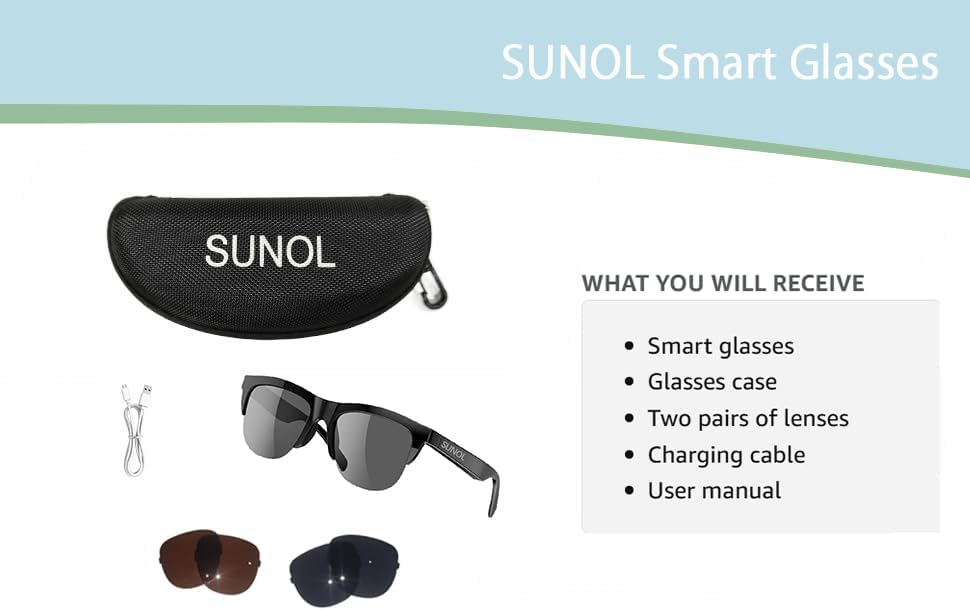
Image: Detailed diagram of touch control functions.
5.1 Хөгжим тоглуулах удирдлага
- Тоглуулах/түр зогсоох: In standby state or during playback, double-click the multi-function touch area to play or pause the audio.
- Next Song/Content: Triple-click the multi-function touch area.
- Previous Song/Content: Long press the multi-function touch area for 1.5 seconds.
5.2 Дуудлагын удирдлага
- Дуудлагад хариулах/тасах: When an incoming call is received, double-click the multi-function touch area to answer. Double-click again to hang up.
- Дуудлагаас татгалзах: Long press the multi-function touch area for 1.5 seconds to reject an incoming call.
6. Линз солих
The SUNOL F06 Smart Glasses come with interchangeable lenses, allowing you to switch between different colors or types as needed. Follow the instructions in the video below to safely replace the lenses.
Video: Demonstrating the process of replacing the lenses on the SUNOL F06 Smart Glasses.
Жич: Handle lenses carefully to avoid scratches. Ensure they are securely seated in the frame after replacement.
7. Засвар үйлчилгээ
Proper maintenance will extend the lifespan of your smart glasses:
- Цэвэрлэх линз: Use the provided lens cloth or a soft, clean microfiber cloth to wipe the lenses. Avoid using abrasive materials or harsh chemicals.
- Цэвэрлэх хүрээ: Хүрээг зөөлөн, d-ээр арчинаamp cloth. Do not submerge the glasses in water, despite their waterproof rating, to prevent damage to electronic components.
- Хадгалах: When not in use, store the glasses in the provided storage case to protect them from dust, scratches, and impacts.
- Батерейны арчилгаа: Avoid extreme temperatures. If storing for a long period, charge the battery to about 50% to maintain battery health.
8. Алдаа засах
If you encounter issues with your SUNOL F06 Smart Glasses, refer to the following common solutions:
| Асуудал | Боломжит шалтгаан | Шийдэл |
|---|---|---|
| Нүдний шил асахгүй байна. | Батерей бага цэнэгтэй; асаах товчийг зөв дараагүй байна. | Charge the glasses fully. Press and hold the touch area for 3 seconds until "Power on" is heard. |
| Төхөөрөмжтэй хослуулах боломжгүй. | Bluetooth not enabled; glasses not in pairing mode; interference. | Ensure Bluetooth is enabled on your device. Power off and on the glasses to re-enter pairing mode. Move closer to your device. Forget previous pairings on your device. |
| Дуу байхгүй эсвэл дуу багатай. | Дууны түвшин хэт бага; холбогдоогүй байна; аудио эх үүсвэрийн асуудал. | Increase volume on both glasses and connected device. Ensure glasses are properly paired. Check audio source on your device. |
| Дуудлагын чанар муу байна. | Weak Bluetooth signal; environmental noise. | Move closer to your connected device. Reduce background noise if possible. |
| Мэдрэгчийн удирдлага хариу өгөхгүй байна. | Түр зуурын програм хангамжийн алдаа; бохирдсон мэдрэгчтэй хэсэг. | Restart the glasses. Clean the touch control area with a soft, dry cloth. |
9. Техникийн үзүүлэлтүүд
| Онцлог | Дэлгэрэнгүй |
|---|---|
| Загварын дугаар | F06 |
| Брэнд | SUNOL |
| Bluetooth хувилбар | 5.3 |
| Зайны төрөл | Лити полимер (1 шаардлагатай, багтсан) |
| Усны хамгаалалттай үнэлгээ | XP4 Life Waterproof |
| Линзний төрөл | UV Filtered, Interchangeable (Brown and Black) |
| Хяналтын арга | Хяналтанд хүрнэ үү |
| Аудио гаралт | Open Ear HIFI Audio, Dual Speaker Design |
| Хэмжээ | 7.4 x 2.91 x 2.56 инч (Багцын хэмжээ) |
| Жин | 1.06 унц (Сав баглаа боодлын жин) |
| Үйлдвэрлэгч | SUNOL |
| Гарал үүслийн улс | Хятад |

Image: Physical dimensions of the smart glasses.
10. Баталгаат хугацаа ба дэмжлэг
Баталгаат хугацааны мэдээлэл болон хэрэглэгчийн дэмжлэг авахыг хүсвэл худалдан авалттайгаа хамт ирсэн баримт бичгийг үзэх эсвэл үйлдвэрлэгчтэй шууд холбогдоно уу. Баталгаат хугацааны нэхэмжлэл гаргахын тулд худалдан авалтын баримтаа хадгална уу.
Manufacturer: SUNOL
For further assistance, please visit the official SUNOL webсайт эсвэл харилцагчийн үйлчилгээний хэлтэстэй холбогдоно уу.


