Танилцуулга
The bopmen Star10 Wireless Bluetooth Karaoke Microphone is a versatile 4-in-1 device designed for singing, acting as a portable handheld microphone, speaker, and featuring an integrated disco light. It offers high-resolution audio quality and extensive compatibility, making it suitable for various entertainment settings including car travel, home parties, and general use for adults and children.

Image: The Star10 Wireless Bluetooth Karaoke Microphone in Rose Gold, showcasing its sleek design and integrated disco ball.
Аюулгүй байдлын мэдээлэл
- Төхөөрөмжийг хэт өндөр температур, чийгшилд бүү тавь.
- Төхөөрөмжийг унагах эсвэл хүчтэй нөлөөнд оруулахаас зайлсхий.
- Жижиг хэсгүүдээс болж хахах аюулаас урьдчилан сэргийлэхийн тулд бага насны хүүхдүүдийн гар хүрэхгүй газар хадгална уу.
- Use only the provided USB C-A cable for charging.
- Төхөөрөмжийг задлах, өөрчлөхийг бүү оролд.
- Төхөөрөмжийг зөөлөн, хуурай даавуугаар цэвэрлээрэй. Хүчтэй химийн бодис эсвэл зүлгүүрийн цэвэрлэгч хэрэглэхээс зайлсхий.
Багцын агуулга
Дараах зүйлсийн нүдийг шалгана уу.
- 1 x Karaoke microphone (Star10)
- 1 x USB C-A charging cable
- 1 х хэрэглэгчийн гарын авлага
Бүтээгдэхүүн дууссанview
Familiarize yourself with the main controls and ports of your Star10 microphone.

Image: Detailed diagram illustrating the main control panel and bottom ports of the Star10 microphone, including Microphone Volume, On/Off/Play/Pause, Reverb On/Off, Volume Up/Down, Next/Previous Song, Tone Mode, Disco Light Control, USB Port, 3.5mm Earphone Jack, and TF Card slot.
Үндсэн хяналтууд:
- Microphone Volume / Accompaniment Mode On/Off: Adjusts microphone volume or toggles accompaniment.
- On/Off, Play/Pause: Powers the device on/off and controls music playback.
- Reverb On/Off / Bluetooth & TF Card Mode: Toggles reverb effect and switches between input modes.
- Дууны хэмжээг нэмэгдүүлэх/доошруулах: Adjusts overall speaker volume.
- Өмнөх/Дараагийн дуу: Замуудаар дамжин навигаци хийдэг.
- Дууны горим: Төрөл бүрийн дуут эффектүүдээр дамжин өнгөрдөг.
- Disco Light Control / Twins Pairing: Controls the disco light and initiates Twins Mode pairing.
Bottom Ports:
- Заагч гэрэл: Shows device status (e.g., charging, connected).
- 3.5 mm Earphone Jack / Re-Set button inside: For private listening or resetting the device.
- USB порт: Микрофоныг цэнэглэх зориулалттай.
- TF картын оролт: For playing music directly from a micro TF card (up to 32GB, not included).
Тохиргоо
Микрофоныг цэнэглэж байна:
- Connect the provided USB C-A cable to the USB port on the bottom of the microphone.
- Кабелийн нөгөө үзүүрийг тохирох USB цахилгаан адаптер (дагалдахгүй) эсвэл компьютерын USB порт руу холбоно уу.
- The indicator light will show charging status. A full charge provides up to 10 hours of use (minimum 5 hours).
Асаах/унтраах:
- -г удаан дар Асаах/унтраах/тоглуулах/түр зогсоох button for a few seconds to power on the microphone. You will hear an audible prompt.
- To power off, press and hold the same button until you hear the power-off prompt.
Ашиглалтын заавар
Bluetooth холболт:
The Star10 microphone uses Bluetooth 5.2 for seamless connection to your devices.
- Power on the microphone. It will automatically enter Bluetooth pairing mode.
- On your smartphone, tablet, or other Bluetooth-enabled device, open the Bluetooth settings.
- хайх "STAR 10" in the list of available devices and select it to pair.
- Once connected, you will hear a confirmation prompt. You can now play music from your device through the microphone's speaker and sing along.

Image: The Star10 microphone demonstrating its wide compatibility, connecting wirelessly to smartphones, tablets, and laptops via Bluetooth.
TF картын горим:
Play music directly from a micro TF card.
- Insert a micro TF card (up to 32GB, not included) with your music files into the TF Card slot on the bottom of the microphone.
- The microphone will automatically switch to TF Card mode. If not, press the Reverb On/Off / Bluetooth & TF Card Mode button to cycle modes.
- -г ашиглана уу Өмнөх / дараагийн дуу замуудыг удирдах товчлуурууд болон Тоглуулах/түр зогсоох for playback control.
Disco Light Control:
Enhance your karaoke experience with the built-in disco light.
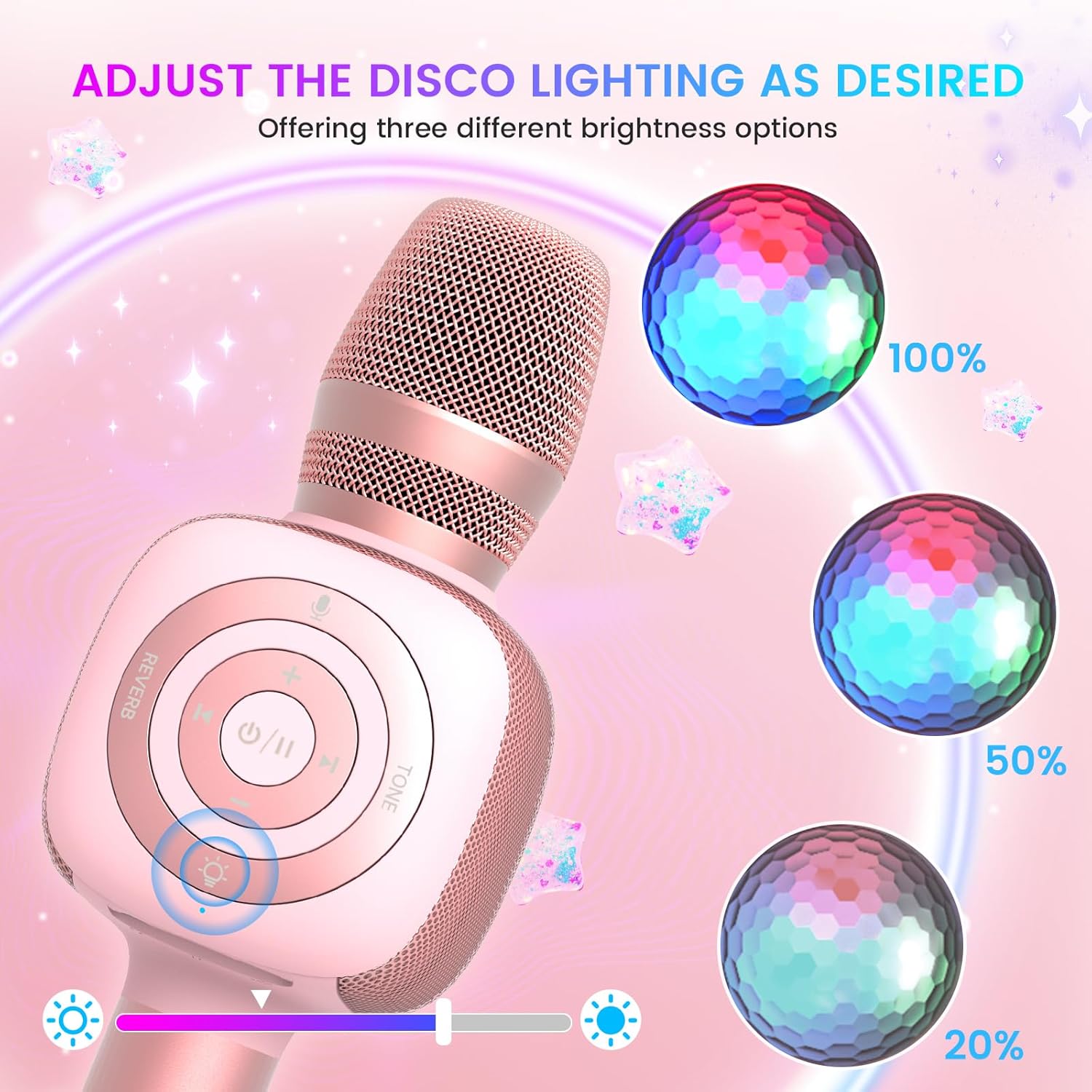
Image: The Star10 microphone's disco light feature, illustrating three adjustable brightness levels (100%, 50%, 20%) to suit different ambiance needs.
- дээр дарна уу Disco Light Control button (light bulb icon) to cycle through three RGB color modes and brightness levels.
- Press again to turn the disco light off.
Tone Modes (Magic Mode):
Experiment with different voice effects for added fun.

Image: The Star10 microphone's "Magic Mode" feature, depicting icons for Male Voice, Female Voice, Cartoon Voice, and Monster Sound effects.
- дээр дарна уу Дууны горим button to cycle through various voice effects such as Male Voice, Female Voice, Cartoon Voice, and Monster Sound.
- Continue pressing to return to the original tone.
Twins Mode (Duet Mode):
Pair two Star10 microphones for a duet experience.

Image: Two individuals enjoying a duet, each holding a Star10 microphone, illustrating the "Twins Mode" functionality for shared singing experiences.
- Ensure both Star10 microphones are powered on.
- On one microphone, press and hold the Disco Light Control button for 2 seconds until a prompt tone "LINK CONNECTED" is heard. This microphone is now in Twins Mode pairing.
- On your cellphone/device, perform Bluetooth pairing selection and choose either of the two microphones. Both microphones will now be connected and output audio.
- To exit Twins Mode, press and hold the Disco Light Control button on the paired microphone for 2 seconds.
Засвар үйлчилгээ
- Цэвэрлэгээ: Wipe the microphone with a soft, dry cloth. Do not use liquid cleaners or aerosols.
- Хадгалах: Микрофоныг сэрүүн, хуурай газар, нарны шууд тусгал болон хэт өндөр температураас хол хадгална уу.
- Батерейны арчилгаа: For optimal battery life, charge the microphone regularly, even if not in frequent use. Avoid fully discharging the battery for extended periods.
Алдааг олж засварлах
| Асуудал | Боломжит шалтгаан | Шийдэл |
|---|---|---|
| Микрофон асахгүй байна. | Батерей бага; Асаах товчийг хангалттай удаан бариагүй байна. | Charge the microphone fully; Press and hold the power button for 3-5 seconds. |
| Bluetooth-ээр холбогдож чадахгүй байна. | Microphone not in pairing mode; Device Bluetooth off; Interference. | Ensure microphone is on and in pairing mode; Enable Bluetooth on your device; Move closer to the microphone; Restart both devices. |
| Чанга яригчаас дуу гарахгүй. | Volume too low; Device volume too low; Incorrect mode. | Increase microphone volume; Increase device volume; Ensure correct mode (Bluetooth/TF Card). |
| Дуут эффектүүд ажиллахгүй байна. | Буруу дарсан товчлуур. | Press the 'Tone Mode' button repeatedly to cycle through effects. |
| Disco light not working. | Light turned off. | Press the 'Disco Light Control' button to turn on/cycle modes. |
Үзүүлэлтүүд
- Загвар: STAR 10
- Брэнд: бопменууд
- Микрофоны хэлбэр хүчин зүйл: Гарын төхөөрөмж
- Холболтын технологи: Bluetooth 5.2
- Эрчим хүчний эх үүсвэр: Батерейгаар ажилладаг (2 лити ион батерей багтсан)
- Зайны хугацаа: Up to 10 hours (minimum 5 hours)
- Бүтээгдэхүүний хэмжээ: 18.7 x 16.54 x 12.2 инч
- Барааны жин: 1.19 фунт (540 грамм)
- Дуу шуугианы харьцаа: 52 дБ
- Давтамжийн хариу: 10 кГц
- Тохиромжтой төхөөрөмжүүд: Personal Computer, Smartphone, Karaoke Machine
- Онцлог шинж чанар: Mute Function, Disco Light, Voice Changer, Twins Mode
- Өнгө: Сарнай алт
- Зөвлөмж болгож буй хэрэглээ: Дотор/гадаа
Баталгаат болон дэмжлэг
Your bopmen Star10 Karaoke Microphone comes with a standard manufacturer's warranty. For detailed warranty information, please refer to the warranty card included in your package or visit the official bopmen webсайт.
If you encounter any issues or have questions regarding your product, please do not hesitate to contact our professional customer service team. We are committed to providing support and assistance within 24 hours to ensure your satisfaction.
Холбоо барих мэдээлэл: Please refer to the contact details provided in your product packaging or on the official bopmen support page for the most up-to-date information.


