1. Танилцуулга
The Samson Expedition Explor is a portable, rechargeable PA system designed for various applications including live performances, presentations, and outdoor events. This system features a powerful 200-watt amplifier, a 3-way speaker system, and an integrated 3-channel mixer. It includes a Samson XPD2 USB Digital Handheld Wireless System for cable-free microphone use and offers Bluetooth connectivity for audio streaming. The internal lithium-ion battery provides extended operation, and its lightweight design with multiple positioning options ensures versatility.
2. Аюулгүй байдлын чухал мэдээлэл
Энэ бүтээгдэхүүнийг ажиллуулахаасаа өмнө аюулгүй байдлын бүх зааврыг уншиж, ойлгоорой. Энэ гарын авлагыг цаашид лавлах зорилгоор хадгална уу.
- Эрчим хүчний эх үүсвэр: Use only the specified power adapter. Disconnect the power cord during lightning storms or when unused for long periods.
- Ус ба чийг: Do not expose this unit to rain, moisture, dripping, or splashing. Do not place objects filled with liquids on the unit.
- Дулаан: Төхөөрөмжийг радиатор, халаалтын төхөөрөмж, зуух болон бусад төхөөрөмж (үүнд орно) зэрэг дулааны эх үүсвэрийн ойролцоо бүү байрлуул. ampөргөгч) дулаан үүсгэдэг.
- Агааржуулалт: Зөв агааржуулалтыг хангах. Агааржуулалтын нүхийг хааж болохгүй.
- Цэвэрлэгээ: Зөвхөн хуурай даавуугаар цэвэрлэ.
- Үйлчилгээ: Энэ бүтээгдэхүүнд өөрөө үйлчлэх гэж бүү оролдоорой. Бүх засвар үйлчилгээг мэргэшсэн үйлчилгээний ажилтнуудад хандаарай.
- Батерейны аюулгүй байдал: Do not disassemble, crush, or expose the battery to high temperatures or fire. Dispose of batteries properly.
3. Багцын агуулга
Таны багцад бүх зүйл байгаа эсэхийг шалгана уу:
- Samson Expedition Explor PA System
- Samson XPD2 Wireless Handheld Microphone
- Утасгүй микрофонд зориулсан USB хүлээн авагч
- Эрчим хүчний адаптер
- Тоос бүрхэвч
- Хэрэглэгчийн гарын авлага (энэ баримт бичиг)
4. Бүтээгдэхүүн дууссанview
The Expedition Explor PA system is designed for clear and powerful audio reproduction. Familiarize yourself with its components and controls.
4.1 Чанга яригчийн бүрэлдэхүүн хэсгүүд

Зураг 4.1: Diagram illustrating the internal speaker components of the Expedition Explor, including the 8-inch woofer, 3.5-inch midrange driver, and dual 1-inch tweeters for a 3-way sound system.
- 8" Woofer: Provides robust low-frequency response.
- 3.5" Midrange Driver: Delivers clear and articulate mid-range frequencies.
- Dual 1" High-Frequency Drivers (Tweeters): Ensures crisp and detailed high-frequency reproduction.
4.2 Rear Panel and Mixer Controls

Зураг 4.2: Нарийвчилсан view of the rear panel of the Expedition Explor, showing the 3-channel mixer with various input/output jacks and control knobs for volume, reverb, and EQ.
- 1 ба 2-р сувгийн оролтууд: Two XLR-1/4" combo jacks for microphones, line-level devices, or high-impedance instruments like guitars. Each channel has independent volume and reverb controls.
- 3-р сувгийн оролт: 1/8" auxiliary input for connecting external audio devices (e.g., smartphones, tablets). This channel also features Bluetooth connectivity.
- Bluetooth холбох товч: Initiates Bluetooth pairing mode for Channel 3.
- Master 3-Band EQ: Controls for Treble, Mid, and Bass to adjust the overall tone of the mix.
- Variable Reverb Controls: Adjusts the amount of reverb effect applied to channels 1 and 2.
- 1/4" Line Out: Allows connection to additional Expedition Explor speakers or other PA systems.
- Power Switch & AC Input: For turning the unit on/off and connecting the power adapter.
- Charge/Power Indicator: LED to show charging status and power on/off.
4.3 Утасгүй микрофон систем

Зураг 4.3: The Samson XPD2 wireless handheld microphone and its accompanying USB receiver, which provides wireless audio input to the PA system.
The included Samson XPD2 USB Digital Handheld Wireless System provides a convenient, cable-free solution for vocal performances or presentations. The USB receiver plugs directly into the PA system's USB port.
4.4 Portability and Positioning
Зураг 4.4: The Samson Expedition Explor PA system being carried by its integrated top handle, highlighting its portability.

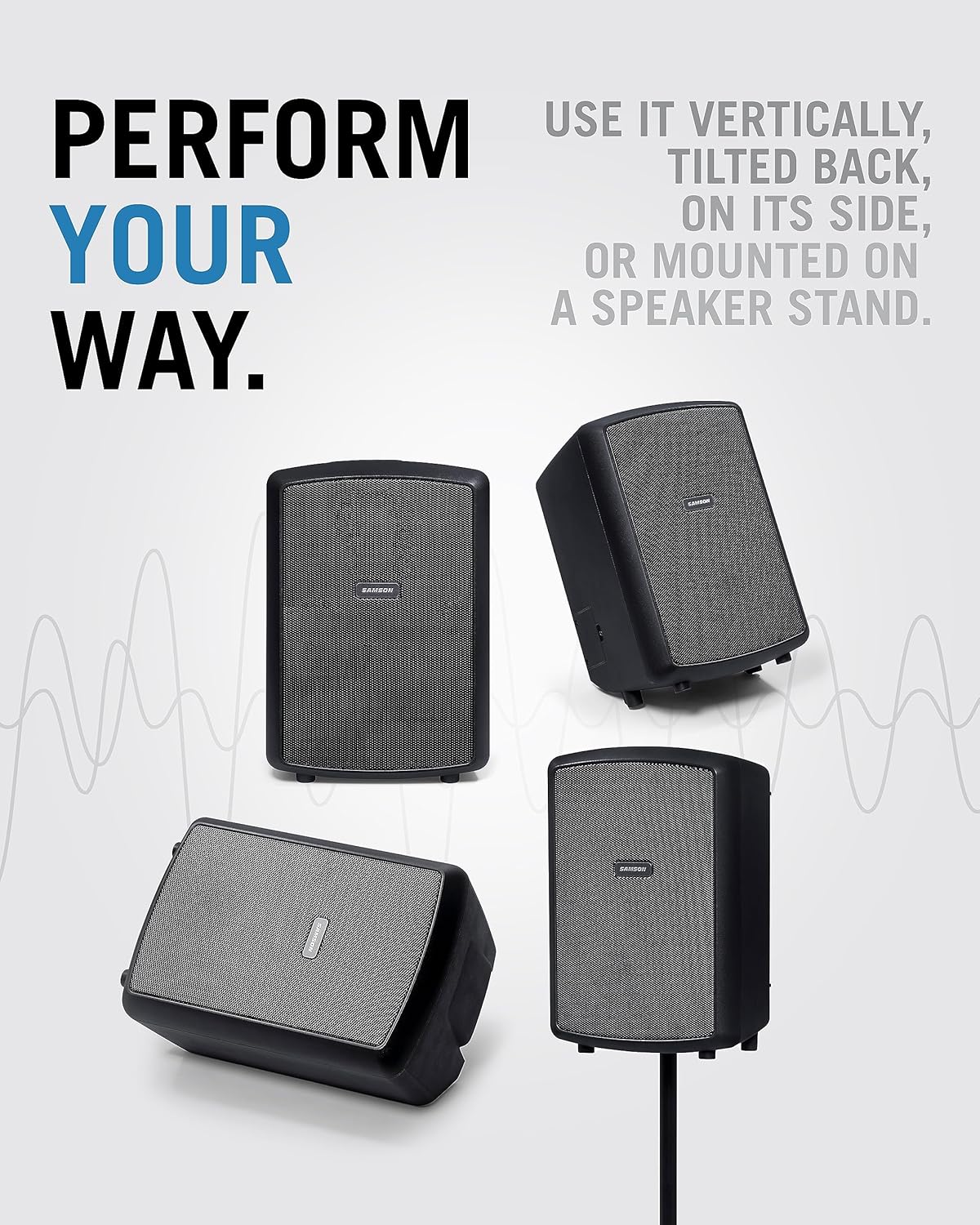
Зураг 4.5: Various positioning options for the Expedition Explor PA system, including vertical, tilted back, on its side as a monitor, and mounted on a speaker stand.
Weighing approximately 15 pounds and featuring an integrated carry handle, the Expedition Explor is highly portable. It offers four performance positions:
- Босоо: Standard upright position for general sound projection.
- Буцаж хазайсан: Angled position for upward sound projection, useful when placed on the floor.
- Horizontal (Monitor): Laying on its side, ideal for use as a stage монитор.
- Тулгуур бэхэлгээ: Utilizes the built-in 1 3/8" pole mount for elevated sound dispersion.
5. Тохиргоо
5.1 Зайг цэнэглэх
- Connect the included power adapter to the AC Input on the rear panel of the Expedition Explor.
- Цахилгаан адаптерийг тохирох АС цахилгаан залгуурт холбоно уу.
- The Charge/Power indicator LED will illuminate to show charging status. A full charge provides up to 12 hours of continuous use.
5.2 Connecting the Wireless Microphone
- Insert the Samson XPD2 USB receiver into the USB port on the rear panel of the Expedition Explor.
- Turn on the wireless handheld microphone.
- The receiver and microphone should automatically pair. Adjust the volume for the corresponding channel (Channel 1 or 2) using its dedicated volume knob.
5.3 Бусад аудио эх сурвалжуудыг холбох
- Микрофон/хэрэгсэл: Connect wired microphones, line-level devices, or high-impedance instruments to the XLR-1/4" combo jacks on Channel 1 or 2. Adjust the respective volume knobs.
- Туслах төхөөрөмжүүд: Connect smartphones, MP3 players, or other audio sources to the 1/8" AUX IN jack on Channel 3. Adjust the Channel 3 volume knob.
- Bluetooth төхөөрөмжүүд: For wireless audio streaming, refer to Section 6.2 for Bluetooth pairing instructions.
5.4 PA системийг байрлуулах
Choose the optimal position for your Expedition Explor based on your environment and audience. Refer to Image 4.5 for visual examples.
- For general use, place the unit vertically on a stable surface or mount it on a speaker stand.
- If placing on the floor, tilt it back to direct sound upwards towards the audience.
- For monitoring purposes, lay the unit horizontally on its side.
6. Ашиглалтын заавар
6.1 Powering On/Off and Volume Adjustment
- Бүх холболт найдвартай эсэхийг шалгаарай.
- Turn the Master Volume knob to its minimum setting.
- Press the Power switch on the rear panel to turn on the unit. The Power LED will illuminate.
- Gradually increase the volume of the connected input channels (Channel 1, 2, or 3) and then the Master Volume to achieve the desired sound level.
- To power off, turn the Master Volume to minimum, then press the Power switch.
6.2 Bluetooth холболт
- Ensure the Expedition Explor is powered on.
- -г удаан дар Bluetooth хослуулах button on the rear panel (Channel 3 section) until the Bluetooth indicator LED begins to flash. This indicates the unit is in pairing mode.
- On your Bluetooth-enabled device (e.g., smartphone), navigate to its Bluetooth settings and select "Samson Explor" from the list of available devices.
- Once paired, the Bluetooth indicator LED on the Expedition Explor will glow solid.
- Play audio from your device and adjust the Channel 3 volume knob on the PA system.
6.3 Using Reverb and EQ
- Reverb: Use the individual Reverb knobs for Channel 1 and 2 to add a spatial effect to microphones or instruments. Start with a low setting and gradually increase to taste.
- Мастер EQ: Adjust the Treble, Mid, and Bass knobs in the Master section to fine-tune the overall sound of your mix. Increase Treble for brighter sound, Bass for more low-end, and Mid for vocal clarity.
6.4 Connecting Additional Explor Speakers
To expand your sound system, connect the 1/4" Line Out of one Expedition Explor to an input channel of another Expedition Explor unit. This allows you to daisy-chain multiple units for larger venues.
6.5 Бүтээгдэхүүний албан ёсны видео
Видео 6.1: Нэг гаруйview of the Samson Expedition Explor PA system, demonstrating its features and portability in a vertical format. (Duration: 1:01)
Видео 6.2: A comprehensive demonstration of the Samson Expedition Explor, detailing its setup, mixer functions, and various applications. (Duration: 8:12)
7. Засвар үйлчилгээ
- Цэвэрлэгээ: Wipe the unit with a soft, dry cloth. Avoid using abrasive cleaners, solvents, or waxes.
- Батерейны арчилгаа: For optimal battery life, avoid fully discharging the unit frequently. Recharge the battery regularly, even if not in use, to maintain its capacity. Store the unit in a cool, dry place.
- Хадгалах: When not in use, store the Expedition Explor in a dry environment, preferably covered with the included dust cover to protect it from dust and debris.
8. Алдаа засах
| Асуудал | Боломжит шалтгаан | Шийдэл |
|---|---|---|
| Дууны гаралт байхгүй |
|
|
| Утасгүй микрофон ажиллахгүй байна |
|
|
| Bluetooth төхөөрөмж хослохгүй |
|
|
| Гажуудсан дуу чимээ |
|
|
9. Техникийн үзүүлэлтүүд
| Онцлог | Дэлгэрэнгүй |
|---|---|
| Гаралтын хүч | 200 ватт |
| Чанга яригч систем | 3-way (8" woofer, 3.5" midrange, dual 1" tweeters) |
| Давтамжийн хариу үйлдэл | 52 Гц - 20 кГц |
| Зайны төрөл | Internal Lithium-ion rechargeable |
| Зайны ашиглалт | 12 цаг хүртэл |
| Сувгууд | 3 |
| Оролтууд | 2x XLR-1/4" Combo, 1/8" Aux In, Bluetooth, USB (for XPD2 wireless) |
| Гаралт | 1/4" Line Out |
| EQ | Master 3-band (Treble, Mid, Bass) |
| Үр нөлөө | Variable Reverb |
| Утасгүй систем | Samson XPD2 USB Digital Handheld Wireless System |
| Хэмжээ (L x W x H) | 23.5 x 14.2 x 12.6 инч |
| Зүйлийн жин | 15 pounds (Note: Product data lists 1 pound, but description and context suggest 15 pounds for a PA system) |
| Суурилуулах төрөл | Tabletop, Pole Mount (1 3/8") |
| Загварын дугаар | SAXPXPLRW |
| UPC | 809164027584, 809164027591 |
10. Баталгаат хугацааны мэдээлэл
For detailed warranty information regarding your Samson Expedition Explor Rechargeable PA System, please refer to the warranty card included in your product packaging or visit the official Samson webсайт. Баталгаат нөхцөл, нөхцөл нь бүс нутаг, бүтээгдэхүүнээс хамаарч өөр өөр байж болно.
11. Дэмжлэг
If you require technical assistance, service, or have questions about your Samson Expedition Explor, please contact Samson customer support through their official webсайт эсвэл бүтээгдэхүүний баримт бичигт заасан холбоо барих мэдээлэл. Та мөн зочилж болно Амазон дээрх Самсон дэлгүүр бүтээгдэхүүний нэмэлт мэдээлэл авах.


