Танилцуулга
Худалдан авалт хийсэнд баярлалааasing the THOMSON Sound Bar B206. This sound bar is designed to enhance your audio experience for television, music, and gaming, featuring multiple connectivity options and two wireless microphones for karaoke. This manual provides essential information for safe and efficient use of your device. Please read it thoroughly before operation and retain it for future reference.
Аюулгүй байдлын мэдээлэл
- Төхөөрөмжийг бороо, чийг, хэт өндөр температурт бүү гарга.
- Ensure proper ventilation around the sound bar to prevent overheating.
- c-г нээж болохгүйasing; бүх үйлчилгээг мэргэшсэн боловсон хүчинд шилжүүлэх.
- Зөвхөн өгсөн тэжээлийн адаптерийг ашиглана уу.
- Төхөөрөмжийг хүчтэй соронзон орноос хол байлга.
- Avoid placing heavy objects on the sound bar.
Багцын агуулга
Доор жагсаасан бүх зүйл таны багцад байгаа эсэхийг шалгаарай.
- THOMSON Sound Bar (B206) x 1
- Алсын удирдлага x 1
- Утасгүй микрофон x 2
- Цахилгаан адаптер x 1
- Аудио кабель x 1
- Coaxial Cable x 1
- Optical Fiber Cable x 1
- Wall Mounting Kit x 1 (includes padlocks, gel column, screws)
- Хэрэглэгчийн гарын авлага x 1

Зураг 1: Дагалдах хэрэгслүүд
This image displays the complete set of items provided with your THOMSON Sound Bar B206, including the sound bar unit, remote control, two wireless microphones, power adapter, user manual, audio cable, coaxial cable, optical fiber cable, and wall mounting kit components.
Бүтээгдэхүүн дууссанview
Дууны самбарын бүрэлдэхүүн хэсгүүд
The THOMSON Sound Bar B206 features a sleek design with integrated controls and various input ports for versatile connectivity.

Figure 2: Sound Bar, Microphones, and Remote
This image shows the main sound bar unit, two wireless microphones, and the remote control, providing a complete view of the primary components.
Internal Speaker Design
The sound bar is equipped with four large dual drive units, delivering a maximum output power of 200 Watts for HiFi sound quality, including dual bass and clear mid-range frequencies for a 3D surround sound effect.

Figure 3: Internal Speaker Structure
This diagram illustrates the internal construction of the sound bar's speakers, emphasizing the dual drive units responsible for audio output, alongside the Bluetooth connectivity symbol.
Rear Panel Connections and Remote Control
The rear panel provides various input options, while the remote control offers full command over the sound bar's functions.

Figure 4: Rear Panel Ports and Remote Control
This image details the connectivity options on the sound bar's rear panel, including the power switch, HDMI ARC, power input, subwoofer output, coaxial, optical, and AUX inputs. The accompanying remote control is also shown, indicating various function buttons.
Тохиргоо
1. Байршуулах сонголтууд
The THOMSON Sound Bar B206 can be placed on a desktop or mounted on a wall. A wall mounting kit is included for convenient installation.
- Ширээний байршил: Place the sound bar on a stable, flat surface in front of your TV.
- Хананд суурилуулах: Use the provided wall mounting kit (padlocks, gel column, screws) to securely attach the sound bar to a wall below your TV. Ensure the wall material can support the weight of the sound bar.
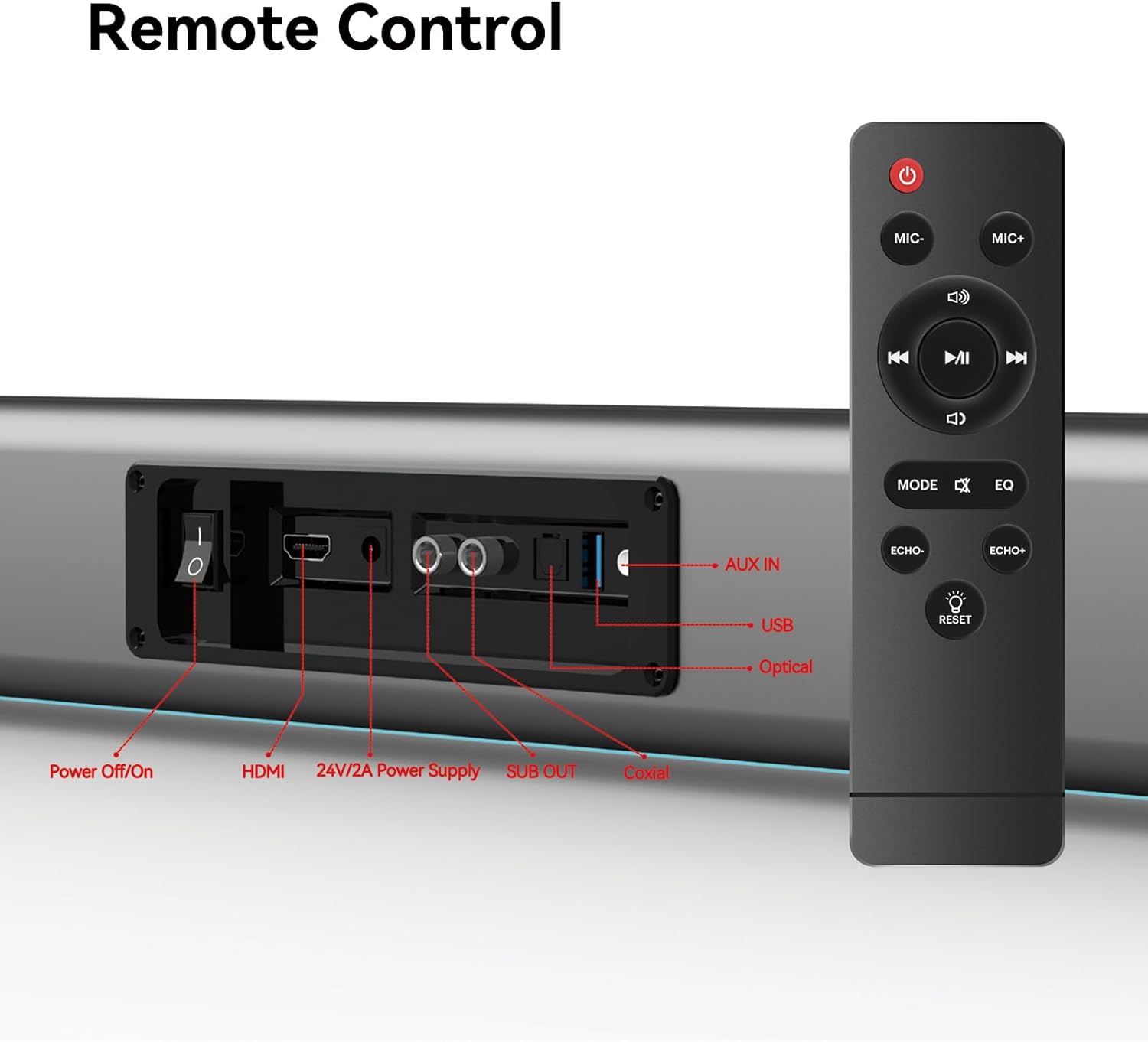
Figure 5: Placement Options (Wall Mount and Desktop)
This image illustrates the versatility of the sound bar's placement, showing it both mounted on a wall beneath a television and resting on a media console, highlighting the included wall mount kit for an elegant setup.
2. Цахилгаан тэжээлд холбогдох
- Connect the power adapter to the "24V/2A Power Supply" port on the sound bar's rear panel.
- Цахилгаан адаптерийг ханын залгуурт холбоно уу.
3. Аудио холболт
Choose one of the following methods to connect the sound bar to your audio source (e.g., TV, smartphone, tablet, laptop):
- HDMI ARC:
Connect an HDMI cable (not included) from the HDMI ARC port on your TV to the HDMI port on the sound bar. Ensure your TV's HDMI ARC function is enabled in its settings.
- Оптик:
Connect the provided optical fiber cable from your TV's optical output to the "Optical" port on the sound bar. Select "Optical" as the input source on the sound bar.
- AUX (3.5mm Audio Jack):
Connect the provided audio cable from your device's headphone jack or audio output to the "AUX IN" port on the sound bar. Select "AUX" as the input source.
- Коаксиаль:
Connect the provided coaxial cable from your TV's coaxial output to the "Coaxial" port on the sound bar. Select "Coaxial" as the input source.
- USB:
Аудио агуулсан USB дискийг оруулна уу files into the "USB" port. The sound bar will automatically switch to USB mode and begin playback.
- Bluetooth:
Refer to the "Bluetooth Pairing" section under Operating Instructions for detailed steps.
Ашиглалтын заавар
1. Асаах/унтраах
дээр дарна уу Цахилгаан унтраах/асаах button on the sound bar's rear panel or the Хүч төхөөрөмжийг асаах эсвэл унтраахын тулд алсын удирдлага дээрх товчийг дарна уу.
2. Оролтын эх үүсвэрийн сонголт
дээр дарна уу MODE button on the remote control to cycle through available input sources: HDMI ARC, Optical, AUX, Coaxial, USB, and Bluetooth. The LED display on the sound bar will indicate the currently selected mode.
3. Дууны түвшний хяналт
-г ашиглана уу Эзлэхүүн + болон Эзлэхүүн - buttons on the remote control or the physical controls on the right side of the sound bar to adjust the volume. The sound bar supports 8 levels of bass and treble adjustment.
4. EQ горимууд
The sound bar offers 5 Equalizer (EQ) modes to optimize audio for different content types. Press the EQ button on the remote control to switch between modes:
- Киноны горим: Enhances cinematic sound effects and dialogue.
- Хөгжмийн горим: Хөгжим тоглуулахад зориулж аудиог оновчтой болгодог.
- Мэдээний горим: Clarifies spoken dialogue for news and talk shows.
- Additional modes may be available for specific audio profiles.
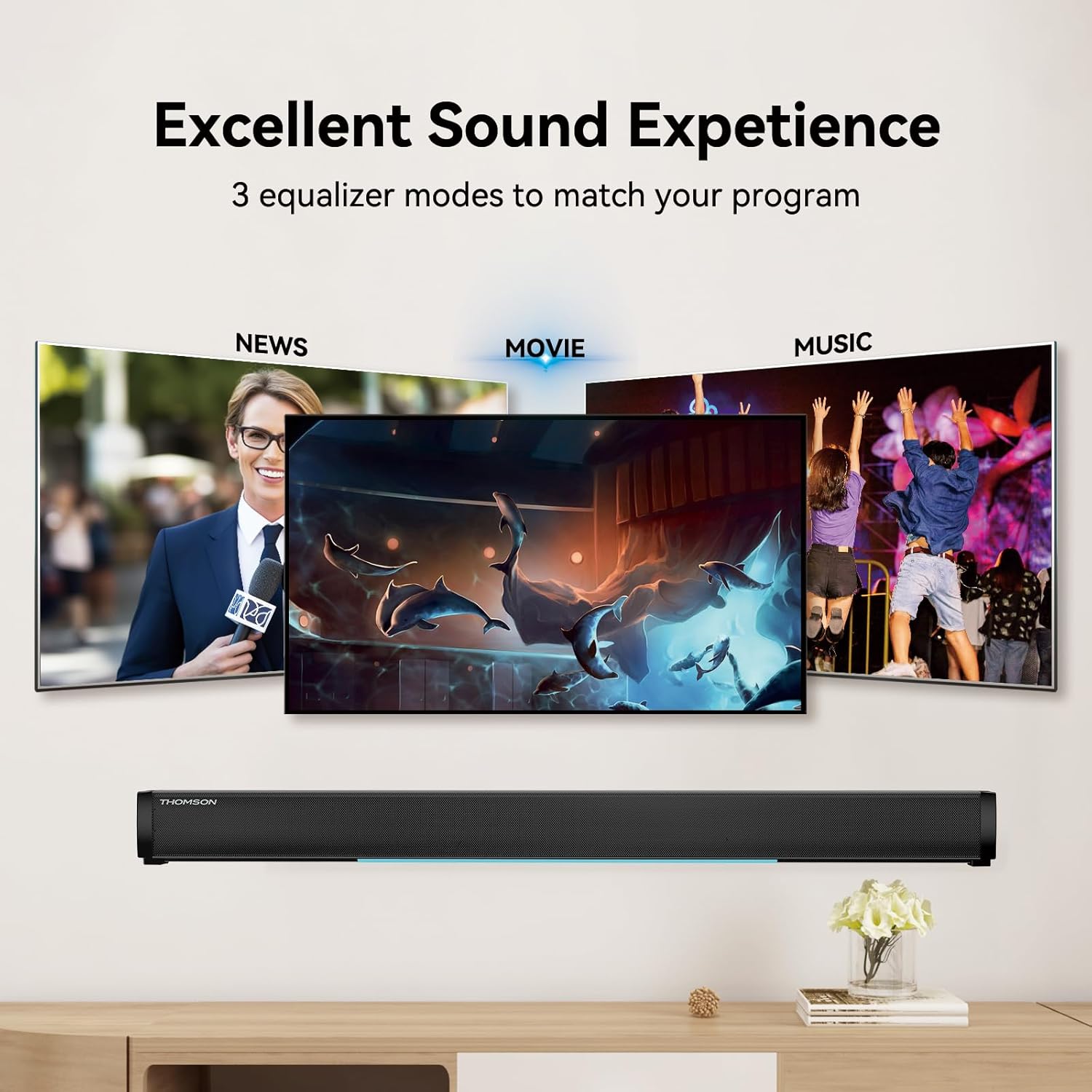
Figure 6: EQ Modes
This image illustrates the three primary equalizer modes (News, Movie, Music) available on the sound bar, demonstrating how each mode is tailored for different audio experiences.
5. Bluetooth хослол
- Turn on the sound bar and select Bluetooth mode using the MODE button on the remote. The LED display will show "BT" and flash, indicating pairing mode.
- Төхөөрөмж дээрээ (ухаалаг утас, таблет гэх мэт) Bluetooth-ийг идэвхжүүлж, боломжтой төхөөрөмжүүдийг хайж олоорой.
- Select "THOMSON B206" from the list. Once connected, the sound bar's LED display will stop flashing.
6. Wireless Microphones
The sound bar comes with two wireless microphones for karaoke or vocal use.
- Ensure the microphones have fresh batteries (AAA, not included).
- Turn on the microphones. They should automatically pair with the sound bar.
- -г ашиглана уу MIC+ болон MIC- buttons on the remote to adjust microphone volume.
- -г ашиглана уу ECHO+ болон ЦУУРГУУР- buttons to adjust the echo effect.

Figure 7: Karaoke Functionality
This image depicts two individuals enjoying a karaoke session, utilizing the THOMSON sound bar and its wireless microphones connected to a large display, showcasing the product's entertainment capabilities.
Алдааг олж засварлах
| Асуудал | Боломжит шалтгаан | Шийдэл |
|---|---|---|
| Хүч чадалгүй | Цахилгаан кабель холбогдоогүй; Цахилгаан залгуур идэвхжээгүй байна. | Цахилгааны кабель найдвартай холбогдсон эсэхийг шалгана уу. Цахилгааны залгуур ажиллаж байгаа эсэхийг шалгана уу. |
| Дуу алга | Оролтын эх үүсвэр буруу сонгогдсон; Дууны түвшин хэт бага; Кабелиуд зөв холбогдоогүй байна. | Select the correct input source (HDMI, Optical, AUX, etc.). Increase volume. Check all audio cable connections. |
| Bluetooth холболт амжилтгүй боллоо | Sound bar not in pairing mode; Device too far; Bluetooth disabled on device. | Ensure sound bar is in Bluetooth mode and flashing. Move device closer. Enable Bluetooth on your device. |
| Микрофонууд ажиллахгүй байна | Microphone batteries low/dead; Microphones not turned on. | Replace microphone batteries. Ensure microphones are switched on. |
| Volume jumps too much with one press | This can be a characteristic of the sound bar's volume control sensitivity. | Adjust volume carefully. Consider using the TV's volume control if connected via HDMI ARC, as it may offer finer adjustments. |
Үзүүлэлтүүд
| Онцлог | Дэлгэрэнгүй |
|---|---|
| Загварын нэр | THOMSON Sound Bar B206 |
| Чанга яригчийн төрөл | Дууны самбар |
| Чанга яригчийн хамгийн их гаралтын чадал | 200 ватт |
| Хүрээлэн буй орчны дууны сувгийн тохиргоо | 2.0 |
| Холболтын технологи | Auxiliary, Bluetooth, Coaxial, HDMI ARC, Optical, USB |
| Утасгүй холбооны технологи | Bluetooth |
| Хяналтын арга | Алсын удирдлага |
| Бүтээгдэхүүний хэмжээс | 37"D x 3.35"W x 2.9"H |
| Зүйлийн жин | 8.63 фунт |
| Материал | Хуванцар |
| Эрчим хүчний эх үүсвэр | Утастай цахилгаан |
| Онцлог шинж чанар | Утасгүй микрофонууд |
Засвар үйлчилгээ
- Цэвэрлэгээ: Дууны барын гадаргууг зөөлөн, хуурай даавуугаар цэвэрлэ. Шингэн цэвэрлэгч болон зүлгүүрийн материалыг бүү ашигла.
- Хадгалах: Удаан хугацаагаар ашиглаагүй үед дууны самбарыг сэрүүн, хуурай газар, нарны шууд тусгал болон хэт өндөр температураас хол хадгална уу.
- Микрофон арчилгаа: Remove batteries from the wireless microphones if they will not be used for a long time to prevent leakage.
Баталгаат болон дэмжлэг
THOMSON products are designed and manufactured to the highest quality standards. For warranty information and customer support, please refer to the warranty card included in your package or visit the official THOMSON webсайт. Худалдан авалтын баримтаа худалдан авалтын баталгаа болгон хадгалаарай.
Нийцлийн мэдээлэл
This device complies with relevant regulations for electronic equipment. Any changes or modifications not expressly approved by the manufacturer could void the user's authority to operate the equipment.