1. Танилцуулга
This manual provides essential information for setting up, operating, maintaining, and troubleshooting your VAIO Pro PF (Model: VJPF11C11N) notebook PC. Please read this manual thoroughly before using your device to ensure proper and safe operation.
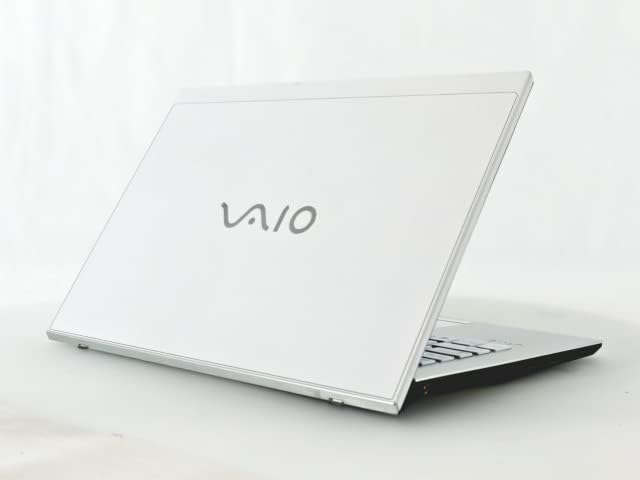
Figure 1: VAIO Pro PF Notebook PC
The VAIO Pro PF is a lightweight and compact mobile notebook designed for productivity. It features an 11.6-inch Full HD display, an Intel 8th Generation Core i5-8250U processor, 8GB of RAM, and a 256GB SSD, running on Windows 11 Pro. The device also includes a backlit keyboard for comfortable typing in various lighting conditions.
2. Тохиргоо
2.1 Савлах
Сав баглаа боодолоос бүх бүрэлдэхүүн хэсгүүдийг болгоомжтой арилгана. Дараах зүйлс байгаа эсэхийг шалгаарай:
- VAIO Pro PF Notebook PC
- Хувьсах гүйдлийн адаптер ба цахилгааны утас
- Баримт бичиг (энэ гарын авлага, баталгаат мэдээлэл)
2.2 Цахилгаан тэжээлд холбогдох
Before initial use, connect the AC adapter to the laptop's power input port and then plug the power cord into a wall outlet. Allow the battery to charge fully.
2.3 Анх асаах болон Windows тохиргоо
Press the power button to turn on the laptop. Follow the on-screen instructions to complete the initial Windows 11 Pro setup, including language selection, network connection, and user account creation.
3. Operating Your VAIO Pro PF
3.1 Гар ба мэдрэгчтэй самбар
The VAIO Pro PF features a full-sized keyboard with a backlight for improved visibility. The touchpad located below the keyboard supports multi-touch gestures for navigation.

Зураг 2: Гар болон мэдрэгчтэй самбарын зохион байгуулалт
3.2 Гадаад төхөөрөмжүүдийг холбох
Таны зөөврийн компьютер гадаад төхөөрөмжүүдийг холбох янз бүрийн портоор тоноглогдсон:
- USB 3.0 портууд (x3): Гадаад хатуу диск, хулгана эсвэл гар зэрэг USB төхөөрөмжүүдийг холбох зориулалттай.
- HDMI порт: For connecting to external displays or projectors with HDMI input.
- D-SUB15 (VGA) Port: For connecting to older external displays or projectors with VGA input.
- Wired LAN Port: For connecting to a wired network using an Ethernet cable.
- Чихэвчний Жак: Чихэвч эсвэл гадаад чанга яригчийг холбоход зориулагдсан.
3.3 Утасгүй холболт
The VAIO Pro PF supports both Wi-Fi and Bluetooth connectivity:
- Wi-Fi (802.11n): To connect to a wireless network, go to Windows Settings > Network & Internet > Wi-Fi, turn Wi-Fi on, and select your desired network.
- Bluetooth: To connect Bluetooth devices, go to Windows Settings > Bluetooth & devices, turn Bluetooth on, and pair your device.
3.4-г ашиглах Web Камер
нэгдсэн web camera can be used for video calls and conferences. Access it through applications like Camera, Microsoft Teams, or Zoom.
4. Засвар үйлчилгээ
4.1 Зөөврийн компьютер цэвэрлэх
To clean the exterior of your laptop, use a soft, lint-free cloth slightly dampened with water or a mild, non-abrasive cleaning solution. Avoid spraying liquids directly onto the device. For the screen, use a specialized screen cleaner.
4.2 Програм хангамжийн шинэчлэлтүүд
Regularly check for and install Windows updates to ensure your system has the latest security patches and performance improvements. Go to Windows Settings > Windows Update.
4.3 Батерейны арчилгаа
To prolong battery life, avoid extreme temperatures and fully discharging the battery frequently. For long-term storage, charge the battery to about 50-70%.
5. Алдаа засах
This section addresses common issues you might encounter with your VAIO Pro PF.
| Асуудал | Шийдэл |
|---|---|
| Зөөврийн компьютер асахгүй байна. | Хувьсах гүйдлийн адаптер найдвартай холбогдсон, тэжээлийн залгуур ажиллаж байгаа эсэхийг шалгаарай. Цахилгаан товчийг 10-15 секунд дарж үзээрэй. |
| Wi-Fi холболтын асуудал. | Check if Wi-Fi is enabled in Windows Settings. Restart your router and the laptop. Ensure you are within range of the Wi-Fi network. |
| Keyboard backlight is not working. | Check if the backlight function key (often Fn + F key) is enabled. Adjust brightness settings if available. |
| Гадаад дэлгэц илэрсэнгүй. | Ensure the cable is securely connected to both the laptop and the display. Use Windows display settings to detect or extend displays. Try a different cable or port if available. |
6. Техникийн үзүүлэлтүүд
| Онцлог | Дэлгэрэнгүй |
|---|---|
| Загварын нэр | VAIO Pro PF (VJPF11C11N) |
| Брэнд | VAIO (Manufacturer: SONY) |
| Дэлгэцийн хэмжээ | 11.6 инч |
| Шийдвэр | 1920x1080 пиксел (Full HD) |
| CPU | Intel Core i5-8250U (8th Gen, 4 Cores, 8 Threads, 1.6 GHz base, up to 3.4 GHz) |
| RAM | 8 ГБ DDR4 SDRAM |
| Хадгалах | 256 ГБ SSD (Хатуу төлөвт диск) |
| Үйлдлийн систем | Windows 11 Pro (64 бит) |
| График | Нэгдсэн Intel график |
| Утасгүй холболт | Wi-Fi (802.11n), Bluetooth |
| Портууд | 3x USB 3.0, 1x HDMI, 1x D-SUB15 (VGA), 1x Wired LAN, 1x Headphone Jack |
| Web Камер | Нэгдсэн |
| Гар | Арын гэрэлтүүлэгтэй гар |
| Жин | Approx. 0.87 kg (870 g) |
| Эхний боломжтой огноо | 10 оны тавдугаар сарын 2023 |
7. Баталгаат хугацаа ба дэмжлэг
For information regarding your product's warranty, please refer to the warranty card included with your purchase or visit the official VAIO support website. For technical assistance, driver downloads, or further inquiries, please contact VAIO customer support through their official channels.


