1. Аюулгүй ажиллагааны заавар
Please read all safety instructions carefully before operating the HANMATEK HM605T Programmable DC Power Supply. Failure to follow these instructions may result in electric shock, fire, or damage to the device.
- Газардуулга: Ensure the power supply is properly grounded to prevent electric shock.
- Эрчим хүчний эх үүсвэр: Connect the device only to the specified input voltage (110 В).
- Агааржуулалт: Do not block the ventilation openings. Ensure adequate airflow around the unit to prevent overheating. The automatic temperature control cooling fan activates when the operating temperature exceeds 45°C.
- Байгаль орчин: Avoid operating the power supply in wet, damp, or dusty environments. Keep away from flammable materials.
- Холболтууд: Always ensure all connections are secure before turning on the output. Verify positive and negative poles.
- Дотоод бүрэлдэхүүн хэсгүүд: c-г нээж болохгүйasing or attempt to repair the unit yourself. Refer servicing to qualified personnel.
- Хамгаалалтын онцлогууд: The device is equipped with Overvoltage Protection (OVP), Overcurrent Protection (OCP), Overpower Protection (OPP), Overheat Protection (OTP), and Short-Circuit Protection. Understand how these features operate.
2. Бүтээгдэхүүн дууссанview
The HANMATEK HM605T is a high-precision programmable DC power supply designed for various electronic applications. It features a 4-digit display for voltage, current, power, and time, along with advanced protection mechanisms and PC software control.
Гол онцлогууд:
- Програмчлагдсан гаралт: Supports Modbus programming instruction set and programmable sequence output via USB interface.
- High Accuracy Display: 4-digit display for output current, voltage, power, and time. Voltage resolution: 10mV; Current resolution: 1mA.
- Иж бүрэн хамгаалалт: Includes Overvoltage Protection (OVP), Overcurrent Protection (OCP), Overpower Protection (OPP), Overheat Protection (OTP), and Short-Circuit Protection.
- Олон үйлдэлт: Features a front 5V 1.5A dual USB charging interface, one-key output ON/OFF switch, 6 groups of quick parameter storage (M1-M6), and automatic switching between voltage stabilization and current stabilization modes.
- Хэрэглэгчдэд ээлтэй: One-key keyboard lock prevents accidental operation.
Бүрэлдэхүүн хэсгүүдийн таних тэмдэг:
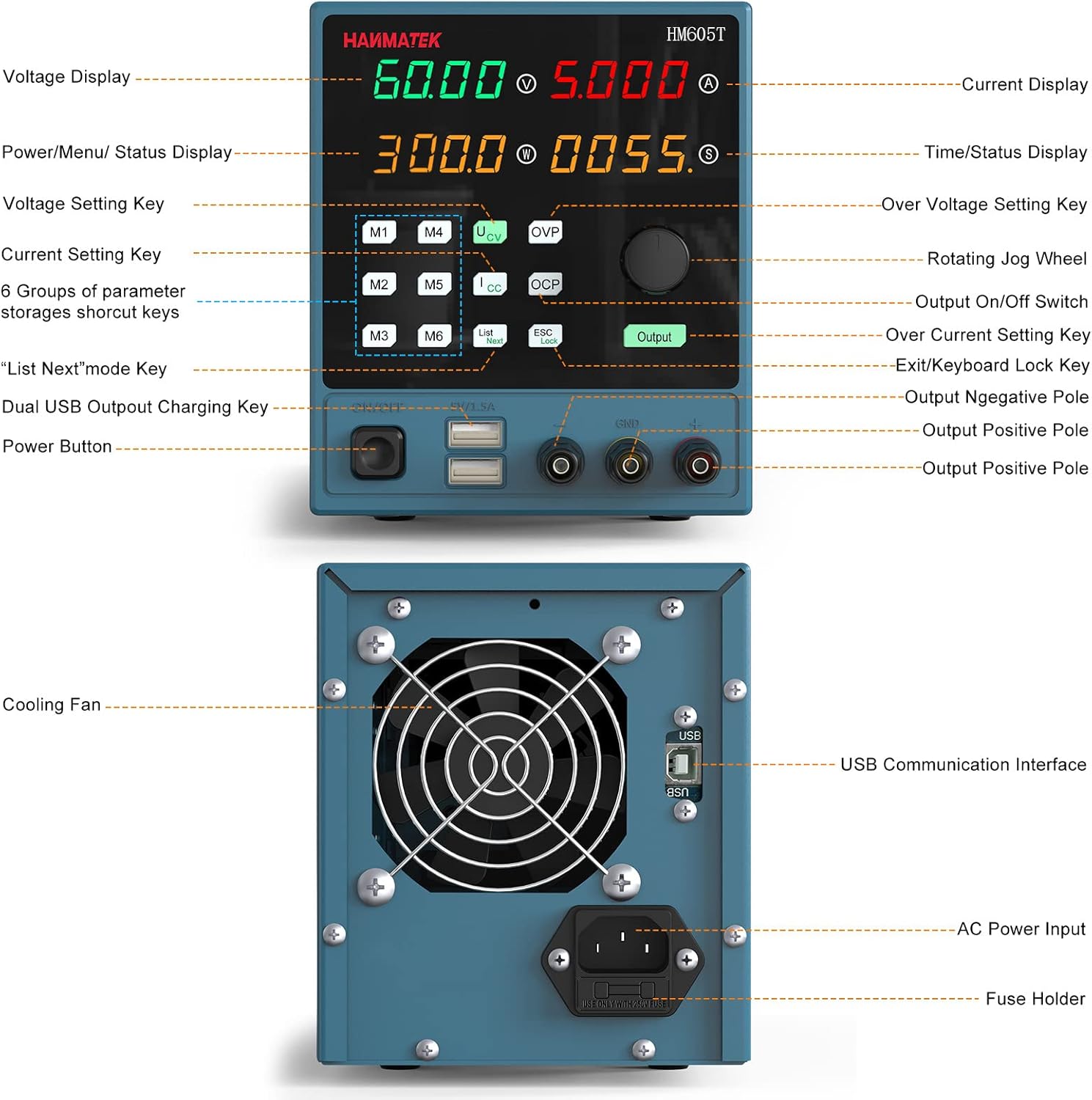
Figure 2.1: Front and Rear Panel Layout. This image illustrates the various controls and ports on the front and back of the HM605T power supply, including the display, control buttons, output terminals, USB ports, cooling fan, and AC power input.

Figure 2.2: Multiple Protection Features. An internal view highlighting the robust circuitry designed for overvoltage, overcurrent, overpower, overtemperature, and short-circuit protection.
3. Тохиргоо
Follow these steps for initial setup of your HANMATEK HM605T power supply:
- Савлах: Carefully remove all components from the packaging. Verify that all items listed in the 'Packing' section (1 * Programmable DC power supply; 1 * CD; 1 * Power cord; 1 * Clip cord; 1 * USB cable; 1 * Manual) are present.
- Эрчим хүчний холболт: Connect the provided power cord to the AC power input on the rear panel of the power supply and then to a suitable 110V AC outlet.
- Анхны асаалт: Turn on the main power switch located on the rear panel. The display on the front panel should illuminate.
- Гаралтын терминалууд: Familiarize yourself with the output terminals (positive, negative, and ground) on the front panel. Ensure correct polarity when connecting your load.
4. Ашиглалтын заавар
This section details the operation of the HM605T power supply, including setting parameters and using its various functions.
4.1 Үндсэн үйл ажиллагаа
- Turning On/Off Output: дээр дарна уу Гаралт button on the front panel to enable or disable the power output.
- Setting Voltage:
- дээр дарна уу V боть сонгохын тулд товчлуурtage тохиргооны горим.
- Rotate the large rotary knob to adjust the voltage value. The 4-digit display allows for precise adjustments.
- Одоогийн тохиргоо:
- дээр дарна уу I button to select the current setting mode.
- Rotate the large rotary knob to adjust the current limit.
- Дэлгэцийн горим: дээр дарна уу Дэлгэц button to switch between numerical and waveform display modes, allowing for real-time monitoring of output parameters.
4.2 Нарийвчилсан функцууд
- Memory Function (M1-M6): The power supply allows for storing and recalling up to 6 sets of frequently used voltage and current parameters. Press the Санах ой button to access the memory presets. Use the rotary knob to navigate and select a preset, then press the knob to load it.
- Гарын түгжээ: Тохиргоонд санамсаргүй өөрчлөлт оруулахаас сэргийлэхийн тулд товчийг дарна уу ESC/Lock button to lock the keyboard. Press it again to unlock.
- Компьютерийн програм хангамжийн хяналт: The HM605T features a standard USB interface on the rear panel for connection to a computer. Install the provided PC software (from the included CD or manufacturer's website) to utilize Modbus programming instruction set and programmable sequence output. This allows for remote control and data logging.
- Front USB Charging Ports: The dual 5V 1.5A USB ports on the front panel can be used for charging compatible devices or powering low-current electronics.
4.3 Сургалтын видео
Video 4.1: HANMATEK DC Power Supply Overview. This video provides a general demonstration of a HANMATEK adjustable DC power supply, showcasing its features and basic operation, including voltage and current adjustment, and output control.
5. Засвар үйлчилгээ
Зөв засвар үйлчилгээ хийснээр таны цахилгаан хангамжийн урт наслалт, найдвартай ажиллагааг хангана.
- Цэвэрлэгээ: Төхөөрөмжийн гадна талыг зөөлөн, хуурай даавуугаар тогтмол цэвэрлээрэй. Зүлгүүрийн цэвэрлэгч эсвэл уусгагч хэрэглэж болохгүй.
- Агааржуулалт: Keep the cooling fan and vents free from dust and obstructions. The fan operates automatically to maintain optimal temperature.
- Хадгалах: Удаан хугацаагаар ашиглаагүй тохиолдолд цахилгаан тэжээлийг нарны шууд тусгал, хэт температураас хол, сэрүүн, хуурай газар хадгална.
6. Алдаа засах
This section addresses common issues you might encounter with the HM605T power supply.
- Эрчим хүчгүй:
- Check if the power cord is securely connected to both the unit and the AC outlet.
- Арын самбар дээрх гол тэжээлийн унтраалга 'ON' байрлалд байгаа эсэхийг шалгаарай.
- Verify the fuse in the AC input socket. Replace if blown (refer to specifications for correct fuse type).
- Гаралт байхгүй:
- дээр дарна уу Гаралт button to ensure the output is enabled.
- Check for active protection (OVP, OCP, OPP). If any protection is triggered, the output will be disabled. Address the cause of the protection event (e.g., reduce voltage/current settings, check load).
- Ensure the load is correctly connected to the output terminals with proper polarity.
- Буруу уншилтууд:
- Verify that the measurement leads are properly connected and not damaged.
- Ensure the device is operating within its specified temperature range.
- PC Software Connection Issues:
- Ensure the USB cable is securely connected to both the power supply and the computer.
- Verify that the correct drivers and software are installed on your PC. Refer to the included CD or manufacturer's webхамгийн сүүлийн хувилбаруудад зориулсан сайт.
7. Техникийн үзүүлэлтүүд
| Тодорхойлолт | Үнэ цэнэ |
|---|---|
| Брэнд | HANMATEK |
| Загвар | HM605T |
| Оролтын хэмжээtage | 110 В |
| Гаралтын ботьtage | 0V-60V |
| Гаралтын гүйдэл | 0А-5А |
| Гаралтын ватtage | 300 Вт |
| Ботьtage Шийдвэрлэх | 10 мВ байна |
| Одоогийн тогтоол | 1 мА |
| Дэлгэц | 4-Digit (Voltage, Current, Power, Time) |
| Front USB Output | Ботьtage: 5V; Current: ≤1.5A |
| Хамгаалалтын онцлог | OVP, OCP, OPP, OTP, Short Circuit |
| Хөргөх арга | Automatic Temperature Control Fan |
| Загварын дугаар | HM605T |
| Илгээмжийн хэмжээ | 36 x 21.3 x 17.4 см; 2.58 кг |
8. Баталгаат хугацаа ба дэмжлэг
For warranty information and technical support, please refer to the documentation included with your product or contact HANMATEK customer service. The product package includes a manual and a CD with software and drivers. Ensure you keep your purchase receipt for warranty claims.


