1. Танилцуулга
This manual provides essential instructions for the proper setup, operation, and maintenance of your Lumos Firefly Charging Cradle. Please read this guide thoroughly before using the product to ensure optimal performance and longevity.
2. Хайрцагт юу байна
Таны багцад бүх бүрэлдэхүүн хэсгүүд байгаа эсэхийг шалгана уу:
- Lumos Charging Cradle
- USB-C кабель
- Cradle Legs (set of 3)
- Хэрэглэгчийн гарын авлага (энэ баримт бичиг)

Figure 2.1: Contents of the Lumos Firefly Charging Cradle package, including the cradle, USB-C cable, and a set of cradle legs.
3. Бүтээгдэхүүн дууссанview
The Lumos Firefly Charging Cradle is designed to provide an effortless and reliable charging solution for your Lumos Firefly device. It features a modern USB-C interface for steady power delivery and includes interchangeable legs for customization.

Зураг 3.1: Урд view of the Lumos Firefly Charging Cradle with its three interchangeable legs attached.

Зураг 3.2: Хажуу тал view of the Lumos Firefly Charging Cradle, showing the USB-C input port.
4. Тохиргоо
- Attach the Cradle Legs: Gently insert the three interchangeable legs into the designated slots on the bottom of the charging cradle until they are securely in place.
- USB-C кабелийг холбоно уу: Insert one end of the provided USB-C cable into the USB-C port on the side of the charging cradle. Connect the other end of the USB-C cable to a compatible USB power adapter (not included) or a powered USB port.
- Байршил: Place the assembled charging cradle on a stable, flat surface.
5. Operating Instructions: Charging Your Lumos Firefly
Follow these steps to charge your Lumos Firefly device using the charging cradle:
- Ensure the charging cradle is connected to a power source as described in the Setup section.
- Carefully place your Lumos Firefly device into the cradle. The device should fit snugly, and a magnetic connection will help secure it in place.
- The Lumos Firefly device will begin charging automatically. Refer to your Firefly's user manual for information on charging indicators (e.g., LED lights).
- Once charging is complete, gently remove the Lumos Firefly from the cradle.
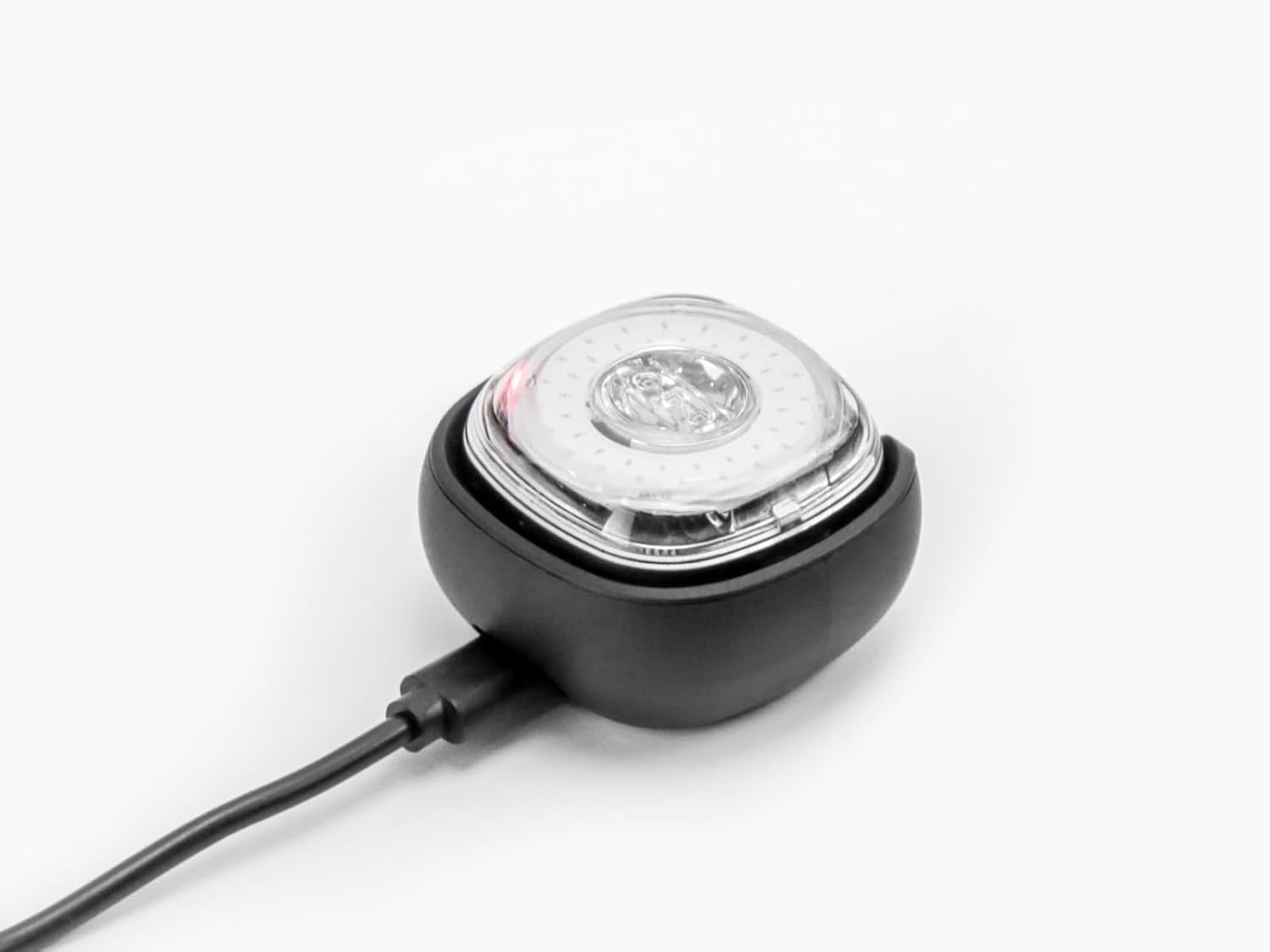
Figure 5.1: Lumos Firefly device placed in the charging cradle, connected via USB-C cable, indicating charging.
6. Засвар үйлчилгээ
To ensure the longevity and proper function of your Lumos Firefly Charging Cradle, follow these maintenance guidelines:
- Цэвэрлэгээ: Use a soft, dry cloth to wipe the surface of the cradle. Avoid using abrasive cleaners, solvents, or harsh chemicals, as these can damage the finish.
- Хадгалах: When not in use, store the charging cradle in a cool, dry place away from direct sunlight and extreme temperatures.
- Кабель арчилгаа: Do not bend or crimp the USB-C cable excessively. Always grasp the plug, not the cable, when connecting or disconnecting.
7. Алдаа засах
If you encounter issues with your Lumos Firefly Charging Cradle, refer to the following common problems and solutions:
- Төхөөрөмж цэнэглэхгүй байна:
- Ensure the USB-C cable is securely connected to both the cradle and the power source.
- Verify that the power source (e.g., wall adapter, USB port) is functional.
- Check that the Lumos Firefly device is correctly seated in the cradle, making proper contact.
- Try using a different USB-C cable or power adapter to rule out cable or adapter issues.
- Cradle is Unstable:
- Ensure all three cradle legs are fully inserted and securely attached.
- Place the cradle on a flat, level surface.
If the problem persists after attempting these solutions, please contact Lumos customer support.
8. Техникийн үзүүлэлтүүд
| Онцлог | Дэлгэрэнгүй |
|---|---|
| Загварын дугаар | LAXBL-CC |
| Брэнд | Лумос |
| Зүйлийн жин | 2.08 унц |
| Багцын хэмжээ | 3.31 x 2.87 x 1.14 инч |
| Холбогч төрөл | USB Type C, Wireless |
| Тохиромжтой төхөөрөмжүүд | Lumos Firefly |
| Онцлог шинж чанар | Утасгүй цэнэглэх |
| Өнгө | Хар |
| Нийт USB портууд | 1 |
| Ватtage | 10 ватт |
| Эхний боломжтой огноо | 1 оны зургадугаар сарын 2023 |
9. Баталгаат хугацааны мэдээлэл
For detailed warranty information regarding your Lumos Firefly Charging Cradle, please refer to the official Lumos website or contact Lumos customer support directly. Keep your proof of purchase for warranty claims.
10. Хэрэглэгчийн дэмжлэг
If you have any questions, require technical assistance, or need further support, please contact Lumos customer service:
- Имэйл: support@lumoshelmet.co
- Webсайт: Visit the official Lumos webТүгээмэл асуултууд болон нэмэлт эх сурвалжуудын сайт.


