1. Танилцуулга
The EPOS Impact 1060T is a professional double-sided wireless headset designed for PC use, optimized for high-performance communication environments. It features advanced AI Noise Cancellation and Super Wideband Audio to ensure exceptional clarity during calls, even in noisy surroundings. The headset is Microsoft Teams Certified, providing seamless integration and optimal performance for virtual meetings.
Engineered for all-day comfort, the Impact 1060T includes soft memory foam earpads and a lightweight frame. Smart features such as a 360° busylight, mic-tip LED mute alerts, and intuitive boom-arm call control enhance efficiency and focus. This manual provides detailed instructions for setting up, operating, and maintaining your headset to ensure optimal performance and longevity.

Figure 1: EPOS Impact 1060T highlighting key features.
2. Багцын агуулга
Таны багцад бүх зүйл байгаа эсэхийг шалгана уу:
- EPOS Impact 1060T Wireless Headset
- USB-C-аас USB-C кабель
- USB-C-аас USB-A адаптер
- Зөөлөн зөөврийн уут
- Аюулгүй байдлын гарын авлага
- Нийцлийн хуудас
- Түргэн гарын авлага
- BTD 800a Dongle (for models with dongle)

Figure 2: EPOS Impact 1060T package contents.
3. Тохиргоо
3.1 Анхны цэнэглэлт
Before first use, fully charge your headset. Connect the provided USB-C to USB-C cable to the headset and a power source. Use the USB-C to USB-A adapter if your power source only has USB-A ports. The headset can also be charged wirelessly if a compatible charging stand is available (charging stand sold separately for some models).
3.2 Асаах/унтраах
- Асаахын тулд: Заагч гэрэл асах хүртэл Асаах товчийг удаан дар.
- Унтраахын тулд: Заагч гэрэл унтрах хүртэл асаах товчийг удаан дар.
3.3 Төхөөрөмжүүдэд холбогдох
The EPOS Impact 1060T offers versatile connectivity options:
- Блютүүт хослуулах:
- Чихэвчийг унтраасан эсэхийг шалгаарай.
- Хослуулах горимыг илтгэх LED индикатор цэнхэр, улаан өнгөөр анивчих хүртэл Power товчийг ойролцоогоор 4 секундын турш дарна уу.
- On your device (PC, smartphone), go to Bluetooth settings and select "EPOS Impact 1060T" from the list of available devices.
- Холбогдсоны дараа LED индикатор нь цэнхэр гэрэл харуулна.
- USB-C утастай холболт: Connect the headset directly to your device using the provided USB-C to USB-C cable. The headset will be recognized automatically.
- USB-A Wired Connection: Use the USB-C to USB-A adapter with the USB-C cable to connect to devices with USB-A ports.
- Using the BTD 800a Dongle: For optimal wireless performance and extended range, plug the BTD 800a USB dongle into your PC. The headset will automatically connect to the dongle.
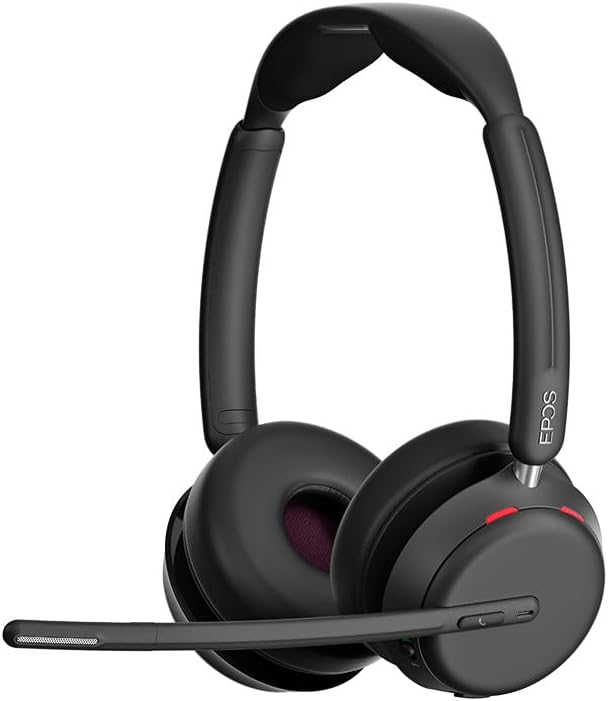
Зураг 3: Урд view of the EPOS Impact 1060T Headset.
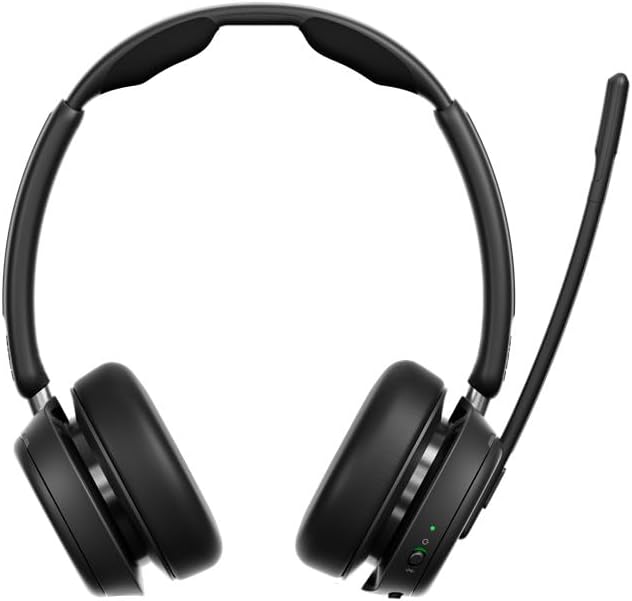
Зураг 4: Буцах view of the EPOS Impact 1060T Headset.
4. Ашиглалтын заавар
4.1 Чихэвч зүүх
Adjust the headband for a comfortable and secure fit. The memory foam earpads are designed for extended wear. The microphone boom arm can be rotated to either side for optimal voice pickup.
4.2 Дуудлагын удирдлага
- Дуудлагад хариулах/дуусах: Use the intuitive inline controller or the dedicated call button on the earcup.
- Микрофоны дууг хаах/асах:
- Lower the microphone boom arm to unmute and raise it to mute.
- A mic-tip LED will alert you if the microphone is muted.
- Alternatively, use the mute button on the inline controller.
- Дууны хяналт: Adjust the volume using the dedicated buttons on the inline controller or earcup.
4.3 Noise Cancellation and Audio Features
- Хиймэл оюун ухааны дуу чимээг дарах: Three digital beamforming microphones powered by EPOS AI™ actively block out background noise, ensuring your voice is heard clearly.
- Super Wideband Audio: Provides rich, natural sound for both calls and media.
- BrainAdapt™ Technology: Designed to reduce brain fatigue and enhance focus during long calls.
4.4 Ухаалаг онцлог
- Завгүй: A 360° busylight on the headset signals your availability to colleagues, preventing interruptions during calls.
- Microsoft Teams Certified: Optimized for Microsoft Teams, offering dedicated controls and seamless integration for calls and meetings.

Figure 5: Headset optimized for Unified Communications.
Video 1: "Powerful Sound and Comfort for Your Workday" - An official EPOS video showcasing the features and comfort of the Impact series headsets, including the 1060T.
Video 2: "EPOS IMPACT 860T Microsoft Teams Headset" - An official EPOS video demonstrating features of the similar Impact 860T model, highlighting Microsoft Teams integration and sound quality.
Video 3: "EPOS Impact 860T ANC Headset" - An official EPOS video showcasing the Active Noise Cancellation and design of the similar Impact 860T model.
5. Засвар үйлчилгээ
- Цэвэрлэгээ: Use a soft, dry cloth to clean the headset. Avoid using liquids or abrasive cleaners.
- Хадгалах: When not in use, store the headset in the provided soft carry pouch to protect it from dust and damage.
- Батерейны арчилгаа: Зайны ашиглалтын хугацааг уртасгахын тулд зайгаа ойр ойрхон бүрэн цэнэггүй болгохоос зайлсхий. Тогтмол цэнэглэ.
- Програм хангамжийн шинэчлэлтүүд: Integrate with EPOS Manager for device updates and analytics to ensure optimal performance and access to the latest features.
6. Алдаа засах
If you experience issues with your EPOS Impact 1060T, refer to the following common solutions:
| Асуудал | Боломжит шалтгаан | Шийдэл |
|---|---|---|
| No audio/microphone not working | Headset not paired/connected, incorrect audio device selected, microphone muted. | Ensure headset is paired/connected. Check device audio settings to select "EPOS Impact 1060T" as input/output. Unmute microphone. |
| Poor audio quality/background noise | Weak Bluetooth signal, environmental interference, microphone not positioned correctly. | Move closer to the connected device. Ensure no obstructions. Adjust microphone boom arm for optimal voice pickup. |
| Чихэвч цэнэглэхгүй байна | Cable not connected properly, faulty cable/charger, wireless charging misalignment. | Verify cable connections. Try a different USB port or charger. Ensure headset is correctly placed on the wireless charging pad. |
| Headset randomly restarts/disconnects | Firmware issue, device compatibility, low battery. | Ensure headset firmware is up to date via EPOS Manager. Fully charge the headset. Try connecting to a different device to isolate the issue. |
7. Техникийн үзүүлэлтүүд
- Загварын нэр: IMPACT 1060T
- Холболтын технологи: Утасгүй (Bluetooth)
- Bluetooth хувилбар: 5.0
- Дуу чимээний хяналт: Дасан зохицох дуу чимээг арилгах
- Микрофон: AI Noise Cancellation with three digital beamforming microphones
- Аудио: Супер өргөн зурвасын аудио
- Чихэвчний хэлбэр: Чихэн дээр
- Материал: Fabric/Silicone
- Барааны жин: 3.68 унц (0.23 фунт)
- Бүтээгдэхүүний хэмжээ: 19.69 x 19.69 x 11.02 инч
- Батерей: 1 лити ион батерей (дагсан)
- Онцлог шинж чанарууд: Тохируулж болдог толгойн боолт, хөнгөн жинтэй, дуу чимээг бууруулах, дууны түвшинг тохируулах, утасгүй цэнэглэлт
- Үйлдвэрлэгч: Demant Sound Epos Audio A/S
8. Баталгаат хугацаа ба дэмжлэг
The EPOS Impact 1060T is built for durability and comes with a 3 жилийн баталгаат хугацаа. For technical support, warranty claims, or further assistance, please visit the official EPOS webсайт эсвэл харилцагчийн үйлчилгээтэй холбогдоно уу. Баталгаат баталгааг баталгаажуулахын тулд худалдан авалтаа баталгаажуулна уу.
Нэмэлт эх сурвалж болон програм хангамжийн шинэчлэлтүүдийг авахыг хүсвэл зочилно уу EPOS Store on Amazon.


