1. Танилцуулга
The MOBI CONNECT Smart DualScan Bluetooth Thermometer (Model 700026) is designed for accurate and versatile temperature measurement. It offers multiple reading methods including ear, forehead, room, and object temperature. This device features a backlit screen, LED fever indicators, and memory recall for up to 20 previous readings. It supports both Fahrenheit and Celsius modes and can connect via Bluetooth to the MOBI Smart App for enhanced tracking and management capabilities.

Image: The MOBI CONNECT Smart DualScan Bluetooth Thermometer, its packaging, and a smartphone displaying the companion app.
2. Багцын агуулга
Бүх зүйл багцад байгаа эсэхийг шалгана уу:
- 1 x MOBI CONNECT Smart DualScan Bluetooth Thermometer
- 1 x Protective Cap (for forehead mode)
- 1 х хадгалах уут
- 1 х хэрэглэгчийн гарын авлага
- 1 x хурдан эхлүүлэх гарын авлага
- 2 х AAA батерей

Зураг: Нарийвчилсан view of the thermometer with its components labeled for easy identification.
3. Тохиргоо
3.1. Зай суурилуулах
- Open the battery compartment cover located on the back of the thermometer.
- Хоёр AAA батерейг зөв туйлшралыг (+/-) баталгаажуулна уу.
- Зайны тасалгааны тагийг сайтар хаа.
3.2. Асаах/унтраах
- Асаахын тулд товчийг дарна уу SCAN/Power button. The device will perform a self-test and display the last reading.
- Батерейны ашиглалтыг хэмнэхийн тулд термометр нь ойролцоогоор 30 секунд идэвхгүй болсны дараа автоматаар унтарна.
3.3. Switching Temperature Units (Fahrenheit/Celsius)
Төхөөрөмж асаалттай үед товчийг дараад барина уу MODE button for 3 seconds to switch between Fahrenheit (°F) and Celsius (°C).
4. Үйлдлийн горимууд
4.1. Forehead Measurement
- Ensure the protective cap is on the probe.
- дээр дарна уу SCAN/Power термометрийг асаах товчлуур.
- Position the thermometer approximately 0.5 to 1 inch (1-2.5 cm) from the center of the forehead.
- -г удаан дар SCAN button. A beep will sound, and the temperature will be displayed on the LCD screen.

Image: Demonstrating forehead temperature measurement.
4.2. Ear Measurement
- Gently remove the protective cap from the probe.
- дээр дарна уу SCAN/Power термометрийг асаах товчлуур.
- Carefully insert the probe into the ear canal. For children under 1 year, gently pull the ear straight back. For children over 1 year and adults, gently pull the ear up and back.
- -г удаан дар SCAN button. A beep will sound, and the temperature will be displayed on the LCD screen.

Image: Removing the protective cap for ear measurement.

Image: Demonstrating ear temperature measurement.
4.3. Room and Object Temperature Measurement
The thermometer can also measure ambient room temperature and the temperature of objects (e.g., liquids, surfaces). To switch to these modes, press the MODE button repeatedly until the desired icon (room or object) appears on the display. Then, point the thermometer at the object or area and press SCAN.
4.4. Халууралтын үзүүлэлт
The LCD display changes color to indicate temperature status:
- Ногоон арын гэрэлтүүлэг: Indicates a normal body temperature.
- Улаан арын гэрэлтүүлэг: Indicates a high body temperature (fever warning).
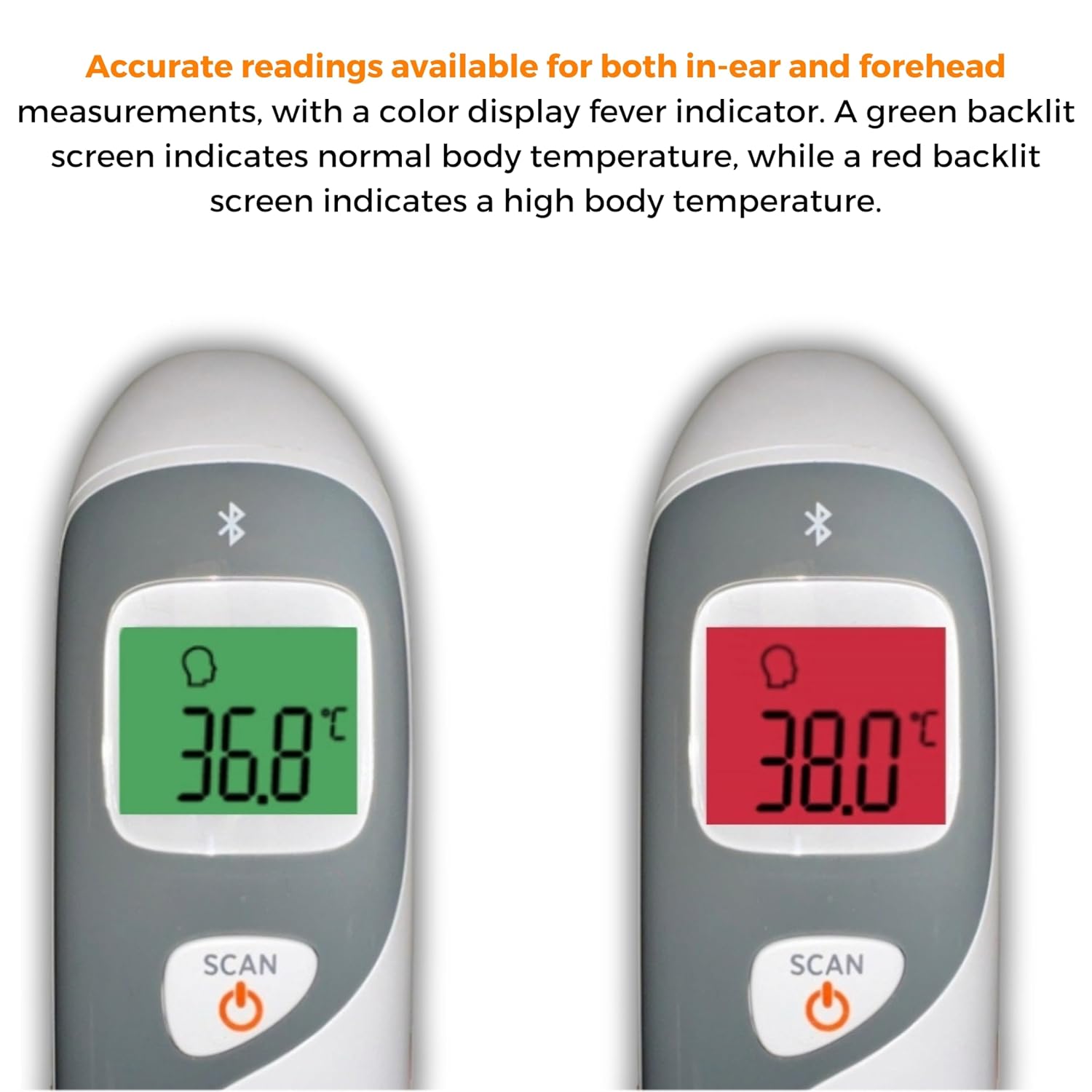
Image: The thermometer's color-changing LCD display indicating normal (green) and high (red) temperatures.
4.5. Санах ойг эргэн санах
The thermometer stores the last 20 temperature readings. To access these readings, press the MEM/MUTE button while the device is on. Each press will cycle through the stored readings.
5. Bluetooth Connectivity and MOBI Smart App
The MOBI CONNECT Smart DualScan Thermometer can be used independently or paired with your smartphone via Bluetooth for enhanced tracking and features through the MOBI Smart App.
5.1. Апп татаж авах болон хослуулах
- Download the "MOBI Smart" app from your device's app store (available on iOS and Android).
- Ухаалаг утсан дээрээ Bluetooth идэвхжсэн эсэхийг шалгаарай.
- Open the MOBI Smart App and follow the on-screen instructions to pair your thermometer.
5.2. Програмын онцлог
- Автомат хяналт: Automatically records temperature readings from the thermometer.
- Олон хэрэглэгчийн Profiles: Мэргэжлийн програмыг үүсгэж удирдахfiles for each family member to track their health data independently.
- Өгөгдлийн бүртгэл: Add comments to each reading for context.
- Reporting & Graphs: View powerful reports and graphs for daily, weekly, monthly, or yearly temperature trends.
- Экспортын сонголтууд: Export data for sharing with healthcare professionals.
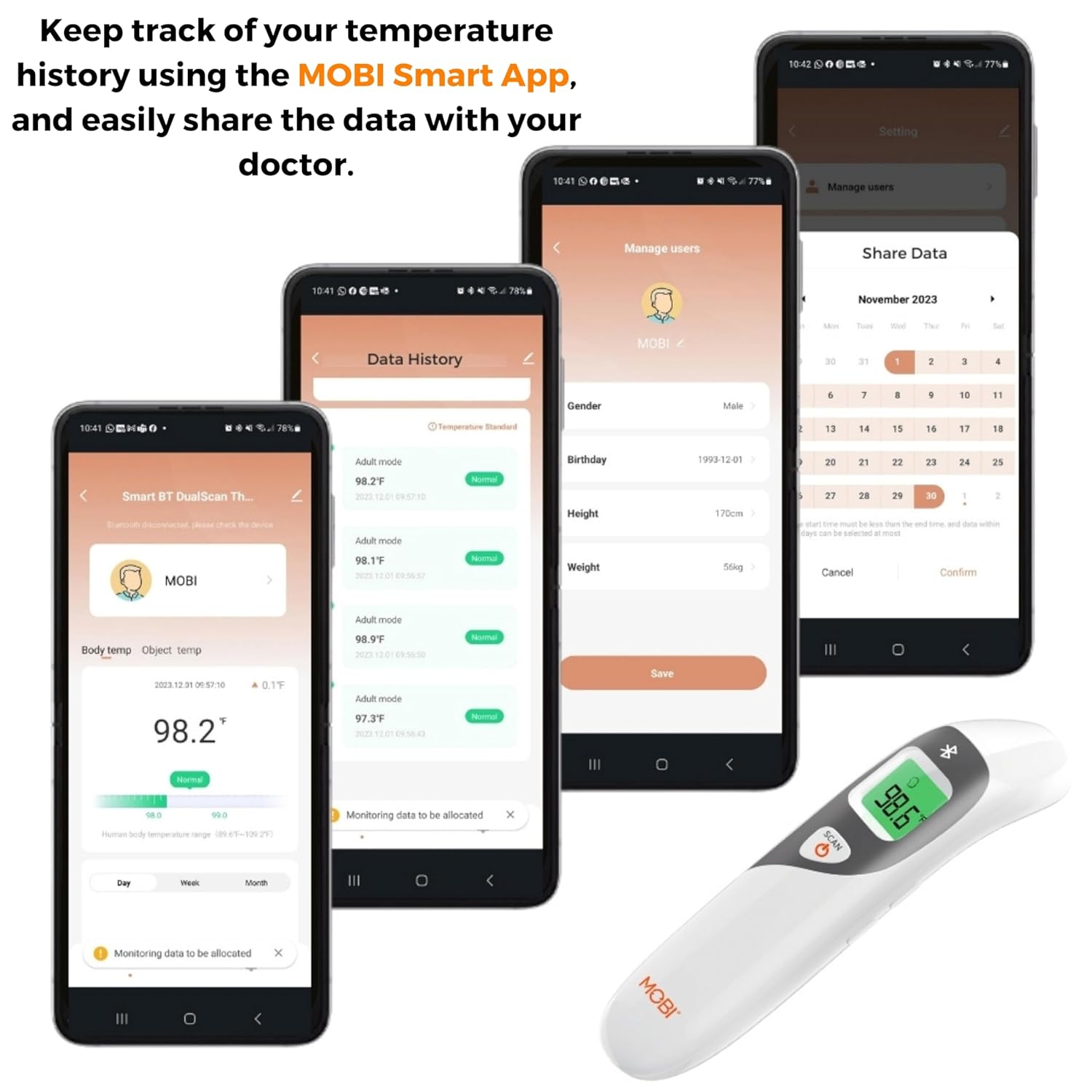
Image: Screenshots of the MOBI Smart App interface, showing data tracking and user management.
5.3. Бүтээгдэхүүний албан ёсны видео
Видео: Албан тушаалтан ирсэнview of the MOBI Smart DualScan Bluetooth Ear & Forehead Thermometer, demonstrating its features and usage.
6. Засвар үйлчилгээ
6.1. Цэвэрлэгээ
To clean the thermometer, wipe it with a soft, damp cloth. Do not immerse the device in water or use abrasive cleaners. Ensure the probe is clean before each use, especially for ear measurements.
6.2. Хадгалах
Store the thermometer in its protective pouch in a cool, dry place, away from direct sunlight and extreme temperatures. Remove batteries if the device will not be used for an extended period.
7. Алдаа засах
- "Lo" or "Hi" Reading: Indicates a temperature outside the measurable range. Ensure proper placement and try again.
- Буруу уншилтууд:
- Check for proper probe placement (ear or forehead).
- Ensure the probe is clean.
- Verify the correct mode (Adult/Child/Object) is selected if applicable.
- Allow the thermometer to acclimate to room temperature for 30 minutes if it has been in a significantly different environment.
- Bluetooth холболтын асуудал:
- Ухаалаг утсан дээрээ Bluetooth идэвхжсэн эсэхийг шалгаарай.
- Restart the thermometer and the MOBI Smart App.
- Ensure the thermometer is within range of your smartphone.
- Дэлгэц байхгүй: Зайны суурилуулалтыг шалгаж, шаардлагатай бол зайгаа солино.
8. Техникийн үзүүлэлтүүд
| Загварын дугаар | 700026 |
| Эрчим хүчний эх үүсвэр | Батерейгаар ажилладаг (2 x AAA) |
| Дэлгэцийн төрөл | Арын гэрэлтүүлэг бүхий LCD дэлгэц |
| Холболт | Bluetooth |
| Хэмжилтийн горимууд | Ear, Forehead, Room, Object |
| Температурын нэгж | Фаренгейт (°F) / Цельсийн (°C) |
| Санах ойг эргэн санах | Сүүлийн 20 уншилт |
| Бүтээгдэхүүний арчилгаа | Цэвэрхэн арчина |
| Материал | Хуванцар |
| Үйлдвэрлэгч | Mobi Technologies Inc. |
9. Баталгаат хугацаа ба дэмжлэг
For warranty information or technical support, please contact Mobi Technologies Inc. directly. Refer to the product packaging or the official MOBI webхамгийн сүүлийн үеийн холбоо барих мэдээллийг авах сайт.


