Танилцуулга
The Cherub WMT-565C is a versatile 5-in-1 device designed for musicians. It integrates a metronome, tuner, tone generator, hygrometer, and thermometer into a single, compact, and rechargeable unit. This manual provides detailed instructions for operating and maintaining your WMT-565C to ensure optimal performance and longevity.

Figure 1: Cherub WMT-565C Multi-Function Device
Бүтээгдэхүүний онцлог
- 5-ын-1 функциональ байдал: Metronome, Tuner, Tone Generator, Hygrometer, and Thermometer.
- Байгаль орчны хяналт: Equipped with a hygrometer and thermometer to monitor ambient humidity and temperature, crucial for instrument care.
- Large Full-Color LCD: High-definition, colorful display for easy readability of tuning, metronome settings, and environmental data.
- Adjustable Metronome Forte: Allows adjustment of metronome volume for practice. Includes electronic sound and vocal count options.
- Цэнэглэдэг ли-ион батерей: Provides up to 600 minutes of battery life on a single charge.

Figure 2: WMT-565C Displaying Environmental Data and Tuning
Тохиргоо
Төхөөрөмжийг цэнэглэж байна
The WMT-565C comes with a built-in rechargeable Li-ion battery. Before first use, fully charge the device using the provided USB cable. Connect the small end of the USB cable to the charging port on the device and the other end to a standard USB power adapter (not included) or a computer's USB port. The charging indicator will show the charging status.
Асаах/унтраах
Төхөөрөмжийг асаахын тулд товчийг дараад барина уу Power/Play button. To power off, press and hold the same button until the screen turns off.
Kickstand ашиглах
The device features a retractable kickstand on its back for convenient tabletop use. Gently pull out the kickstand to prop up the device for better viewөнцөг.
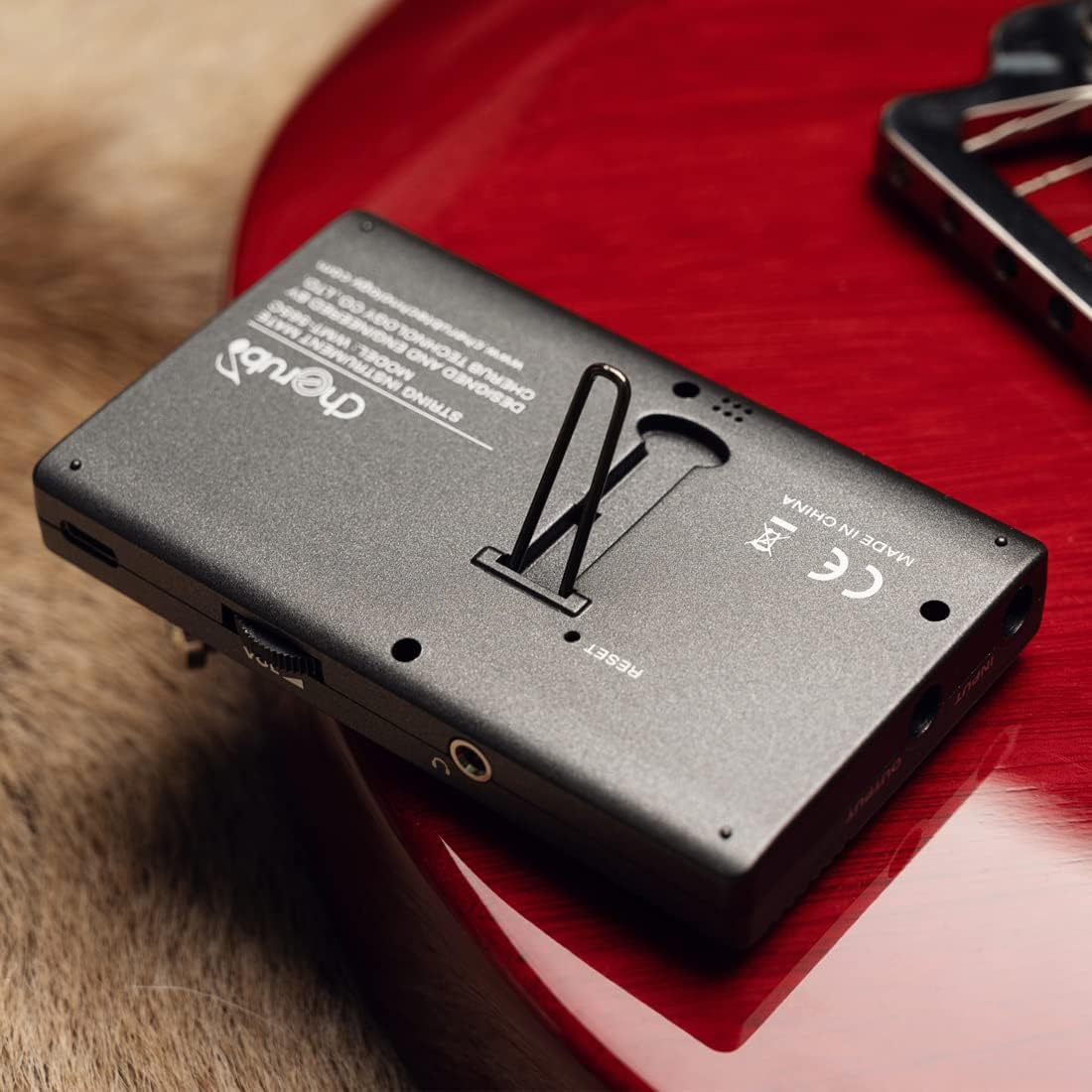
Figure 3: Device with Kickstand Extended
Ашиглалтын заавар
Навигацийн горимууд
дээр дарна уу Х / Т button to switch between Metronome and Tuner modes. The current mode will be displayed on the screen.

Figure 4: WMT-565C in Tuner Mode with Guitar Connection
Метрономын горим
In Metronome mode, you can adjust the tempo, beat, and rhythm. Use the Дээш/Доош arrow buttons to change values. The Forte button allows you to adjust the metronome's volume. You can also select between electronic sound and vocal count for practice.
Тааруулагч горим
The tuner supports various instruments and chromatic tuning. Use the Beat/Item button to cycle through different tuning items (e.g., Chromatic, Guitar, Bass, Violin, Ukulele). The display will show the note, string number (for specific instruments), and pitch deviation. The screen's color changes to indicate if the note is flat (red), sharp (red), or in tune (green).
Дуу үүсгэгч
The tone generator function allows you to produce specific notes for ear training or manual tuning. Access this function through the mode selection and use the arrow buttons to select the desired note.
Температур ба чийгшлийн хяналт
The WMT-565C continuously monitors and displays the real-time temperature and humidity of the environment. This information is shown on the upper right corner of the LCD screen, allowing musicians to protect their instruments from adverse environmental conditions.

Figure 5: Tuner Mode with Environmental Data
Хяналтview

Figure 6: WMT-565C Control Layout
Бүтээгдэхүүний албан ёсны видео
Видео 1: Дууслааview of the Cherub WMT-565C Rechargeable Metro-Tuner's features and functions.
Засвар үйлчилгээ
To ensure the longevity and optimal performance of your Cherub WMT-565C, follow these maintenance guidelines:
- Цэвэрлэгээ: Төхөөрөмжийг цэвэрлэхдээ зөөлөн, хуурай даавуу ашиглаарай. Зүлгүүрийн цэвэрлэгч эсвэл уусгагч хэрэглэхээс зайлсхий.
- Хадгалах: Төхөөрөмжийг нарны шууд тусгал, хэт температураас хол, сэрүүн, хуурай газар хадгална.
- Батерейны арчилгаа: Батерейны эрүүл мэндийг хадгалахын тулд төхөөрөмжийг байнга ашигладаггүй байсан ч тогтмол цэнэглэ. Удаан хугацааны турш батерейг бүрэн цэнэглэхээс зайлсхий.
- Харьцуулах: Handle the device with care to prevent drops or impacts that could damage the screen or internal components.
Алдааг олж засварлах
If you encounter any issues with your Cherub WMT-565C, consider the following:
- Төхөөрөмж асахгүй байна: Батерей цэнэглэгдсэн эсэхийг шалгана уу. Төхөөрөмжийг USB кабель ашиглан тэжээлийн эх үүсвэрт холбоод дахин оролдоно уу.
- Буруу тохируулга: Check that the correct tuning item (e.g., Guitar, Chromatic) is selected. Ensure the instrument's sound is clear and free from background noise if using the built-in microphone. If using a pickup cable, ensure it is securely connected.
- Metronome Sound Issues: Check the volume setting using the Forte button. Ensure the speaker is not obstructed.
- Дэлгэцийн гэмтэл: If the screen is unresponsive or displaying incorrectly, try restarting the device. If the issue persists, contact customer support.
Үзүүлэлтүүд
| Онцлог | Тодорхойлолт |
|---|---|
| Зүйлийн жин | 5.6 унц |
| Багцын хэмжээ | 4.76 x 3.23 x 2.6 инч |
| Загварын дугаар | WMT-565C |
| Батерей | 1 Лити Полимер батерей шаардлагатай. (оруулсан) |
| Зайны төрөл | Лити полимер |
| Өнгөний нэр | Хар |
| Эхний боломжтой огноо | 22 оны тавдугаар сарын 2023 |
Баталгаат болон дэмжлэг
The Cherub WMT-565C comes with a standard manufacturer's warranty. Please refer to the product packaging or the official Cherub webтусгай баталгаат нөхцөл, болзлын сайт.
For technical support, troubleshooting assistance, or warranty claims, please contact Cherub customer service through their official webсайт эсвэл таны худалдан авалтад өгсөн холбоо барих мэдээлэл.