1. Танилцуулга
The Brickhouse Security Spark Nano 7 GPS Tracker is a compact and versatile device designed for real-time tracking of vehicles, assets, and personal belongings. Its small size allows for discreet placement, while its advanced features provide comprehensive monitoring capabilities.
This manual provides detailed instructions on setting up, operating, and maintaining your Spark Nano 7 GPS Tracker to ensure optimal performance.

Image: The Spark Nano 7 GPS Tracker shown alongside a smartphone displaying its tracking application interface. The device is blue and black, compact, and designed for discreet use.
2. Юу багтсан
Upon unboxing your Spark Nano 7 GPS Tracker, please verify that all components are present:
- Spark Nano 7.0 GPS Tracker Unit
- Ханын цэнэглэгч
- Хэрэглэгчийн гарын авлага (энэ гарын авлага)
- Урьдчилан суулгасан SIM карт
3. Тохиргоо ба идэвхжүүлэлт
3.1 Төхөөрөмжийг цэнэглэх
Before first use, fully charge your Spark Nano 7 GPS Tracker using the provided wall charger. Connect the charger to the device's charging port and plug it into a standard electrical outlet. The charging indicator light will confirm the charging status.
3.2 Activating Your Subscription
A subscription plan is required for the Spark Nano 7 to function. The device comes with a pre-installed SIM card. To activate your service and choose a plan, visit the Brickhouse Security website or contact customer support. You will need the device's serial number, typically found on the back of the unit or its packaging.
3.3 Downloading the Mobile App
For real-time tracking and access to all features, download the Brickhouse Security mobile application. It is available for both iOS (iPhone) and Android devices. хайх "Brickhouse Security" in your device's app store. A web application is also available for desktop access.

Image: A smartphone screen showing the user-friendly interface of the Brickhouse Security mobile application, illustrating how users can access tracking data from anywhere.
4. Төхөөрөмжөө ажиллуулах
4.1 Бодит цагийн хяналт
Once activated, the Spark Nano 7 provides real-time location updates. Access these updates through the mobile app or web browser. The device reports automatically every 60 seconds, with options to adjust tracking intervals based on your subscription plan.
4.2 Газарзүйн хамгаалалт
Set up virtual boundaries (geofences) on the map within the application. You will receive alerts when the tracker enters or exits these predefined areas. This feature is useful for monitoring vehicles, ensuring assets remain within designated zones, or for personal safety.
4.3 Speed Alerts
Configure speed thresholds in the app to receive notifications if the tracker exceeds a specified speed limit. This is particularly useful for fleet management or monitoring driving habits.
4.4 сандрах товчлуур
The Spark Nano 7 features a panic button. In an emergency, pressing this button will send an immediate alert to pre-configured contacts, providing the device's current location.
4.5 Түүхэн мэдээлэл
Review detailed travel reports and location history within the application. The duration of historical data storage depends on your subscription plan (e.g., 30, 90, or 180 days).

Image: A laptop screen displaying the web application for the Spark Nano 7, demonstrating real-time location viewing and access to historical data.
5. Засвар үйлчилгээ
5.1 Батерейны ашиглалтын хугацаа
The Spark Nano 7 is equipped with a Lithium Ion battery. Battery life varies based on usage and tracking frequency. It offers up to 2 weeks of standby time or 14 hours of constant tracking. Regularly check the battery level via the mobile app and recharge as needed.
5.2 Төхөөрөмжийн арчилгаа
Keep the device clean and dry. Avoid exposing it to extreme temperatures, direct sunlight for prolonged periods, or harsh chemicals. While compact, it is not inherently waterproof unless placed in a suitable protective case (not included).
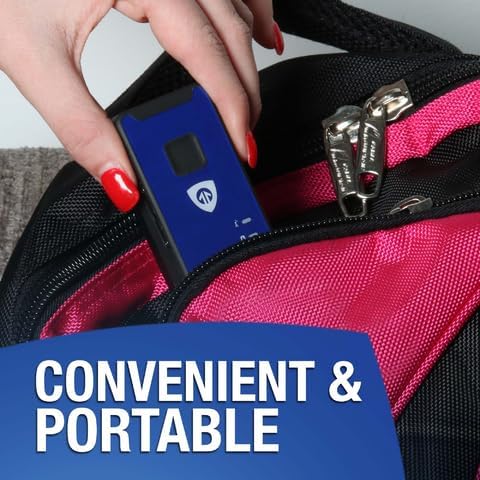
Image: A hand placing the compact Spark Nano 7 GPS Tracker into a bag, illustrating its portable and discreet design for convenient tracking.
6. Алдаа засах
| Асуудал | Боломжит шалтгаан | Шийдэл |
|---|---|---|
| Төхөөрөмж байршлыг мэдээлэхгүй байна. | No active subscription, low battery, no cellular signal. | Verify subscription status, charge the device, move to an area with better cellular coverage. |
| Inaccurate location data. | Poor GPS signal (e.g., indoors, dense urban areas), device obstruction. | Төхөөрөмжийг цэлмэг тэнгэртэй задгай газар байрлуул view. Ensure no metal objects are directly covering the device. |
| Cannot log into mobile app/web портал. | Incorrect credentials, internet connectivity issues. | Double-check username and password. Ensure your device has a stable internet connection. Reset password if necessary. |
| Батерей хурдан дуусдаг. | Frequent tracking updates, extreme temperatures. | Adjust tracking frequency to a longer interval if possible. Avoid placing the device in very hot or cold environments. |
7. Техникийн үзүүлэлтүүд
- Загвар: Spark Nano 7 GPS Tracker (Blue)
- Хэмжээ: 3 x 1.58 x 1 инч
- Жин: 8.8 унц
- Зай: 1 литийн ион зай шаардлагатай (дагсан)
- Холболт: Cellular (4G LTE coverage across North America, International tracking available)
- Tracking Intervals: Reports automatically every 60 seconds (adjustable based on plan)
- Онцлог шинж чанарууд: Smallest GPS Tracker, Lifetime Warranty (check terms), Real-Time Location Viewing, Panic Button, Geofencing, Speed Alerts, No Long-Term Contract Needed.
- Дэмжигдсэн програмууд: GPS, iOS iPhone, Android, Web App, Alexa
- Үйлдвэрлэгч: BRICKHOUSE SECURITY

Image: The Spark Nano 7 GPS Tracker with its compact dimensions (3 x 1.58 x 1 inches) highlighted, emphasizing its small and easily concealable design.
8. Subscription Plans
To utilize the full capabilities of your Spark Nano 7 GPS Tracker, an active subscription plan is required. Brickhouse Security offers various plans to suit different needs, billed monthly, quarterly, or annually. No long-term contracts are required, and you can cancel anytime.
Available Plans (Billed Annually, as examples):
- ҮНДСЭН: Starting at $17.99/unit/month (billed annually). Includes Unlimited Cellular Data, Cloud Software, Mobile Application, 30 Days of Tracking History, 60-Second Location Updates, 60 SMS Alerts, 5 Geofences, Single Login, Coverage in North America, 2 Standard Reports.
- НЭМЭГДСЭН: Starting at $27.99/unit/month (billed annually). Includes Unlimited Cellular Data, Cloud Software, Mobile Application, 90 Days of Tracking History, 30-Second Location Updates, 200 SMS Alerts, 60 Geofences, Up to 3 User Logins, Coverage in North America & Europe, 4 Standard Reports, 10% off Future Devices.
- ДЭЭД ЗЭРЭГЛЭЛ: Starting at $34.99/unit/month (billed annually). Includes Unlimited Cellular Data, Cloud Software, Mobile Application, 180 Days of Tracking History, 5-Second Location Updates, Unlimited SMS Alerts, Unlimited Geofences, Unlimited User Logins, Worldwide Coverage, 8 Standard Reports, 15% off Future Devices.
For the most current pricing and detailed feature comparisons, please visit the official Brickhouse Security webсайт.

Image: A detailed comparison table outlining the features and pricing for Basic, Plus, and Premium subscription plans for the GPS tracker, highlighting differences in tracking history, alerts, and coverage.
9. Баталгаат хугацаа ба дэмжлэг
The Spark Nano 7 GPS Tracker comes with a Lifetime Warranty. Please refer to the official Brickhouse Security website or your purchase documentation for specific terms and conditions of the warranty, including coverage details and claim procedures.
For technical assistance, troubleshooting, or any questions regarding your device or subscription, please contact Brickhouse Security Customer Service. Contact information can be found on their official webсайт эсвэл таны бүтээгдэхүүний савлагаанд.
Онлайн нөөцүүд: -д зочилно уу Brickhouse Security Store on Amazon бүтээгдэхүүний талаарх дэлгэрэнгүй мэдээлэл, дэмжлэг авах.


