1. Танилцуулга
This manual provides detailed instructions for the installation, operation, and maintenance of your FOSCAM V8EP 4K IP PoE Security Camera. The V8EP is an 8-megapixel outdoor camera designed for home and business surveillance, featuring 4K Ultra HD resolution, AI human and vehicle detection, color night vision, two-way audio, and Power over Ethernet (PoE) for simplified setup.

Image 1.1: FOSCAM V8EP Camera and App Interface
2. Бүтээгдэхүүн дууссанview
2.1 Багцын агуулга
- 1x FOSCAM V8EP 8MP Outdoor IP Camera
- 1x хурдан тохируулах гарын авлага
- 1х Ethernet кабель
- 1x Surveillance Sign
- 1x Усны хамгаалалттай таг
2.2 Гол онцлогууд
- 4K 8MP Ultra HD Resolution: Captures video at 3840x2160p with 6X digital zoom for clear details.
- Хиймэл оюун ухаанаар хүн ба тээврийн хэрэгслийг илрүүлэх: Advanced algorithms identify humans and vehicles, reducing false alarms.
- Өнгөт шөнийн хараа: Provides full-color video in low-light conditions up to 66 feet using built-in spotlights.
- Siren Alert & Spotlights: Deters intruders with an audible siren and bright spotlights upon detection.
- Хоёр талын аудио: Суурилуулсан микрофон болон чанга яригч нь бодит цаг хугацаанд харилцах боломжийг олгодог.
- Ethernet дээрх хүч (PoE): Simplifies installation by delivering power and data through a single Ethernet cable.
- IP66 цаг агаарт тэсвэртэй: Гаднах янз бүрийн цаг агаарын нөхцөл байдлыг тэсвэрлэх зориулалттай.

Image 2.1: 4K Ultra HD Clarity Comparison
3. Тохиргоо
3.1 PoE Installation
The FOSCAM V8EP camera utilizes Power over Ethernet (PoE) technology, requiring only one Ethernet cable for both power supply and data transmission. This simplifies wiring and installation.
- Камерыг суурилуулах: Securely mount the camera to a wall or desired surface using the provided mounting hardware. Ensure the camera is positioned to cover the desired surveillance area.
- Ethernet кабель холбох: Connect one end of the Ethernet cable to the camera's PoE port.
- PoE Switch/NVR-тэй холбогдоно уу: Connect the other end of the Ethernet cable to a PoE switch, PoE injector, or a Foscam NVR. Ensure the PoE device is powered on.
- Сүлжээний холболт: Connect your PoE switch or NVR to your router for network access.

Image 3.1: PoE Installation Diagram
3.2 App Setup and Initial Connection
To access and manage your camera, download the Foscam app on your smartphone.
- Foscam аппликейшнийг татаж авах: хайх "Foscam" in your device's app store (iOS or Android) and install the application.
- Бүртгэл үүсгэх: Open the app and follow the prompts to create a new Foscam account or log in if you already have one.
- Камер нэмэх: In the app, select the option to add a new camera. Follow the on-screen instructions, which typically involve scanning a QR code on the camera or manually entering its details.
- Тохиргоог тохируулах: Once connected, you can configure various camera settings, including network preferences, recording schedules, and alert notifications.
4. Үйл ажиллагаа
4.1 AI Detection
The FOSCAM V8EP camera features intelligent AI detection capabilities to distinguish between different types of motion.
- Хүний илрүүлэлт: Identifies human figures, reducing alerts from non-human movements.
- Тээврийн хэрэгсэл илрүүлэх: Recognizes vehicles, useful for monitoring driveways or parking areas.
- Custom Motion Zones: You can define specific areas within the camera's field of view where motion detection should be active, ignoring irrelevant areas to minimize false alarms.
- Тохируулах мэдрэмж: Sensitivity levels for detection can be adjusted via the Foscam app to suit your environment.

Image 4.1: AI Human and Vehicle Detection
4.2 Шөнийн хараа
The camera provides advanced night vision options for clear surveillance in low-light conditions.
- Color Starlight Night Vision: Utilizes a high-quality sensor and F/1.6 aperture to capture color video in very low ambient light, extending up to 66 feet.
- Integrated Spotlights: Built-in spotlights (4500K) can be activated manually or automatically upon motion detection to illuminate the area and enable full-color night vision.
- Хэт улаан туяаны (IR) шөнийн хараа: When spotlights are off, the camera automatically switches to infrared mode for black and white video in complete darkness.
- Schedule Spotlights: You can set schedules for when the spotlights should be active.

Image 4.2: Color Night Vision with Spotlights
4.3 Хоёр талын аудио
Communicate directly through the camera using its integrated microphone and speaker.
- Real-time Communication: Speak to visitors or deter unwanted individuals from your smartphone via the Foscam app.
- Аудио хяналт: Listen to audio from the camera's location.
Image 4.3: Two-Way Audio Functionality
4.4 дохиоллын систем
When abnormal activity is detected, the camera can trigger an alarm to deter intruders and notify you.
- Сирена идэвхжүүлэлт: An audible siren can be triggered automatically or manually.
- Spotlight Activation: Spotlights can flash to draw attention and illuminate the scene.
- Шуурхай анхааруулга: Receive push notifications, emails, or alerts on your device, allowing you to respond promptly.
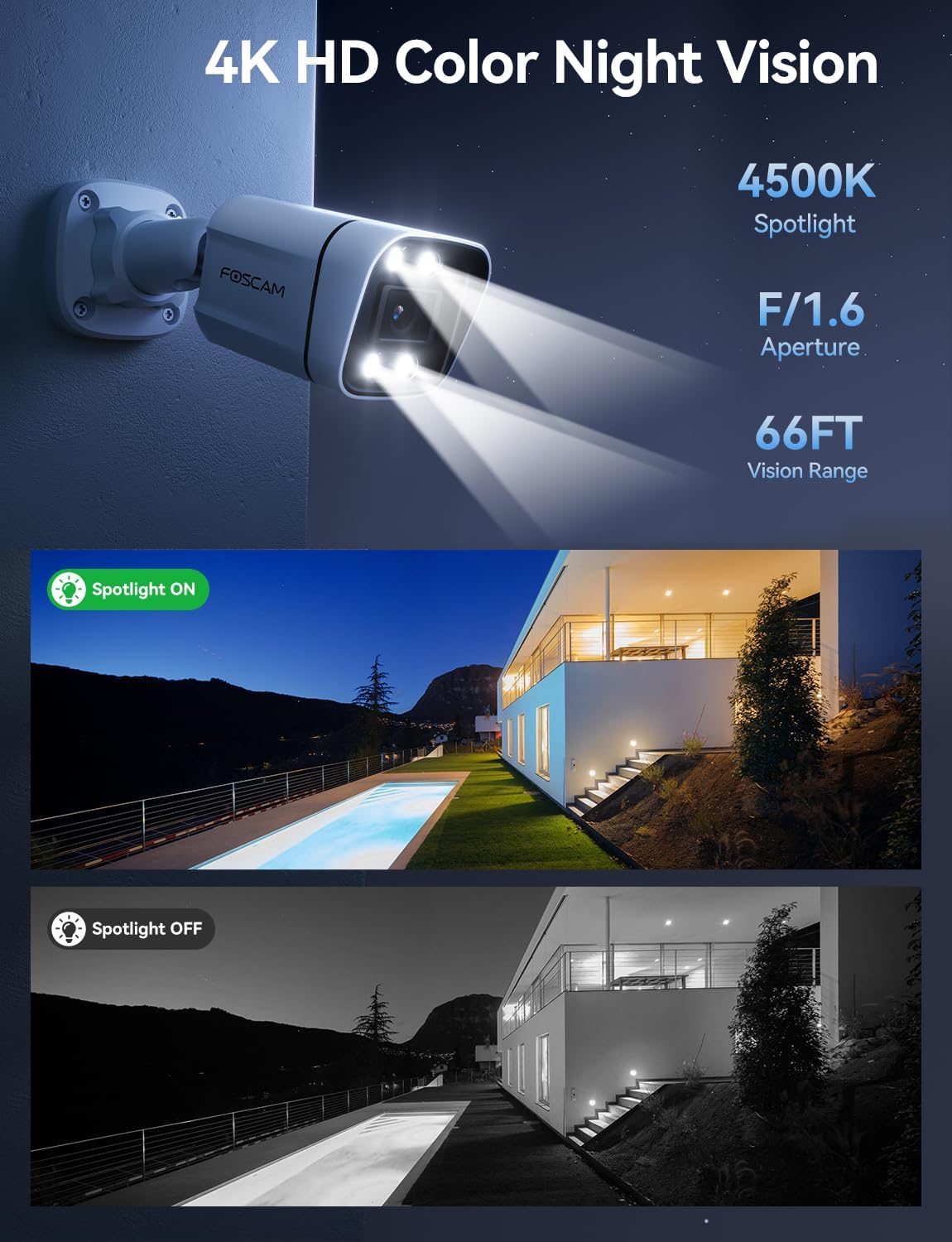
Image 4.4: Sound and Light Alarm System
4.5 Remote Access and Compatibility
Monitor your property from anywhere at any time.
- Foscam App/VMS: Шууд нэвтрэх view, recordings, and settings through the Foscam mobile app or Foscam VMS software on a computer.
- Ухаалаг гэрийн интеграци: Compatible with Alexa and Google Assistant for voice control and integration into smart home ecosystems.
- NVR/NAS Compatibility: Supports Blue Iris, Homey, Synology NAS, Qnap NAS, and ONVIF-enabled NVRs for local storage and advanced management.

Image 4.5: Remote Access Across Devices
5. Засвар үйлчилгээ
5.1 Цаг агаарын эсэргүүцэл
The FOSCAM V8EP camera features an IP66 weatherproof housing, ensuring reliable operation in various outdoor conditions, including rain, snow, and dust.

Image 5.1: IP66 Weatherproof Design
5.2 Ерөнхий арчилгаа
- Цэвэрлэгээ: Камерын линз болон орон сууцыг үе үе зөөлөн, damp cloth to remove dirt and debris that may affect image quality. Do not use harsh chemicals.
- Кабелийн үзлэг: Regularly inspect the Ethernet cable and connections for any signs of wear or damage.
- Програм хангамжийн шинэчлэлтүүд: Keep the camera's firmware updated through the Foscam app to ensure optimal performance and access to new features.
6. Алдаа засах
- Цахилгаан/Холболт байхгүй: Ensure the Ethernet cable is securely connected to both the camera and a powered PoE device (switch/injector/NVR). Verify the PoE device is functioning correctly and connected to your network.
- Апп-д холбогдох боломжгүй: Ensure your smartphone is connected to the same network as the camera during initial setup. Restart the camera and your router. Verify the Foscam app is updated to the latest version.
- Байнга тохиолддог хуурамч дохиолол: Adjust the AI detection sensitivity settings in the Foscam app. Utilize custom motion zones to exclude areas with irrelevant movement (e.g., swaying trees, busy roads).
- Шөнийн хараа муу: Ensure the camera lens is clean. Check if the spotlights are enabled and functioning. Verify there are no obstructions blocking the camera's view.
- Үгүй Web Интерфэйс: Note that this camera model primarily uses the Foscam app for configuration and live viewing. A direct web interface may not be available for all settings.
7. Техникийн үзүүлэлтүүд
| Онцлог | Тодорхойлолт |
|---|---|
| Загварын нэр | V8EP |
| Видео бичлэгийн нягтрал | 4K (3840x2160p) |
| Үр дүнтэй шийдэл | 8 МП |
| Frame Rate | 20 fps |
| Талбар View | 110 градус |
| Digital Zoom Ratio | 20X |
| Холболтын технологи | Утастай (PoE) |
| Холболтын протокол | Ethernet |
| Эрчим хүчний эх үүсвэр | Утастай цахилгаан (PoE-ээр дамжуулан) |
| Дотор/гадаа ашиглах | Дотор, гадаа |
| Олон улсын хамгаалалтын зэрэглэл | IP66 |
| Шөнийн харааны хүрээ | 66 Feet (Color Starlight) |
| Флэш санах ойн дэмждэг хамгийн дээд хэмжээ | 256 ГБ (Микро SD) |
| Хэмжээ (L x W x H) | 4.3 x 3.94 x 7.6 инч |
| Зүйлийн жин | 1.34 фунт |
| Хянагчийн төрөл | Alexa, Google Assistant, Blue Iris, Homey, Synology NAS, Qnap NAS, NVR |
8. Баталгаат хугацаа ба дэмжлэг
FOSCAM is committed to providing reliable products and customer service.
- Техникийн дэмжлэг: FOSCAM offers 24/7 fast reply and lifetime technical support for its products.
- Чанарын баталгаа: The product comes with a 180-day quality guarantee.
- Буцах: Enjoy 30-day free returns.
- Солих: Free replacement and fast delivery are provided for eligible issues.
For further assistance, please visit the official FOSCAM webсайт эсвэл тэдний хэрэглэгчийн дэмжлэгтэй холбогдоно уу.


