1. Танилцуулга
The Zyxel USGFLEX200H ZyWALL High Speed Cyber Security Firewall is designed to provide robust network security and high performance for small to medium-sized businesses. This manual provides essential information for setting up, operating, maintaining, and troubleshooting your device to ensure optimal performance and protection.

Figure 1: Zyxel USG FLEX H Series Firewall, a solution for SMBs.
2. Бүтээгдэхүүн дууссанview
2.1 Гол онцлогууд
- Аюулгүй байдалд чиглэсэн сүлжээ: High-performance Multi-Gig network security firewall with 1-Year UTM Gold security services included, recommended for small to mid-size offices with internet speeds up to 1000 Mbps.
- Өндөр гүйцэтгэл: Max Throughput: 5000 Mbps SPI Firewall, 1500 Mbps UTM (AV+IDP), 1200 Mbps VPN, 600k Sessions (Results may vary based upon testing method).
- Уян хатан портууд: High throughput Multi-Gig 2x 2.5Gbps and 6x Configurable GbE for flexible configuration and fast local network connectivity.
- Complete Security Bundle: Includes 1 year Gold Security sandboxing, DNS reputation, anti-malware, ransomware blocking, web filtering, application control and IDP security services and Nebula cloud Pro management.
- Хосгүй менежмент: Use Zyxel's award-winning Nebula Cloud Management solution to easily manage, monitor and configure network security.
2.2 Physical Description and Ports
The USGFLEX200H features a robust design with clearly labeled ports for easy connectivity.

Figure 2: Front panel of the Zyxel USGFLEX200H. Features include Status LEDs, 1x USB 3.0 port, 2x 2.5G Ethernet ports, 6x 1G Ethernet ports, and 1x Console (RJ45) port.

Figure 3: Rear panel of the Zyxel USGFLEX200H. Includes the 12V-2A power input and a grounding screw.

Figure 4: Flexible Ports with Multi-Gig and PoE+ capabilities.
2.3 Багцын агуулга
Таны багц дараах зүйлсийг агуулж байгаа эсэхийг шалгана уу.
- Zyxel USGFLEX200H Firewall Unit
- Эрчим хүчний адаптер
- Консолын кабель (RJ45-аас DB9 хүртэл)
- Mounting Brackets (for rack or wall mounting)
- Power Plug Adapters (various regions)
- Түргэн эхлүүлэх гарын авлага

Figure 5: Included accessories with the Zyxel USGFLEX200H.
Video 1: Unboxing of the USGFLEX200H, showing the contents of the package.
3. Тохиргоо
Zyxel USGFLEX200H галт ханаа тохируулахын тулд дараах алхмуудыг дагана уу:
- Физик холболт: Connect your internet service provider's modem to one of the WAN ports on the firewall. Connect your internal network devices (switches, computers) to the LAN ports.
- Асаах: Connect the power adapter to the firewall and plug it into a power outlet. The device will power on automatically.
- Анхны тохиргоо: Төхөөрөмжид хандах web-based management interface using a connected computer. Refer to the Quick Start Guide for default IP address and login credentials.
- Nebula Cloud Setup: For simplified management, register your device with Zyxel Nebula Cloud. This allows for remote configuration and monitoring.
Video 2: Learn how to get up and running quickly with the Nebula App for Zyxel devices.
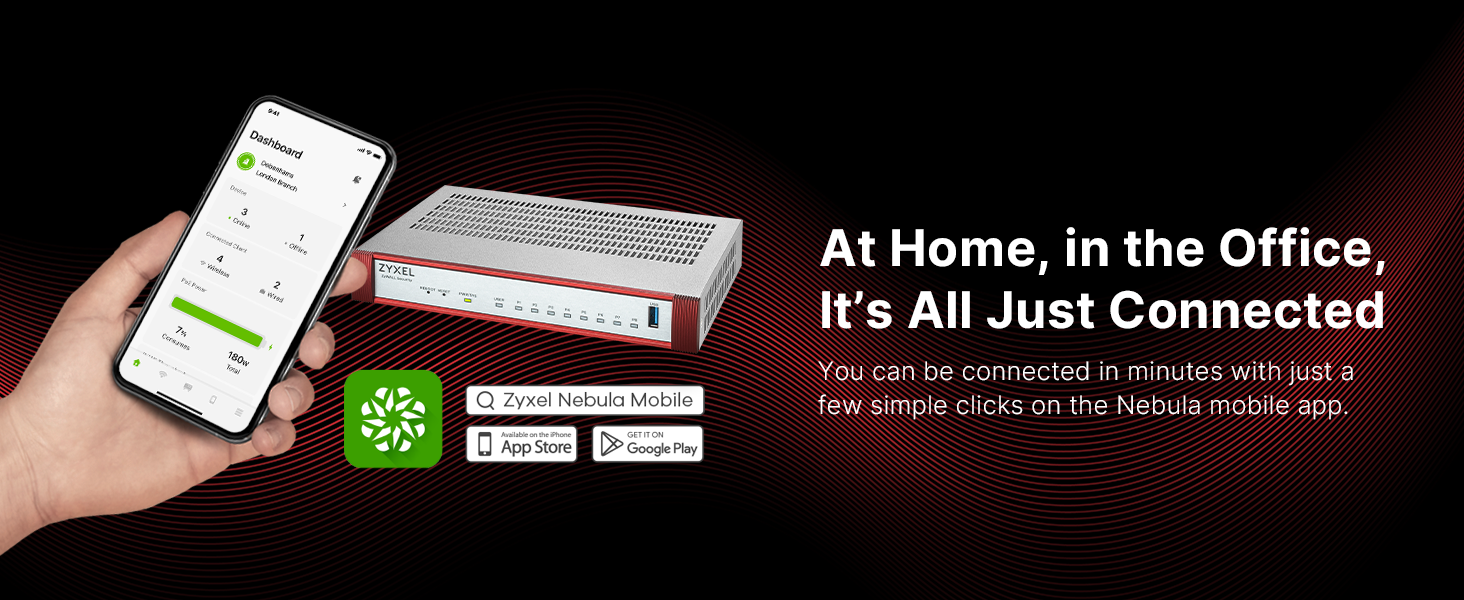
Figure 6: Manage your network from anywhere with the Nebula Mobile app.
4. Ашиглалтын заавар
The Zyxel USGFLEX200H provides comprehensive security and networking features. Utilize the web interface or Nebula Cloud for detailed configuration.
4.1 Аюулгүй байдлын онцлог
- UTM (Unified Threat Management): Activate and configure services like Anti-Malware, IDP (Intrusion Detection and Prevention), Web Filtering, and Application Control for multi-layered protection.
- VPN (Виртуал хувийн сүлжээ): Set up VPN tunnels for secure remote access and site-to-site connectivity.
- Галт ханын дүрэм: Define granular firewall rules to control network traffic based on your organization's security policies.
- Sandboxing: Leverage cloud-based sandboxing for advanced threat detection against unknown malware.

Figure 7: AI-Powered Cloud Cybersecurity for robust protection.
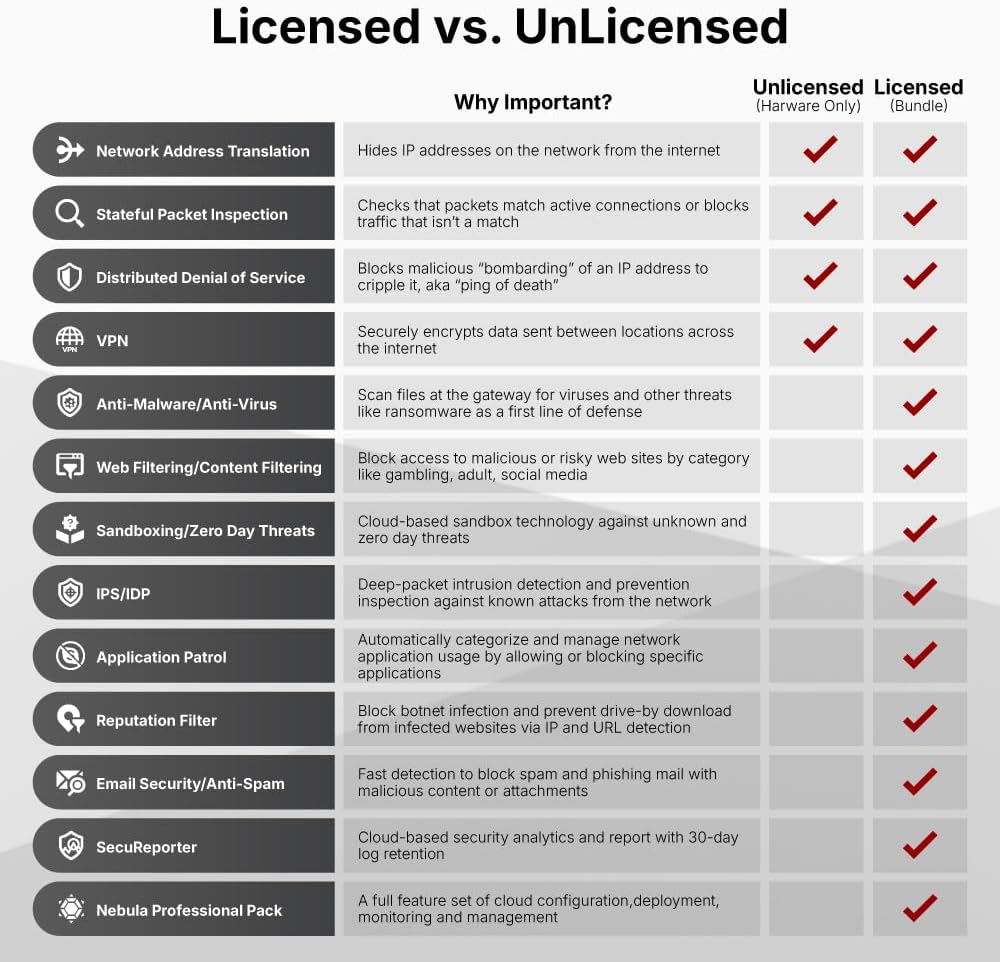
Figure 8: Licensed vs. Unlicensed features comparison.

Figure 9: License Comparison for security services.
4.2 Сүлжээний удирдлага
- Мананцар Үүлний Удирдлага: Centralize management of multiple Zyxel devices, including firewalls, access points, and switches, through a single cloud platform.
- VLAN: Аюулгүй байдал болон гүйцэтгэлийг сайжруулахын тулд сүлжээгээ сегментчилэхийн тулд Виртуал Орон Нутгийн Сүлжээг тохируулна уу.
- Чиглүүлэлт: Manage static and dynamic routing protocols to optimize network traffic flow.
Видео 3: Дууслааview of the USG FLEX H Firewall Series.
Video 4: Detailed features of Zyxel USGFLEX H Series Firewalls.

Figure 10: Highlighting performance and flexible management of the USG FLEX H series.
5. Засвар үйлчилгээ
Regular maintenance ensures the longevity and optimal performance of your firewall.
- Програм хангамжийн шинэчлэлтүүд: Regularly check for and install the latest firmware updates from the Zyxel support portal to ensure your device has the most current security patches and features.
- Тохиргооны нөөцлөлт: Periodically back up your device configuration. This allows for quick restoration in case of unexpected issues.
- Биеийн үзлэг: Ensure the device is placed in a well-ventilated area and free from dust accumulation.
6. Алдаа засах
If you encounter issues with your USGFLEX200H, consider the following troubleshooting steps:
- Эрчим хүчгүй: Цахилгаан адаптерийн холболт болон цахилгааны залгуурыг шалгана уу. Урд талын самбар дээрх цахилгааны LED гэрэл ассан эсэхийг шалгана уу.
- Интернет холболт байхгүй: Verify that your modem is working correctly. Check the WAN port connection and ensure the link/activity LEDs are active. Review your firewall's WAN settings.
- Сүлжээний холболтын асуудлууд: Check LAN port connections and corresponding LEDs. Ensure IP addresses are correctly assigned to devices on your network.
- Төхөөрөмж хариу өгөхгүй байна: If the device is unresponsive, press the 'REBOOT' button on the front panel. If the issue persists, use the 'RESET' button (requires a paperclip) to restore factory default settings (note: this will erase your configuration).
- Удаан гүйцэтгэл: Check network utilization through the management interface. Ensure your UTM services are not causing excessive overhead. Refer to the product matrix for throughput limits.
7. Техникийн үзүүлэлтүүд
| Атрибут | Үнэ цэнэ |
|---|---|
| Бүтээгдэхүүний хэмжээс | 11 x 7 x 1 инч |
| Зүйлийн жин | 0.634 унц |
| Загварын дугаар | USGFLEX200H |
| Брэнд | ZYXEL |
| Онцлог шинж чанар | Интернетийн аюулгүй байдал |
| Давтамжийн зурвасын ангилал | Хос зурвас |
| Утасгүй холбооны стандарт | 802.11ax |
| Тохиромжтой төхөөрөмжүүд | Personal Computer, Security Camera, Smartphone |
| Бүтээгдэхүүний ашиглахыг зөвлөж байна | Бизнес |
| Холболтын технологи | Ethernet |
| Өнгө | цагаан |
| Портын тоо | 4 |
| Хяналтын арга | Хүрэх |
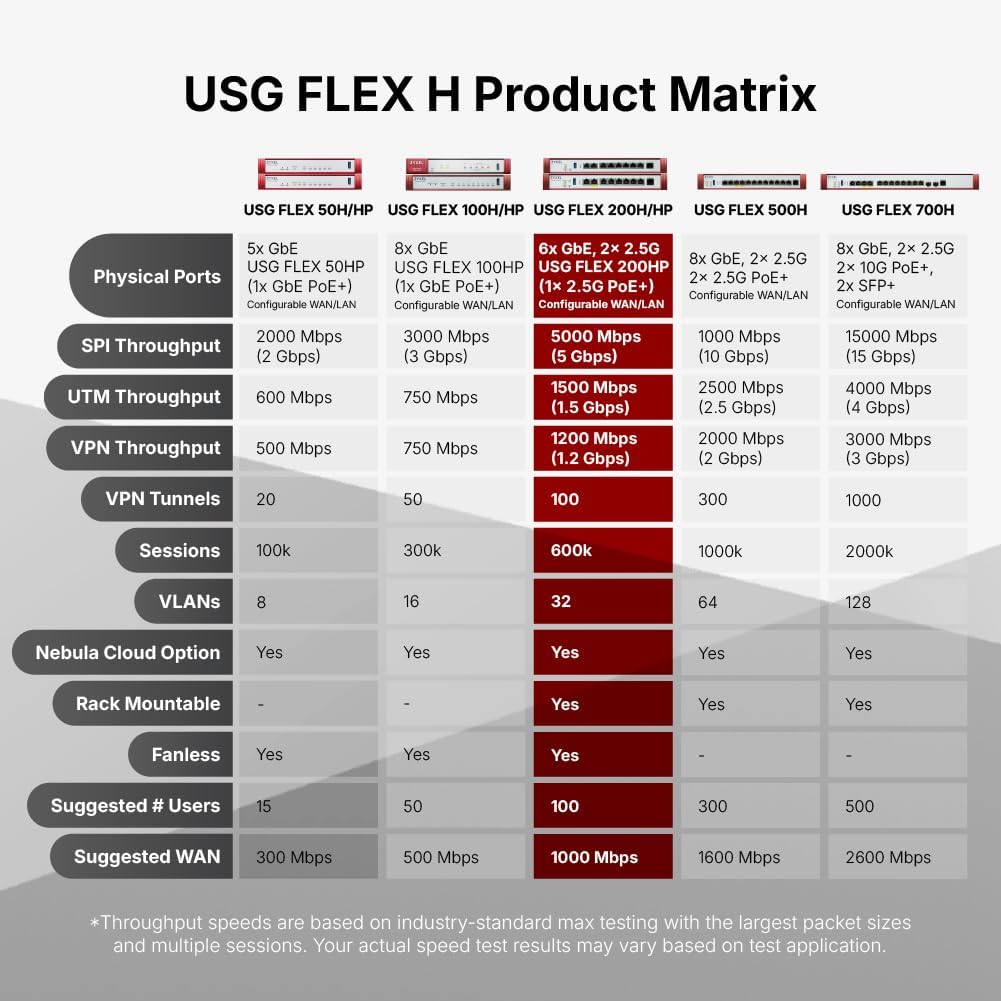
Figure 11: USG FLEX H Product Matrix for model comparison.
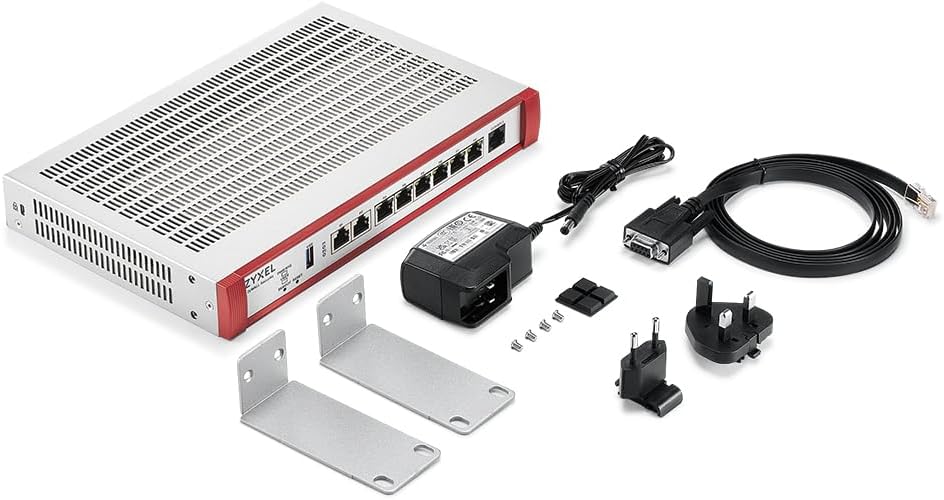
Figure 12: Comparison of USG FLEX 200 (Prior Generation) vs. USG FLEX 200 H/HP (New Generation).
8. Баталгаат хугацаа ба дэмжлэг
Баталгаат хугацаа, техникийн дэмжлэг болон нэмэлт эх сурвалжуудын талаар албан ёсны Zyxel Networks хаягаар зочилно уу. webсайт эсвэл харилцагчийн үйлчилгээтэй холбогдоно уу. Баталгаат зарга авахын тулд худалдан авалтын баримтаа хадгална уу.
Та дэлгэрэнгүй мэдээлэл, дэмжлэг авах боломжтой Амазон дээрх ZYXEL дэлгүүр.


