Танилцуулга
This manual provides detailed instructions for the safe and effective use of your Dylanto Kids Instant Print Camera, Model BLL2. Please read this manual thoroughly before operating the device and retain it for future reference.
Бүтээгдэхүүн дууссанview
The Dylanto Kids Instant Print Camera is designed for children aged 3-12, offering both digital photography and instant black-and-white printing capabilities. It features a 2.4-inch screen, 1080P video recording, 16x digital zoom, and various creative functions.

Figure 1: Dylanto Kids Instant Print Camera and included accessories.
Багцын агуулга:
- Dylanto Kids Instant Print Camera (Model BLL2)
- 3 Rolls of Thermal Printing Paper
- 32 ГБ санах ойн карт
- оосор
- USB төрөл-C кабель
- Хэрэглэгчийн гарын авлага (энэ баримт бичиг)
Аюулгүй байдлын мэдээлэл
- Ensure the camera is fully charged before first use and after each use to prolong battery life.
- The thermal printing paper is BPA-free.
- Do not expose the camera to extreme temperatures or moisture.
- Supervise young children during use to prevent accidental damage or misuse.
- Keep small parts, such as the memory card, out of reach of very young children to prevent choking hazards.
Тохиргоо
1. Камерыг цэнэглэж байна
Before initial use, fully charge the camera. Connect the provided USB Type-C cable to the camera's charging port and the other end to a compatible USB power adapter (not included) or computer USB port. The charging indicator will show the charging status.
The camera has a 2000 mAh battery capacity, providing approximately 3-4 hours of continuous use after a full charge.
2. Installing the Memory Card
Locate the memory card slot on the camera. Insert the provided 32GB memory card into the slot until it clicks into place. Ensure the card is inserted in the correct orientation.
3. Loading Printing Paper
The camera uses thermal printing paper. Follow these steps to load a new roll:
- Gently push up the part with the lens to open the paper slot.
- Insert a roll of thermal printing paper into the slot. Ensure the paper feeds from the bottom of the roll and the end of the paper is facing upwards, ready to be pulled out.
- Close the two parts of the camera until they click securely.
- To avoid blank prints, pull the paper out by approximately 1 inch before the first print.

Figure 2: Steps for loading thermal printing paper.

Figure 3: Detailed instructions for paper installation, including a tip for blank prints.
Ашиглалтын заавар
Асаах/унтраах
Камерыг асаах эсвэл унтраахын тулд асаах товчийг дараад барина уу.
Навигац ба цэс
Use the directional buttons and the OK/Shutter button to navigate through the camera's menu and select options on the 2.4-inch IPS screen.

Figure 4: Camera interface showing main functions.
Зураг авах
In photo mode, frame your shot using the screen. Press the shutter button to capture a photo. The camera supports 16x digital zoom.
The camera can capture color photos digitally and simultaneously print black-and-white thermal photos.
Хэвлэх горимууд:
The camera offers three printing modes for thermal prints: Low, Middle, and High, which likely refer to print density or quality.

Figure 5: Available printing modes.
Видео бичлэг хийх
Switch to video mode. Press the shutter button to start recording 1080P video. Press it again to stop recording.

Figure 6: Video recording capabilities and storage.
Video 1: Demonstration of the camera's instant print and video recording features. This video highlights the camera's ability to capture moments and print them instantly.
Онцлог шинж чанарууд
- Хугацаатай гэрэл зураг: Set intervals for automatic photo capture (e.g., 2s, 5s, 10s).
- Тасралтгүй зураг авалт: Хурдан дараалсан олон зураг аваарай.
- Тоглоомууд: The camera includes built-in puzzle games for entertainment.
- Filter Frames & Stickers: Apply various frames and stickers to photos before printing or saving.
- Мп3 тоглуулагч: The camera supports MP3 playback.
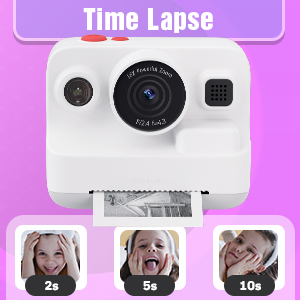
Figure 7: Time-lapse settings.

Figure 8: Built-in games and DIY photo features.

Figure 9: Creative frame and sticker options.
Засвар үйлчилгээ
- Цэвэрлэгээ: Камерын их бие болон дэлгэцийг цэвэрлэхдээ зөөлөн, хуурай даавуу ашиглаарай. Шингэн цэвэрлэгч эсвэл зүлгүүрийн материал бүү ашиглаарай.
- Хадгалах: Камерыг ашиглаагүй үед нарны шууд тусгалаас хол, сэрүүн, хуурай газар хадгална.
- Батерейны арчилгаа: Fully charge the camera regularly, even if not in frequent use, to maintain battery health.
- Цаас хадгалах: Store thermal paper rolls in a cool, dark place to prevent premature fading or damage.
Алдааг олж засварлах
| Асуудал | Боломжит шалтгаан | Шийдэл |
|---|---|---|
| Камер асахгүй байна. | Батерей бага. | Charge the camera fully using the provided USB Type-C cable. |
| Printed photos are blank. | Thermal paper installed incorrectly (wrong side up). | Open the paper slot, rotate the paper roll 180 degrees, and re-install it correctly. Ensure the paper feeds from the bottom of the roll and the end is facing upwards. |
| Хэвлэх чанар муу. | Low battery; paper quality; print mode setting. | Ensure camera is fully charged. Use recommended thermal paper. Check print mode settings (Low, Middle, High) and adjust to High for better quality. |
| Зураг/видео хадгалах боломжгүй. | Санах ойн карт дүүрсэн эсвэл зөв оруулаагүй байна. | 32 ГБ санах ойн картыг зөв оруулсан эсэхийг шалгана уу. Шаардлагагүй устга files to free up space or replace the card if full. |
| Камер хөлддөг эсвэл хариу өгөхгүй байна. | Програм хангамжийн алдаа. | Press and hold the power button for 10-15 seconds to force a restart. If the issue persists, contact customer support. |
Үзүүлэлтүүд
| Онцлог | Дэлгэрэнгүй |
|---|---|
| Загварын нэр | BLL2 |
| Дэлгэцийг харуулах | 2.4-inch IPS Color Screen |
| Фото зургийн нягтрал | Up to 12 MP Effective Still Resolution |
| Видеоны нягтрал | 1080P (AVI format) |
| Оптик томруулалт | 16x Digital Zoom |
| Зураг тогтворжуулах | Дижитал |
| Фото мэдрэгчийн технологи | CMOS (1/4-inch sensor size) |
| Дэмжигдсэн File Формат | JPEG (photos) |
| Зайны багтаамж | 2000 мАч лити ион |
| Зайны ашиглалт | Approx. 3-4 hours continuous use |
| Цэнэглэх интерфейс | USB Type-C |
| Санах ойн сан | 32GB (багтсан) |
| Холболт | USB, Wi-Fi |
| Флэш | Built-In, Automatic |
| Тасралтгүй буудлага | 30 fps |
| Насны хүрээ | Kid (3-12 years old recommended) |
| Хэмжээ (ойролцоогоор) | 3.9 инч (өргөн) x 3.1 инч (өндөр) |

Figure 10: Camera dimensions and included accessories.
Баталгаат хугацааны мэдээлэл
The Dylanto Kids Instant Print Camera comes with a 6 сарын баталгаат хугацаа худалдан авсан өдрөөс эхлэн. Энэхүү баталгаа нь хэвийн ашиглалтын үед гарсан үйлдвэрлэлийн согог болон эвдрэлийг хамарна. Энэ нь буруу ашиглалт, осол, зөвшөөрөлгүй засвар, эсвэл хэвийн элэгдэл, урагдалтаас үүдэлтэй хохирлыг хамрахгүй.
Баталгаат заргад зориулж худалдан авалтаа нотлох баримтаа үлдээнэ үү.
Хэрэглэгчийн дэмжлэг
For any questions, technical assistance, or warranty claims, please contact Dylanto customer support through the retailer where you purchased the product or visit the official Dylanto brand store on Amazon:


