1. Танилцуулга
This manual provides comprehensive instructions for the assembly, operation, and maintenance of your Diablo X-Mate 1000 Gaming Table, model 100cm x 75cm x 60cm. Please read this guide carefully before assembly and use to ensure proper functionality and longevity of your product. Keep this manual for future reference.
2. Бүтээгдэхүүний онцлог
The Diablo X-Mate 1000 Gaming Table is designed to enhance your gaming or work setup with its thoughtful features:
- Олон талт дизайн: A multi-functional piece of furniture optimized for gaming and efficient space utilization.
- Чихэвчний дэгээ: Conveniently located hook to keep your gaming headset within easy reach and off the desk surface.
- Аяга эзэмшигч: Integrated cup holder designed to securely hold beverages, minimizing the risk of spills on your equipment.
- Space-Saving Configuration: Engineered to allow placement flush against a wall, maximizing available room space.
- Cable Management (Wire Mat TM): An integrated module located at the rear underside of the tabletop helps organize power supplies and cables, ensuring a tidy setup.
- Robust Tabletop: Features a 1.5 cm thick HPL board tabletop, known for durability, finished with a Carbon Mate TM outer layer for enhanced resistance to damage.
- Сайжруулсан тогтвортой байдал: Supported by two sturdy table legs with adjustable foot covers to stabilize the table on uneven surfaces and prevent wobbling. The legs feature the Diablo logo for distinct identification.
3. Тохиргоо ба угсралт
Follow these steps for the correct assembly of your Diablo X-Mate 1000 Gaming Table. It is recommended to assemble the table on a soft, clean surface to prevent scratches.
- Бүрэлдэхүүн хэсгүүдийг задлах: Carefully remove all parts from the packaging. Verify that all components listed in the parts list (not provided in this manual, refer to packaging) are present and undamaged.
- Assemble Table Legs: Attach the foot covers to the base of each table leg. Ensure they are securely fastened.
- Attach Tabletop to Legs: Position the tabletop upside down on your soft assembly surface. Align the table legs with the pre-drilled holes on the underside of the tabletop. Secure the legs using the provided screws and the included Allen key. Tighten all screws firmly but do not overtighten.
- Дагалдах хэрэгсэл суурилуулах: Attach the headset hook and cup holder to the designated locations on the tabletop's underside. These can typically be installed on either side based on user preference.
- Кабелийн удирдлагын суурилуулалт: Secure the Wire Mat TM cable management module to the rear underside of the tabletop using the provided fasteners.
- Final Placement and Adjustment: Carefully flip the assembled table upright. Place it in your desired location. Adjust the foot covers on the table legs to ensure the table is level and stable, preventing any wobbling.

Image: Fully assembled Diablo X-Mate 1000 Gaming Table, showcasing түүний дизайн болон дагалдах хэрэгслүүд.

Зураг: өнцөгт view of the gaming table, emphasizing the integrated mousepad and cup holder.
4. Ашиглалтын заавар
The Diablo X-Mate 1000 Gaming Table is designed for straightforward use. Here are guidelines for optimal operation:
- Ширээний хэрэглээ: Place your monitor, keyboard, mouse, and other peripherals on the tabletop. The Carbon Mate TM surface is designed to be durable for daily use.
- Чихэвчний дэгээ: Utilize the integrated hook to hang your headphones when not in use. This keeps them safe and prevents clutter on the desk.
- Аяга эзэмшигч: Place your beverage in the cup holder to prevent accidental spills on your electronic devices. Ensure the cup is stable before leaving it unattended.
- Кабелийн менежмент: Route all power cables and peripheral wires through the Wire Mat TM module at the back of the desk. This helps maintain a clean and organized workspace.
- Тогтвортой байдлын шалгалт: Periodically check the stability of the table. If any wobbling occurs, adjust the foot covers on the table legs until the table is firm.

Зураг: Дууслааview of the table highlighting the headset hook, cup holder, and cable organizer features.

Image: Detail of the dedicated headphone hook, providing convenient storage.

Зураг: View of the integrated cable management system, designed to keep wires organized.
5. Засвар үйлчилгээ
Proper maintenance will ensure the longevity and appearance of your gaming table.
- Ширээний тавцанг цэвэрлэх: Wipe the tabletop surface with a soft, damp cloth. For stubborn marks, use a mild, non-abrasive cleaner. Avoid harsh chemicals or abrasive materials that could damage the Carbon Mate TM finish.
- Хүрээг цэвэрлэх: Металл хүрээг зар сурталчилгаагаар цэвэрлэж болноamp даавуу. Зэврэхээс сэргийлж нэн даруй хатаана.
- Шургийг чангалах: Periodically check all assembly screws and tighten them if necessary. Loose screws can affect the table's stability.
- Илүүдэл жингээс зайлсхийх: Do not place excessively heavy items on the table that exceed its structural capacity.
6. Алдаа засах
If you encounter any issues with your Diablo X-Mate 1000 Gaming Table, refer to the following common solutions:
- Хүснэгтийн савлагаа:
Шийдэл: Ensure the table is placed on a flat, even surface. Adjust the individual foot covers on each leg by rotating them until the table is stable and level. Check that all assembly screws are securely tightened. - Scratches or Damage to Tabletop:
Шийдэл: While the Carbon Mate TM finish is durable, deep scratches may occur from sharp objects. For minor blemishes, specialized furniture repair kits may be used. For significant damage, contact customer support for advice. - Алга болсон эсвэл гэмтсэн хэсгүүд:
Шийдэл: If you find any parts missing or damaged upon unboxing, do not proceed with assembly. Contact the seller or manufacturer immediately for replacement parts.
7. Техникийн үзүүлэлтүүд
| Онцлог | Дэлгэрэнгүй |
|---|---|
| Брэнд | Диабло |
| Загварын дугаар | X-Mate 1000 |
| Бүтээгдэхүүний хэмжээ (W x D x H) | 100 см х 60 см х 75 см |
| Жин | 23 кг |
| Материал | Инженерийн мод, металл |
| Өнгө | Хар |
| Онцлог шинж чанарууд | Ergonomic design, Headphone Hook, Cup Holder, Cable Management (Wire Mat TM), Carbon Mate TM tabletop finish, Adjustable Foot Covers |
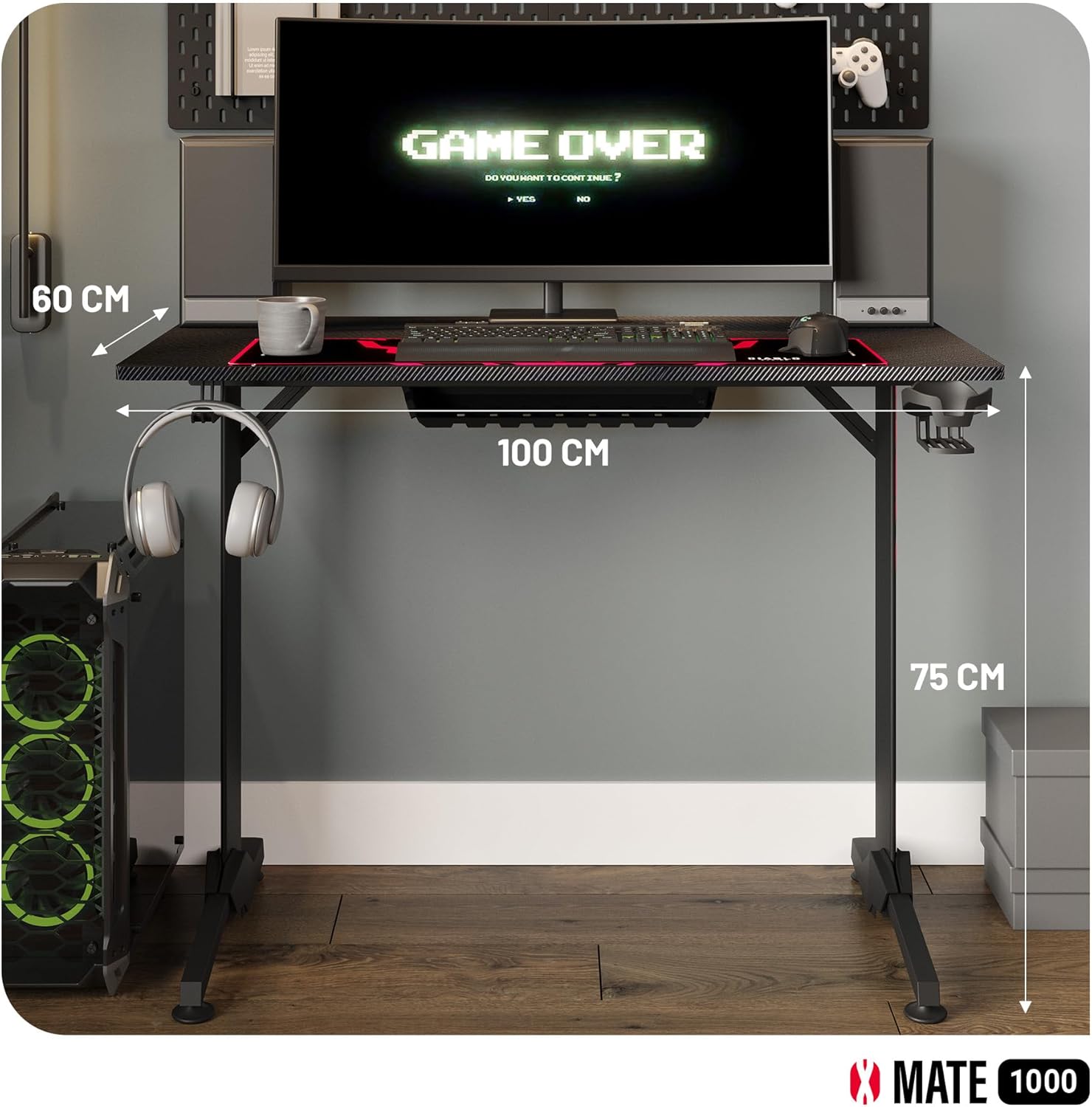
Image: Dimensions of the Diablo X-Mate 1000 Gaming Table.
8. Баталгаат хугацаа ба дэмжлэг
For warranty information, claims, or technical support, please refer to the documentation provided with your purchase or contact the seller/manufacturer directly. Keep your proof of purchase for any warranty-related inquiries.


