1. Танилцуулга
Thank you for choosing the EKSA Wireless Headset H5. This headset is designed to provide clear communication and comfortable wear for various professional environments, including office work, call centers, and trucking. It features AI noise-cancelling technology, dual connectivity options (Bluetooth and USB dongle), and extended battery life. This manual provides detailed instructions for setup, operation, maintenance, and troubleshooting to ensure optimal performance.
2. Багцын агуулга
Таны багцад бүх зүйл байгаа эсэхийг шалгана уу:
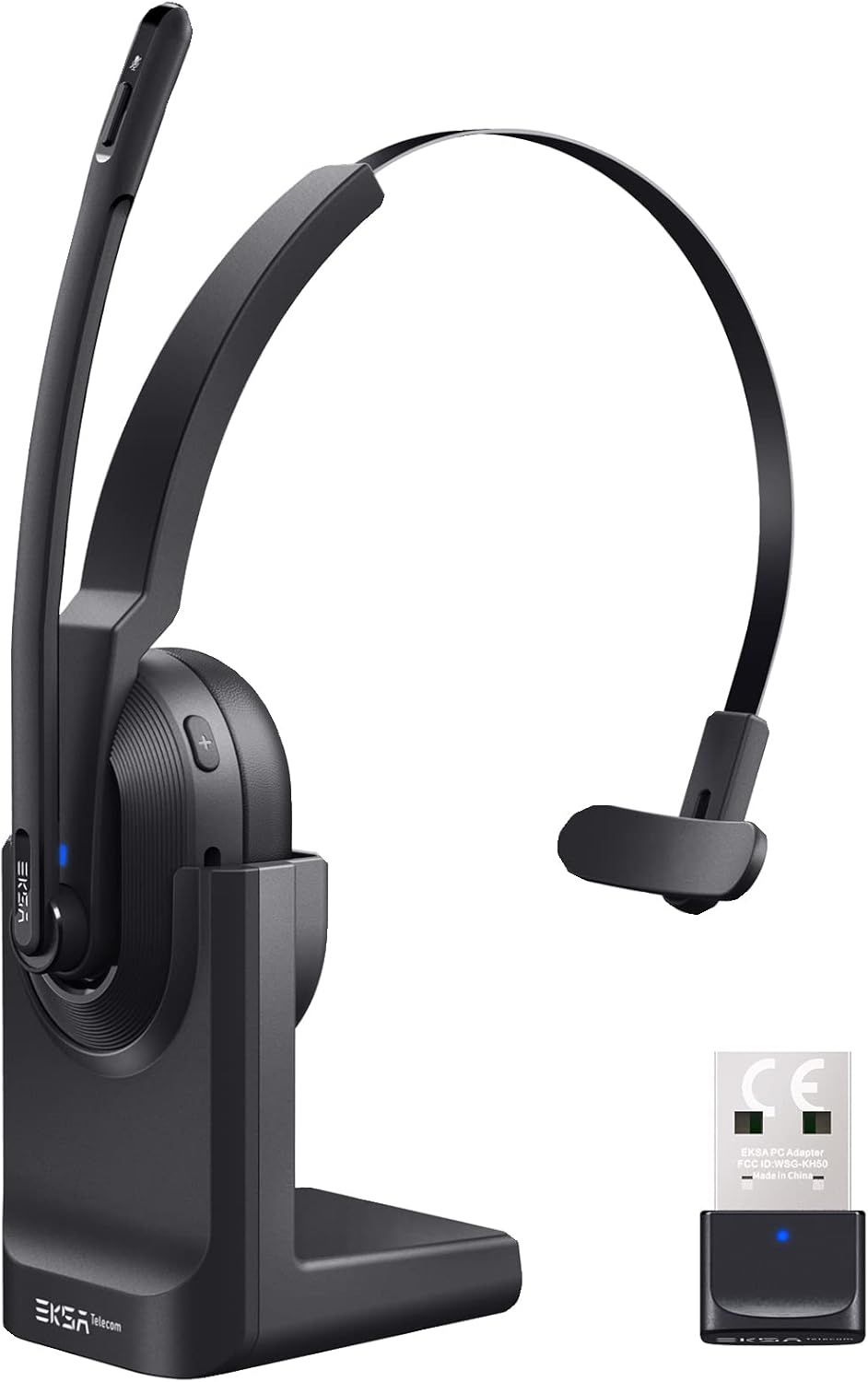
- EKSA Wireless Headset H5
- USB Dongle
- Цэнэглэх суурь
- USB-C цэнэглэгч кабель
- Хэрэглэгчийн гарын авлага
3. Бүтээгдэхүүн дууссанview
Familiarize yourself with the components of your EKSA Wireless Headset H5.

4. Тохиргоо
4.1 Чихэвчийг цэнэглэх
The headset supports two charging methods:
- Шууд цэнэглэх: Connect the USB-C charging cable directly to the headset's Type-C port and a power source.
- Цэнэглэх суурь: Place the headset onto the included charging base. Ensure the charging contacts align. Connect the charging base to a power source using the USB-C cable.

A full charge takes approximately 1.5 hours. The headset provides up to 25 hours of talk time and 45 hours of music playback at 70% volume.

4.2 USB Dongle-ээр холбогдох
For PC and laptop connections, the USB dongle provides a stable wireless link.
- Insert the USB dongle into an available USB port on your PC or laptop.
- The LED indicator on the dongle will turn solid blue when successfully paired with the headset.
- On your PC/laptop, navigate to Тохиргоо > Дуу.
- Тохируулах EKSA Telecom H5 as both the input and output device.

4.3 Bluetooth-ээр холбогдох 5.0
The headset can connect to mobile phones, tablets, and other Bluetooth-enabled devices.
- Ensure the headset is powered on and in pairing mode (the Bluetooth indicator will flash).
- Мобайл төхөөрөмж дээрээ очно уу Settings > Bluetooth & other devices.
- Сонго "Bluetooth эсвэл бусад төхөөрөмж нэмэх" болон хайх "EKSA Telecom H5".
- Сонго EKSA Telecom H5 хослох.
- Once connected, set EKSA Telecom H5 as the input and output device in your device's sound settings.


4.4 Meeting Application Settings
For applications like Zoom or Skype:
- In the application's audio/video settings, select EKSA Telecom H5 as both the microphone and speaker.

5. Ашиглалтын заавар
5.1 Үндсэн удирдлага
- Асаах/унтраах: Олон үйлдэлт товчлуурыг удаан дар.
- Дууг нэмэгдүүлэх/Дараагийн дуу: Press the '+' button. Hold for next track.
- Дууг бууруулах/Өмнөх дуу: Press the '-' button. Hold for previous track.
- Дуудлагад хариулах/дуусах: Press the Multi-Function Button during an incoming call or active call.
- Дуудлагаас татгалзах: Press and hold the Multi-Function Button during an incoming call.
- Микрофоны дууг хаах/асах: Press the Mute Button located on the microphone arm.
5.2 Чихэвч зүүх
The headset is designed for comfort and flexibility:
- The microphone arm can be rotated up to 270 degrees, allowing you to wear the headset on either your left or right ear.
- Толгойн туузыг найдвартай, тав тухтай байлгахын тулд тохируулна уу.

5.3 AI Noise Cancelling Microphone
The headset features an AI-powered Environmental Noise Cancelling (ENC) microphone with a Qualcomm chip. This technology intelligently suppresses up to 99.6% of environmental noise, ensuring your voice is clear during calls, even in noisy environments.


6. Засвар үйлчилгээ
Чихэвчнийхээ удаан эдэлгээ, оновчтой ажиллагааг хангахын тулд:
- Чихэвчийг зөөлөн, хуурай даавуугаар тогтмол цэвэрлээрэй.
- Чихэвчийг хэт өндөр температур, чийгшил эсвэл нарны шууд тусгалд өртүүлэхээс зайлсхий.
- Зүлгүүрийн цэвэрлэгч, уусгагчийг бүү ашигла.
- Store the headset in a cool, dry place when not in use, preferably on its charging base or in a protective case.
7. Алдаа засах
| Асуудал | Боломжит шалтгаан | Шийдэл |
|---|---|---|
| Чихэвч асахгүй байна | Батерей бага | Charge the headset using the USB-C cable or charging base. |
| No sound/microphone not working | Not connected or incorrect audio settings | Ensure the headset is paired via Bluetooth or dongle. Check your device's sound settings to confirm "EKSA Telecom H5" is selected as input/output. |
| Poor sound quality/intermittent connection | Out of range, interference, or low battery | Move closer to the connected device (within 10 meters). Avoid strong electromagnetic interference. Charge the headset. |
| Bluetooth-ээр холбох боломжгүй | Headset not in pairing mode or device already connected | Ensure the headset is in pairing mode (flashing indicator). Disconnect from any other devices. Restart Bluetooth on your device. |
| AI Noise Cancelling not effective | Микрофоны байрлал | Ensure the microphone is positioned correctly near your mouth for optimal voice pickup and noise suppression. |
8. Техникийн үзүүлэлтүүд
| Онцлог | Дэлгэрэнгүй |
|---|---|
| Загварын нэр | H5 |
| Холболтын технологи | Wireless (Bluetooth 5.0, USB Dongle) |
| Утасгүй сүлжээ | 10 метр хүртэл |
| Зайны хугацаа (Хөгжим) | 45 цаг хүртэл (70% эзлэхүүнтэй) |
| Батерейны хугацаа (Ярилцах) | 25 цаг хүртэл (70% эзлэхүүнтэй) |
| Цэнэглэх хугацаа | Ойролцоогоор 1.5 цаг |
| Дуу чимээний хяналт | Active Noise Cancellation (AI Environmental Noise Cancelling) |
| Микрофон | 270° Rotatable, AI ENC |
| Жин | Approx. 75g (headset only) / 0.54 kg (packaged) |
| Материал | Металл, хуванцар |
| Оруулсан бүрэлдэхүүн хэсгүүд | Charging Base, USB Dongle |
| Давтамжийн хүрээ | 20 Гц - 20,000 Гц |
9. Баталгаат хугацаа ба дэмжлэг
EKSA products come with a standard manufacturer's warranty. For specific warranty details, please refer to the warranty card included in your package or visit the official EKSA website. For technical support, troubleshooting assistance, or any inquiries, please contact EKSA customer service through their official channels. You can find contact information on the EKSA webсайт эсвэл таны худалдан авах платформоор дамжуулан.


