1. Танилцуулга
This manual provides comprehensive instructions for the installation, operation, and maintenance of your Segotep Memphis M-ATX Mini Tower PC Case. Please read this manual thoroughly before beginning assembly to ensure proper setup and optimal performance.
2. Үндсэн шинж чанарууд
- 40 Series GPU Support: Designed to accommodate high-performance 40 series GPUs, ideal for gaming and creative applications.
- Vertical Air Duct: Optimizes internal airflow for efficient cooling and heat dissipation, preventing component overheating.
- Tool-less Disassembly: Facilitates quick and easy installation or upgrades of components without the need for tools.
- 460cm² Side Panel Cooling Holes: Allows for flexible installation of additional fans or radiators to enhance cooling capabilities.
- Excellent Cable Management: Features dedicated routing and concealment options for cables, ensuring a clean build, maximized airflow, and minimized interference.
- Температуртай шилэн хавтангууд: Тодорхой өгдөг view of internal components and adds to the aesthetic appeal.
3. Тохиргоо ба суурилуулалт
Follow these steps for assembling your PC components within the Segotep Memphis case. Refer to the accompanying images and video for visual guidance.
3.1 Case Disassembly
Before installing components, carefully remove the side panels and top cover. The tempered glass side panels are designed for easy removal.

Зураг 3.1: Тэсэрсэн view of the Segotep Memphis case showing the removal of the 4mm tempered glass side panel, power cover, and removable dust filter.
Video 3.1: A detailed guide on disassembling the Segotep Slath Mini Case, which shares similar design principles for panel removal and internal access.
3.2 Motherboard and Storage Installation
The case supports M-ATX and ITX motherboards. Install your motherboard and then proceed with installing up to three SSDs and one HDD.

Figure 3.2: Layout indicating motherboard compatibility (M-ATX, ITX) and storage drive locations (3x SSD, 1x HDD).
3.3 GPU суурилуулах
The Segotep Memphis case is designed to support 40 Series GPUs with a maximum length of 350mm. Ensure proper seating in the PCIe slot.
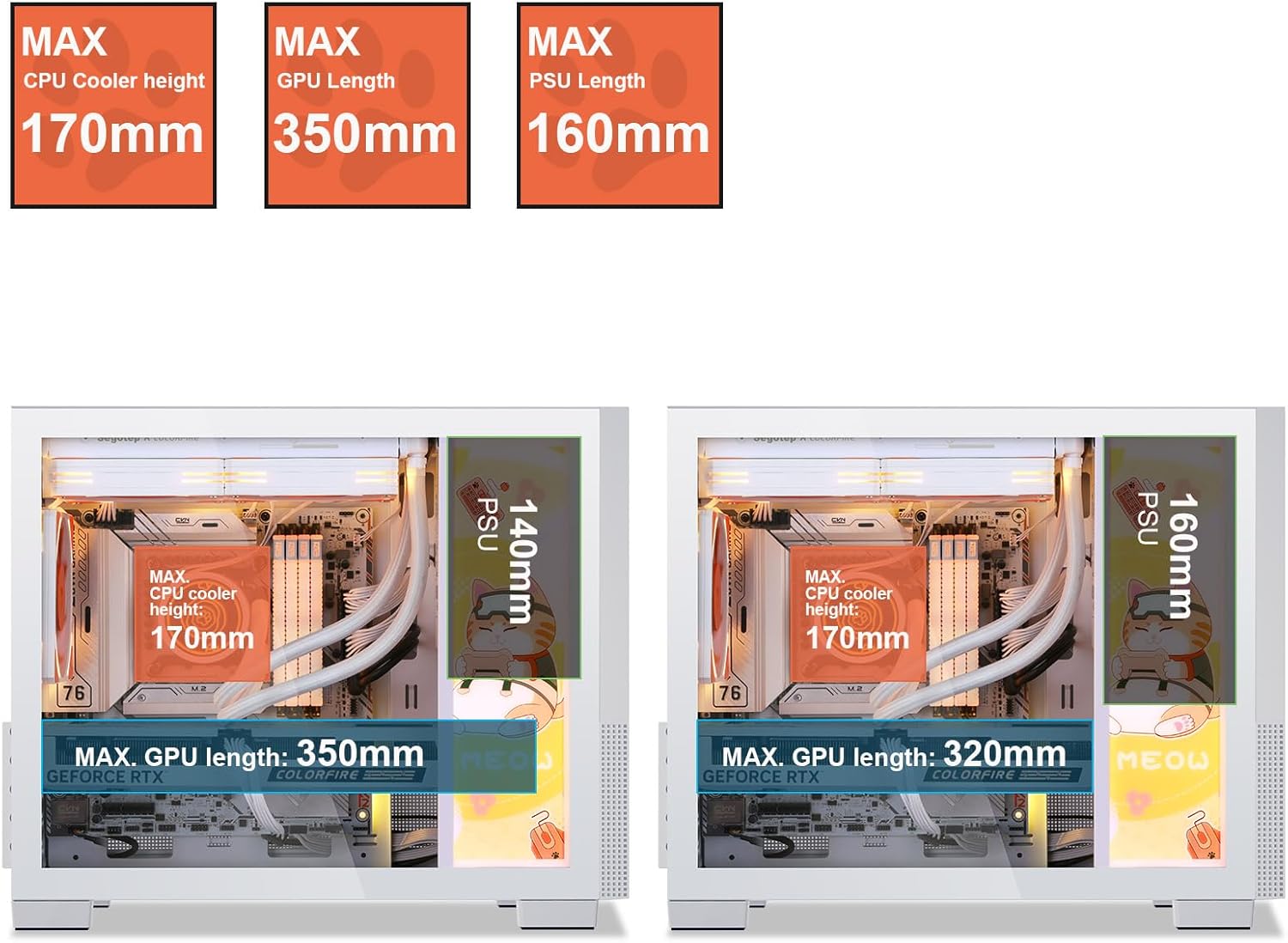
Figure 3.3: Component clearance specifications, including maximum GPU length.
3.4 Хөргөлтийн систем суурилуулах
The case supports up to 6 case fans and a 240mm liquid radiator. Install fans in designated areas for optimal airflow.

Figure 3.4: Fan and radiator support, showing locations for 120mm/140mm fans and a 240mm liquid radiator.

Figure 3.5: Vertical air duct design for efficient cooling.
3.5 Цахилгаан хангамжийн нэгж (PSU) суурилуулах
Install the PSU in its designated rear-mount location. The case supports PSUs with a maximum length of 160mm.
3.6 Кабелийн менежмент
-г ашиглах ample space and routing options behind the motherboard tray to manage cables effectively. This ensures a clean build and improved airflow.

Figure 3.6: Top panel and cable management features.
3.7 Дахин угсрах
Once all components are installed and cables are managed, carefully reattach the side panels and top cover. Ensure all screws are tightened securely.
4. Ашиглалтын заавар
After successful assembly, connect all necessary peripherals and power cables. The front I/O panel provides convenient access to power, audio, and USB 3.0 ports.

Зураг 4.1: Урд талын оролт/гаралтын самбарын зохион байгуулалт.
- Дэлгэц, гар, хулгана болон бусад дагалдах хэрэгслийг эх хавтан болон график карт дээрх тохирох портууд руу холбоно уу.
- Цахилгааны кабелийг цахилгаан тэжээлийн хэсэг болон ханын залгуурт холбоно уу.
- Press the Power button on the front I/O panel to turn on your system.
5. Засвар үйлчилгээ
Тогтмол засвар үйлчилгээ нь таны компьютерын гэр болон эд ангиудын урт наслалт, оновчтой ажиллагааг хангахад тусална.
- Тоосны шүүлтүүр: The Segotep Memphis case includes removable dust filters. Regularly clean these filters to maintain optimal airflow and prevent dust buildup inside the case.
- Гадна цэвэрлэгээ: Зөөлөн ашиглах, damp cloth to wipe down the exterior surfaces. Avoid abrasive cleaners that may damage the finish or tempered glass.
- Дотоод цэвэрлэгээ: Periodically use compressed air to remove dust from internal components, paying attention to fan blades and heatsinks. Ensure the system is powered off and unplugged before cleaning.
6. Алдаа засах
Хэрэв та компьютерээ бүтээхэд асуудалтай тулгарвал дараах нийтлэг алдааг олж засварлах алхмуудыг анхаарч үзээрэй.
- Эрчим хүчгүй:
- Ensure the PSU is switched on and properly connected to the wall outlet and motherboard.
- Verify all power cables (24-pin ATX, CPU, GPU) are securely seated.
- Урд талын самбарын цахилгаан унтраалгын эх хавтантай холболтыг шалгана уу.
- Дэлгэц байхгүй:
- Confirm the monitor cable is connected to the graphics card (not the motherboard, if a dedicated GPU is installed).
- График картыг PCIe үүрэнд дахин суулгана уу.
- Ensure RAM modules are properly seated in their slots.
- Хэт халалт:
- Check if all case fans are spinning and properly oriented for airflow.
- Тоосны шүүлтүүр болон дотоод эд ангиудыг цэвэрлэ.
- Verify CPU cooler installation and thermal paste application.
For further assistance, please refer to the support section or contact Segotep customer service.
7. Техникийн үзүүлэлтүүд
| Онцлог | Тодорхойлолт |
|---|---|
| Брэнд | Сеготеп |
| Загварын нэр | Мемфис |
| Кейсийн төрөл | Мини цамхаг |
| Эх хавтангийн нийцтэй байдал | Micro ATX, ITX |
| GPU-ийн хамгийн их урт | 350 мм |
| CPU хөргөгчийн хамгийн их өндөр | 170 мм |
| PSU-ийн хамгийн их урт | 160 мм |
| Liquid Radiator Support | 240 мм хүртэл |
| Фэнүүдийн дэмжлэг | 6 хүртэлх фен |
| Storage Drive Bays | 3x SSD, 1x HDD |
| Урд I / O портууд | 2x USB 3.0, Audio (Headphone/Microphone) |
| Материал | Металл, хатуу шил |
| Өнгө | Memphis-White |
| Зүйлийн жин | 9.55 фунт |
| Багцын хэмжээ | 19.25 x 15.5 x 11.5 инч |
8. Баталгаат хугацаа ба дэмжлэг
Segotep products are designed for reliability and performance. For warranty information and technical support, please refer to the official Segotep webсайт эсвэл харилцагчийн үйлчилгээтэй шууд холбогдоно уу. Баталгаат нэхэмжлэл гаргахын тулд худалдан авалтаа нотлох баримтаа хадгалаарай.
Холбоо барих мэдээлэл: Please visit the official Segotep webхамгийн сүүлийн үеийн тусламжийн холбоо барих мэдээллийг авах сайт.


