Танилцуулга
This manual provides essential information for the safe and efficient operation of your APC Smart-UPS SMT3000C 3000VA Uninterruptible Power Supply. Please read this manual thoroughly before installation and use.
Аюулгүй байдлын чухал заавар
Please read and follow all safety instructions carefully to prevent injury or damage to the unit. Retain this manual for future reference.
- Цахилгааны аюулгүй байдал: Connect the UPS to a grounded outlet only. Do not remove the grounding prong.
- Батерейны аюулгүй байдал: Batteries can present a risk of electrical shock and high short-circuit current. Observe proper polarity when connecting batteries.
- Суурилуулалт: UPS-ийг дотор, хэт их тоос шороо, идэмхий утаа, дамжуулагч бохирдлоос ангид, хяналттай орчинд суурилуулна уу.
- Үйлчилгээ: Refer all servicing to qualified service personnel. There are no user-serviceable parts inside the UPS.
Багцын агуулга
Verify that all items listed below are included in your package. If any items are missing or damaged, contact your dealer or APC.
- APC Smart-UPS SMT3000C Unit
- PowerChute Business Edition Software CD
- RS-232 кабель
- USB кабель
- Ethernet кабель
- Утасны зангиа
- Цэвэрлэгээний хэрэгсэл
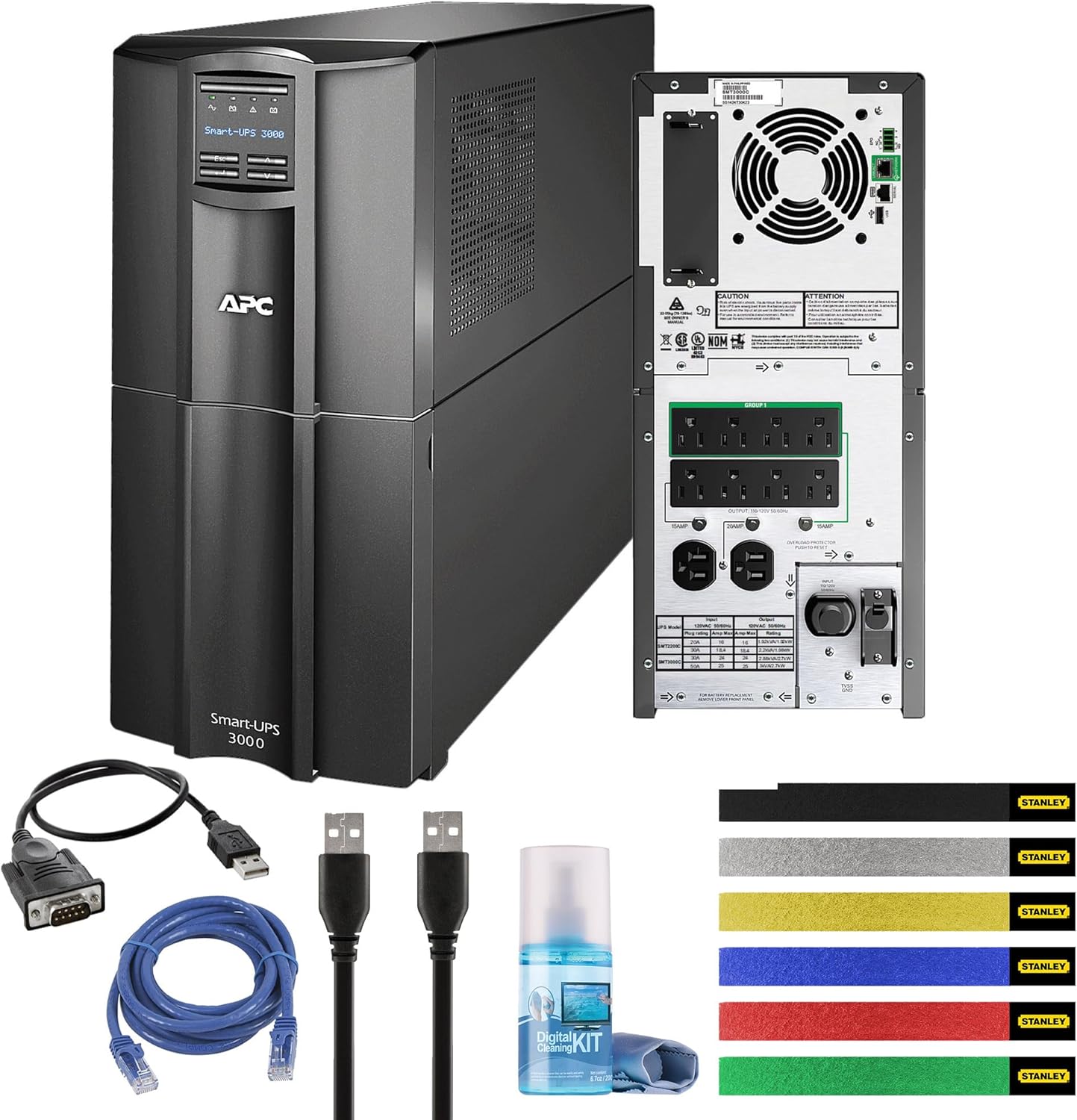
Зураг 1: APC Smart-UPS SMT3000C unit shown with all included accessories: RS-232 cable, USB cable, Ethernet cable, wire ties, and a cleaning kit.
Бүтээгдэхүүн дууссанview
The APC Smart-UPS SMT3000C is a Line Interactive Uninterruptible Power Supply designed to provide reliable power protection for your electronic equipment. It features Automatic Voltage Regulation (AVR) and SmartConnect for remote monitoring.
Урд самбар

Зураг 2: Урд view of the APC Smart-UPS SMT3000C, displaying the control panel and LCD screen for status monitoring.
Арын самбар
The rear panel provides all necessary connections for input power, protected outlets, and communication ports.
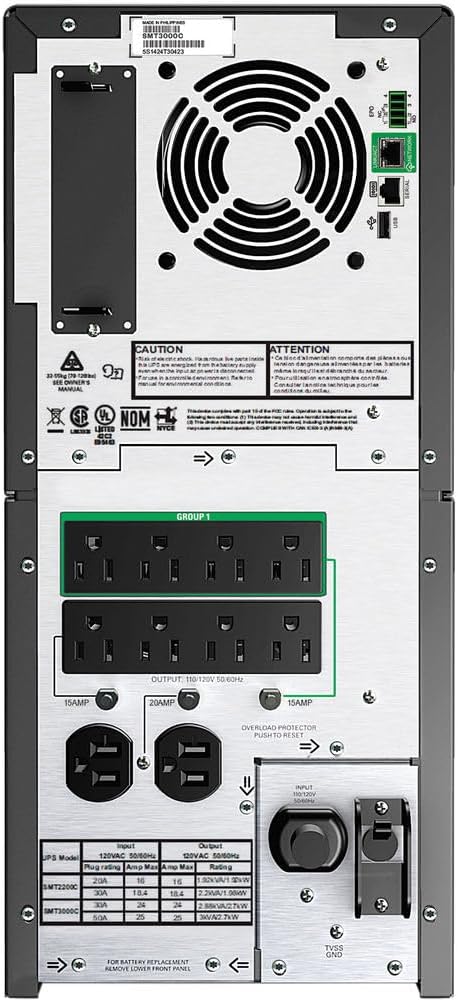
Зураг 3: Арын view of the APC Smart-UPS SMT3000C, highlighting the NEMA 5-30P input, (8) NEMA 5-15R outputs, (2) NEMA 5-20R outputs, communication ports (RS-232, USB, Ethernet), and a circuit breaker.
- Оролтын хүч: ОБЕГ 5-30P
- Output Outlets: (8) NEMA 5-15R, (2) NEMA 5-20R
- Харилцаа холбооны портууд: RS-232, USB, Ethernet (for SmartConnect)
- Хэлхээ таслагч: Хэт ачааллын хамгаалалт
Тохиргоо
1. Байрлуулах
Place the UPS on a flat, stable surface in a cool, dry, and well-ventilated area. Ensure adequate clearance around the unit for proper airflow. Avoid direct sunlight, heat sources, and excessive moisture.
2. Зайны холболт
The UPS is shipped with the internal battery disconnected for safety. Follow these steps to connect the battery:
- Remove the front bezel of the UPS.
- Locate the battery connector.
- Firmly push the battery connector together until it clicks into place.
- Урд талын хүрээг солих.
3. Тоног төхөөрөмжийг холбох
Connect your critical equipment (computers, servers, network devices) to the UPS output outlets. Ensure that the total load does not exceed the UPS capacity (2700W).
- Батерейны нөөцлөлт болон хэт хүчдэлээс хамгаалагдсан залгуурууд: These outlets provide battery power during outages and surge protection. Connect critical equipment here.
4. Цахилгаан хангамжид холбогдох
Plug the UPS power cord (NEMA 5-30P) into a dedicated, grounded 120V wall outlet. Avoid using extension cords or surge strips with the UPS input.
5. Анхны эрчим хүч
Press the power button on the front panel to turn on the UPS. The LCD display will illuminate, and the UPS will perform a self-test. Allow the UPS to charge for at least 24 hours before relying on it for extended battery backup.
6. SmartConnect Setup
The APC SmartConnect feature allows for remote monitoring of your UPS. Connect an Ethernet cable from the UPS SmartConnect port to your network. Follow the instructions provided with the SmartConnect service to register your device and enable remote monitoring, automatic notifications, and firmware updates.
UPS-ийг ажиллуулах
Асаах/унтраах
- Асаахын тулд: Дэлгэц асах хүртэл урд самбар дээрх асаах товчийг дараад барина уу.
- Унтраахын тулд: Дэлгэц унтрах хүртэл асаах товчийг дараад барина уу.
Автомат ботьtage Зохицуулалт (AVR)
UPS нь Автомат Volt функцтэйtage Regulation (AVR) нь бага хэмжээний хэмжээг автоматаар засдагtage fluctuations (sags and surges) without using battery power. This helps to preserve battery life and ensures a stable power supply to connected equipment.
Ажиллах цагийн мэдээлэл
The APC Smart-UPS SMT3000C provides varying runtimes depending on the connected load:
- 50W Load: Ойролцоогоор 563 минут
- 100W Load: Ойролцоогоор 330 минут
- 200W Load: Ойролцоогоор 172 минут
- 300W Load: Ойролцоогоор 112 минут
- 400W Load: Ойролцоогоор 81 минут
- 500W Load: Ойролцоогоор 63 минут
- 600W Load: Ойролцоогоор 51 минут
- 700W Load: Ойролцоогоор 42.2 минут
- 800W Load: Ойролцоогоор 35.7 минут
- 900W Load: Ойролцоогоор 30.6 минут
- 1000W Load: Ойролцоогоор 26.7 минут
- 1350W (Half Load): Ойролцоогоор 17.5 минут
- 1400W Load: Ойролцоогоор 16.6 минут
- 1600W Load: Ойролцоогоор 13.5 минут
- 1800W Load: Ойролцоогоор 11.2 минут
- 2000W Load: Ойролцоогоор 9.4 минут
- 2500W Load: Ойролцоогоор 6.1 минут
- 2700W (Full Load): Ойролцоогоор 5.7 минут
PowerChute Business Edition Software
Install the PowerChute Business Edition software on your connected computer to enable safe system shutdown during extended power outages, monitor UPS status, and configure various settings. Connect the UPS to your computer using the provided USB or RS-232 cable.
Засвар үйлчилгээ
Батерейны арчилгаа
The UPS batteries are designed for a specific lifespan. Factors such as ambient temperature, number of discharge cycles, and discharge depth affect battery life. Replace batteries when the UPS indicates a battery fault or when runtime significantly decreases.
- Perform regular self-tests (via the UPS display or PowerChute software) to assess battery health.
- Avoid operating the UPS in environments with high temperatures, as this can shorten battery life.
Цэвэрлэгээ
Regularly clean the exterior of the UPS with a soft, dry cloth. Use the provided cleaning kit for gentle cleaning. Ensure the UPS is powered off and disconnected from utility power before cleaning. Do not use liquid or aerosol cleaners directly on the unit.
Алдааг олж засварлах
This section provides solutions to common issues you may encounter with your UPS. For more complex problems, contact APC technical support.
- UPS асахгүй байна: Ensure the battery is properly connected and the UPS is plugged into a live wall outlet. Check the input circuit breaker.
- UPS beeps continuously: This usually indicates an overload condition or a low battery. Reduce the connected load or allow the battery to charge.
- Connected equipment loses power during an outage: The UPS may be overloaded, or the battery may be depleted or faulty. Verify the load and battery status.
- SmartConnect not connecting: Ensure the Ethernet cable is securely connected and your network settings allow communication. Check the SmartConnect portal for device registration status.
Үзүүлэлтүүд
| Онцлог | Дэлгэрэнгүй |
|---|---|
| Загварын дугаар | SMT3000C |
| Хүчин чадал | 3000ВА / 2700Вт |
| Оролтын хэмжээtage | 120 вольт |
| Оролтын холболт | ОБЕГ 5-30P |
| Гаралтын холболтууд | (8) NEMA 5-15R, (2) NEMA 5-20R |
| Зайны төрөл | Хар тугалгын хүчил |
| Бүтээгдэхүүний хэмжээс | 6 x 6 x 6 инч |
| Зүйлийн жин | 124.9 фунт |
| Өнгө | Хар |
| Эрчим хүчний Оддын гэрчилгээтэй | Тиймээ |
Баталгаат болон дэмжлэг
APC provides a standard warranty for this product. For detailed warranty information, please refer to the warranty card included with your product or visit the official APC website. For technical support, product registration, or service inquiries, please contact APC customer support through their official channels.
The APC SmartConnect feature is free during the standard warranty period of the UPS, providing advanced support services and remote monitoring.