1. Танилцуулга
The SCHWAIGER SOEM0100 Energy Cost Meter is designed to help you monitor and manage the electricity consumption and associated costs of your household appliances. With its large, rotatable display and multiple viewing modes, it provides clear and accurate data, enabling informed decisions about energy usage. This manual will guide you through the setup, operation, and maintenance of your device.
Official Product Summary Video for SCHWAIGER SOEM0100. This video provides a brief overview of the energy cost meter's features and design.
2. Аюулгүй байдлын мэдээлэл
- Хэрэглэхийн өмнө бүх зааврыг анхааралтай уншина уу.
- Do not exceed the maximum load of 16А / 3600Вт. Overloading can cause damage to the device and connected appliances, and poses a fire hazard.
- This device is intended for indoor use only. Do not expose to moisture or extreme temperatures.
- Төхөөрөмжийг задлах эсвэл засах гэж бүү оролд. Бүх засвар үйлчилгээг мэргэшсэн ажилтнуудад даатга.
- Хүүхдийн гар хүрэхгүй газар хадгална.
- Ensure the device is securely plugged into a wall socket and that the appliance is securely plugged into the meter.
3. Багцын агуулга
- 1x SCHWAIGER SOEM0100 Energy Cost Meter
- 1х зааварчилгааны гарын авлага (энэ баримт бичиг)
4. Бүтээгдэхүүн дууссанview
The SCHWAIGER SOEM0100 features a compact design with an integrated display and intuitive controls for easy operation.
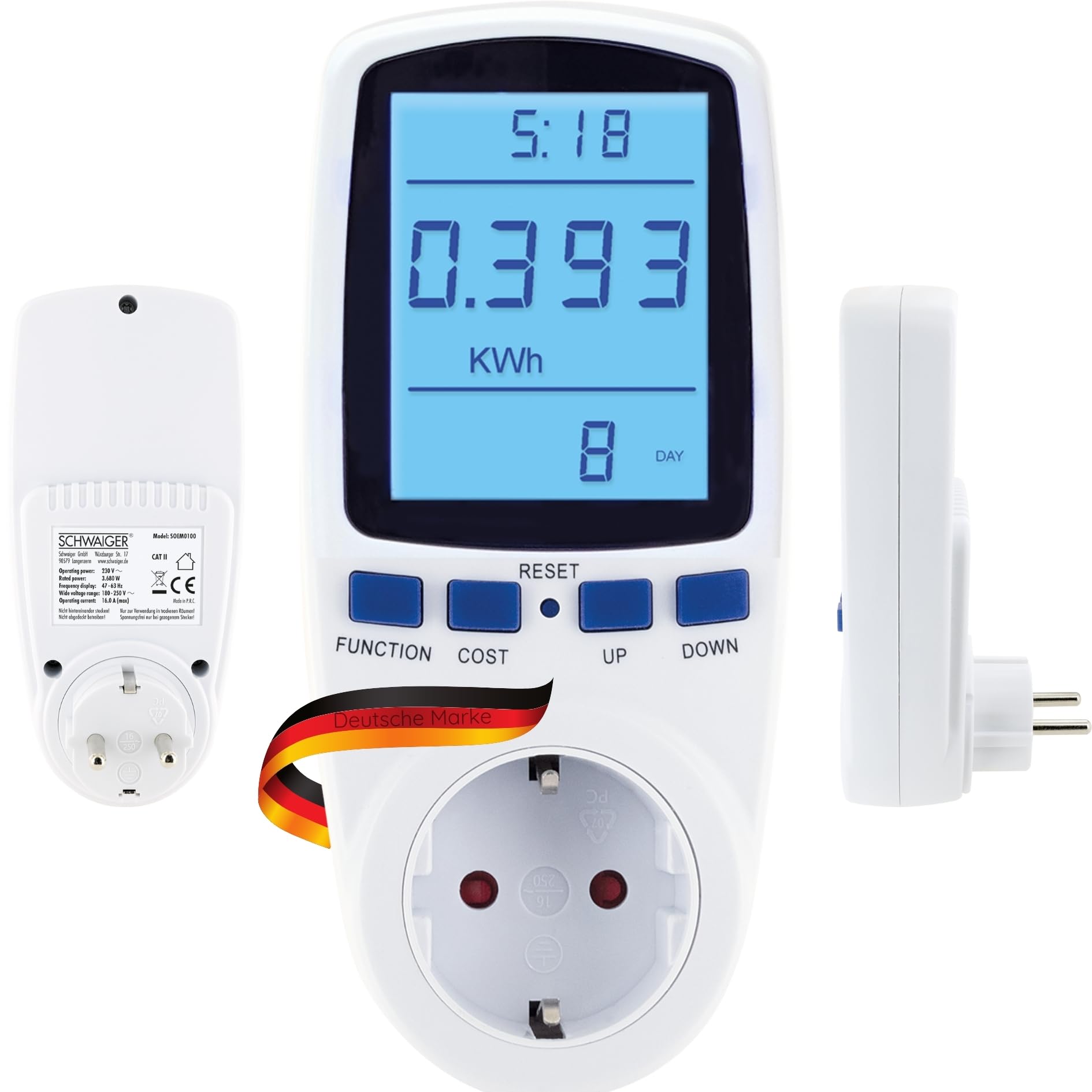


Хяналт ба дэлгэц:
- Дэлгэц: Large, 180° rotatable, backlit LCD for clear visibility of measurement data.
- FUNCTION товчлуур: Cycles through the 7 different display modes (e.g., KWh, Watt, Voltage, Frequency, Cost, Total Time).
- ҮНИЙН ТОВЧ: Used to set the electricity cost per KWh.
- RESET товч: Хуримтлагдсан өгөгдлийг дахин тохируулна.
- ДЭЭШ/ДООШ товчлуурууд: Used for adjusting values during settings.
5. Тохиргоо
- Тоолуурыг залгана уу: Insert the SCHWAIGER SOEM0100 into a standard wall socket.
- Анхны асаалт: The display will light up, and the device will be ready for use.
- Set Current Time (Optional): If the device has a clock function, use the appropriate buttons (refer to specific button combinations if available, otherwise assume 'FUNCTION' or 'SET' to access time settings and 'UP/DOWN' to adjust).
- Set Electricity Cost:
- дээр дарна уу ЗАРДАЛ button. The cost setting will appear on the display.
- -г ашиглана уу UP болон ДООШ buttons to adjust the cost per KWh according to your local electricity tariff.
- дарна уу ЗАРДАЛ тохиргоог баталгаажуулж, хадгалахын тулд дахин дарна уу.
- Төхөөрөмжийг холбох: Plug the appliance you wish to monitor into the socket on the front of the energy cost meter.

6. Ашиглалтын заавар
Viewing Measurement Data:
дээр дарна уу ФУНКЦИЯ button repeatedly to cycle through the 7 different display modes. These modes typically include:
- Current Power (Watt): Shows the real-time power consumption of the connected appliance.
- Accumulated Energy (KWh): Displays the total energy consumed since the last reset.
- Ботьtage (V): Shows the current line voltage.
- Одоогийн (A): Displays the current drawn by the appliance.
- Давтамж (Гц): Shows the mains frequency.
- Electricity Cost: Calculates the total cost based on accumulated energy and your set tariff.
- Total Operating Time: Shows the duration the appliance has been connected and powered on.
Өгөгдөл хадгалах:
The SCHWAIGER SOEM0100 features internal memory to store accumulated data (KWh, cost, total operating time) even during a power outage or when unplugged. This ensures continuous tracking of your energy usage.
Өгөгдлийг дахин тохируулах:
To clear all accumulated data (KWh, cost, total operating time) and start a new measurement cycle, press and hold the RESET button for approximately 3-5 seconds until the display clears or resets to zero.
7. Засвар үйлчилгээ
- Цэвэрлэгээ: Төхөөрөмжийг зөөлөн, хуурай даавуугаар арчина. Зүлгүүрийн цэвэрлэгч, уусгагчийг бүү ашигла.
- Хадгалах: When not in use for extended periods, unplug the device and store it in a cool, dry place away from direct sunlight.
- Шалгалт: Periodically check the device and its connections for any signs of damage. Do not use if damaged.
8. Алдаа засах
| Асуудал | Боломжит шалтгаан | Шийдэл |
|---|---|---|
| Дэлгэц хоосон эсвэл асахгүй байна. | No power to the socket or device is faulty. | Check if the wall socket is live. Try plugging another device into the socket. If the problem persists, the meter may be faulty. |
| Incorrect readings or no readings. | Төхөөрөмж зөв холбогдоогүй эсвэл тоолуур эвдэрсэн байна. | Ensure the appliance is fully plugged into the meter. Try resetting the meter by holding the RESET button. |
| Cost calculation is incorrect. | Electricity cost per KWh is set incorrectly. | Re-enter the correct electricity cost per KWh using the COST and UP/DOWN buttons. |
| Device feels warm. | Normal operation for some loads, or device is overloaded. | Ensure the connected appliance does not exceed the maximum load of 16A / 3600W. If it continues to feel excessively hot, discontinue use. |
9. Техникийн үзүүлэлтүүд
| Брэнд | ШВАЙГЕР |
| Загвар | SOEM0100 |
| Үйлдлийн хүч | 230V ~ 50Гц байна |
| Макс. Ачаалал | 16А / 3600Вт |
| Ботьtage Хамрах хүрээ | 180-250 В |
| Давтамжийн дэлгэц | 47-63 Гц |
| Жин | 210 гр |
| Оруулсан бүрэлдэхүүн хэсгүүд | Эрчим хүчний зардлын тоолуур |
Тайлбар: Бүтээгдэхүүний үзүүлэлтүүдийг урьдчилан мэдэгдэлгүйгээр өөрчлөх боломжтой.

10. Баталгаат хугацаа ба дэмжлэг
Баталгаат хугацаа:
The SCHWAIGER SOEM0100 Energy Cost Meter comes with a 2 жилийн баталгаат хугацаа from the date of purchase. This warranty covers manufacturing defects and material faults under normal use. It does not cover damage caused by misuse, accidents, unauthorized modifications, or natural disasters.
Хэрэглэгчийн дэмжлэг:
For technical assistance, troubleshooting, or warranty claims, please contact SCHWAIGER customer support. You can find contact information on the official SCHWAIGER webсайт эсвэл жижиглэн худалдаалагчаар дамжуулан.
Visit the official SCHWAIGER webдэлгэрэнгүй мэдээллийг сайтаас авна уу: SCHWAIGER Official Webсайт