1. Аюулгүй байдлын мэдээлэл
Унаж явахдаа үргэлж дуулга өмс.
Operating an electric kickscooter carries inherent risks, including but not limited to loss of control, collisions, and falls. To minimize these risks, it is crucial to read and follow all instructions and warnings in this manual. Ensure you understand how to operate the kickscooter safely before your first ride.
- Хамгаалалтын малгай, өвдөгний дэвсгэр, тохойны жийргэвч зэрэг хамгаалалтын хэрэгслийг үргэлж өмс.
- Do not ride in wet conditions, on slippery surfaces, or in poor visibility.
- Adhere to local laws and regulations regarding electric kickscooter use.
- Бусад тээврийн хэрэгсэл болон явган зорчигчоос аюулгүй хурд, зайг баримтал.
- Avoid sudden maneuvers, sharp turns, and excessive speeds.
- Do not allow children under the recommended age or individuals exceeding the weight limit to operate the kickscooter.
- Regularly inspect the kickscooter for any damage or loose parts before each ride.
2. Бүтээгдэхүүн дууссанview
The Segway Ninebot F2 Pro Electric KickScooter is designed for urban commuting, offering a balance of performance, safety, and convenience. It features a robust design with advanced functionalities.
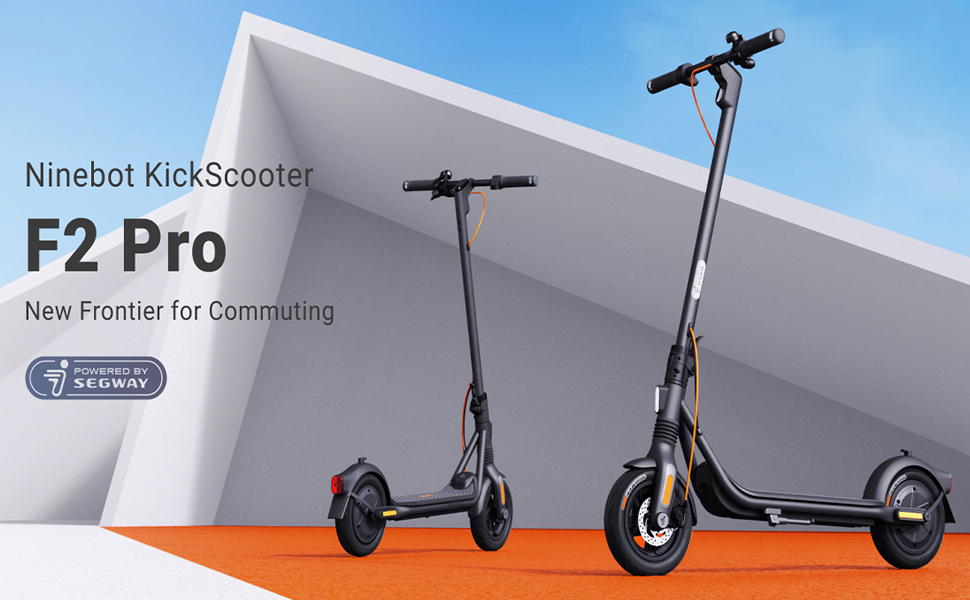
Image: The Segway Ninebot F2 Pro Electric KickScooter, showcasing its design for urban commuting.
Гол онцлогууд:
- Хамгийн их хурд: 32 км/ц (20 миль/цаг)
- Хамгийн их хязгаар: 55 км (34 миль) хүртэл
- Мотор гаралт: 800W maximum power
- Дугуй: 10-inch self-sealing tubeless tires
- Түдгэлзүүлэх: Front spring suspension for a smoother ride
- Тоормосны систем: Dual braking system (front disc brake + rear E-ABS)
- Аюулгүй байдлын онцлогууд: Integrated turn signals, Traction Control System (TCS), high-decibel electric horn, built-in LED headlight.
- Холболт: Bluetooth connection, Apple Find My compatibility.
- Зөөврийн чадвар: Portable folding design.

Зураг: Урд view of the Segway Ninebot F2 Pro Electric KickScooter.

Зураг: хажуу тал view of the Segway Ninebot F2 Pro Electric KickScooter.

Зураг: Ар талд view of the Segway Ninebot F2 Pro Electric KickScooter.
3. Тохиргоо
3.1 КикСкутерийг дэлгэх
- Кикскутерийг хавтгай гадаргуу дээр байрлуул.
- Lift the stem until it locks into the upright position. Ensure the locking mechanism is securely engaged.
- Скутерийг дэмжихийн тулд хөлийн тавиурыг задлаарай.

Image: Dimensions of the Segway Ninebot F2 Pro KickScooter in both folded and unfolded states.
3.2 Анхны цэнэглэлт
Before first use, fully charge the kickscooter's battery. Connect the charger to the charging port and then to a power outlet. The charging indicator on the charger will change color (e.g., red to green) when fully charged.
- Бүрэн цэнэглэхэд цэнэглэх хугацаа ойролцоогоор 8 цаг байна.
- Only use the official charger provided with the kickscooter.

Зураг: Дотоод view of the battery cells within the kickscooter deck, illustrating the 34-mile max range and 8-hour fast charging capability.
3.3 Connecting to the Smart App
Download the official Segway-Ninebot app from your smartphone's app store. Follow the in-app instructions to connect your F2 Pro KickScooter via Bluetooth. The app allows for firmware updates, riding status monitoring, and scooter locking/unlocking.

Image: Screenshot of the Segway-Ninebot smart app, demonstrating features like Bluetooth connection, lock/unlock, riding status, cruise mode, and firmware updates.
4. Ашиглалтын заавар
4.1 Асаах/унтраах
- Асаах: Press the power button located on the display panel.
- Унтраах: Цахилгаан товчийг хэдэн секундын турш дарна уу.
4.2 Riding the KickScooter
- Нэг хөлийг тавцан дээр чанга тавь.
- Анхны эрч хүчээ авахын тулд нөгөө хөлөөрөө түлх.
- Хөдөлгөөний дараа хөдөлгүүрийг ажиллуулахын тулд хурдны хөшүүргийг зөөлөн дарна уу.
- Хоёр дахь хөлөө тавцан дээр тавь.
- To slow down, release the throttle. To brake, use the brake lever on the handlebar.

Image: Detail of the front wheel, highlighting the disc brake and front suspension system.

Image: Diagram showing the front spring suspension, designed for smooth riding over bumps.
4.3 Using Turn Signals and Horn
- Эргэлтийн дохио: Use the switch on the handlebar to activate the integrated turn signals for indicating turns.
- Эвэр: Press the horn button on the handlebar to alert others.

Image: Close-up of the handlebar, showing the activated turn signal for improved visibility.
4.4 Тээвэрлэхэд зориулж нугалах
To fold the kickscooter for storage or transport:
- Ensure the kickscooter is powered off.
- Locate the folding mechanism at the base of the stem.
- Follow the specific instructions in the quick start guide to release the latch and fold the stem down until it clicks into place.

Image: A person carrying the folded Segway Ninebot F2 Pro KickScooter, demonstrating its portability.
5. Засвар үйлчилгээ
Regular maintenance ensures the longevity and safe operation of your Segway Ninebot F2 Pro KickScooter.
5.1 Ерөнхий цэвэрлэгээ
Кикскотерыг зөөлөн, d-ээр арчинаamp cloth. Do not use alcohol, gasoline, kerosene, or other corrosive chemical solvents to clean the scooter. Do not wash the scooter with a high-pressure water jet.
5.2 Дугуйны арчилгаа
The F2 Pro features 10-inch self-sealing tubeless tires, which reduce the risk of punctures. However, it is important to regularly check tire pressure and inflate to the recommended PSI for optimal performance and safety.

Image: Diagram showing the self-sealing layer within the tire, designed to prevent punctures.
5.3 Зайны засвар үйлчилгээ
- Avoid fully discharging the battery. Charge it regularly, even if not in use for extended periods.
- Кикскотерыг сэрүүн, хуурай газар, нарны шууд тусгал болон хэт өндөр температураас хол хадгална уу.
- Зайны багцыг задлах эсвэл өөрчлөхийг бүү оролдоорой.
5.4 Тоормосны системийн шалгалт
Periodically check the functionality of both the front disc brake and the rear E-ABS brake. Ensure the brake levers operate smoothly and the braking power is effective. If you notice any issues, consult a qualified technician.

Image: Illustration detailing the dual braking system, which includes a front disc brake and a rear E-ABS for effective stopping power.
6. Алдаа засах
This section addresses common issues you might encounter with your F2 Pro KickScooter.
6.1 KickScooter Not Powering On
- Батерейны түвшинг шалгах: Ensure the battery is sufficiently charged. Connect the charger and attempt to power on after a short charge.
- Цахилгаан товч: Confirm the power button is being pressed correctly and held for the required duration.
6.2 Програмын холболтын асуудал
- Bluetooth: Ensure Bluetooth is enabled on your smartphone and the kickscooter is within range.
- Програмыг дахин эхлүүлэх: Close and reopen the Segway-Ninebot app.
- Програм хангамжийн шинэчлэлт: If possible, check for and install any pending firmware updates via the app on a successful connection.
6.3 Reduced Performance or Range
- Дугуйн даралт: Incorrect tire pressure can significantly impact range and performance. Check and adjust to recommended levels.
- Унаах нөхцөл: Steep inclines, heavy loads, and aggressive riding (e.g., frequent acceleration/braking) will reduce range.
- Батерейны эрүүл мэнд: Over time, battery capacity may decrease. Ensure proper battery maintenance.
7. Техникийн үзүүлэлтүүд
| Онцлог | Тодорхойлолт |
|---|---|
| Загварын нэр | F2 Pro |
| Загварын дугаар | 051203U |
| Брэнд | Сегвей |
| Хамгийн их хурд | 32 км/ц (20 миль/цаг) |
| Макс муж | 55 км (34 миль) хүртэл |
| Мотор гаралт | 900 Вт (Оргил) |
| Хилл зэрэглэл | 22% хүртэл |
| Дугуйн хэмжээ | 10 Inches (Self-Sealing Tubeless) |
| Тоормосны төрөл | Front Disc Brake, Rear E-ABS |
| Түдгэлзүүлэх | Front Spring Suspension |
| Зайны төрөл | Лити ион (1 шаардлагатай, багтсан) |
| Цэнэглэх хугацаа | Ойролцоогоор 8 цаг |
| Бүтээгдэхүүний хэмжээс (нээлттэй) | 56.9 x 125.22 x 115.82 см |
| Зүйлийн жин | 18.5 кг (ойролцоогоор 39 фунт) |
| Хамгийн их жингийн багтаамж | 265 фунт |
| Насны хүрээ | Насанд хүрсэн |
| Материал | Aluminum (Frame: Alloy Steel) |
| Усны эсэргүүцэл | IPX5 Resistant |
| Оруулсан бүрэлдэхүүн хэсгүүд | Цэнэглэгч |

Image: Infographic detailing key specifications and features such as range, speed, power, climbing slope, TCS, dual braking, front suspension, electric horn, self-sealing tires, and Apple Find My compatibility.
8. Баталгаат хугацаа ба дэмжлэг
Specific warranty details and support contact information are typically provided with the product packaging or available on the manufacturer's official website. Please refer to the documentation included with your purchase or visit the official Segway website for the most up-to-date information regarding warranty coverage and customer support.
9. Бүтээгдэхүүний видео
Энэхүү гарын авлагад оруулах боломжтой өгөгдөлд худалдагчийн албан ёсны бүтээгдэхүүний видео бичлэг ороогүй болно.


