1. Танилцуулга
Welcome to the user manual for your Hoppstar Expert Digital Camera. This manual provides essential information on how to set up, operate, and maintain your camera, ensuring a fun and creative experience for young photographers. Please read this manual carefully before using the camera and keep it for future reference.
The Hoppstar Expert is designed specifically for children, offering a user-friendly interface, durable construction with interchangeable silicone covers, and a range of exciting features including a selfie camera, video recording, picture frames, photo filters, and face detection.
2. Аюулгүй байдлын мэдээлэл
- This product is intended for children aged 3 years and older. Adult supervision is recommended during use.
- Камерыг ус эсвэл хэт их чийгэнд бүү тавь.
- Avoid dropping the camera or subjecting it to strong impacts, even with the protective silicone cover.
- Keep small parts, such as memory cards, out of reach of very young children to prevent choking hazards.
- Use only the charging cable provided or a compatible USB charger.
- Камерыг өөрөө задлах эсвэл засах гэж бүү оролдоорой. Асуудал гарвал хэрэглэгчийн дэмжлэгтэй холбогдоно уу.
3. Багцын агуулга
Дараах зүйлсийн нүдийг шалгана уу.
- Hoppstar Expert Digital Camera
- Зааварчилгааны гарын авлага
- USB цэнэглэгч кабель
- Lanyard/Strap
- USB-C-аас USB-A адаптер
- USB-C to Micro-USB Adapter
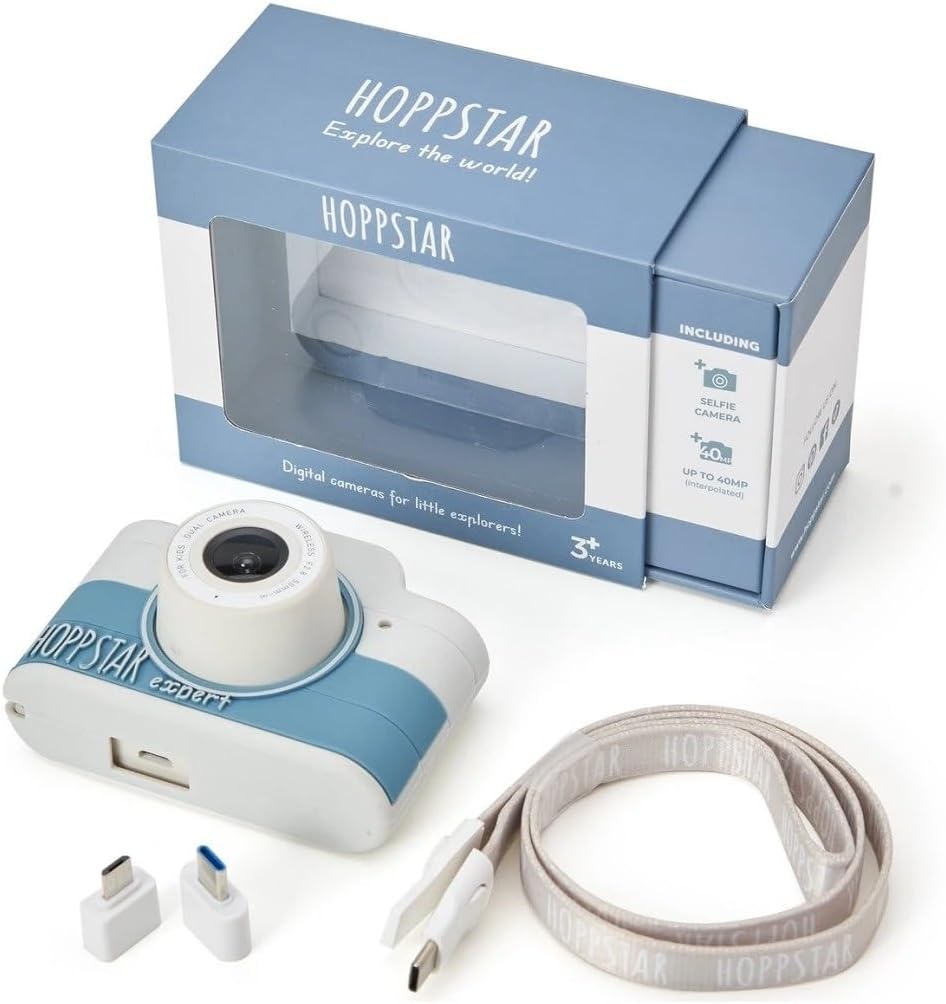
Image: Hoppstar Expert camera shown with its retail packaging, USB charging cable, lanyard, and two USB adapters.
4. Бүтээгдэхүүн дууссанview
Урд View

Image: The front of the Hoppstar Expert camera, featuring the main lens, flash, and the 'Hoppstar Expert' branding on the blue and white body.
- Үндсэн линз: For taking standard photos and videos.
- Flash/Light: Гэрэл багатай нөхцөлд гэрэлтүүлэг өгдөг.
- Микрофон: Видео бичлэг хийх явцад дуу хураана.
Арын View

Image: The back of the Hoppstar Expert camera, displaying the LCD screen and the control buttons on either side.
- LCD дэлгэц: Цэсийг шууд харуулна viewболон дахин тоглуулах.
- Селфи камер: Located above the screen for self-portraits.
- Хяналтын товчлуурууд: Navigation, OK, Menu, and other function buttons.
5. Тохиргоо
5.1 Камерыг цэнэглэж байна
Before first use, fully charge the camera's internal battery. Connect the provided USB charging cable to the camera's USB port and to a USB power source (e.g., computer, wall adapter). The charging indicator light will show the charging status and turn off when fully charged.
5.2 Санах ойн карт оруулах
The Hoppstar Expert comes with 16 GB of internal storage. If you wish to expand storage, locate the memory card slot (usually on the side or bottom) and insert a compatible microSD card (not included) until it clicks into place. Ensure the camera is powered off before inserting or removing the card.
5.3 Асаах/унтраах
Камерыг асаах эсвэл унтраахын тулд Асаах товчийг (ихэвчлэн дээд эсвэл хажуу талд байрладаг) хэдэн секундын турш дарна уу.
6. Ашиглалтын заавар
6.1 Үндсэн удирдлага
- OK товчлуур: Цэс дэх сонголтыг баталгаажуулах, зураг авах эсвэл видео бичлэгийг эхлүүлэх/зогсоох.
- Навигацийн товчлуурууд: Used to move through menu options (Up, Down, Left, Right).
- Цэсийн товчлуур: Accesses the camera's settings and feature options.
- Горимын товчлуур: Зураг, видео болон тоглуулах горимуудын хооронд шилждэг.
6.2 Зураг авах
In photo mode, frame your shot using the LCD screen. Press the OK button to capture a photo. The camera supports both front and selfie cameras. To switch between cameras, navigate to the camera settings in the menu or use a dedicated button if available.
6.3 Видео бичлэг хийх
Switch to video mode. Press the OK button once to start recording and press it again to stop. Videos are saved to the internal memory or inserted memory card.
6.4 Бүтээлч шинж чанаруудыг ашиглах нь
The Hoppstar Expert includes several creative features:
- Picture Frames: Apply fun borders to your photos. Access this feature through the camera's menu.
- Photo Filters: Change the look and feel of your photos with various color and effect filters.
- Нүүр илрүүлэх: The camera can automatically detect faces in the frame, assisting with focus.
Explore these options within the camera's menu settings to enhance your photos and videos.
7. Засвар үйлчилгээ
- Цэвэрлэгээ: Use a soft, dry cloth to clean the camera body and screen. For the lens, use a specialized lens cleaning cloth. Do not use liquid cleaners.
- Силикон бүрхүүл: The interchangeable silicone cover can be removed and cleaned with mild soap and water if necessary. Ensure it is completely dry before reattaching.
- Батерейны арчилгаа: Зайны ашиглалтын хугацааг уртасгахын тулд зайгаа ойр ойрхон бүрэн цэнэггүй болгохоос зайлсхий. Камераа удаан хугацаагаар ашиглаагүй байсан ч тогтмол цэнэглэ.
- Хадгалах: Камерыг нарны шууд тусгал, хэт температураас хол, сэрүүн, хуурай газар хадгална.
8. Алдаа засах
Камер асахгүй байна
- Батерей цэнэглэгдсэн эсэхийг шалгана уу. Камерыг тэжээлийн эх үүсвэрт холбоод дахин оролдоно уу.
- Press and hold the Power button for a longer duration (5-10 seconds).
Poor Image/Video Quality
- Линз нь цэвэр, толбо, тоосгүй эсэхийг шалгаарай.
- Check lighting conditions. Optimal results are achieved in well-lit environments.
- Ensure the camera is held steady during capture.
Камер хөлддөг/хариу өгөхгүй байна
- Try resetting the camera by pressing the reset button (if available, often a small pinhole) or by holding the Power button until it turns off and then restarting.
Зураг/видео хадгалах боломжгүй
- Check if the internal memory or inserted memory card is full. Delete unnecessary files эсвэл шинэ карт оруулах.
- Ensure the memory card is properly inserted and not corrupted.
If you encounter issues not listed here or if troubleshooting steps do not resolve the problem, please contact Hoppstar customer support.
9. Техникийн үзүүлэлтүүд
| Онцлог | Тодорхойлолт |
|---|---|
| Брэнд нэр | Hoppstar |
| Загварын нэр | Hoppstar Expert Yale |
| Загварын дугаар | 76893 |
| Өнгө | Йел |
| Багцын хэмжээ | 14.3 x 8.7 x 5.1 см |
| Тасралтгүй буудлагын хурд | 30 fps |
| Суулгасан бүрэлдэхүүн хэсгүүд | Camera + Instruction Manual |
| Загварын жил | 2023 |
| Киноны өнгө | Өнгө |
| Өртөлтийг хянах төрөл | Автомат |
| Хөшигний төрөл | Цахим |
10. Баталгаат хугацаа ба дэмжлэг
The Hoppstar Expert Digital Camera comes with a standard manufacturer's warranty. Please refer to the warranty information provided with your purchase or visit the official Hoppstar webбаталгааны нөхцөл, болзлын талаарх дэлгэрэнгүй мэдээллийг сайтаас авна уу.
For technical support, product inquiries, or warranty claims, please contact Hoppstar customer service through their official webсайт эсвэл таны худалдан авалтын баримт бичигт заасан холбоо барих мэдээлэл.


