1. Танилцуулга
The TAUROX gaming mouse is designed to provide precise and responsive control for an enhanced gaming experience. With an impressive sensor resolution of up to 7,200 DPI and customizable features, it adapts to various gaming styles.
Гол онцлогууд
- High-precision sensor with up to 7,200 DPI for accurate tracking.
- Two integrated DPI switches for on-the-fly sensitivity adjustment.
- 5 configurable buttons for personalized control and macros.
- Lightweight design (135 grams with cable) for comfortable extended use.
- Customizable RGB lighting to personalize your gaming setup.
- Durable fabric-covered cable with 1.8-meter length for flexibility.
- USB-A connection for easy and universal compatibility.

Image: The TAUROX Gaming Mouse showcasing its multi-coloured LED lighting and ergonomic design.
2. Багцын агуулга
Багцанд байгаа бүх зүйл байгаа эсэхийг шалгана уу:
- TAUROX Gaming Mouse
- Configuration Software (downloadable or included)

Зураг: Урд view of the TAUROX Gaming Mouse retail packaging, highlighting key features.
3. Тохируулах гарын авлага
3.1 Хулгана холбох
Connect the USB-A connector of the TAUROX Gaming Mouse to an available USB port on your computer. The mouse is plug-and-play for basic functionality.
3.2 Програм хангамж суурилуулах
For full utilization of all functions, including macro programming and advanced customization, the installation of the dedicated configuration software is necessary. This software is typically provided via a download link or included on a small disc. Refer to the product packaging or Speedlink's official website for the download location.
Image: Side of the product box indicating the need for configuration software.
4. Operating Your TAUROX Gaming Mouse
4.1 DPI тохируулга
The TAUROX Gaming Mouse features two integrated DPI switches located behind the scroll wheel. Use these buttons to cycle through different sensitivity levels (up to 7,200 DPI) to match your gaming style or task requirements. The current DPI setting may be indicated by the mouse's LED lighting color, depending on software configuration.

Image: Screenshot of the Speedlink software's 'Performance' tab, showing DPI control settings.
4.2 програмчлах товчлуур
The mouse is equipped with 5 configurable buttons. These buttons can be assigned various functions, including keyboard macros, multimedia controls, or specific in-game actions, using the configuration software. Launch the software and navigate to the 'Button' or 'Macro' section to customize these settings.
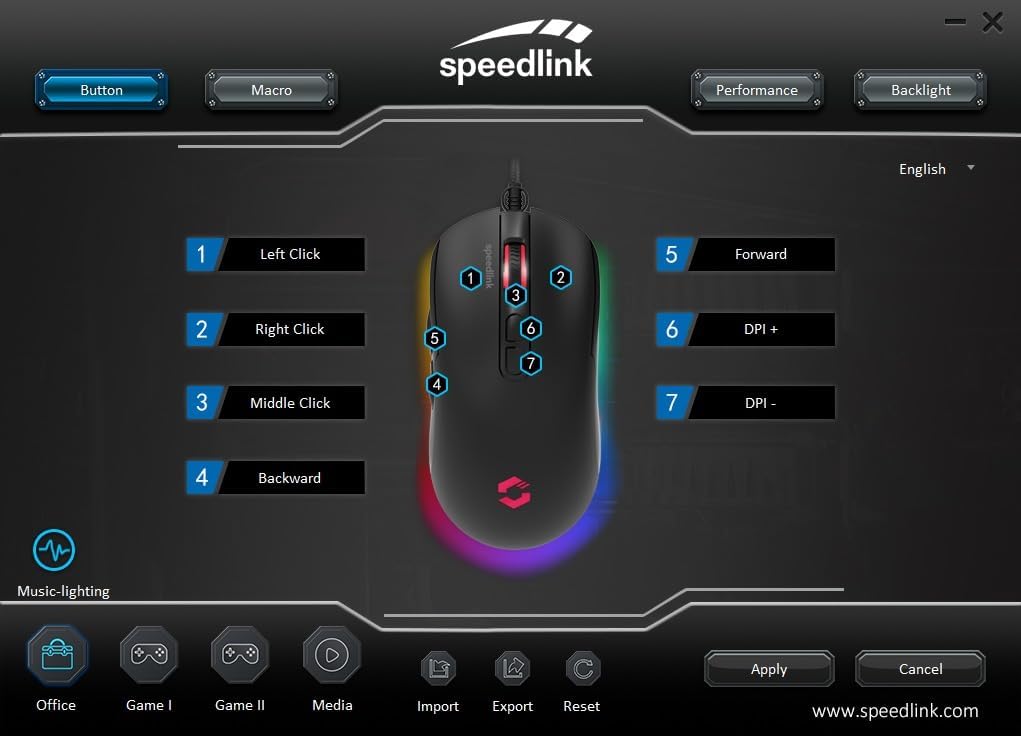
Image: Screenshot of the Speedlink software's 'Button' tab, illustrating the mapping of the mouse's 7 buttons.
4.3 RGB гэрэлтүүлэг
The TAUROX Gaming Mouse features multi-coloured RGB lighting that can be customized through the configuration software. You can select from various lighting effects, colors, and brightness levels to match your personal preference or gaming setup. Access the 'Backlight' section in the software to adjust these settings.

Image: Screenshot of the Speedlink software's 'Backlight' tab, showing options for customizing the mouse's RGB lighting effects.
5. Засвар үйлчилгээ
To ensure the longevity and optimal performance of your TAUROX Gaming Mouse, follow these maintenance guidelines:
- Цэвэрлэгээ: Хулганы гадаргууг цэвэрлэхийн тулд зөөлөн, хуурай даавуу ашиглаарай. Зөрүүд бохирдлыг бага зэрэг арчина.amp cloth can be used, but ensure no liquid enters the mouse. Avoid abrasive cleaners.
- Кабель арчилгаа: Avoid sharp bends, kinks, or excessive pulling on the cable. Store the cable neatly when not in use to prevent damage.
- Мэдрэгчийн засвар үйлчилгээ: Хулганы доод талд байрлах оптик мэдрэгчийг тоос шороо, хог хаягдлаас ангид байлгаж, үнэн зөв хянах боломжтой.
6. Алдаа засах
If you encounter issues with your TAUROX Gaming Mouse, consider the following:
- Хулгана хариу өгөхгүй байна: Ensure the USB cable is securely connected to your computer. Try plugging the mouse into a different USB port.
- Буруу мөрдөх: Clean the optical sensor on the bottom of the mouse. Ensure you are using the mouse on a suitable surface (e.g., a mouse pad).
- Програм хангамжийн асуудлууд: If the configuration software is not functioning correctly, try reinstalling it. Ensure your operating system is up to date.
- Товчлуур ажиллахгүй байна: Check the button assignments in the configuration software to ensure they are correctly configured.
- Гэрэлтүүлэг ажиллахгүй байна: Verify the RGB lighting settings in the configuration software.
For persistent issues, refer to the support section on the Speedlink webсайт.
7. Техникийн үзүүлэлтүүд
| Онцлог | Тодорхойлолт |
|---|---|
| Бүтээгдэхүүний хэмжээс | 4.92 x 2.48 x 0.04 inches (125x63x40 mm LxWxH) |
| Зүйлийн жин | 5.7 ounces (135 grams with cable) |
| Загварын дугаар | SL-680016-BK |
| Брэнд | Хурдны холбоос |
| Өнгө | Хар |
| Холболтын технологи | USB-A (Утастай) |
| Онцлог шинж чанарууд | Programmable Buttons, Multi-coloured LED Lighting |
| Хөдөлгөөнийг илрүүлэх технологи | Оптик |
| DPI нягтрал | 7,200 DPI хүртэл (тохируулж болно) |
| Кабелийн урт | 1.8 метр |
| Үйлдвэрлэгч | Хурдны холбоос |
8. Safety Instructions and Compliance
8.1 Аюулгүй ажиллагааны чухал заавар
Please note that the failure to observe these instructions can cause product damage, explosion, fire and/or electric shock!
- Төхөөрөмжүүдийг зөвхөн хэрэглэгчийн гарын авлагад заасны дагуу ашиглана уу. Тэдгээрийг нээж, засварлаж болохгүй.
- Төхөөрөмжийг шингэн зүйл, халуун, хүйтэнд бүү тавь.
- Зар сурталчилгаанд байгаа төхөөрөмжийг бүү ашиглаamp орчин. Төхөөрөмжийг хуурай даавуугаар цэвэрлэ.
- Төхөөрөмж болон бүх сул хэсгүүдийг хүүхэд, тэжээвэр амьтан, зөвшөөрөлгүй хүмүүсээс хол байлга.
- Only use the devices with the appropriate provided accessories.
- Disconnect cables from the devices if they will not be used for a long time. When disconnecting by cables, don't pull on the cord but on the plug.
- Don't use the cables in any way other than mentioned in the user guide. Don't bend, cut, extend, knot or step on them.
- Don't insert any foreign objects into the openings of the device.
- Хэрэв төхөөрөмжүүд ямар нэгэн байдлаар гэмтсэн эсвэл хэт халсан бол тэдгээрийг ашиглахаа даруй зогсоо.
- Take caution when using devices that emit radio signals if you have a pacemaker or are dependent on other sensitive electronic aids.
Бусад хэл дээрх аюулгүй байдлын зааварчилгаа: www.speedlink.com
8.2 Warning Symbols and Markings
Extended use of input devices may cause health problems such as discomfort or pain. As such, take regular breaks and consult a doctor if problems persist.
8.3 FCC мэдэгдэл
Энэхүү төхөөрөмж нь FCC дүрмийн 15-р хэсэгт заасны дагуу B ангиллын дижитал төхөөрөмжийн хязгаарт нийцэж байгааг туршиж үзсэн. Эдгээр хязгаарлалтууд нь орон сууцны суурилуулалтанд хортой хөндлөнгийн оролцооноос зохих хамгаалалтыг хангах зорилготой юм. Энэхүү төхөөрөмж нь радио давтамжийн энерги үүсгэж, ашиглаж, цацруулж чаддаг бөгөөд хэрэв зааврын дагуу суурилуулж, ашиглаагүй бол радио холбоонд хортой хөндлөнгийн оролцоо үүсгэж болзошгүй. Гэсэн хэдий ч тодорхой суурилуулалтанд хөндлөнгийн оролцоо гарахгүй гэсэн баталгаа байхгүй. Хэрэв энэ төхөөрөмж нь радио, телевизийн хүлээн авалтад хортой хөндлөнгийн нөлөөлөл үүсгэж байгаа бөгөөд үүнийг төхөөрөмжийг унтрааж, асаах замаар тодорхойлох боломжтой бол хэрэглэгч дараахь арга хэмжээнүүдийн нэг буюу хэд хэдэн аргаар хөндлөнгийн нөлөөллийг арилгахыг оролдохыг зөвлөж байна.
- Хүлээн авах антенны чиглэлийг өөрчлөх эсвэл өөр газар шилжүүлэх.
- Тоног төхөөрөмж болон хүлээн авагчийн хоорондох зайг нэмэгдүүлэх.
- Тоног төхөөрөмжийг хүлээн авагч холбогдсоноос өөр хэлхээний залгуурт холбоно.
- Дилер эсвэл туршлагатай радио/телевизийн техникчээс тусламж авна уу.
Энэ төхөөрөмж нь FCC дүрмийн 15-р хэсэгтэй нийцдэг. Ашиглалт нь дараах хоёр нөхцлийн дагуу явагдана: (1) Энэ төхөөрөмж нь хортой хөндлөнгийн оролцоо үүсгэхгүй, (2) энэ төхөөрөмж нь хүсээгүй үйлдлийг үүсгэж болзошгүй хөндлөнгийн оролцоо зэрэг хүлээн авсан аливаа хөндлөнгийн оролцоог хүлээн авах ёстой.
Жич: Modifications to this product will void the user's authority to operate this equipment.
8.4 Conformity Notice
ИМПОРТОР/ҮЙЛДВЭРЛЭГЧ: Zocherl Media GmbH, Im Dorf 5, 29303 Hemslingen, GERMANY
Утас: +49 4267 9341 0
БҮТЭЭГДЭХҮҮНИЙ ДЭЛГЭРЭНГҮЙ:
Төрөл №: SL-680016-BK
Бүтээгдэхүүний тодорхойлолт: TAUROX тоглоомын хулгана, хар
БҮТЭЭГДЭХҮҮН ДАРААХ ЗААВАРТАЙ БАЙНА.
ЭЕШ: 2014/30/ЕХ
RoHS: 2011/65/ЕХ
For a full declaration of conformity, the latest user guide, FAQ or further information, please visit: www.speedlink.com
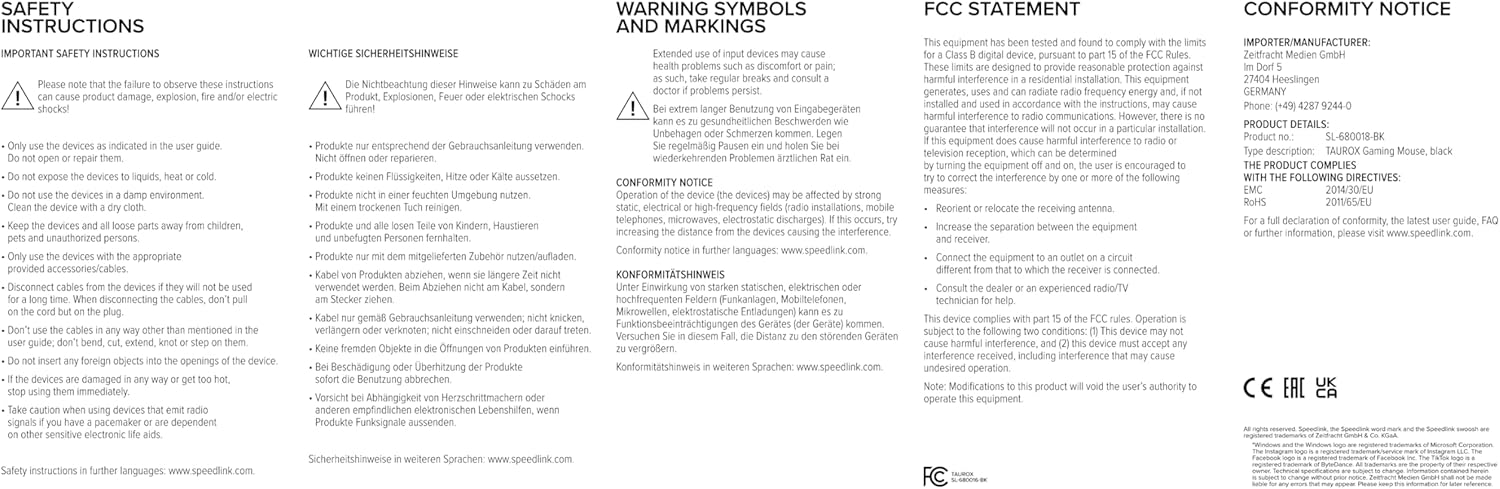
Image: Product packaging displaying various certifications and multilingual product names.
9. Баталгаат хугацаа ба дэмжлэг
For warranty information, technical support, frequently asked questions (FAQs), and the latest user guides, please visit the official Speedlink webсайт:


