1. Танилцуулга
This manual provides detailed instructions for the installation, operation, maintenance, and troubleshooting of your XPG CORE Reactor II VE 650W Power Supply Unit (PSU). Please read this manual thoroughly before using the product to ensure proper functionality and safety.
2. Аюулгүй байдлын мэдээлэл
- Цахилгаан тэжээлийн блокийг суурилуулах, салгах эсвэл цэвэрлэхийн өмнө цахилгааны утсыг үргэлж хананы залгуураас салга.
- PSU-г нээж болохгүй casing. Өндөр ботьtages are present inside, which can cause electric shock. The warranty will be void if the casing нээгдэнэ.
- Install the PSU in a well-ventilated area, away from heat sources, direct sunlight, and moisture.
- Ensure all cables are securely connected. Loose connections can cause damage to components.
- Use only the modular cables provided with this PSU. Using third-party cables may cause damage and void the warranty.
- Энэ бүтээгдэхүүн нь зөвхөн компьютерийн системд ашиглах зориулалттай. Үүнийг өөр зорилгоор ашиглаж болохгүй.
3. Багцын агуулга
Таны бүтээгдэхүүний багцад доор жагсаасан бүх зүйл байгаа эсэхийг шалгана уу.
- XPG CORE Reactor II VE 650W Power Supply Unit
- Модульчлагдсан кабелийн багц (12V-2x6 кабель орно)
- Хувьсах гүйдлийн цахилгааны утас
- Суурилуулах эрэг
- Түргэн эхлүүлэх гарын авлага

Image: The XPG CORE Reactor II VE 650W power supply unit shown with its retail box, modular cables, AC power cord, and quick start guide.
4. Бүтээгдэхүүн дууссанview
The XPG CORE Reactor II VE 650W is an 80 PLUS Gold certified power supply compliant with Intel's ATX 3.1 specifications. It features a fully modular design and an FDB (Fluid Dynamic Bearing) fan for efficient and quiet operation.

Зураг: Урд тал view of the XPG CORE Reactor II VE 650W power supply, showcasing its fan grille and XPG branding.

Image: The rear panel of the XPG CORE Reactor II VE 650W power supply, featuring the AC power inlet and the main power switch.

Image: A close-up of the modular cable connection panel on the XPG CORE Reactor II VE 650W PSU, showing labeled ports for Motherboard, CPU & VGA, 12V-2x6, and SATA & Molex connectors.
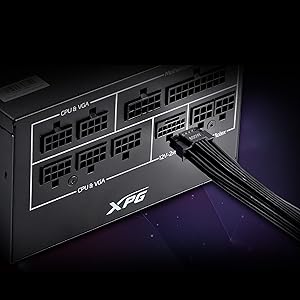
Зураг: Нарийвчилсан view of the 12V-2x6 connector port on the XPG CORE Reactor II VE 650W PSU, designed for next-generation graphics cards.
5. Тохиргоо ба суурилуулалт
Follow these steps to properly install your XPG CORE Reactor II VE 650W PSU into your computer system:
- Системээ бэлтгэ: Компьютерээ бүрэн унтрааж, залгуураас салгасан эсэхийг шалгаарай. Компьютерийнхээ гэрийг нээ.
- Хуучин PSU-г арилгах (хэрэв байгаа бол): Хуучин цахилгаан тэжээлийн блокоос бүх кабелийг салгаад, хайрцгаас нь салга.
- Шинэ цахилгаан тэжээлийн блокийг суурилуулах: Insert the XPG CORE Reactor II VE 650W PSU into the designated PSU bay in your computer case. Secure it with the provided mounting screws.
- Үндсэн кабелийг холбох:
- 24 зүүтэй ATX кабелийг эх хавтан дээрээ холбоно уу.
- Connect the 4+4-pin or 8-pin EPS/CPU cable(s) to your motherboard's CPU power connector(s).
- Connect the appropriate PCI-E (6+2-pin) or 12V-2x6 cable(s) to your graphics card(s).
- Connect SATA power cables to your storage drives (HDDs, SSDs) and optical drives.
- Connect Molex cables to any peripherals requiring them.
Ensure all modular cables are firmly seated into both the PSU and the respective components.
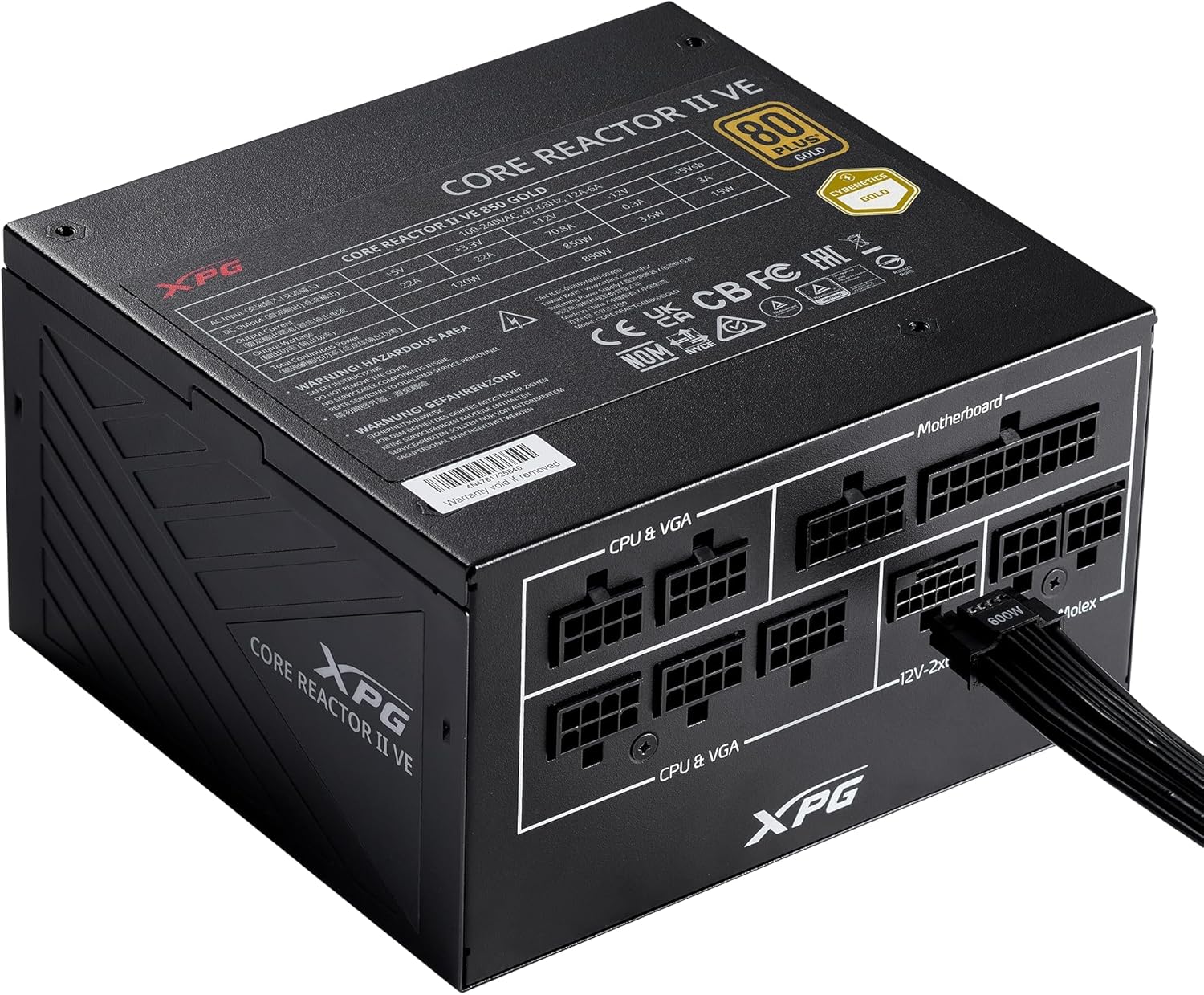
Image: The XPG CORE Reactor II VE 650W power supply with a 12V-2x6 cable connected to its modular port, illustrating a typical cable connection.
- Кабелийн менежмент: Route cables neatly to improve airflow and aesthetics within your case.
- Хайрцаг хаагаад цахилгааныг холбоно уу: Close your computer case. Connect the AC power cord to the PSU's inlet and then to a wall outlet.
- Асаах: Flip the power switch on the back of the PSU to the 'ON' position and power on your computer.
6. Ашиглалтын заавар
The XPG CORE Reactor II VE 650W PSU operates automatically once installed and powered on. It features an FDB fan with intelligent fan control, which adjusts its speed based on the PSU's temperature and load to maintain optimal cooling and minimize noise.
The PSU is designed to provide stable and reliable power to your system. No user intervention is typically required during normal operation.
7. Засвар үйлчилгээ
To ensure the longevity and optimal performance of your XPG CORE Reactor II VE 650W PSU, consider the following maintenance tips:
- Тоос арилгах: Periodically clean the fan grille and the interior of your computer case to prevent dust buildup. Dust can impede airflow and lead to overheating. Use compressed air for this purpose, ensuring the system is powered off and unplugged.
- Кабель шалгах: Бүх модульчлагдсан кабелийн холболтууд найдвартай байгаа эсэхийг шалгахын тулд үе үе шалгаж байгаарай.
- Байгаль орчин: Operate the PSU in a clean, dry, and well-ventilated environment.
8. Алдаа засах
If you encounter issues with your XPG CORE Reactor II VE 650W PSU, refer to the following common troubleshooting steps:
- Эрчим хүчгүй:
- Хувьсах гүйдлийн тэжээлийн утас нь цахилгаан тэжээлийн хэсэг болон ханын залгуурт найдвартай холбогдсон эсэхийг шалгаарай.
- Check that the power switch on the back of the PSU is in the 'ON' position.
- Өөр төхөөрөмжийг залгаж, ханын залгуур ажиллаж байгаа эсэхийг шалгана уу.
- Confirm that the 24-pin ATX and 4+4-pin/8-pin EPS/CPU cables are correctly and firmly connected to the motherboard.
- Системийн тогтворгүй байдал/санамсаргүй унтрах:
- Ensure all power cables to components (motherboard, CPU, GPU, drives) are securely connected.
- Check for proper ventilation within your computer case. Overheating can cause instability.
- If you have recently added new components, ensure the 650W output is sufficient for your total system load.
- Сэнс эргэхгүй байна:
- The FDB fan features intelligent control and may not spin at low loads or temperatures. This is normal operation.
- If the fan does not spin under heavy load and the PSU feels excessively hot, contact support.
- Ер бусын дуу чимээ:
- A slight coil whine can sometimes occur under specific loads; this is generally not indicative of a fault.
- If you hear grinding or scraping noises, power off the system immediately and contact support.
Хэрэв эдгээр алхмууд нь таны асуудлыг шийдэж чадахгүй бол нэмэлт тусламж авахын тулд Баталгаат болон дэмжлэгийн хэсгээс лавлана уу.
9. Техникийн үзүүлэлтүүд
Key technical specifications for the XPG CORE Reactor II VE 650W PSU:
| Онцлог | Тодорхойлолт |
|---|---|
| Загварын дугаар | COREREACTORIIVE650G-BKCUS |
| Гаралтын ватtage | 650 ватт |
| Үр ашгийн гэрчилгээ | 80 PLUS Gold, CYBENETICS Gold |
| ATX стандарт | ATX 3.1 / EPS v2.92 |
| Form Factor | ATX |
| Хөргөх арга | Air (FDB 120mm Fan) |
| Цахилгаан хангамжийн дизайн | Бүрэн модуль |
| Бүтээгдэхүүний хэмжээ (L x W x H) | 5.86 x 5.9 x 3.38 инч (140x150x86мм) |
| Зүйлийн жин | 5.07 фунт |
| Холбогч төрлүүд | ATX, Molex, PCI Express, SATA, 12V-2x6 |
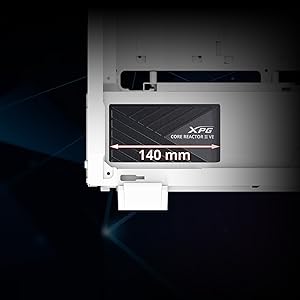
Image: A diagram illustrating the compact 140mm length of the XPG CORE Reactor II VE power supply, highlighting its compatibility with various PC cases.

Image: Visual representation of the multiple protection mechanisms integrated into the PSU, including OPP (Over Power Protection), OVP (Over Voltage Protection), SIP (Surge & Inrush Protection), SCP (Short Circuit Protection), UVP (Under Voltage Protection), OCP (Over Current Protection), OTP (Over Temperature Protection), and NLO (No Load Operation).
10. Баталгаат хугацаа ба дэмжлэг
For warranty information, technical support, or service inquiries regarding your XPG CORE Reactor II VE 650W PSU, please visit the official XPG website or contact their customer support directly. Details can typically be found on the product packaging or the manufacturer's official support pages.
Баталгаат нэхэмжлэл гаргахын тулд худалдан авалтаа нотлох баримтаа хадгалаарай.


