1. Танилцуулга
The FXTUL M6 Motorcycle Diagnostic Tool is a comprehensive OBD2 scanner designed for diagnosing and maintaining motorcycles. It features a 5-inch RGB display screen and offers full system coverage, real-time data recording, and printable reports. This manual provides detailed instructions for the proper use and maintenance of your M6 diagnostic tool.

Figure 1: FXTUL M6 Diagnostic Tool, cables, and protective carrying case.
2. Бүтээгдэхүүн дууссанview
2.1 Гол онцлогууд
- Системийн оношлогоо: Supports engine, ABS, tire pressure, anti-theft, and other systems. Reads and clears Diagnostic Trouble Codes (DTCs), views freeze frame data, displays data streams, and performs active tests.
- 104 Service Functions: Includes ECU reset, oil maintenance lamp reset, CO Trimmer adjustments, TPS adjustments, auto adaptive parameter reset, service light reset, and idling adjustments.
- Батерейны туршилт: Features cranking test, standard test, quick test, and charging test functions.
- Өгөгдөл бичих ба тоглуулах: Оношлогооны өгөгдлийг дараа нь дахин бүртгэнэview болон дүн шинжилгээ хийх.
- Information Printing: Generates printable reports for diagnostic results, module information, fault codes, and data streams.
- Зураг Viewэ: Captures and reviews screenshots of the device interface during diagnosis.
- 5-inch RGB Display: High-resolution (800x480) screen with customizable dark and light themes.
- Wide Motorcycle Coverage: Compatible with over 70 motorcycle brands and models globally.
- Free Lifetime Software Upgrade: Connects to a computer via USB for software updates.
- Олон хэлний дэмжлэг: Offers various language options for user interface.
2.2 Бүрэлдэхүүн хэсэг ба удирдлага
The FXTUL M6 device features a user-friendly interface with a clear display and intuitive controls.
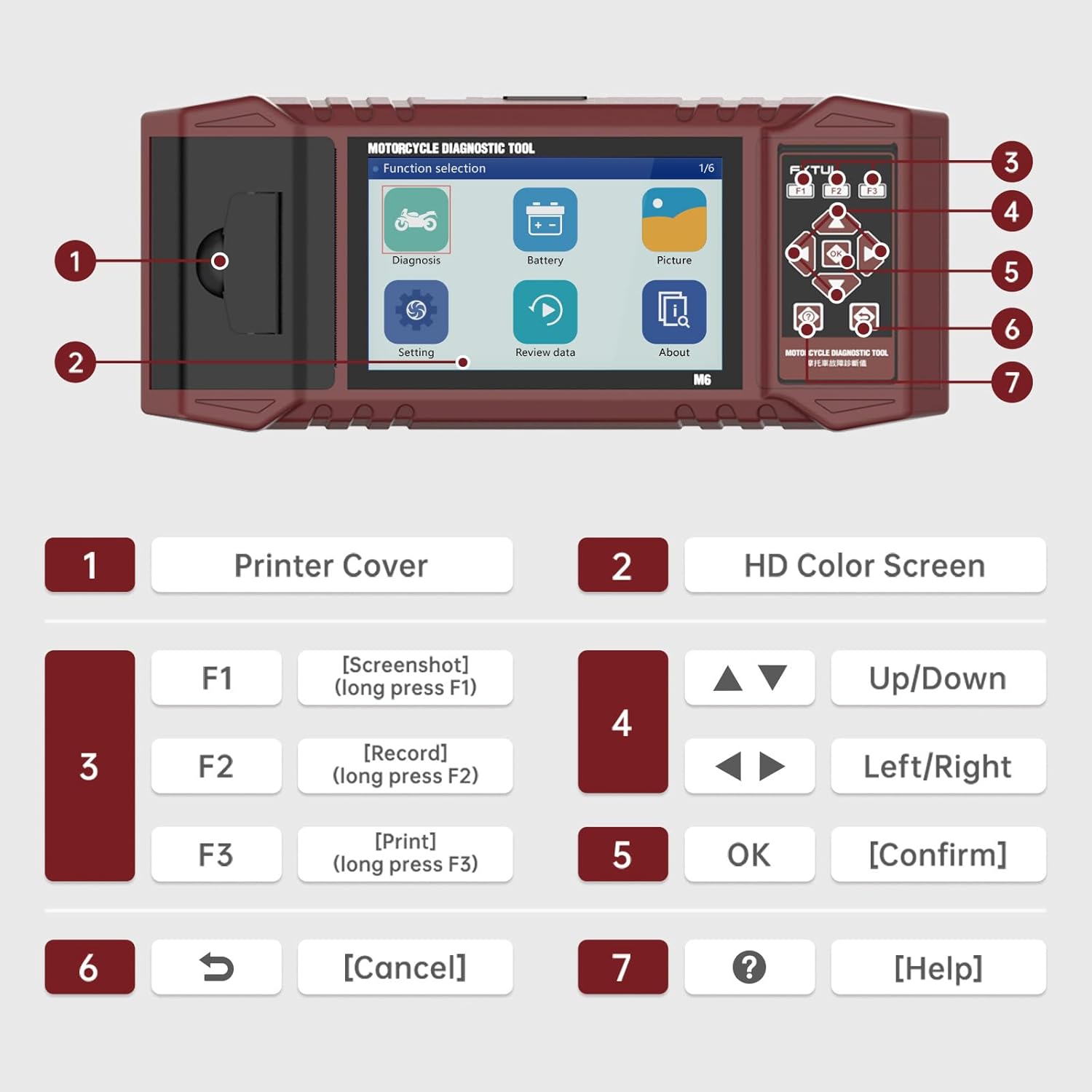
Figure 2: Labeled components and controls of the FXTUL M6 Diagnostic Tool.
| Үгүй | Бүрэлдэхүүн хэсэг | Чиг үүрэг |
|---|---|---|
| 1 | Принтерийн хавтас | Covers the built-in thermal printer. |
| 2 | HD өнгөт дэлгэц | 5-inch RGB display for interface and data. |
| 3 | Function Keys (F1, F2, F3) | F1: Screenshot (long press), F2: Record (long press), F3: Print (long press). |
| 4 | Навигацийн товчлуурууд | Up/Down, Left/Right for menu navigation. |
| 5 | OK товч | Сонголтыг баталгаажуулна. |
| 6 | Түлхүүрийг цуцлах | Returns to previous screen or cancels operation. |
| 7 | Тусламжийн түлхүүр | Provides contextual help. |
3. Тохиргоо
- Савлах: Carefully remove the M6 diagnostic tool and all accessories from the packaging. Verify all components listed in the "What's in the Box" section are present.
- Эрчим хүчний холболт: The device is typically powered via the motorcycle's diagnostic port. Ensure the motorcycle's ignition is turned off before connecting the tool.
- Connecting to Motorcycle: Locate the diagnostic port on your motorcycle. Connect the appropriate diagnostic cable from the M6 tool to the motorcycle's port.
- Асаах: Turn the motorcycle's ignition to the ON position. The M6 tool should power on automatically. If not, check the connection.
- Хэлний сонголт: Upon first use, you may be prompted to select your preferred language. Navigate using the arrow keys and confirm with the OK button.
4. Ашиглалтын заавар
4.1 Системийн оношлогоо
This function allows for comprehensive scanning of various motorcycle systems to identify and resolve issues.
- Үндсэн цэснээс "Оношлогоо"-г сонгоно уу.
- The tool will automatically identify the vehicle model and scan all available systems.
- Review the assembly status and fault codes for each system.
- To read fault codes, select the "Read Fault Codes" option.
- To clear all fault codes, select the "Clear Fault Codes" option. Confirm the action when prompted.

Figure 3: Vehicle System Diagnostic interface for reading and clearing fault codes.
4.2 Үйлчилгээний чиг үүрэг
The M6 supports over 100 service functions for various maintenance procedures.
- From the main menu, navigate to the "Service Functions" or similar option (may be under "Diagnosis" depending on software version).
- Select the desired service function from the list (e.g., ECU reset, Oil service light reset, CO adjustment).
- Follow the on-screen prompts to complete the procedure.

Зураг 4: Жишээ ньamples of 104 service functions supported by the tool.
4.3 Өгөгдлийн урсгалыг унших
View real-time data parameters from the motorcycle's ECU. The data stream waveform graph automatically adapts for easy viewing.
- From the "Diagnosis" menu, select "Data Stream" or "Live Data".
- Choose the specific data parameters you wish to monitor.
- The data will be displayed numerically and can also be viewed as a waveform graph for trend analysis.

Figure 5: Data Stream Display and Waveform Analysis.
4.4 Батерейны туршилт
Perform various tests on the motorcycle's battery.
- Үндсэн цэснээс "Батерей"-г сонгоно уу.
- Choose the desired test: "Cranking Test", "Standard Test", "Quick Test", or "Charging Test".
- Follow the on-screen instructions to perform the test and view үр дүн.

Figure 6: Battery Test functions interface.
4.5 Data Recording and Playback
Record diagnostic sessions for later review болон дүн шинжилгээ хийх.
- During a diagnostic process, long-press the F2 key to initiate data recording.
- To play back recorded data, select "Review data" from the main menu.
- Navigate through recorded files and select the one you wish to play back.
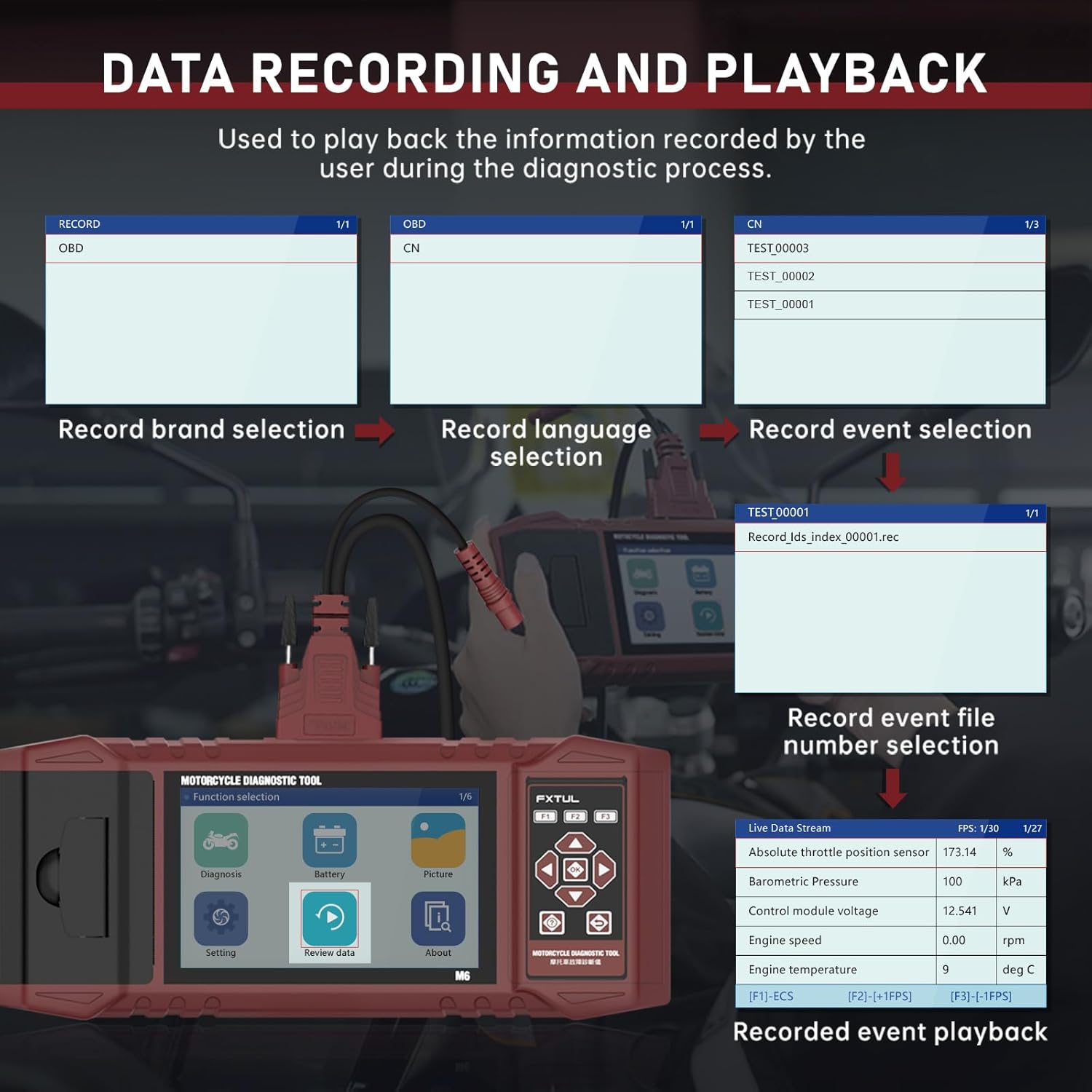
Figure 7: Data Recording and Playback process.
4.6 Information Printing
Print diagnostic reports directly from the device using the built-in printer.
- On any screen displaying information you wish to print (e.g., diagnostic reports, fault codes), long-press the F3 key.
- Input any required user or vehicle information using the on-screen keyboard.
- The device will print the information.

Figure 8: Information Printing function.
4.7 Зураг Viewer
Capture screenshots of the device interface and review дараа нь.
- To capture a screenshot, long-press the F1 key on any interface.
- руу view saved images, select "Picture" from the main menu.
- You can browse through saved images and delete them as needed.

Figure 9: Image Viewer interface for browsing and deleting screenshots.
5. Програм хангамжийн шинэчлэл
The FXTUL M6 offers free lifetime software upgrades to ensure compatibility with new motorcycle models and features.
- Шинэчлэлтийг татаж авах: Obtain the latest software update files from the official FXTUL webсайт эсвэл хэрэглэгчийн дэмжлэгтэй холбоо барина уу.
- Компьютерт холбогдох: Connect the M6 device to your computer using a USB cable.
- Төхөөрөмжийг таних: Wait for the computer to recognize the device. A new drive symbol should appear.
- Replace Folder: Open the new drive. Locate the "DIAGNOSE" folder. Replace this folder with the downloaded "DIAGNOSE" upgrade folder.
- Дахин ачаалах: Disconnect the device from the computer and power it on again. The updated software will be loaded.

Figure 10: Software upgrade process via USB connection.
6. Алдаа засах
- Төхөөрөмж асахгүй байна:
- Ensure the diagnostic cable is securely connected to both the M6 tool and the motorcycle's diagnostic port.
- Verify the motorcycle's ignition is turned to the ON position.
- Check the motorcycle's battery voltage.
- Cannot connect to motorcycle ECU:
- Ensure the correct diagnostic cable for your motorcycle model is being used.
- Verify the motorcycle's ignition is ON and the engine is off (unless specific tests require it to be running).
- Check for any blown fuses in the motorcycle's diagnostic circuit.
- Ensure the M6 software is up to date. Some newer motorcycle models may require the latest software version.
- Specific motorcycle models not listed:
- While the tool supports over 70 brands, specific models within those brands may require the latest software updates. Perform a software upgrade as described in Section 5.
- Contact FXTUL customer support with your motorcycle's make, model, and year for assistance with compatibility.
- Принтер ажиллахгүй байна:
- Check if the printer cover is properly closed.
- Ensure there is sufficient thermal paper loaded in the printer.
- Verify you are long-pressing the F3 key to initiate printing.
7. Техникийн үзүүлэлтүүд
| Тодорхойлолт | Дэлгэрэнгүй |
|---|---|
| Загвар | FXTUL-M6 |
| Дэлгэцийг харуулах | 5-inch RGB Display (800x480 resolution) |
| Зүйлийн жин | 8.48 фунт |
| Багцын хэмжээ | 15 x 12 x 5 инч |
| Supported Motorcycle Brands | 70+ (e.g., Ducati, Harley Davidson, BMW, Kawasaki, Yamaha, Honda, Suzuki, etc.) |
| Холболт | OBD2, USB for updates |
| Эрчим хүчний эх үүсвэр | Vehicle's diagnostic port |
| Програм хангамжийн шинэчлэлтүүд | Free Lifetime Upgrade |

Figure 11: Partial list of supported motorcycle brands and models.
8. Баталгаат хугацаа ба дэмжлэг
FXTUL is committed to providing high-quality products and customer satisfaction. The M6 Motorcycle Diagnostic Tool is designed for durability and reliability.
- Чанарын баталгаа: The product is manufactured under strict quality control standards.
- Free Lifetime Software Upgrade: As mentioned in Section 5, software updates are provided free of charge for the lifetime of the product.
- Техникийн дэмжлэг: For any technical assistance, troubleshooting, or inquiries regarding product functionality and compatibility, please contact FXTUL customer support. Refer to the product packaging or official webхолбоо барих мэдээллийг авах сайт.


