Танилцуулга
Худалдан авалт хийсэнд баярлалааasing the JTEMAN Cell Phone Stand with Wireless Bluetooth Speaker and Alarm Clock. This multi-functional device is designed to enhance your daily routine by combining essential features into one compact and stylish unit. It serves as a high-quality Bluetooth speaker, a reliable alarm clock with a clear display, and a stable, adjustable stand for your mobile devices. Please read this manual carefully to ensure proper use and optimal performance.
Аюулгүй байдлын мэдээлэл
- Төхөөрөмжийг хэт өндөр температур, нарны шууд тусгал, өндөр чийгшилд бүү тавь.
- Төхөөрөмжийг унагах эсвэл хүчтэй нөлөөнд оруулахаас зайлсхий.
- Keep away from water and other liquids. If the device comes into contact with liquid, disconnect it immediately and allow it to dry completely before reuse.
- Төхөөрөмжийг өөрөө задлах, засах, өөрчлөх гэж бүү оролдоорой. Бүх үйлчилгээг мэргэшсэн боловсон хүчинд шилжүүлээрэй.
- Зөвхөн өгсөн цэнэглэгч кабель эсвэл баталгаажуулсан түүнтэй адилтгах төхөөрөмжийг ашиглана уу.
- Хүүхдийн гар хүрэхгүй газар хадгална.
Багцын агуулга
- JTEMAN Cell Phone Stand with Wireless Bluetooth Speaker and Alarm Clock (Model: JT-L36)
- C төрлийн цэнэглэгч кабель
- Хэрэглэгчийн гарын авлага
Бүтээгдэхүүн дууссанview
Familiarize yourself with the components and controls of your JTEMAN device:
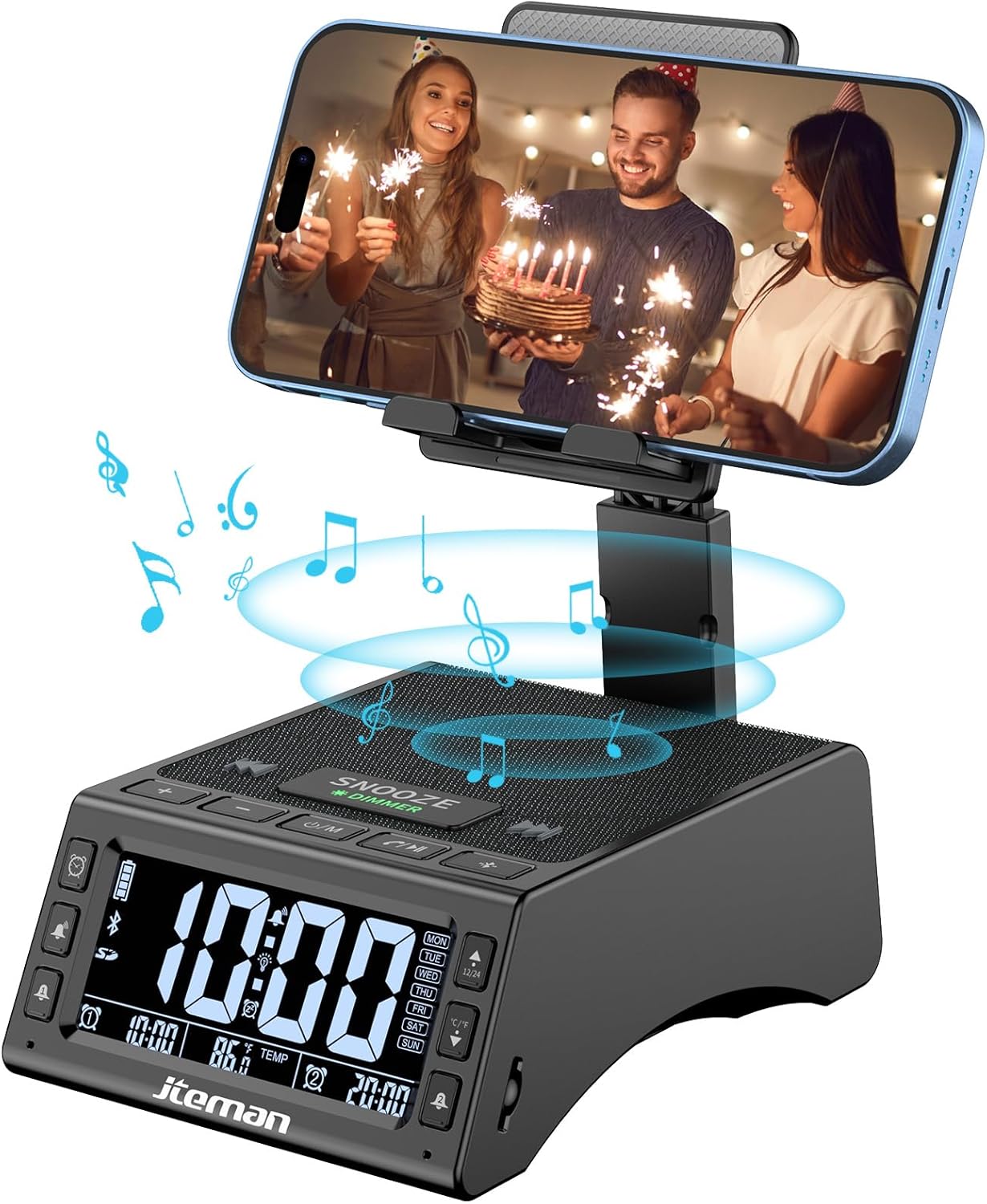
Зураг 1: Урд view of the JTEMAN device with a smartphone on the adjustable stand, displaying the time and temperature.

Зураг 2: Илүүview highlighting the multi-functional aspects including Bluetooth speaker, 12/24H time display, temperature display, foldable phone stand, TF card support, microphone, charging station, dual alarm clocks, and 9 ringtones.
Хяналт ба портууд:
- Дэлгэц: Shows time, temperature, day of the week, and alarm indicators.
- ЗУУРАЙЛГАХ/БҮДЭРГҮЙЛГЭХ Товч: Press to snooze an active alarm (5 minutes); long press to adjust display brightness (4 levels).
- Power On/Off/Mode Button: Long press to power on/off; short press to cycle through modes (Bluetooth, TF Card).
- Play/Pause/Answer Button: Controls music playback; answers/ends calls.
- Дууг нэмэгдүүлэх/Дараах дууны товчлуур: Эзлэхүүнийг нэмэгдүүлдэг; дараагийн дууг богино хугацаанд дарна уу.
- Дууг багасгах/Өмнөх дууны товчлуур: Дууны хэмжээг бууруулдаг; өмнөх дууг богино хугацаанд дарна уу.
- Bluetooth холбох товч: Bluetooth хослуулах горимыг эхлүүлнэ.
- Alarm 1 & Alarm 2 Buttons: For setting and managing dual alarms.
- Микрофон: Гар ашиглахгүй дуудлага хийх зориулалттай.
- Type-C оролтын порт: Төхөөрөмжийг цэнэглэхэд зориулагдсан.
- Type-C гаралтын порт: Гадны төхөөрөмжийг цэнэглэхэд зориулагдсан.
- TF картын оролт: TF картнаас шууд хөгжим тоглуулах зориулалттай.
- Тохируулж болох утасны суурь: Foldable and extendable for various viewing angles. Features anti-slip pads and base for stability.
Тохиргоо
1. Анхны цэнэглэлт
- Connect the provided Type-C charging cable to the Type-C оролтын порт төхөөрөмж дээр.
- Connect the other end of the cable to a compatible USB power adapter (not included) and plug it into a wall outlet.
- The display will indicate charging status. Fully charge the device before first use.

Figure 3: The device connected via Type-C for charging itself and an external phone.
2. Цаг, огноог тохируулах
- Upon powering on, the device should automatically synchronize the current time.
- If manual adjustment is needed, refer to the detailed instructions in the full user manual (included in the package).
- To switch between 12/24 hour format or °F/°C temperature display, use the dedicated buttons or refer to the full manual.

Figure 4: The HD display showing time, temperature, and alarm settings with brightness adjustment levels.
Ашиглалтын заавар
1. Using the Phone Stand
- The integrated phone stand can be pulled up from the back of the unit.
- Adjust the height and angle of the stand to your preferred viewing position. The stand is designed to be stable and strong, accommodating devices from 4.0 to 13 inches.
- When not in use, the stand can be folded back into the unit for a compact form factor.

Figure 5: Demonstrates the adjustable height and angle of the phone stand, along with its anti-slip features and foldable design.
2. Bluetooth чанга яригчийн функц
- Асаах: Long press the Power On/Off/Mode button. The device will enter Bluetooth pairing mode, indicated by a flashing Bluetooth icon on the display.
- Хослуулах: On your smartphone or other Bluetooth-enabled device, search for “JT-L36” in the Bluetooth settings and select it to pair. A confirmation sound will indicate successful pairing.
- Хөгжим тоглуулах: Once paired, you can play audio from your device through the JTEMAN speaker. Use the Play/Pause, Volume Up/Next Track, and Volume Down/Previous Track buttons to control playback.
3. TF карт тоглуулах
- Insert a TF card (not included) with audio files into the TF Card Slot.
- The device will automatically switch to TF Card mode and begin playing music. If not, short press the Mode button to select TF Card mode.
4. Alarm Clock Features
- Сэрүүлгийг тохируулах: Use the Alarm 1 and Alarm 2 buttons to set up to two independent alarms. Follow the on-screen prompts to set the time and alarm frequency (e.g., Mon-Fri, Sat-Sun, Mon-Sun).
- Залгах функц: When an alarm sounds, press the large SNOOZE button on top to activate a 5-minute snooze.
- Гэрэлтүүлгийн тохируулга: Long press the SNOOZE/DIMMER button to cycle through four levels of display brightness, including an off setting for minimal light disturbance.
5. Гар чөлөөтэй дуудлага хийх
- When a call comes in while your phone is connected via Bluetooth, press the Play/Pause/Answer button to answer the call.
- Тодорхой харилцахын тулд суурилуулсан микрофоныг ашиглана уу.
- Press the Play/Pause/Answer button again to end the call.
6. Гадаад төхөөрөмжүүдийг цэнэглэх
- Connect your external device (e.g., smartphone, tablet) to the Type-C гаралтын порт on the JTEMAN unit using a compatible charging cable.
- The JTEMAN device will provide power to charge your external device.
Засвар үйлчилгээ
- Төхөөрөмжийг зөөлөн, хуурай даавуугаар цэвэрлэ. Зүлгүүрийн цэвэрлэгч, уусгагчийг бүү ашигла.
- Бүх портууд нь тоос, хог хаягдалгүй эсэхийг шалгаарай.
- Төхөөрөмжийг удаан хугацаагаар ашиглаагүй бол сэрүүн, хуурай газар хадгална.
Алдааг олж засварлах
| Асуудал | Боломжит шалтгаан | Шийдэл |
|---|---|---|
| Төхөөрөмж асахгүй байна. | Low battery; power adapter/cable issue. | Charge the device fully. Check power adapter and cable connections. |
| Чанга яригчаас дуу гарахгүй. | Volume too low; not paired correctly; wrong mode. | Increase volume on both device and connected phone. Re-pair Bluetooth. Ensure correct mode (Bluetooth/TF Card). |
| Bluetooth хослол амжилтгүй боллоо. | Device too far; pairing mode not active; interference. | Ensure device is in pairing mode and within 10 meters. Turn off other Bluetooth devices. Try restarting both devices. |
| Сэрүүлэг дуугарахгүй байна. | Alarm not set; alarm volume too low; alarm disabled. | Verify alarm settings and ensure it's enabled. Increase alarm volume. |
| Phone not charging via output port. | Cable issue; device battery low; incompatible device. | Ensure the JTEMAN device is charged. Try a different charging cable. Confirm your phone is compatible with Type-C charging. |
Үзүүлэлтүүд
| Брэнд | ЖТЕМАН |
| Загварын дугаар | JT-L36 |
| Бүтээгдэхүүний хэмжээс | 6.1 x 4.3 x 2.1 инч |
| Зүйлийн жин | 1.26 фунт |
| Өнгө | Хар |
| Тоног төхөөрөмжийн интерфейс | USB 2.0 |
| Нийт USB портууд | 2 (Type-C Input, Type-C Output) |
| Тохиромжтой байдал | 4.0-13 inch devices |
Баталгаат болон дэмжлэг
JTEMAN products are manufactured with high standards of quality. For specific warranty information, please refer to the warranty card included in your product packaging or visit the official JTEMAN website. If you encounter any issues or have questions not covered in this manual, please contact JTEMAN customer support through the contact information provided on the product packaging or webсайт.
Баталгаат заргад зориулж худалдан авалтаа нотлох баримтаа үлдээнэ үү.


