1. Танилцуулга
This manual provides detailed instructions for the setup, operation, and maintenance of your Victrola Montauk Vinyl Record Player, Model VM-135-FNT. This belt-driven turntable system offers three playback speeds, integrated Bluetooth connectivity, and includes matching stereo speakers for a complete audio experience. Please read this manual thoroughly before use to ensure proper functionality and longevity of your product.

Figure 1: Victrola Montauk Vinyl Record Player with included stereo speakers.
2. Хайрцагт юу байна
- Victrola Montauk Turntable Unit
- Stereo Bluetooth Speakers (2 units)
- Зөөврийн тоосны бүрхүүл
- Эрчим хүчний адаптер
- RCA Output Cable
- 3.5 мм туслах кабель
- Зааварчилгааны гарын авлага

Figure 2: All components included in the Victrola Montauk package.
3. Тохируулах заавар
- Бүрэлдэхүүн хэсгүүдийг задлах: Сав баглаа боодолоос бүх зүйлийг болгоомжтой авч хая. Жагсаалтад орсон бүх эд анги байгаа эсэхийг шалгаарай.
- Place Turntable and Speakers: Position the turntable on a stable, level surface. Place the stereo speakers on either side of the turntable, ensuring they are within reach of the speaker cables.
- Install Drive Belt and Platter: Gently place the sub-platter onto the spindle. Carefully loop the drive belt around the motor pulley and the sub-platter. Then, place the main platter on top of the sub-platter.
- Balance Tone Arm: Install the counterweight onto the rear of the tone arm. Adjust the counterweight by rotating it until the tone arm is balanced and floats horizontally. Refer to the detailed instructions in the included manual for precise balancing.
- Install Dust Cover: Attach the removable dust cover to the hinges at the back of the turntable unit.
- Чанга яригчийг холбох: Connect the included speaker cables from the turntable's speaker outputs to the input terminals on the back of each stereo speaker. Ensure correct polarity (red to red, black to black).
- Эрчим хүчийг холбох: Plug the power adapter into the DC IN port on the back of the turntable, then plug the adapter into a wall outlet.
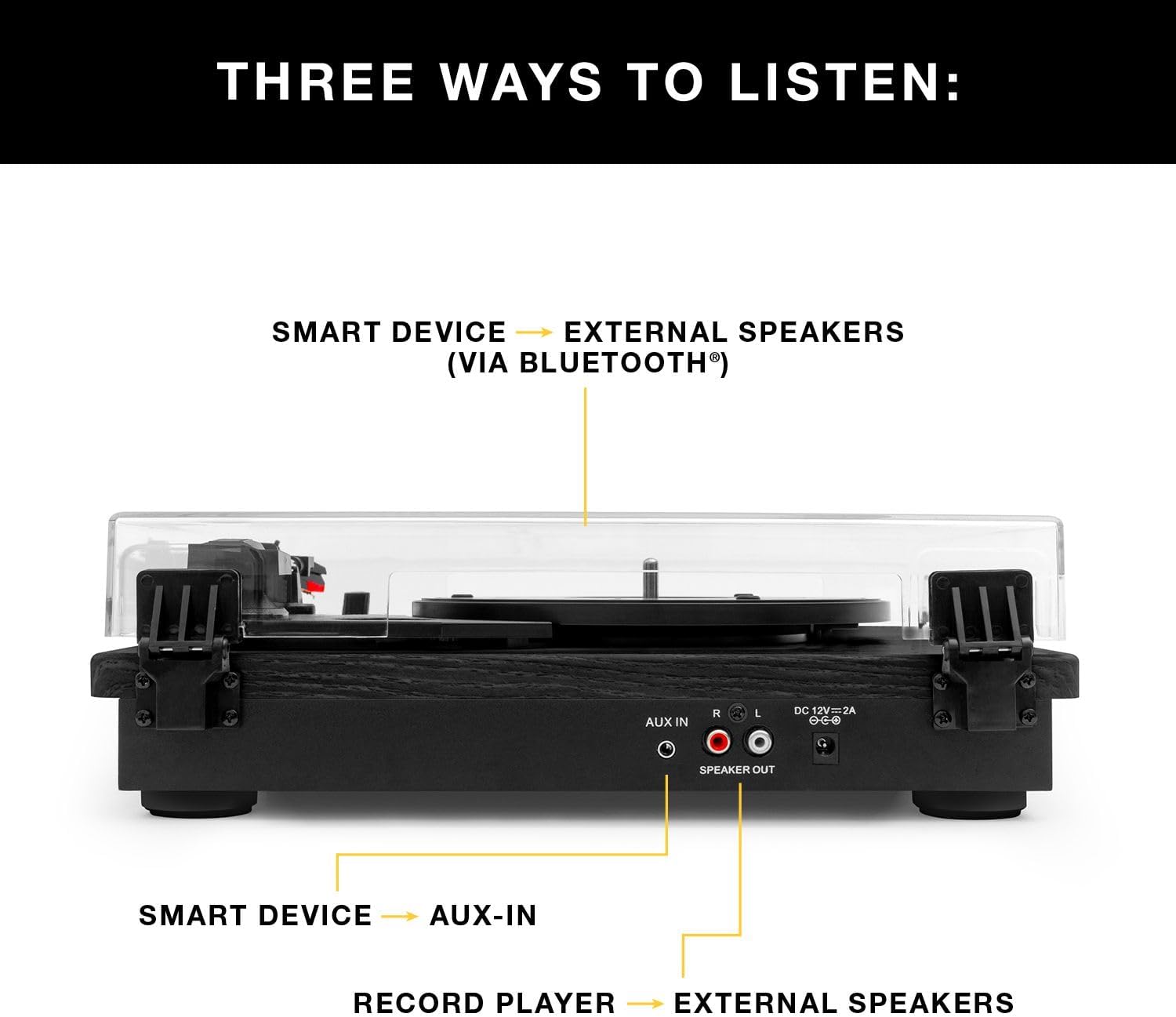
Зураг 3: Ар талд view of the turntable showing audio output and power connections.
4. Ашиглалтын заавар
4.1 Винил пянз тоглуулах
- Асаах: Цахилгаан унтраалга ашиглан эргэдэг тавцанг асаана уу.
- Хурд сонгох: Choose the appropriate speed (33 1/3, 45, or 78 RPM) for your record using the speed selector switch.
- Байрны бичлэг: Винил пянзаа тавган дээр болгоомжтой байрлуул.
- Аяны гарыг байрлуулах: Release the tone arm lock. Gently lift the tone arm using the cueing lever and position the stylus over the desired track on the record.
- Гарны доод ая: Slowly lower the cueing lever to gently place the stylus onto the record. Playback will begin automatically.
- Дууны хэмжээг тохируулах: Use the volume knob on the turntable to adjust the sound level.
- Тоглуулахыг дуусгах: At the end of the record, the tone arm will automatically return to its rest position (if auto-stop is enabled). Alternatively, manually lift the tone arm using the cueing lever and return it to its rest.

Figure 4: Detail of the stylus and record during playback.
4.2 Bluetooth тоглуулах
- Bluetooth-г идэвхжүүлэх: Switch the turntable to Bluetooth mode. The Bluetooth indicator will flash, indicating it's ready for pairing.
- Төхөөрөмжийг холбох: On your smart device (phone, tablet, etc.), enable Bluetooth and select
Холбогдох баримт бичиг - VM-135-FNT

Victrola Montauk VM-135 эргэдэг тавиур: Зааварчилгааны гарын авлага, ашиглалтын гарын авлага
Таны Victrola Montauk VM-135 эргүүлдэг тавцанг тохируулах, ажиллуулах, засвар үйлчилгээ хийх цогц гарын авлага. Bluetooth холболт, зүүг солих, аюулгүй байдал, баталгааны талаар мэдэж аваарай.
Victrola VM-135 Montauk эргэдэг тавиур систем: Зааварчилгааны гарын авлага
Энэхүү зааварчилгааны гарын авлагад Victrola VM-135 Montauk эргэлдэгч системийн талаарх дэлгэрэнгүй мэдээллийг багтаасан бөгөөд аюулгүй байдлын удирдамж, тохиргоо, бичлэгийн ажиллагаа, Bluetooth болон Aux-in, техникийн үзүүлэлтүүд, эргэлдэгч тавиурын зохион байгуулалт, зүү солих, баталгаат хугацаа зэргийг багтаасан болно.
Victrola V50-200 50-ийн Retro Bluetooth бичлэг тоглуулагч ба Мультимедиа төвийн хэрэглэгчийн гарын авлага
Victrola V50-200 50-аад оны Retro Bluetooth бичлэг тоглуулагч болон мультимедиа төвийн цогц хэрэглэгчийн гарын авлага. Үүний 3 шатлалт эргэлдэгч тавцан, CD тоглуулагч, AM/FM радио, Bluetooth дамжуулалт, винилээс MP3 руу бичлэг хийх функцуудын талаар болон тохиргоо болон аюулгүй байдлын зааврын талаар мэдэж аваарай.
Victrola VM-137 Kingfield эргэдэг тавиур, Bluetooth чанга яригчтай - Хэрэглэгчийн гарын авлага
Victrola VM-137 Kingfield Turntable-ийн дэлгэрэнгүй хэрэглэгчийн гарын авлага, тохиргоо, ажиллагаа, үзэг солих, Bluetooth болон AUX холболт, техникийн үзүүлэлтүүд, аюулгүй байдлын зааварчилгаа, баталгаат хугацааны талаарх дэлгэрэнгүй мэдээлэл.
Victrola Avery 3-in-1 Turntable (VTA-320B) User Manual
User manual for the Victrola Avery 3-in-1 Turntable (Model VTA-320B), detailing setup, operation, maintenance, troubleshooting, specifications, and warranty information for versatile audio playback.
Victrola VPT-800 автомат эргэдэг ширээний зааварчилгаа
Энэхүү гарын авлага нь Victrola VPT-800 автомат эргэдэг тавиурыг тохируулах, ажиллуулах, засвар үйлчилгээ хийх цогц зааварчилгааг агуулдаг. Савыг задлах, таваг суурилуулах, Bluetooth эсвэл RCA-аар чанга яригчтай холбогдох, бичлэг тоглуулах, зүүг солих, нийтлэг асуудлуудыг олж засварлах, бүтээгдэхүүний техникийн үзүүлэлтүүдийн талаар мэдэж аваарай.