1. Танилцуулга
This manual provides detailed instructions for the proper use and maintenance of your Arlec Remote SS3136. This remote control is specifically designed to operate the Arlec Wall Fan AWDC001HA, offering convenient and effortless control over your fan's functions. Please read this manual thoroughly before first use to ensure optimal performance and longevity of your device.
2. Бүтээгдэхүүний онцлог
- Хялбар хяналт: Utilizes Infrared technology for seamless communication with your Arlec Wall Fan AWDC001HA from up to 10 meters away.
- Урт хугацааны хүчин чадал: Requires 3 alkaline batteries for extended use.
- Гоёмсог дизайн: Finished in a sophisticated black color.
- Олон талт нийцтэй байдал: Designed to control Arlec Wall Fans, specifically model AWDC001HA.
- Энгийн ажиллагаа: Features 3 intuitive buttons for easy fan control.
3. Багцын агуулга
Бүх зүйл багцад байгаа эсэхийг шалгана уу:
- 1 x Arlec Remote SS3136
- 1 x Хананд бэхлэх суурь
- 2 х холбох эрэг
- 2 х ханын залгуур
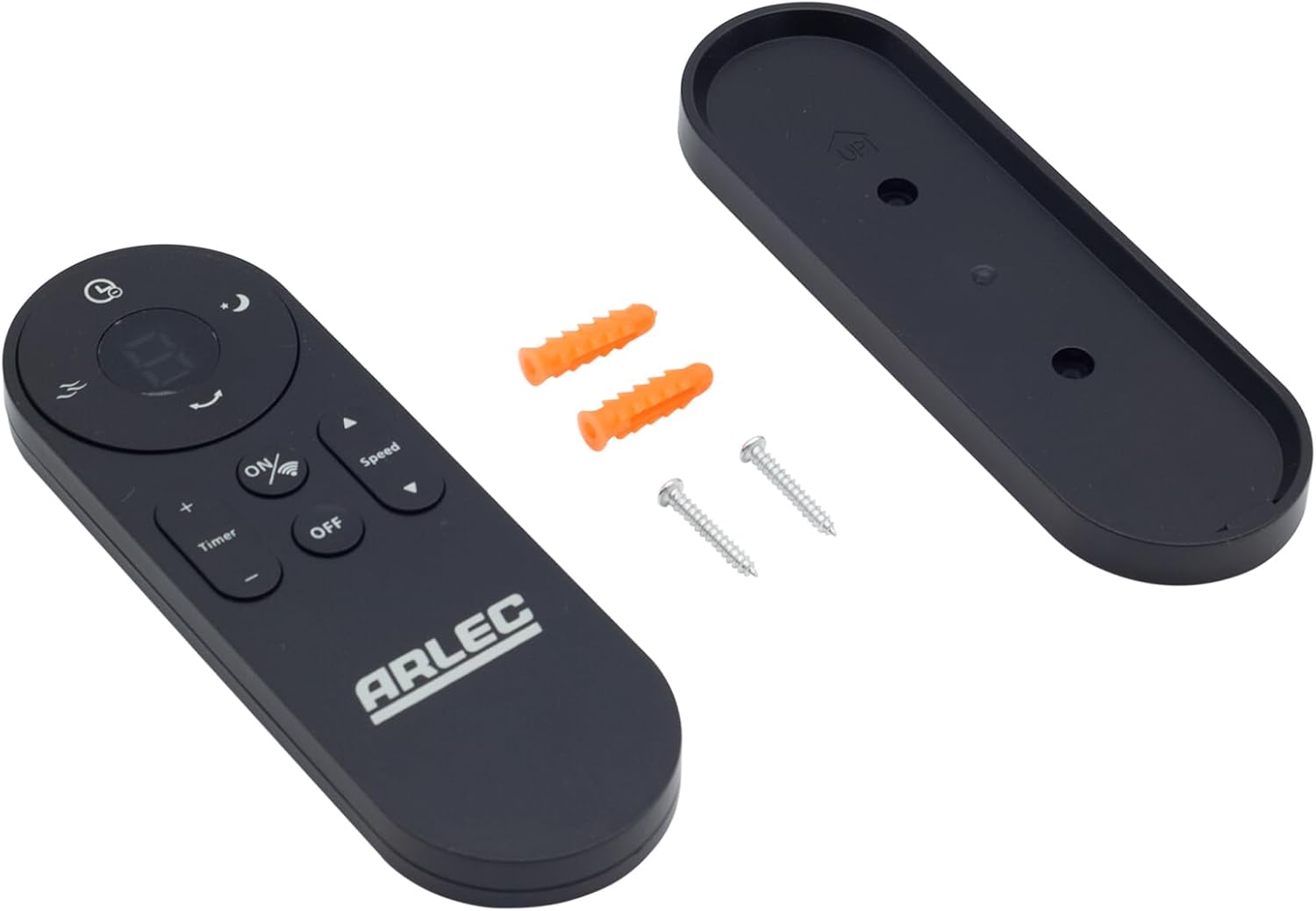
Image: Arlec Remote SS3136 shown with its included wall mount holder, two mounting screws, and two wall plugs, indicating the complete package contents.
4. Тохиргоо
4.1 Батерей суурилуулах
- Алсын удирдлагын ар талд байгаа зайны тасалгааг ол.
- Зайны тасалгааны тагийг нээ.
- Insert 3 Alkaline batteries (not included) into the compartment, ensuring the correct polarity (+ and -) as indicated inside the compartment. The remote requires 3 Volts (DC).
- Зайны тасалгааны тагийг сайтар хаа.
4.2 Хананд суурилуулах (заавал биш)
- Choose a suitable location on a wall for the remote holder.
- Mark the positions for the two mounting screws using the holder as a template.
- Drill pilot holes at the marked positions. Insert the wall plugs if drilling into drywall or masonry.
- Secure the wall mount holder to the wall using the provided screws.
- Place the remote control into the installed holder for convenient storage.
5. Ашиглалтын заавар
The Arlec Remote SS3136 features a simple 3-button layout for controlling your Arlec Wall Fan AWDC001HA. Ensure there is a clear line of sight between the remote and the fan's infrared receiver for optimal performance.

Зураг: Ойролцоогоор view of the Arlec Remote SS3136, highlighting its three main control buttons: ON/OFF, Speed, and Timer.
- ON/OFF товч: Сэнсийг асаах, унтраахын тулд энэ товчийг дарна уу.
- Хурдны товчлуур: Use this button to cycle through the available fan speed settings (e.g., Low, Medium, High).
- Цаг хэмжигч товчлуур: Press this button to set or adjust the fan's timer function. Refer to your Arlec Wall Fan AWDC001HA manual for specific timer intervals.
The remote operates using Infrared (IR) technology. Point the remote directly towards the fan's IR receiver. The effective operating range is up to 10 meters (approximately 33 feet).
6. Засвар үйлчилгээ
- Цэвэрлэгээ: Алсын удирдлагыг зөөлөн, хуурай даавуугаар арчина. Зүлгүүрийн цэвэрлэгч эсвэл уусгагч хэрэглэж болохгүй.
- Зай солих: Replace batteries when the remote's performance degrades or it stops responding. Always replace all 3 batteries at the same time with new alkaline batteries.
- Хадгалах: Хэрэв алсын удирдлагыг удаан хугацаагаар ашиглахгүй бол гоожихоос сэргийлж батерейг нь салгаж авна уу. Сэрүүн, хуурай газар хадгална уу.
7. Алдаа засах
| Асуудал | Боломжит шалтгаан | Шийдэл |
|---|---|---|
| Алсын удирдлага сэнсэнд хариу өгөхгүй байна. |
|
|
| Товчнууд нь наалдамхай эсвэл хариу өгөхгүй байна. | Товчлуурын доорх шороо, хог хаягдал. | Clean the remote surface with a soft, dry cloth. Avoid liquids. |
8. Техникийн үзүүлэлтүүд
| Атрибут | Дэлгэрэнгүй |
|---|---|
| Загвар | SS3136 |
| Үйлдвэрлэгч | Arlec |
| Тохиромжтой төхөөрөмжүүд | Arlec Wall Fan AWDC001HA |
| Холболтын технологи | Хэт улаан туяаны (IR) |
| Товчлуурын тоо | 3 |
| Хянагчийн төрөл | Товчлуурын удирдлага |
| Зайны төрөл | Alkaline (3 required) |
| Ботьtage | 3 вольт (ДС) |
| Үйл ажиллагааны хүрээ | 10 метр хүртэл |
9. Баталгаат хугацаа ба дэмжлэг
For warranty information and technical support, please refer to the documentation provided with your Arlec Wall Fan AWDC001HA or contact Arlec customer service directly. Keep your purchase receipt as proof of purchase.
Нэмэлт тусламж авахыг хүсвэл үйлдвэрлэгчийн албан ёсны төлөөлөгчөөс лавлана уу webсайт эсвэл хэрэглэгчийн тусламжийн шугамтай холбогдоно уу.


