1. Танилцуулга
This manual provides detailed instructions for the installation, operation, and maintenance of your CP PLUS 4MP Wi-Fi Floodlight Camera, model CP-F42A. Please read this manual thoroughly before using the product to ensure proper functionality and safety. This camera combines high-resolution video surveillance with integrated floodlighting for enhanced security.
2. Аюулгүй байдлын мэдээлэл
- Ensure the power supply matches the camera's requirements.
- Камерыг задлах, өөрчлөхийг бүү оролд.
- Install the camera in a location where it is protected from extreme weather conditions, although it has an IP54 rating, direct exposure to heavy rain or prolonged submersion is not recommended.
- Камерыг дулааны эх үүсвэр болон нарны шууд тусгалаас хол байлга.
- Бие махбодид гэмтэл учруулахгүйн тулд камертай болгоомжтой харьц.
- Хэрэв та цахилгааны утсыг суурилуулах талаар эргэлзэж байвал мэргэшсэн цахилгаанчинтай зөвлөлдөнө үү.
3. Багцын агуулга
Бүх зүйл багцад байгаа эсэхийг шалгана уу:
- CP PLUS 4MP Wi-Fi Floodlight Camera (CP-F42A)
- Эрчим хүчний адаптер
- Суурилуулах эрэг ба ханын залгуур
- Хурдан эхлүүлэх гарын авлага (энэ гарын авлагад ороогүй болно)
4. Бүтээгдэхүүн дууссанview
The CP-F42A is an outdoor Wi-Fi floodlight camera designed for surveillance and illumination. It features a 4MP sensor for clear video, H.265 video compression for efficient storage, and a 110° viewing angle. The integrated floodlight provides illumination, and the PIR sensor detects motion up to 12 meters.
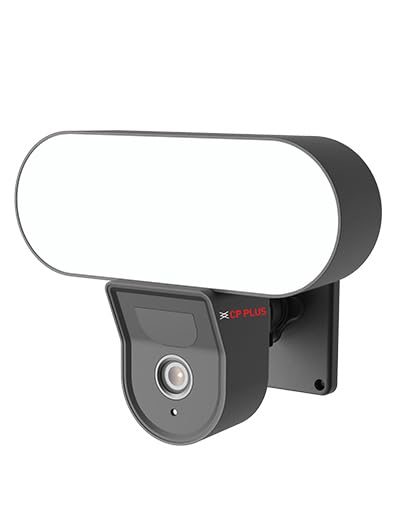
Зураг: Урд view of the CP PLUS 4MP Wi-Fi Floodlight Camera CP-F42A, showing the camera lens and the integrated floodlight panel.
Гол бүрэлдэхүүн хэсгүүд:
- Камерын линз: Captures 4MP video.
- Floodlight Panel: Гэрэлтүүлгийг хангана.
- PIR мэдрэгч: Хөдөлгөөнийг илрүүлдэг.
- Микрофон: Аудио оролтын хувьд.
- Илтгэгч: Хоёр талын аудио гаралтын хувьд.
- Холбох хаалт: Аюулгүй суурилуулалтын хувьд.
5. Тохиргоо
5.1 Физик суурилуулалт
- Байршил сонгоно уу: Ил тод агаартай гадаа байршлыг сонгоно уу view of the area you wish to monitor and within Wi-Fi range. Ensure the mounting surface is sturdy.
- Өрөмдлөгийн цэгүүдийг тэмдэглэх: Use the mounting bracket as a template to mark the screw holes on the wall.
- Өрөмдлөгийн цооног: Drill pilot holes at the marked points. Insert wall plugs if mounting on masonry.
- Камерыг суурилуулах: Secure the mounting bracket to the wall using the provided screws. Attach the camera to the bracket.
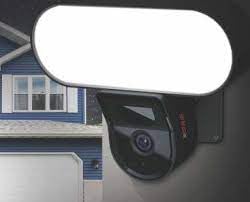
Image: The CP PLUS Floodlight Camera mounted on the exterior of a house, illustrating a typical installation scenario during the day.
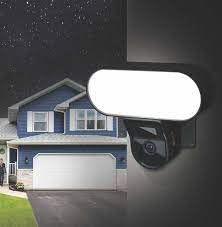
Image: The CP PLUS Floodlight Camera mounted on the exterior of a house at night, with the floodlight illuminated, demonstrating its night-time functionality.
5.2 Эрчим хүчний холболт
Connect the provided power adapter to the camera's power input port and then plug it into a suitable electrical outlet. Ensure the connection is secure and protected from moisture.
5.3 Wi-Fi Connection and App Pairing
- Апп татаж авах: хайх the "ezyKam+" app (or the recommended CP PLUS app) on your smartphone's app store (iOS or Android) and install it.
- Бүртгэл үүсгэх: Аппликешныг нээгээд шинэ бүртгэлээр бүртгүүлэх эсвэл хэрэв танд бүртгэл байгаа бол нэвтэрнэ үү.
- Төхөөрөмж нэмэх: Follow the in-app instructions to add a new device. Select "Floodlight Camera" or a similar option.
- Wi-Fi-д холбогдох: The app will guide you through connecting the camera to your home Wi-Fi network. This usually involves scanning a QR code on the camera or entering your Wi-Fi credentials.
- Бүрэн тохиргоо: Once connected, you can name your camera and adjust initial settings.
Image: Branding for CP PLUS ezyKam+ Wi-Fi Floodlight Full Color Camera, indicating compatibility with Alexa and Google Home, relevant for app pairing and smart home integration.
6. Ашиглалтын заавар
Access all camera functions through the dedicated mobile application.
6.1 Амьд View
Open the app and select your camera from the device list to view the live video feed. You can pinch to zoom and pan across the image.
6.2 Бичлэг хийх, тоглуулах
- Гараар бичлэг хийх: Шууд дамжуулалт дээр бичлэг хийх товчийг дарна уу view гараар бичлэг эхлүүлэх/зогсоох.
- Үйл явдлын бичлэг: The camera automatically records when motion is detected. These recordings are stored on the installed microSD card (if any) or cloud storage (subscription may be required).
- Тоглуулах: Бүртгэгдсэн foo руу нэвтрэхtagапп доторх "Тоглуулах" эсвэл "Түүх" хэсгээр дамжуулан.
6.3 Хөдөлгөөн илрүүлэх ба дохиолол
Configure motion detection sensitivity and areas within the app settings. When motion is detected, the camera can send push notifications to your phone and trigger recording. The PIR sensor has a detection range of 6-12 meters.
6.4 Floodlight Control
The floodlight can be controlled manually via the app or set to activate automatically upon motion detection during specific times or low-light conditions. Adjust brightness and duration settings in the app.
6.5 Хоёр талын аудио
Шууд нэвтрүүлэгт микрофон болон чанга яригчийн дүрсийг ашиглана уу view to communicate with visitors or deter intruders. Press and hold the microphone icon to speak, and release to listen.
6.6 Шөнийн хараа
The camera features infrared (IR) night vision for clear black-and-white video in low-light conditions and can also utilize the floodlight for full-color night vision when activated. The night vision range is up to 12 meters.
7. Засвар үйлчилгээ
7.1 Цэвэрлэгээ
Wipe the camera lens and floodlight panel with a soft, damp Тоос шороог арилгахын тулд даавуугаар арчина. Хүчтэй химийн бодис эсвэл зүлгүүрийн цэвэрлэгч хэрэглэж болохгүй.
7.2 Програм хангамжийн шинэчлэлтүүд
Periodically check the app for available firmware updates. Keeping your camera's firmware up-to-date ensures optimal performance and security features.
7.3 Хадгалалтын менежмент
If using a microSD card, regularly check its status in the app. Format the card periodically to maintain performance. Back up important recordings before formatting.
8. Алдаа засах
| Асуудал | Боломжит шийдэл |
|---|---|
| Камер асахгүй байна. | Check power adapter connection and ensure the outlet is functional. |
| Wi-Fi-д холбогдох боломжгүй байна. | Ensure the camera is within Wi-Fi range. Verify Wi-Fi password. Try resetting the camera and router. |
| Видео чанар муу. | Check Wi-Fi signal strength. Clean the camera lens. Ensure sufficient lighting. |
| Хөдөлгөөн мэдрэгч ажиллахгүй байна. | Adjust motion detection sensitivity and area settings in the app. Ensure there are no obstructions. |
| Floodlight not activating. | Check floodlight settings in the app. Ensure it's set to activate on motion or during low light. |
9. Техникийн үзүүлэлтүүд
| Онцлог | Дэлгэрэнгүй |
|---|---|
| Загварын дугаар | CP-F42A |
| Шийдвэр | 4MP (Effective Still Resolution: 4 MP) |
| Видео шахалт | H.265, MPEG |
| Viewing өнцөг | 110 градус |
| PIR зай | 6 ~ 12 метр |
| Утасгүй технологи | Wi-Fi |
| Шөнийн харааны хүрээ | 12 Meters (Infrared, Night Color) |
| Frame Rate | Секундэд 20 кадр |
| Оптик томруулалт | 3x |
| Олон улсын хамгаалалтын зэрэглэл | IP54 |
| Сэрэмжлүүлгийн төрөл | Зөвхөн хөдөлгөөн |
| Эрчим хүчний эх үүсвэр | Утастай цахилгаан |
| Оруулсан бүрэлдэхүүн хэсгүүд | Адаптер |
| Хэмжээ (L x W x H) | 20 x 12 x 10 сантиметр |
| Зүйлийн жин | 630 гр |
| Дотор/гадаа ашиглах | Гадаа |
| Фото мэдрэгчийн технологи | CMOS |
| Зөвлөмж болгож буй хэрэглээ | Гэрийн аюулгүй байдал, шөнийн хараа |
10. Баталгаат хугацаа ба дэмжлэг
For warranty information and technical support, please refer to the official CP PLUS webсайт эсвэл харилцагчийн үйлчилгээтэй холбогдоно уу. Худалдан авалтын баримтаа баталгаат нэхэмжлэлд зориулж худалдан авалтын баталгаа болгон хадгална уу.
CP PLUS Official Webсайт: www.cpplusworld.com


