Танилцуулга
This manual provides detailed instructions for the setup, operation, and maintenance of your ATTACK SHARK M71 75% TKL Wireless Mechanical Keyboard. Please read this guide thoroughly to ensure proper use and to maximize your keyboard's performance and lifespan.

Image: The ATTACK SHARK M71 keyboard showcasing its 68% layout and key features like aluminum alloy body, three-mode connection, and RGB backlight.
Багцын агуулга
Бүх зүйл багцад байгаа эсэхийг шалгана уу:
- ATTACK SHARK M71 Wireless Mechanical Keyboard
- Type-C кабель
- 2.4G утасгүй хүлээн авагч
- Keycap Puller / Switch Puller (Two-in-one tool)
- Complimentary 61 additional PBT OEM keycaps (different color layout)
- Хэрэглэгчийн гарын авлага

Image: A visual representation of the items included in the ATTACK SHARK M71 keyboard package, including the keyboard, cables, and extra keycaps.
Video: Unboxing the Blueberry version of the M71 keyboard, showing the package contents and a demonstration of its typing sound.
Бүтээгдэхүүн дууссанview
The ATTACK SHARK M71 is a 75% TKL wireless mechanical keyboard featuring a full aluminum CNC chassis, multi-mode connectivity, hot-swappable switches, and RGB lighting. Its compact design and robust construction are engineered for both gaming and productivity.
Гол онцлогууд:
- Full Aluminum CNC Body: Constructed from international standard 6063 aluminum alloy for durability and a premium feel.
- Гурван горимын холболт: Supports Bluetooth 5.0/3.0, 2.4G wireless, and wired USB-C connections.
- Халуун сольж болох унтраалга: Compatible with 3/5-pin switches, allowing for easy customization without soldering.
- Жийргэвчний бэхэлгээний бүтэц: Incorporates anti-static IPEX switch pads, PORON sound-absorbing cotton, and PET acoustic switch pads to enhance typing feel and reduce noise.
- RGB LED гэрэлтүүлэг: Features customizable RGB backlighting and a side LED light strip.
- 4600 мАч батерей: Provides extended wireless usage.
- PBT OEM Keycaps: Durable keycaps with GMK-like characters.
Бүрэлдэхүүн хэсгүүд:
Familiarize yourself with the main components of your keyboard:
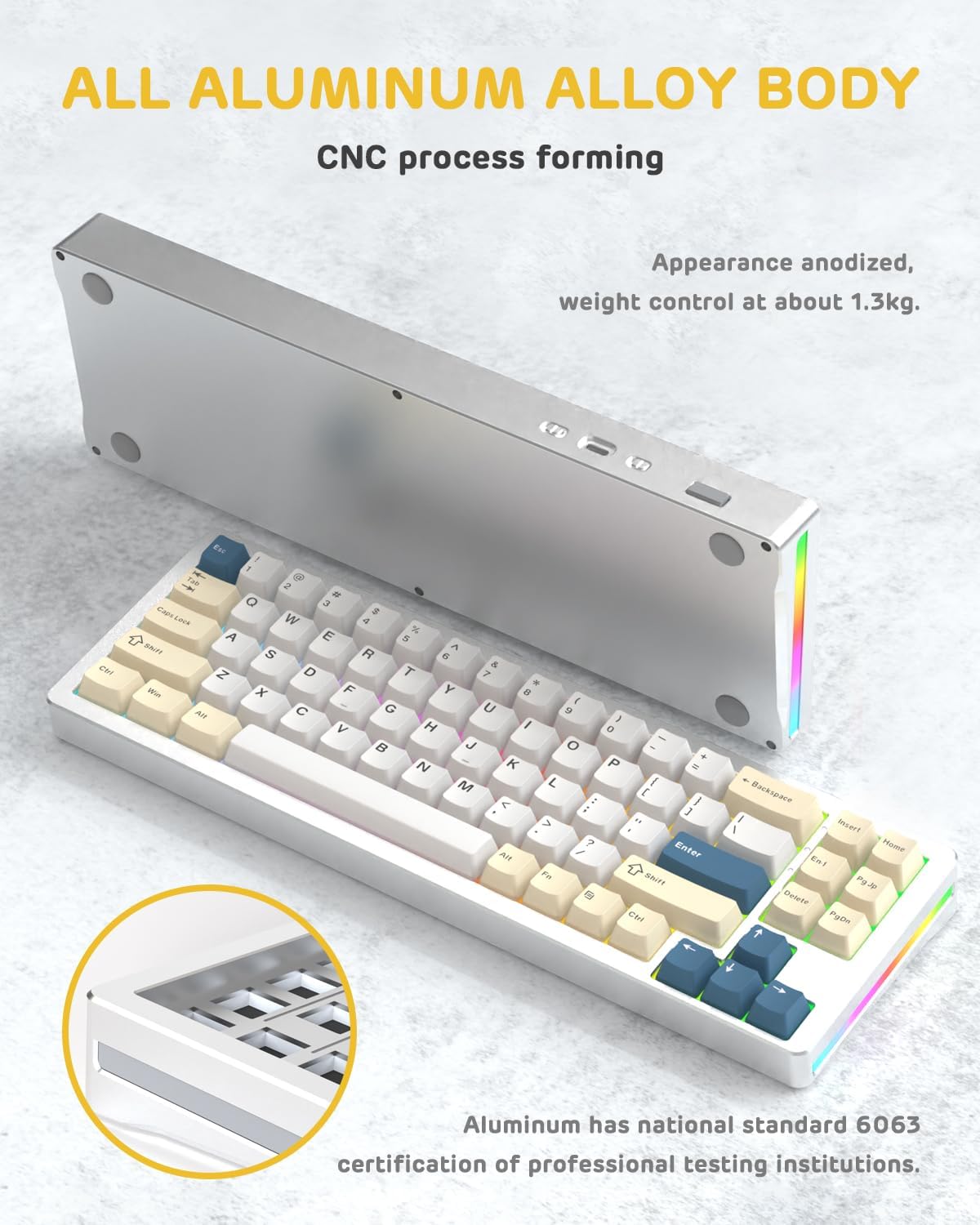
Зураг: нэг тал view of the M71 keyboard highlighting its full aluminum alloy body and CNC process forming.

Зураг: дэлбэрсэн view illustrating the multi-layered gasket mount structure, including the PBT keycaps, aluminum alloy upper cover, customized switch body, PC positioning board, PORON filled cotton, anti-static IPEX switch underpad, PET singing pad, PCB board, PORON shaft seat cushion, PET sound backing pad, wing light strip, and aluminum alloy base.
Тохиргоо
1. Connectivity Modes:
The M71 keyboard supports three connection modes: Bluetooth, 2.4G wireless, and wired USB-C.
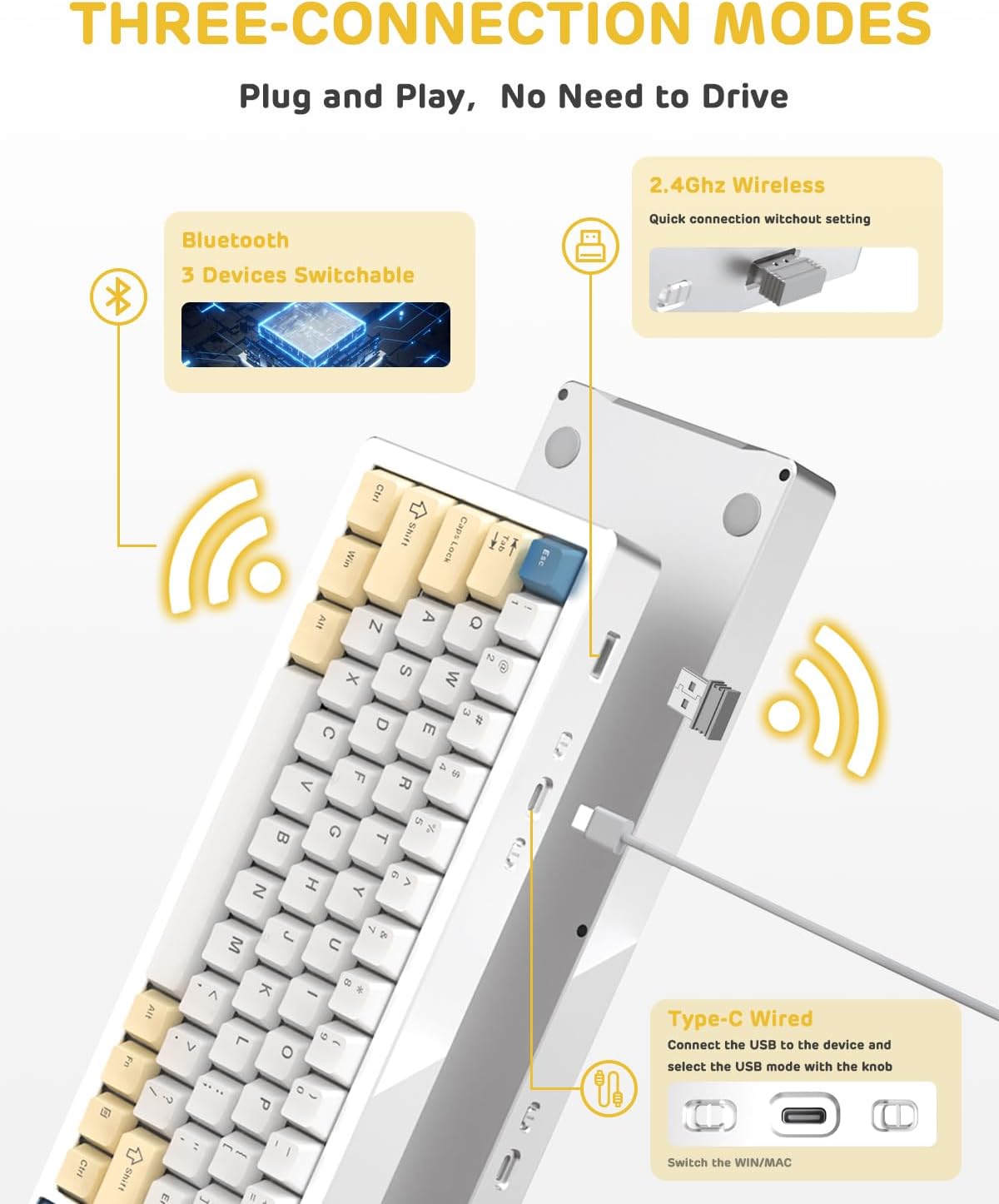
Image: A visual guide to the three connectivity options: Bluetooth for up to 3 devices, 2.4GHz wireless with a receiver, and wired Type-C connection.
Утастай холболт:
- Өгөгдсөн Type-C кабелийг гарны USB-C порт болон компьютерынхоо USB порттой холбоно уу.
- Ensure the mode switch on the keyboard is set to the wired (USB-C) position.
- Гарыг таны систем автоматаар таних болно.
2.4G утасгүй холболт:
- Locate the 2.4G wireless receiver (dongle) in the package.
- 2.4G хүлээн авагчийг компьютер дээрх боломжтой USB порт руу залгаарай.
- Set the mode switch on the keyboard to the 2.4G wireless position.
- Гар автоматаар холбогдох ёстой.
Bluetooth холболт:
- Гар дээрх горимын шилжүүлэгчийг Bluetooth байрлалд тохируулна уу.
- Компьютер эсвэл төхөөрөмж дээрээ Bluetooth тохиргоог нээгээд шинэ төхөөрөмжүүдийг хайгаарай.
- The keyboard should appear as "ATTACK SHARK M71" or similar. Select it to pair.
- The keyboard can connect to up to 3 Bluetooth devices. Use Fn + 1/2/3 хосолсон төхөөрөмжүүдийн хооронд шилжих.
2. Battery Charging and Status:
The M71 keyboard is equipped with a 4600mAh battery. To charge, connect the keyboard via the USB-C cable to a power source (e.g., computer USB port, USB wall adapter).

Image: A diagram showing how to check the battery level using Fn+ALT(R) and the visual indicators on the keyboard's side LED strip.
- Утасгүй горимд батерейны түвшинг шалгахын тулд дарна уу Fn + ALT (Right). The side LED strip will indicate the charge level.
- Battery life is approximately 1-2 weeks with lighting enabled and up to 4 weeks with lighting disabled.
Ашиглалтын заавар
1. Multimedia Keys:
The keyboard features 12 multimedia keys accessible via the Fn түлхүүр хослолууд:
- Fn + F1-F12: Access various multimedia functions (e.g., volume control, play/pause, calculator, email).
- Fn + 1/2: Control screen brightness.
2. RGB гэрэлтүүлгийн удирдлага:
Customize the keyboard's RGB backlight and side LED strip:

Image: The M71 keyboard displaying its RGB backlight and side LED strip, along with a close-up of the PBT keycaps.
- Fn + Ctrl (Right): Switch between different side LED light strip modes.
- Fn + Таб: Toggle white light mode.
- Refer to the full user manual for additional lighting effect controls and customization options via the programmable software.
3. Programmable Software:
The keyboard supports a dedicated driver program for advanced customization. You can download the software from the official ATTACK SHARK website to personalize lighting effects, key assignments, and macros. The keyboard is compatible with Windows 2000/XP/Vista/7/8/10/11, Android, and iOS.
Засвар үйлчилгээ
1. Цэвэрлэгээ:
- Гарны гадаргууг зөөлөн, хуурай даавуугаар арчина.
- For deeper cleaning, remove keycaps using the provided keycap puller and use compressed air to clear debris from between switches.
- Химийн хатуу бодис, зүлгүүрийн материал ашиглахаас зайлсхий.
2. Hot-Swapping Switches:
The M71 keyboard features hot-swappable sockets, allowing you to change switches without soldering.

Зураг: Ойрын зураг view of the hot-swappable White Jade linear switches on the M71 keyboard, demonstrating how they can be easily removed and replaced.
- Гарыг унтраа эсвэл төхөөрөмжөөсөө салга.
- Шилжүүлэгч татах хэрэгслийг ашиглан унтраалгыг болгоомжтой барьж, дээш нь татна уу.
- Align the pins of the new switch with the holes on the PCB and press down gently until it clicks into place. Ensure pins are not bent.
- The PCB supports both 3-pin and 5-pin switches.
Video: A demonstration of the disassembly process for the M71 keyboard, showing how to remove keycaps and switches, revealing the gasket mount structure.
Алдааг олж засварлах
| Асуудал | Боломжит шийдэл |
|---|---|
| Гар утасгүй горимд хариу өгөхгүй байна. |
|
| Түлхүүрүүд бүртгэгдээгүй эсвэл давхар бичиж байна. |
|
| RGB гэрэлтүүлэг ажиллахгүй эсвэл буруу байна. |
|
| Bluetooth холболттой холбоотой асуудлууд. |
|
Үзүүлэлтүүд
| Онцлог | Дэлгэрэнгүй |
|---|---|
| Загвар | M71 |
| Зохион байгуулалт | 75% TKL (71 keys) |
| Холболт | Bluetooth 5.0/3.0, 2.4G Wireless, USB-C Wired |
| Шилжүүлэгч | Hot-swappable (3/5-pin compatible), Pre-lubed Linear White Jade Switch |
| Товчлуурууд | PBT OEM товчлуурын тагнууд |
| Суулгах хэв маяг | Жийргэвчний бэхэлгээ |
| Явах эд ангийн материал | Full Aluminum CNC (6063 alloy) |
| Зайны багтаамж | 4600 мАч |
| Гэрэлтүүлэг | RGB Backlight, RGB LED Side Light Strip |
| Тохиромжтой байдал | Windows 2000/XP/Vista/7/8/10/11, Android, iOS, Mac |
| Бүтээгдэхүүний хэмжээс | 13.78"L x 4.53"W x 1.22"H |
| Зүйлийн жин | 2.86 фунт |
Баталгаат болон дэмжлэг
For warranty information and technical support, please refer to the official ATTACK SHARK webсайт эсвэл харилцагчийн үйлчилгээтэй шууд холбогдоно уу. Худалдан авалтын баримтаа аливаа баталгаат нэхэмжлэлийг худалдан авсан баримт болгон хадгална уу.
Үйлдвэрлэгч: ATACK SHARK
Худалдагч: Ajazz US
Эхний боломжтой огноо: 4 оны наймдугаар сарын 2023


