1. Танилцуулга
This manual provides detailed instructions for the installation, setup, and operation of your SONOFF Matter Smart Light Switch M5-3C-120W 3-Gang. This smart wall switch integrates with Matter, allowing seamless control through various smart home ecosystems including Alexa, Google Home, and SmartThings. It features 2.4GHz WiFi connectivity, requiring a neutral wire for installation. Please read this manual thoroughly before installation and use to ensure proper function and safety.

Зураг 1.1: Урд view of the SONOFF Matter Smart Light Switch M5-3C-120W 3-Gang.

Зураг 1.2: Дууслааview of Matter compatibility with various smart home platforms.
2. Аюулгүй байдлын мэдээлэл
АНХААРУУЛГА: Risk of electric shock. Installation should be performed by a qualified electrician. Always turn off power at the circuit breaker before installing or servicing the switch. Ensure all wiring is compliant with local electrical codes.
- Энэ төхөөрөмжийг зөвхөн дотоод орчинд ашиглах зориулалттай.
- Нойтон гараар эсвэл нойтон дээр зогсож байхдаа суулгахгүй байх, damp гадаргуу.
- Ensure the power supply is disconnected before any installation, maintenance, or removal procedures.
- A neutral wire is required for the operation of this smart switch. Verify its presence in your electrical box before proceeding.
- The device is FCC certified, ensuring safety and reliability.

Image 2.1: Illustration of the switch's internal design, highlighting high temperature resistance and safe disassembly features.
3. Багцын агуулга
Сав баглаа боодлыг онгойлгосны дараа бүх зүйл байгаа бөгөөд гэмтээгүй эсэхийг шалгана уу:
- SONOFF Matter Smart Light Switch (M5-3C-120W) x 1
- Шуурхай гарын авлага x 1
- Шураг х 2

Зураг 3.1: Урд view бүтээгдэхүүний сав баглаа боодлын талаар.

Зураг 3.2: Буцах view of the product packaging, detailing specifications and features.
4. Суурилуулалт
Чухал: Installation requires working with electrical wiring. If you are not comfortable with electrical work, consult a qualified electrician.
4.1 Суулгахын өмнөх шалгалт
- Төвийг сахисан утсыг шалгах: This smart switch requires a neutral wire (typically white or gray) in your electrical box. Without a neutral wire, the switch cannot be installed.
- Унтраах: Locate your circuit breaker panel and turn off the power to the switch you are replacing. Confirm the power is off using a voltage шалгагч.
- Existing Switch Removal: Carefully remove the faceplate and unscrew the existing switch from the wall box. Disconnect the wires, noting their connections.
4.2 Утас тавих заавар
The SONOFF M5-3C-120W switch has terminals for Line (Live), Load, and Neutral wires. Refer to the diagram below for typical wiring connections.
- Line (L): Connect the incoming live wire from your electrical supply.
- Load (L1, L2, L3): Connect the wires going to your light fixtures. Each gang corresponds to a load terminal.
- Төвийг сахисан (N): Connect the neutral wire from your electrical supply.
- Газар (GND): Connect the ground wire (if present in your wall box) to the switch's ground terminal.
4.3 Физик суурилуулалт
- After wiring, carefully push the switch into the wall box.
- Шилжүүлэгчийг ханын хайрцагт нийлүүлсэн эрэг ашиглан бэхлээрэй.
- Нүүрний хавтанг шилжүүлэгчтэй холбоно уу.
- Restore power at the circuit breaker. The switch's indicator light should illuminate.

Image 4.1: Compatibility with standard US wall boxes and detailed product dimensions.
5. Тохиргоо ба Хослуулах
The SONOFF M5-3C-120W supports Matter protocol for broad compatibility.
5.1 Initial Setup with eWeLink App (Optional)
While Matter allows direct integration, you can also use the eWeLink app for initial setup or additional features.
- eWeLink програмыг татаж авах: хайх Ухаалаг утасныхаа програмын дэлгүүрт (Google Play Store эсвэл Apple App Store) "eWeLink"-г суулгаад суулгаарай.
- Бүртгүүлэх/Нэвтрэх: Аппликешныг нээгээд бүртгэл үүсгэнэ үү эсвэл танд бүртгэл байгаа бол нэвтэрнэ үү.
- Төхөөрөмж нэмэх: Follow the in-app instructions to add a new device. The switch should enter pairing mode automatically after power-up.
5.2 Pairing with Matter Ecosystems
To integrate with Matter-compatible hubs (e.g., Apple Home, Google Home, Alexa, SmartThings), follow these general steps:
- Ensure your Matter-compatible hub (e.g., HomePod, Apple TV 4K, Google Nest Hub, Amazon Echo device) is set up and online.
- Open the respective smart home app (Apple Home, Google Home, Alexa, SmartThings).
- Initiate the "Add Device" or "Add Accessory" process within the app.
- Scan the Matter QR code located on the device or its packaging, or manually enter the pairing code.
- Хослуулах үйл явцыг дуусгахын тулд дэлгэцэн дээрх зааврыг дагана уу.
6. Ашиглалтын заавар
6.1 Гарын авлагын удирдлага
Press the physical buttons on the switch to manually turn connected lights on or off.
6.2 Програмын алсын удирдлага
Use the eWeLink app or your preferred Matter-compatible smart home app to control the switch remotely.
- Асаах/унтраах хяналт: Tap the respective button in the app to toggle the light on or off.
- Хуваарь: Set custom schedules and timers for automatic light control.
- Давталтын цаг хэмжигч: Configure lights to cycle on and off at specified intervals.
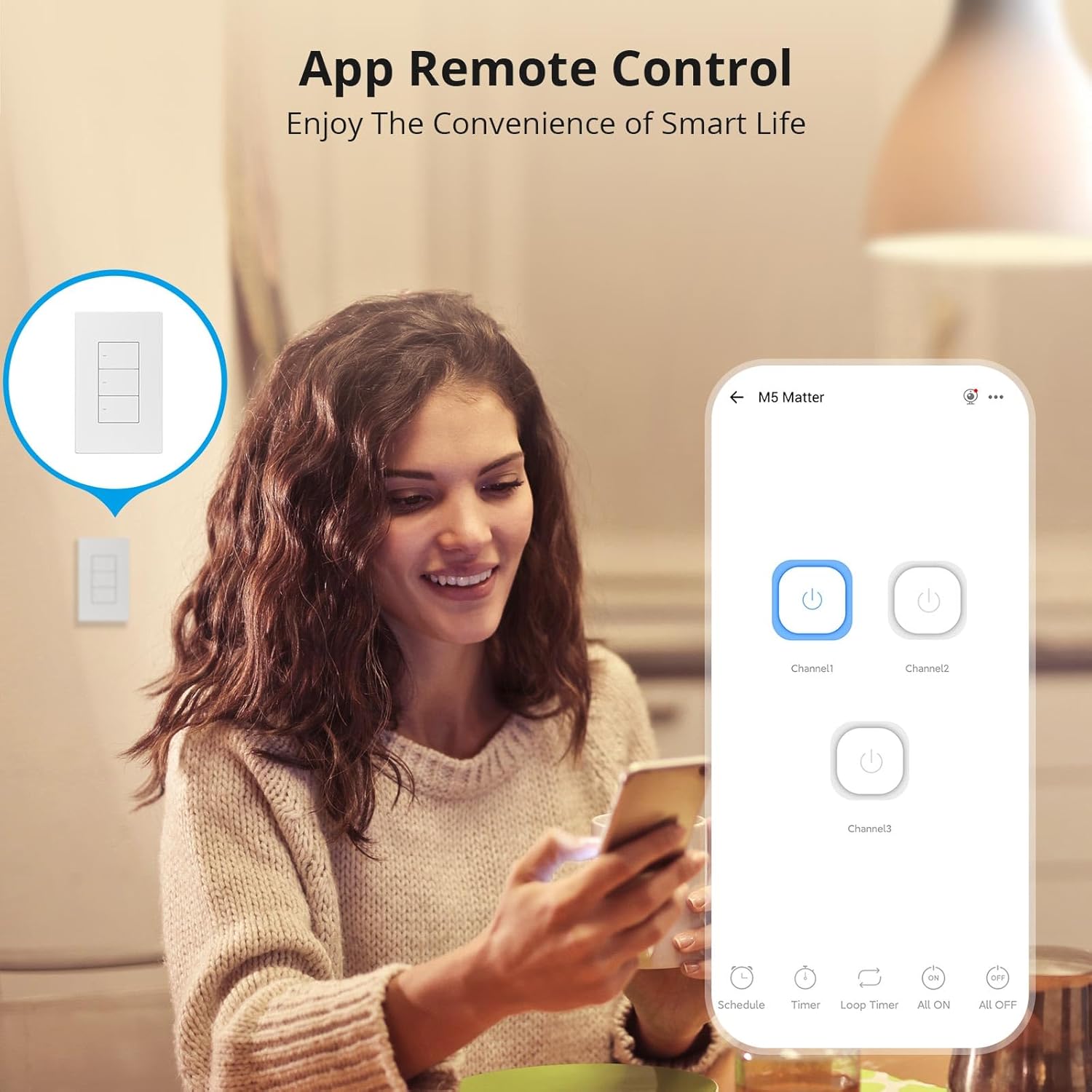
Image 6.1: Remote control via the eWeLink app interface.

Зураг 6.2: Жишээ ньample of setting scheduled on/off times for automated lighting.
6.3 Дуут удирдлага
Once integrated with Alexa, Google Home, or other voice assistants, you can control your lights using voice commands.
- Example: "Alexa, turn off the living room light."
- Example: "Hey Google, turn on the kitchen lights."

Image 6.3: Voice control in action with a smart speaker.
6.4 Ухаалаг үзэгдлүүд
Create smart scenes to automate actions based on specific conditions or other smart devices.
- Example: Link with a door sensor (e.g., SONOFF DW2-WiFi) to automatically turn on lights when a door opens.

Image 6.4: Smart scene example: lights activate upon door opening.
6.5 Two-Way Control (with SONOFF R5)
The SONOFF M5 switch can be paired with a SONOFF R5 Scene Controller for two-way or multi-way control without complex wiring.

Image 6.5: Two-way control setup using an M5 switch and an R5 scene controller.
6.6 LED индикаторын тохируулга
The LED indicator on the switch buttons can be adjusted for brightness via the eWeLink app to suit your preference, especially for locating the switch in the dark or minimizing disturbance during sleep.

Image 6.6: App interface for adjusting LED indicator brightness.
7. Засвар үйлчилгээ
To maintain the performance and appearance of your smart switch:
- Гадаргууг зөөлөн, хуурай даавуугаар арчина. Зүлгүүрийн цэвэрлэгч эсвэл уусгагч хэрэглэж болохгүй.
- Ensure the switch is kept free from dust and moisture.
- Do not attempt to disassemble the switch beyond what is described in the safety section, as this may void the warranty and pose a safety risk.
8. Алдаа засах
If you encounter issues with your SONOFF Matter Smart Light Switch, refer to the following common problems and solutions:
- Switch is unresponsive / No power:
- Check the circuit breaker to ensure power is restored to the switch.
- Төвийг сахисан утсыг зөв холбосон эсэхийг шалгана уу.
- Бүх утас холболт найдвартай эсэхийг шалгаарай.
- Cannot connect to WiFi / Drops connection frequently:
- Ensure your WiFi network is 2.4GHz. This device does not support 5GHz WiFi.
- Check the distance between the switch and your WiFi router. Obstructions can weaken the signal.
- WiFi чиглүүлэгчээ дахин эхлүүлнэ үү.
- Perform a factory reset on the switch (refer to the quick guide for specific steps) and attempt pairing again.
- Cannot pair with Matter / Smart Home App:
- Ensure your Matter-compatible hub is online and within range.
- Verify that the Matter QR code or pairing code is entered correctly.
- Check for any firmware updates for your Matter hub or the smart switch.
- Try resetting the switch and initiating the pairing process again.
- Lights flicker or do not turn off completely:
- This can sometimes occur with low-wattage LED bulbs. Ensure your bulbs are compatible with smart switches.
- Verify the load connected does not exceed the maximum wattagтехникийн үзүүлэлтэд заасан e.
9. Техникийн үзүүлэлтүүд
| Онцлог | Дэлгэрэнгүй |
|---|---|
| Загвар | M5-3C-120W |
| Бүтээгдэхүүний хэмжээс | 4.72 x 2.91 x 1.63 инч |
| Зүйлийн жин | 8.08 унц |
| Үйлдлийн горим | АСААХ, УНТРААХ |
| Одоогийн үнэлгээ | 6 Amps |
| Үйл ажиллагааны ботьtage | 100-240 вольтын хувьсах гүйдэл |
| Холбоо барих төрөл | Ер нь хаалттай |
| Холбогч төрөл | Clamp |
| Терминал | Шураг |
| Хэлхээний төрөл | 1 чиглэлтэй |
| Хөдөлгүүрийн төрөл | Товчлуур |
| Wi-Fi | IEEE 802.11 b / g / n 2.4GHz |
| Casing Материал | PC V0 + CRS |
| Ажлын температур | -10 хэмээс 40 хэм хүртэл |
| Баталгаажуулалт | CE/FCC/ISED |
| Max. Load (per gang) | 3-Gang: 1320W (440W/Gang) |
10. Баталгаат хугацаа ба дэмжлэг
SONOFF products are designed and manufactured to the highest quality standards. For warranty information and technical support, please refer to the official SONOFF webсайт эсвэл харилцагчийн үйлчилгээтэй шууд холбогдоно уу. Худалдан авалтын баримтаа баталгаат нэхэмжлэлд зориулж худалдан авалтын баталгаа болгон хадгална уу.
Үйлдвэрлэгч: СОНОФ
Webсайт: sonoff.tech
Үйлчилгээний имэйл: support@itead.cc