1. Бүтээгдэхүүн дууссанview
The ROOFULL External CD DVD Drive is a multifunctional device designed to provide comprehensive disc reading and writing capabilities, along with expanded connectivity options for modern laptops and computers. This 8-in-1 unit supports various disc formats and offers high-speed data transfer, making it an essential accessory for users without built-in optical drives or those requiring additional USB and card reader ports.

Figure 1.1: ROOFULL External CD DVD Drive and accessories.
2. Хайрцагт юу байна
- 1 x ROOFULL External CD/DVD Drive (RF40-SU)
- 1 x USB Power Supply Cord
- 1 х хэрэглэгчийн гарын авлага

Figure 2.1: Package contents of the ROOFULL External CD DVD Drive.
3. Онцлогууд
- 8-ын-1 олон үйлдэлт: Functions as a CD/DVD-ROM reader, CD/DVD burner, writer, rewriter, ripper, and recorder.
- True USB 3.0 & Dual Connectors: Supports up to 5 Gbps high-speed transfer with a full 9-wire cable and dedicated controller chip. Includes both USB Type-A and Type-C connectors for broad compatibility without adapters.
- Built-in Hub & SD Card Reader: Features multiple USB 3.0/2.0 Type-A ports and integrated SD/microSD card readers for connecting peripherals and importing media.
- Өргөн нийцтэй байдал: Supports Windows 11/10/8.1/7/Vista/XP, Linux PCs, and Apple MacBook Pro, Air, iMac, Mac Studio, and Mac Mini with macOS 10.16 or later.
- Plug & Play: No manual driver installation required; automatically recognized by compatible systems.
- Slim & Portable Design: Авсаархан, хөнгөн жинтэй тул тээвэрлэх, хадгалахад хялбар.

Figure 3.1: Key features of the ROOFULL External CD DVD Drive.

Figure 3.2: Illustration of True USB 3.0 technology.
4. Тохиромжтой байдал
The ROOFULL RF40-SU is designed for broad compatibility with various operating systems and devices:
- Дэмжигдсэн үйлдлийн системүүд: Windows 11, 10, 8.1, 7, Vista, XP; Linux OS; macOS 10.16 and later (for Apple MacBook Pro, Air, iMac, Mac Studio, Mac Mini).
- Дэмжигдсэн төхөөрөмжүүд: Laptops, Desktops, All-in-one PCs.
- Дэмжигдээгүй төхөөрөмжүүд: Chromebooks (ChromeOS), smartphones, TVs, iPads, tablets, projectors, trucks, cars, some Surface models, Blu-ray/4K discs.

Зураг 4.1: Төрөл бүрийн үйлдлийн системүүдтэй өргөн нийцтэй байдал.
5. Тохиргоо
Follow these steps for initial setup of your ROOFULL External CD DVD Drive:
- Драйвыг задлах: Remove the drive and all accessories from the packaging.
- Locate the Data Cable: The main data cable is conveniently stored underneath the drive. Gently pull it out from its slot.
- Төхөөрөмждөө холбогдох: Plug the data cable into an available USB port on your laptop or computer. The cable features both USB Type-A and Type-C connectors for versatile connection.
- Power Supply (if needed): If your computer's USB port cannot provide sufficient power, connect the included USB power supply cord to the drive's USB-C power port (not data port) and plug the other end into a USB power source (e.g., power bank, wall adapter).
- Автомат таних: The drive should be automatically recognized by your operating system. No manual driver installation is typically required.

Figure 5.1: Connecting the drive to a laptop.
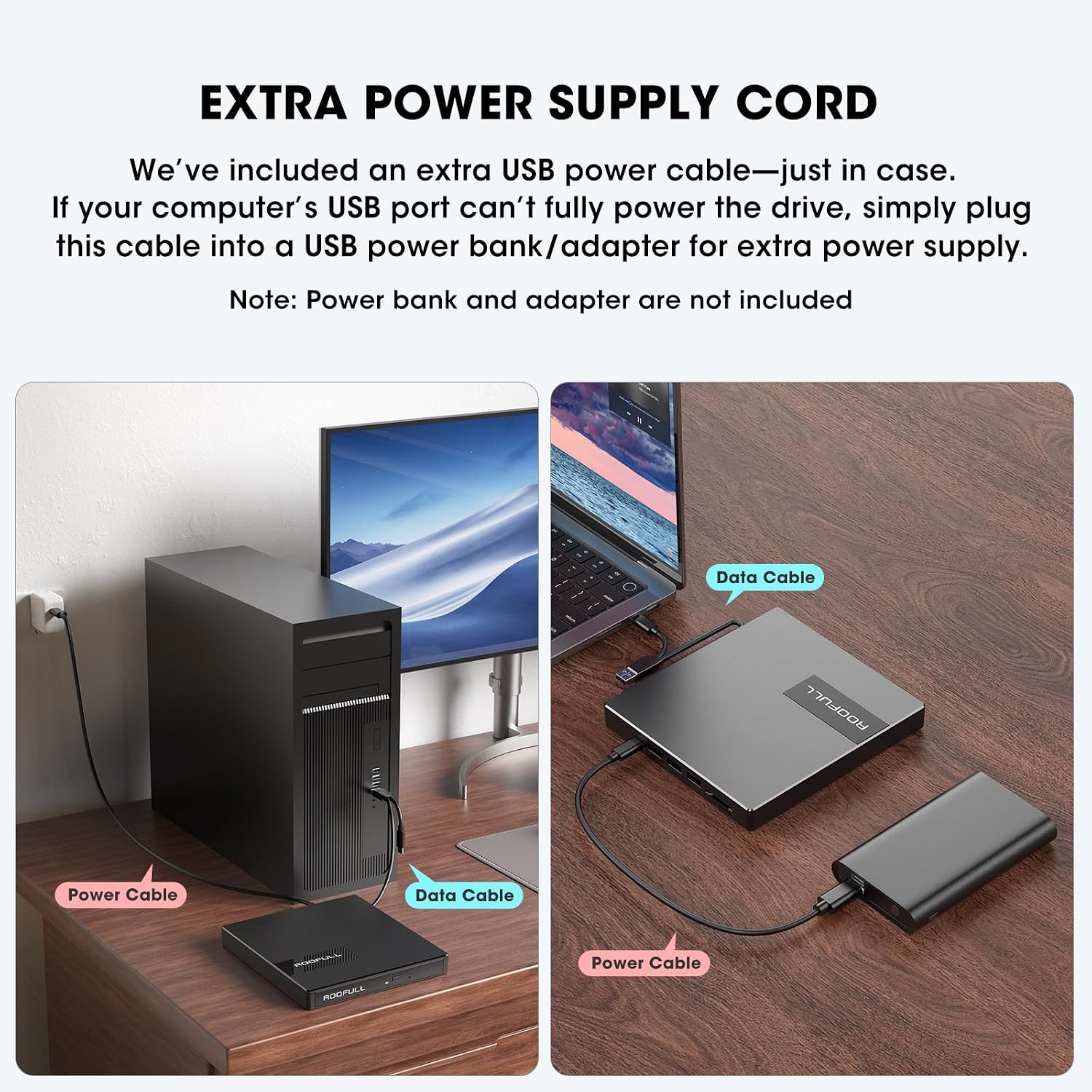
Figure 5.2: Using the extra power supply cord for stable operation.
DVD Region Code Setting
When inserting a DVD for the first time, your system may prompt you to select a DVD region. It is crucial to select the correct region corresponding to your DVD discs. Note that you can typically change the drive's region a limited number of times (e.g., 5 times). Refer to the map below for common DVD regions:

Figure 5.3: DVD Region Code Map.
| Бүс нутаг | Geographical Area |
|---|---|
| Бүс 1 | Канад, АНУ |
| Бүс 2 | Japan, Europe, South Africa, Middle East |
| Бүс 3 | Southeast Asia, East Asia (including Hong Kong) |
| Бүс 4 | Australia, New Zealand, Pacific Islands, Central America, Mexico, South America |
| Бүс 5 | Eastern Europe, Russia, Indian Subcontinent, Africa, North Korea, and Mongolia |
| Бүс 6 | Хятад |
| Бүс 7 | Reserved for unspecified special use |
| Бүс 8 | Air and oceanic travel |
6. Ажиллаж байгаа
Using the CD/DVD Drive
- Open the Disc Tray: Дискний тавиурыг нээхийн тулд хөтчийн урд талд байрлах гаргах товчийг дарна уу.
- Диск оруулах: CD эсвэл DVD-гээ тавиур дээр болгоомжтой байрлуулж, голын голд байгаа эсэхийг шалгаарай.
- Тавиурыг хаах: Тавиурыг хаах хүртэл зөөлөн түлхэж хөтч рүү оруулна.
- Агуулга руу нэвтрэх: Your computer will typically recognize the disc automatically. Use your preferred media player software (e.g., Windows Media Player, VLC, iTunes) to play music CDs, movie DVDs, or access data discs. For burning or ripping, dedicated software is required (e.g., BurnAware, Nero, HandBrake).

Figure 6.1: Front panel features including Tray Loading Design, Indicator Light, Ejection Button, and Forced Ejection Hole.
Video 6.1: Official demonstration of the ROOFULL External CD DVD Drive, showing connection, disc insertion, and basic functions.
Using USB Ports and SD/TF Card Slots
The drive features additional ports for enhanced connectivity:
- USB 3.0 порт: Located on the side, this port can be used for high-speed data transfer with USB 3.0 devices.
- 3 x USB 2.0 порт: These ports allow you to connect various USB peripherals such as wired mice, keyboards, flash drives, or 2.4G receivers.
- SD Card Slot & Micro-SD (TF) Card Slot: Insert your SD or microSD cards to import photos, videos, or access other data. Note that SD and TF cards cannot be used simultaneously.

Зураг 6.2: Хажуу тал view showing USB ports, SD/TF card slots, and USB-C power port.
7. Засвар үйлчилгээ
- Цэвэрлэгээ: Хөтчийн гадна талыг цэвэрлэхийн тулд зөөлөн, хуурай даавуу ашиглаарай. Шингэн цэвэрлэгч эсвэл зүлгүүрийн материал бүү ашиглаарай.
- Дискний арчилгаа: Хурууны хээ болон зурааснаас зайлсхийхийн тулд дискийг үргэлж ирмэгээс нь барьж байгаарай. Ашиглаагүй үедээ дискийг хамгаалалтын хайрцагт хадгална уу.
- Хадгалах: When not in use, store the drive in a cool, dry place. Ensure the data cable is neatly tucked into its storage slot underneath the drive.
- Нөлөөлөлөөс зайлсхийх: Protect the drive from drops or impacts, as this can damage internal components.
8. Алдаа засах
- Драйвыг таньсангүй: Ensure the data cable is securely connected to both the drive and your computer. Try a different USB port. If using a desktop PC, connect to a rear USB port on the motherboard for a more stable power supply. If power is an issue, use the included extra power supply cord.
- Disc Not Reading/Burning: Check if the disc is clean and free of scratches. Ensure the disc is correctly placed on the tray. Verify that you have the necessary software installed for playing, burning, or ripping discs.
- Tray Cannot Be Opened via Button (macOS): Due to macOS limitations, the tray button may not function after playing or burning a disc. To eject a disc on a Mac, right-click the disc icon on your desktop and select "Eject," or go to "File" > "Eject" from the menu bar in the active application.
- Цахилгаангүй/Тасралтгүй ажиллагаа: Connect the extra USB power supply cord to the drive and a reliable USB power source. Some USB ports (especially on older laptops or front panel desktop ports) may not provide enough power.
- Удаан дамжуулах хурд: Ensure you are connected to a USB 3.0 port on your computer for optimal speed. Verify that the data cable is fully inserted.
- SD/TF карт илрээгүй байна: Ensure only one card (either SD or TF) is inserted at a time, as they cannot be used simultaneously. Reinsert the card firmly.
9. Техникийн үзүүлэлтүүд
| Онцлог | Дэлгэрэнгүй |
|---|---|
| Брэнд | ДЭЭВЭР |
| Загварын дугаар | RF40-SU |
| Оптик хөтчийн төрөл | CD-ROM, CD-R, CD+/-RW, DVD-ROM, DVD+/-R, DVD+/-RW |
| Оптик хадгалах бичих хурд | Max 24xCD / 8xDVD |
| Тоног төхөөрөмжийн интерфейс | USB 3.0 төрөл А, USB 3.0 төрөл C |
| USB 3.0 портын тоо | 1 |
| Үйлдлийн системийн нийцтэй байдал | Windows 11/10/8/7, Mac, Linux |
| Техник хангамжийн платформ | Зөөврийн компьютер, компьютер |
| Зүйлийн жин | 10.6 унц |
| Бүтээгдэхүүний хэмжээ (LxWxH) | 5.6 x 5.6 x 0.6 инч |
| Гарал үүслийн улс | Хятад |
10. Баталгаат хугацаа ба дэмжлэг
ROOFULL is committed to producing quality external CD/DVD-RW drives and offers comprehensive after-sales service.
- Баталгаат хугацаа: The product comes with up to 2 years of comprehensive after-sales service.
- Техникийн дэмжлэг: If you experience any issues or require technical assistance, please contact ROOFULL customer support. Contact information can typically be found on the product packaging or the official ROOFULL webсайт.
- Үнэгүй солих: In case of product issues covered under warranty, a free replacement may be provided.


