
1. Бүтээгдэхүүн дууссанview
The THOMSON 43-inch QLED Smart Android TV (Model 43QA2S13) offers an immersive viewing experience with its Ultra High Definition (UHD) display and QLED technology. Enjoy vibrant colors and sharp details, four times more precise than Full HD. This smart TV integrates Android TV, providing access to a vast library of applications, intelligent voice control with Google Assistant, and built-in Chromecast for seamless content streaming. Its sleek, frameless design on three sides ensures a captivating visual experience.

Зураг 1.1: Урд view of the THOMSON 43-inch QLED Smart Android TV, showcasing түүний тод дэлгэц, нарийхан хүрээ.
2. Тохируулах гарын авлага
2.1 Савлах
Зурагт болон бүх дагалдах хэрэгслийг савлагаанаас болгоомжтой салга. Савлагааны материалыг ирээдүйд тээвэрлэх эсвэл хадгалах зорилгоор хадгал.
2.2 Стенд угсрах / Хананд суурилуулах
Your TV comes with two stand feet for tabletop placement.
- Attach the stand feet to the designated slots at the bottom of the TV using the provided screws. Ensure they are securely fastened.
- For wall mounting, use a VESA compatible wall mount (200x200 mm, not included). Refer to the wall mount's instructions for proper installation.

Зураг 2.1: Урд view of the TV with its two stand feet attached.

Зураг 2.2: Хажуу талын мэргэжлийнfile түүний гоолиг дизайныг харуулсан зурагт.

Зураг 2.3: Diagram illustrating the TV's dimensions (102.3 cm width, 59 cm height with stand, 30 cm depth with stand).
2.3 Төхөөрөмжүүдийг холбох
Гадаад төхөөрөмжүүдээ тохирох портуудыг ашиглан телевизортой холбоно уу.
- HDMI (x3): Blu-ray тоглуулагч, тоглоомын консол, дээд хайрцаг гэх мэтийг холбоход зориулагдсан.
- USB (x2): Медиа тоглуулахын тулд USB санах ойн төхөөрөмжүүдийг холбоход зориулагдсан.
- LAN: Утастай интернет холболтын хувьд.
- Аудио гаралт (дижитал оптик): Дууны самбар эсвэл гэрийн театрын системд холбогдох.
- Хиймэл дагуул (DVB-S2): Хиймэл дагуулын антен холбох зориулалттай.
- Antenna (DVB-T2/C):): Газрын болон кабелийн антенны холболтод зориулагдсан.
- AV-д: Нийлмэл видео/аудио гаралт бүхий хуучин төхөөрөмжүүдийг холбоход зориулагдсан.
- Нийтлэг интерфэйс (CI+): Шифрлэгдсэн сувгуудад зориулсан CAM модуль болон смарт картыг оруулахад зориулагдсан.

Зураг 2.4: Арын view of the TV, illustrating the various input and output ports available for connectivity.
2.4 Анхны тохиргоо
After connecting the power cable and turning on the TV, follow the on-screen instructions for the initial setup:
- Өөрийн дуртай хэлээ сонгоно уу.
- Wi-Fi сүлжээнд холбогдох эсвэл утастай LAN холболтыг ашиглана уу.
- Sign in with your Google account to access Android TV features and apps.
- Scan for available TV channels using the built-in triple tuner.
- Accept terms and conditions to complete the setup.
3. ТВ-ээ ажиллуулах
3.1 Алсын удирдлага
The ergonomic, backlit remote control provides easy navigation and access to all TV functions.
- Google туслах товч: Press to activate voice control and search for content, control smart home devices, or get information.
- Дуртай товчлуур: Customize this button to quickly launch your most-used application with a single click.
- The backlight ensures visibility even in dim lighting conditions.

Зураг 3.1: A user interacting with the TV using the Google Assistant voice command feature on the remote control.
3.2 Android ТВ-ийн онцлог
Your THOMSON TV runs on Android TV, offering a rich entertainment experience.
- Апп хандалт: Browse and download over 400,000 movies and TV shows from various applications available on the Google Play Store (e.g., Netflix, Prime Video, Disney+, YouTube, Spotify, Apple TV).
- Chromecast суурилуулсан: Wirelessly stream movies, music, and videos from compatible devices (smartphones, tablets, computers) directly to your TV.
- Google Туслах: Use voice commands to search for content, control playback, adjust settings, and manage smart home devices.

Зураг 3.2: The Android TV home screen, displaying popular streaming service applications and content recommendations.
3.3 Зураг ба дууны чанар
Experience superior visual and audio performance with advanced technologies.
- QLED технологи: Delivers vibrant and realistic colors through Quantum Dots, enhancing brightness and color accuracy.
- 4K UHD нягтрал: Provides incredibly sharp and detailed images with 3840 x 2160 pixels.
- HDR (High Dynamic Range) with Dolby Vision: Improves contrast, brightness, and color reproduction for a more realistic and immersive picture, especially in scenes with extreme light and shadow.
- Dolby Аудио: Creates a dynamic and immersive sound experience.
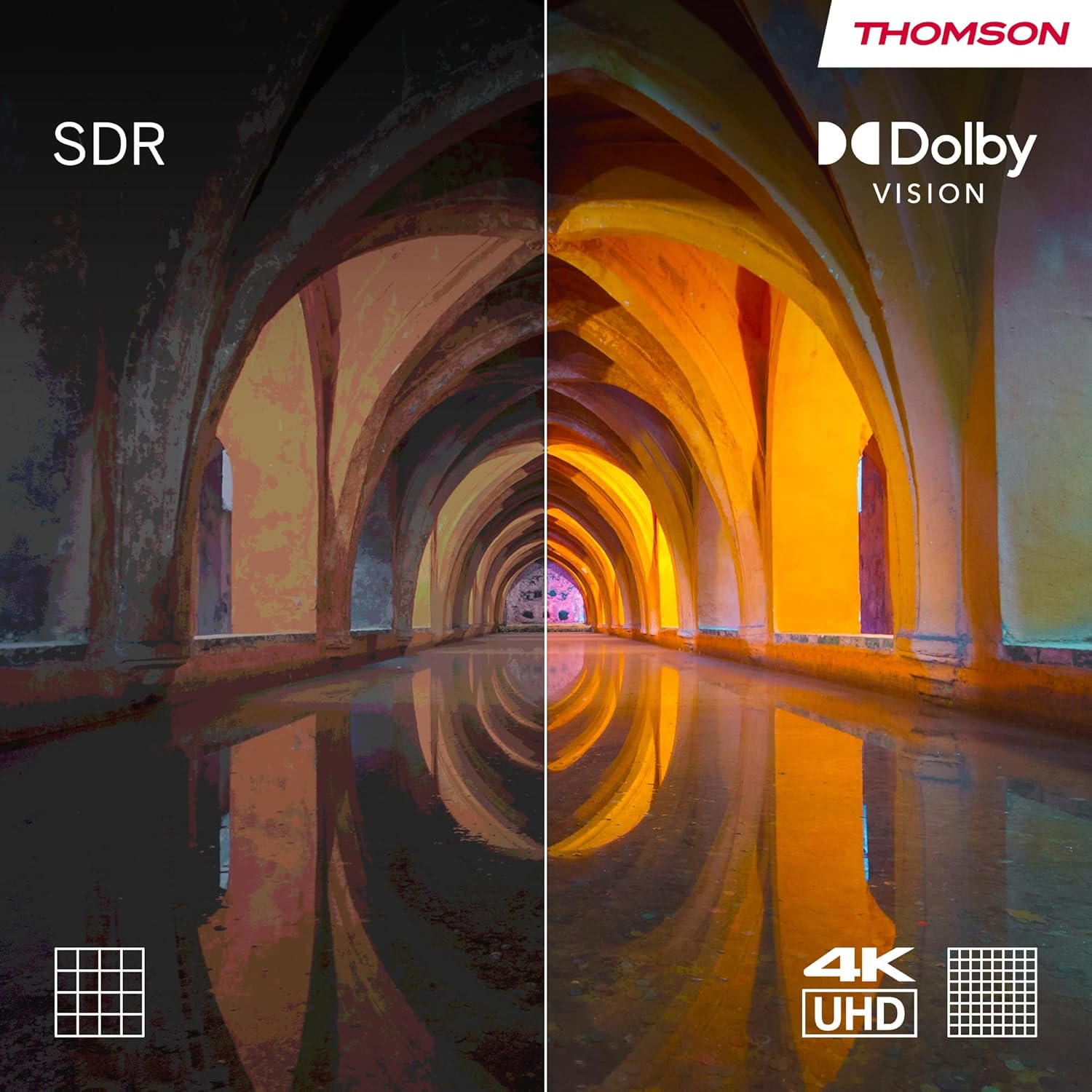
Зураг 3.3: Visual comparison demonstrating the enhanced contrast and color depth provided by Dolby Vision compared to standard dynamic range (SDR).

Зураг 3.4: An illustration depicting the immersive, multi-dimensional sound experience created by Dolby Atmos technology.
4. Засвар үйлчилгээ
Зохих засвар үйлчилгээ нь таны ТВ-ийн урт наслалт, оновчтой ажиллагааг баталгаажуулдаг.
- Дэлгэц цэвэрлэх: Зөөлөн, хөвөнгүй даавуугаар дэлгэцийг зөөлөн арчина. Зөрүүд тэмдгүүдийн хувьд цахилгаан хэрэгсэлд тусгайлан зориулсан дэлгэц цэвэрлэх уусмалыг шууд дэлгэцэн дээр биш харин даавуунд түрхээрэй.
- Шүүгээ цэвэрлэх: Зөөлөн, хуурай даавуугаар ТВ-ийн шүүгээг цэвэрлэ. Зүлгүүрийн цэвэрлэгч, уусгагч хэрэглэхээс зайлсхий.
- Програм хангамжийн шинэчлэлтүүд: Ensure your TV's software is up-to-date. The TV will typically notify you of available updates. You can also check manually in the settings menu. Regular updates improve performance and security.
- Эрчим хүчний менежмент: For optimal performance and to clear temporary data, it is recommended to occasionally power off the TV completely (unplug from the wall) for a few minutes, especially if you notice any slowdowns.
5. Алдаа засах
Хэрэв танд ТВ-тэй холбоотой асуудал тулгарвал дараах нийтлэг асуудал, шийдлүүдийг үзнэ үү.
| Асуудал | Боломжит шалтгаан / шийдэл |
|---|---|
| Хүч чадалгүй |
|
| Зураг байхгүй / Хар дэлгэц |
|
| Дуу байхгүй |
|
| Алсын удирдлага хариу өгөхгүй байна |
|
| Сүлжээний холболтын асуудлууд |
|
For more complex issues, please refer to the support section or contact customer service.
6. Техникийн үзүүлэлтүүд
| Онцлог | Дэлгэрэнгүй |
|---|---|
| Брэнд | Томсон |
| Загварын дугаар | 43QA2S13 |
| Дэлгэцийн хэмжээ | 43 инч (109 см) |
| Дэлгэцийн технологи | QLED |
| Шийдвэр | 3840 x 2160 пиксел (4K UHD) |
| Сэргээх хурд | 60 Гц |
| Үйлдлийн систем | Android TV |
| Онцлог шинж чанарууд | Chromecast built-in, Google Assistant, HDR (Dolby Vision), Dolby Audio |
| Холболт | 3x HDMI, 2x USB, Wi-Fi, Bluetooth, LAN, Digital Optical Audio Out, AV In |
| Таалагч | DVB-C/S2/T2 (Triple Tuner) |
| Дууны тохиргоо | 2.0 |
| Бүтээгдэхүүний хэмжээ (L x W x H) | 102.3 x 30 x 166.7 см (тастангийн хамт) |
| Жин | 6.3 кг |
| VESA Wall Mount Support | 200x200 мм (бэхэлгээ багтаагүй) |
6.1 Эрчим хүчний хэмнэлт
This product has an energy efficiency rating of F.

Зураг 6.1: EU Energy Label for the THOMSON 43QA2S13 TV, showing its energy efficiency class F.
For more details, visit the EPREL database: https://eprel.ec.europa.eu/qr/1471757
7. Баталгаат хугацаа ба дэмжлэг
Your THOMSON 43-inch QLED Smart Android TV comes with a comprehensive Үйлдвэрлэгчийн 3 жилийн баталгаат хугацаа, demonstrating our commitment to quality and reliability.
For technical assistance, troubleshooting beyond this manual, or warranty claims, please contact THOMSON customer support.
- Үйлдвэрлэгч: STREAMVIEW GMBH
- Refer to the official THOMSON website or your purchase documentation for the most up-to-date contact information and support resources in your region.


