1. Танилцуулга
Thank you for choosing the ELEPHAS Mini Portable Projector. This compact and versatile device is designed to provide a high-quality viewing experience for entertainment, education, and business presentations. With its advanced features and user-friendly design, you can enjoy large-screen projection anywhere.
The ELEPHAS Mini Projector, comparable to a smartphone in size, incorporates upgraded 2023 technology. It features a built-in HIFI speaker for rich audio without the need for external speakers and an efficient heat dissipation system to minimize fan noise. Supporting 1080P HD resolution and equipped with a German Emerald Glass Lens, it delivers vibrant, detailed images up to 200 inches. Its multimedia capabilities allow easy connection to a wide range of devices.

Image: The ELEPHAS Mini Portable Projector, shown with its included mini tripod, demonstrating its compact size and portability when held in a hand.
2. Багцын агуулга
Бүх зүйл байгаа эсэхийг шалгахын тулд багцыг сайтар шалгана уу:
- ELEPHAS Mini Portable Projector (Model BL128)
- Мини Tripod
- Зөөх цүнх
- Алсын удирдлага (батарей ороогүй)
- Эрчим хүчний адаптер
- Хэрэглэгчийн гарын авлага

Image: The ELEPHAS Mini Portable Projector displayed alongside a smartphone and its dedicated carrying case, illustrating its compact dimensions (15cm x 11cm x 6cm) for easy transport.
3. Бүтээгдэхүүний онцлог
The ELEPHAS Mini Portable Projector offers a range of features designed for optimal performance and user convenience:
- Хэт авсаархан дизайн: Easily fits in your hand, making it highly portable for indoor and outdoor use.
- 1080P HD Support: Delivers clear and detailed images with support for Full HD resolution.
- Built-in HIFI Speaker: Provides excellent sound quality without the need for external audio devices.
- Үр ашигтай дулаан ялгаруулалт: Advanced cooling system significantly reduces fan noise for a quieter viewтуршлага.
- German Emerald Glass Lens: Equipped with a high-quality lens supporting 24-bit true colors and over 16.77 million colors for vivid projection.
- Том дэлгэцийн төсөөлөл: Capable of projecting an impressive screen size of up to 200 inches.
- Олон талт холболт: Features multiple ports including USB, HDMI, AV, and Audio for broad device compatibility.
- Төхөөрөмжийн өргөн нийцтэй байдал: Connects seamlessly with laptops, PCs, TV boxes, TV sticks, Chrome Books, tablets, Blu-Ray DVD players, USB drives, media players, and smartphones (iOS, Android, Windows).

Image: An internal diagram illustrating the advanced optical path and components of the projector, highlighting the German Osram LED projection technology and Emerald Glass Lens responsible for high-quality image output.
4. Тохируулах гарын авлага
Follow these steps to set up your ELEPHAS Mini Portable Projector:
- Байршил: Place the projector on a stable, flat surface, such as a table, at the desired distance from your projection screen or wall. Ensure there are no obstructions blocking the lens or ventilation ports.
- Эрчим хүчний холболт: Цахилгаан адаптерийг проекторын тэжээлийн оролтын порт руу холбож, дараа нь адаптерийг цахилгааны залгуурт залгана уу.
- Асаах: Төхөөрөмжийг асаахын тулд проектор эсвэл алсын удирдлага дээрх асаах товчийг дарна уу. Заагч гэрэл асна.
- Фокусын тохируулга: Once the projector is on, adjust the focus ring (usually located near the lens) until the projected image appears clear and sharp.
- Төхөөрөмжүүдийг холбох: Refer to the 'Connectivity' section to connect your desired input devices (e.g., laptop, smartphone, USB drive).

Image: Two individuals enjoying an outdoor movie night, with the ELEPHAS Mini Portable Projector projecting onto a screen inside a tent, demonstrating its suitability for portable outdoor entertainment.
5. Ашиглалтын заавар
This section outlines the basic operation of your projector:
- Алсын удирдлага: Use the included remote control to navigate menus, select input sources, adjust volume, and control playback. Ensure batteries are inserted correctly.
- Оролтын эх үүсвэрийн сонголт: Press the 'Source' button on the remote or projector to cycle through available input options (HDMI, USB, AV). Select the input corresponding to your connected device.
- Дууны хяналт: Use the volume up/down buttons on the remote to adjust the audio output from the built-in speaker.
- Зургийн тохируулга: In addition to the manual focus ring, some settings like aspect ratio or keystone correction might be available in the projector's on-screen display (OSD) menu. Access the OSD menu using the 'Menu' button on the remote.
- Унтраах: Press the power button again to turn off the projector. It is recommended to allow the projector to cool down before unplugging it.
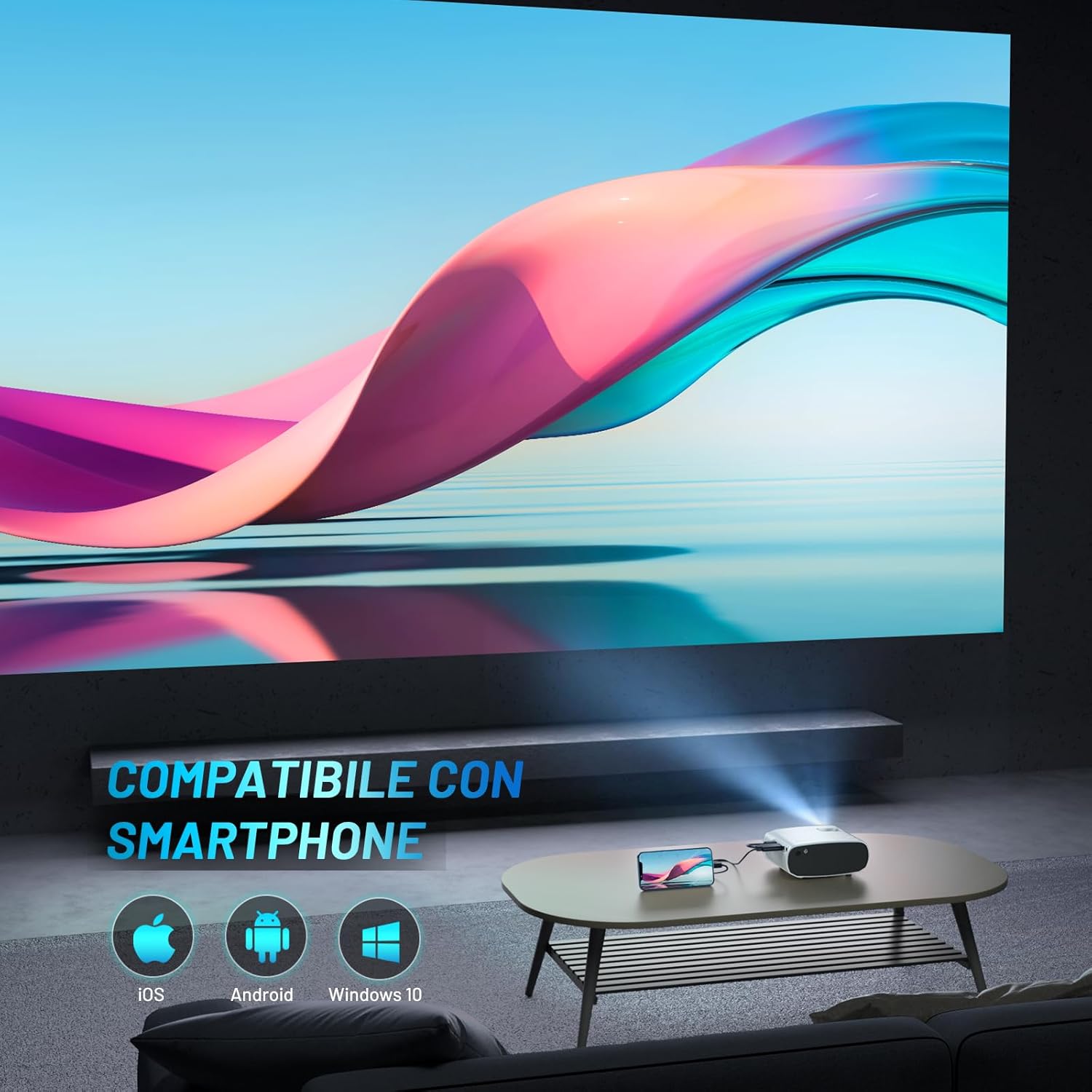
Image: The ELEPHAS Mini Portable Projector set up in a living room, projecting content onto a wall while connected to a smartphone, demonstrating its ease of use for home entertainment.
6. Холболт
The ELEPHAS Mini Portable Projector offers various connection options to suit your needs:
- HDMI порт: Connect devices such as laptops, PCs, TV boxes, TV sticks (e.g., Roku Stick, Fire TV, Chromecast), gaming consoles (XBOX, PS4), and Blu-Ray DVD players for high-definition video and audio transmission.
- USB порт: Plug in USB flash drives to play multimedia content directly (videos, photos, music).
- AV порт: Use the AV cable (not always included, check package) to connect older devices with composite video and stereo audio outputs.
- Аудио гаралтын порт: Connect external speakers or headphones for a more immersive audio experience, though the built-in HIFI speaker is often sufficient.
- Ухаалаг гар утасны нийцтэй байдал: The projector supports direct connection with iOS, Android, and Windows smartphones, often requiring a compatible adapter or cable (not included) for screen mirroring.

Image: A visual diagram illustrating the projector's extensive multimedia support, showing connections to various devices such as Roku Stick, Fire TV, Chromecast, external speakers, USB disk, phone/tablet/PC, XBOX/PS4, and DVD player.
7. Засвар үйлчилгээ
Зөв засвар үйлчилгээ нь таны проекторын урт наслалт, оновчтой ажиллагааг хангана:
- Линз цэвэрлэх: Проекторын линзийг оптик гадаргууд зориулсан зөөлөн, хөвөнгүй даавуугаар зөөлөн арчина. Зүлгүүрийн цэвэрлэгч эсвэл хэт их хүч хэрэглэж болохгүй.
- Агааржуулалтын портууд: Regularly check and clean the ventilation ports to prevent dust buildup, which can hinder heat dissipation and affect performance. Use a soft brush or compressed air.
- Хадгалах: When not in use, store the projector in its carrying bag in a cool, dry, and dust-free environment. Avoid extreme temperatures or humidity.
- Зөв унтрах: Always power off the projector using the designated power button and allow it to complete its shutdown cycle before unplugging.
8. Алдаа засах
Хэрэв та проектортой холбоотой асуудалтай тулгарвал дараах нийтлэг асуудал, шийдлүүдийг үзнэ үү.
| Асуудал | Боломжит шалтгаан | Шийдэл |
|---|---|---|
| Зураг төсөллөөгүй | Эрчим хүч байхгүй; Буруу оролтын эх үүсвэр; Сул кабель холболт | Ensure power adapter is securely connected and outlet is active. Select the correct input source (HDMI, USB, AV). Check all cable connections. |
| Дуу алга | Volume too low; Muted; External audio device not connected/configured | Increase volume using remote. Check if projector or source device is muted. Ensure external speakers are properly connected if used. |
| Зураг бүдэг/тодорхойгүй | Focus not adjusted; Projector too far/close; Lens dirty | Adjust the manual focus ring until the image is sharp. Ensure projector is within optimal projection distance. Clean the lens. |
| Image edges are not sharp | Inherent characteristic of some compact projectors; Keystone correction needed | While the projector offers good overall clarity, slight softness at the extreme edges can be a characteristic of compact projectors. Ensure the projector is perpendicular to the screen and adjust keystone correction if available in settings. |
| Сэнсний чимээ чанга байна | Normal operation; Blocked vents | A certain level of fan noise is normal for cooling. Ensure ventilation ports are not blocked and are clean. The projector features an efficient heat dissipation system to minimize noise. |
9. Техникийн үзүүлэлтүүд
| Брэнд | ЕЛЕФАС |
| Загварын дугаар | BL128 |
| Өнгө | Цагаан |
| Бүтээгдэхүүний төрөл | Зөөврийн проектор |
| Холболтын технологи | USB, HDMI |
| Онцлог шинж чанарууд | Portable, Built-in Speaker, Efficient Heat Dissipation System |
| Тохиромжтой төхөөрөмжүүд | Smartphone, Laptop, PC, TV Box, TV Stick, Chrome Book, Tablets, Blu-Ray DVD Players, USB Drives, Media Players |
| Дэлгэцийн нягтрал | 1920 x 1080 (1080P HD Support) |
| Дэлгэцийн төрөл | LED |
| Form Factor | Зөөврийн |
| Суурилуулах төрөл | Ширээний тавиур |
| Оруулсан бүрэлдэхүүн хэсгүүд | Mini Tripod, Carrying Bag |
| Зөвлөмж болгож буй хэрэглээ | Бизнес, Боловсрол, Тоглоом, Гэрийн кино театр |
10. Баталгаат хугацаа ба дэмжлэг
For specific warranty details regarding your ELEPHAS Mini Portable Projector, please refer to the warranty card included with your purchase or the product listing on the retailer's webсайт. Баталгаат нөхцөл нь ихэвчлэн худалдан авсан өдрөөс хойш тодорхой хугацаанд үйлдвэрлэлийн согогийг хамардаг.
For technical support, troubleshooting assistance beyond this manual, or any other inquiries, please contact ELEPHAS customer service. Contact information can usually be found on the product packaging, the official ELEPHAS webсайт эсвэл худалдан авалтын цэгээр дамжуулан.
Note: No official product videos were found for this model at the time of manual creation.