1. Танилцуулга
This manual provides comprehensive instructions for the installation, operation, and maintenance of the Teltonika RUT241 Industrial Cellular Router. The RUT241 is designed for reliable 4G LTE and 3G connectivity, featuring Wi-Fi and two Ethernet ports, along with automatic WAN failover for continuous connection. Its robust industrial design and compact size make it suitable for various IoT and M2M applications, particularly in North America, with compatibility across Verizon, AT&T, and T-Mobile networks.
2. Аюулгүй байдлын мэдээлэл
- Ensure the device is powered by the specified 9-30 VDC power supply. Using an incorrect power source may damage the device and void the warranty.
- Төхөөрөмжийг чийг, хэт өндөр температур, нарны шууд тусгалд бүү тавь.
- Төхөөрөмжийг дулааны эх үүсвэрийн ойролцоо эсвэл агааржуулалт муутай газар байрлуулахаас зайлсхий.
- Only use accessories and antennas approved by Teltonika.
- Төхөөрөмжийг нээх эсвэл өөрчлөхийг бүү оролдоорой. Бүх үйлчилгээг мэргэшсэн боловсон хүчинд шилжүүлээрэй.
- Орон нутгийн дүрэм журмын дагуу цахим хог хаягдлыг хариуцлагатай устгана уу.
3. Багцын агуулга
Бүх зүйл багцад байгаа эсэхийг шалгана уу:
- Teltonika RUT241 Router
- 9 Вт-ын цахилгаан хангамжийн нэгж (PSU)
- 2 x LTE Antennas (swivel, SMA male)
- 1 x Wi-Fi Antenna (swivel, RP-SMA male)
- Ethernet кабель (1.5 м)
- SIM адаптерийн хэрэгсэл
- Түргэн эхлэх гарын авлага (QSG)
4. Төхөөрөмж дууссанview
The Teltonika RUT241 router features various ports, indicators, and connectors for its operation. Familiarize yourself with the device's layout before proceeding with installation.

Зураг 4.1: Урд view of the RUT241 router, displaying the model number, Teltonika branding, power input specifications (9-30 VDC), and the default IP address (192.168.1.1).

Зураг 4.2: Өнцөгтэй view of the RUT241, highlighting the WAN and LAN Ethernet ports, the 4-pin industrial DC power socket, and LED indicators for signal strength and network status.

Зураг 4.3: Өөр нэг өнцөг view of the RUT241, showing the SMA male connectors for LTE antennas, the RP-SMA male connector for the Wi-Fi antenna, and the recessed reset button.
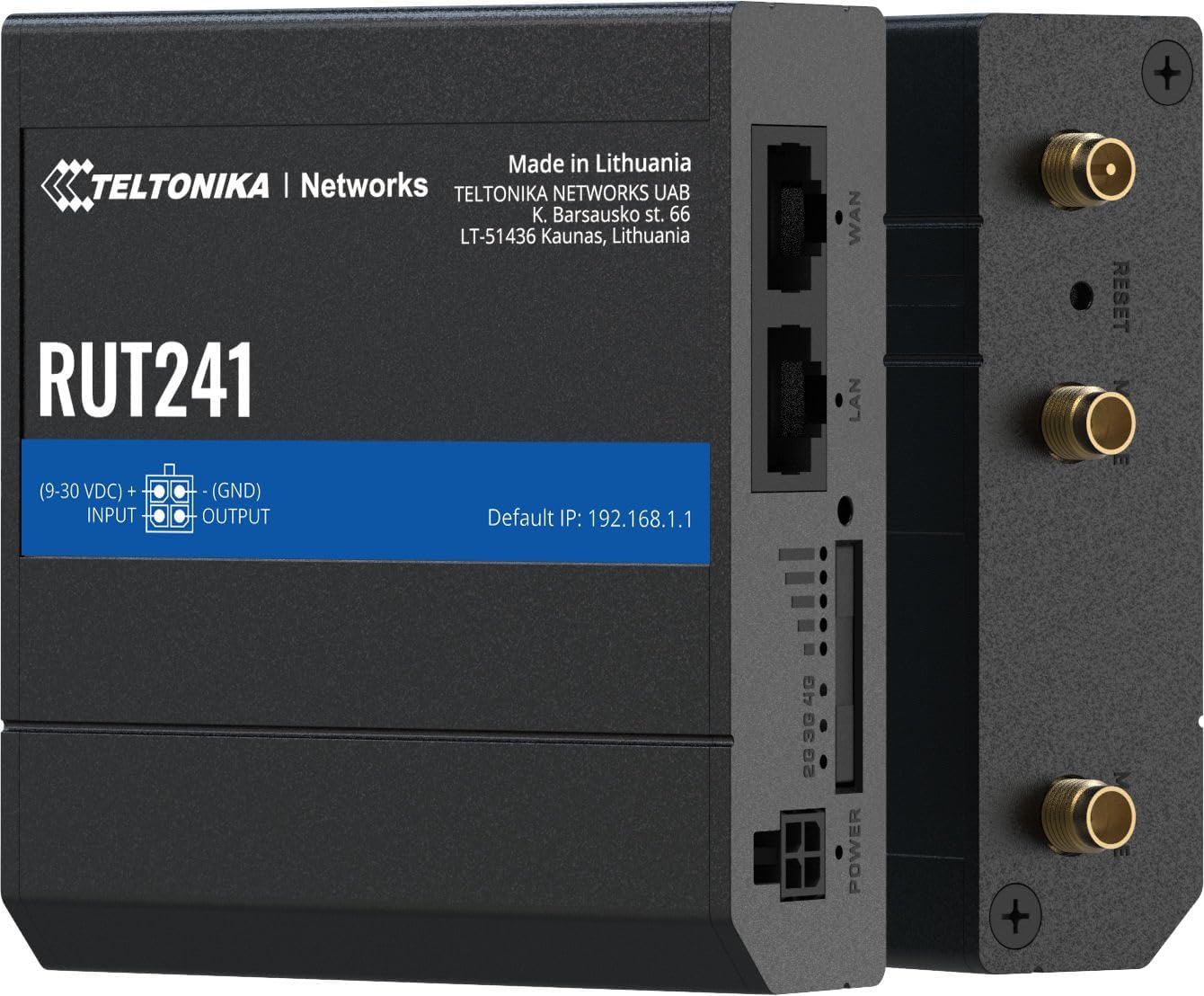
Зураг 4.4: Хажуу тал view of the RUT241, providing a clear look at the WAN and LAN ports, power input, signal strength LEDs, and antenna connectors.

Зураг 4.5: Доод талд view of the RUT241, showing the SIM card slot cover and mounting screw points for industrial installations.

Зураг 4.6: Топ view of the RUT241, detailing the Wi-Fi, Reset, and Mobile antenna connectors.
5. Тохиргоо
5.1. SIM карт суурилуулах
- Чиглүүлэгч унтарсан эсэхийг шалгаарай.
- Locate the SIM card slot on the bottom of the device (refer to Figure 4.5).
- Use the provided SIM adapter kit if your SIM card is not standard size.
- Insert the prepared SIM card into the slot until it clicks into place.
- Replace the SIM card slot cover securely.
5.2. Антенны холболт
- Connect the two LTE antennas to the SMA male connectors labeled "MOBILE" on the device (refer to Figure 4.6).
- Connect the Wi-Fi antenna to the RP-SMA male connector labeled "WIFI" (refer to Figure 4.6).
- Дохио хүлээн авахын тулд антеннуудыг байрлуул.
5.3. Эрчим хүчний холболт
- Connect the 9 W PSU to the 4-pin industrial DC power socket on the router.
- Plug the PSU into a suitable power outlet. The router will power on automatically.
5.4. Анхны хандалт
- Connect your computer to the router's LAN port using the provided Ethernet cable.
- Нээлттэй a web хөтөч дээр нээгээд анхдагч IP хаяг руу очно уу: 192.168.1.1.
- Follow the on-screen instructions to complete the initial configuration, including setting up a new password.
6. Ашиглалтын заавар
6.1. Mobile Connectivity
The RUT241 supports 4G LTE (Cat 4) and 3G connectivity. Once the SIM card is installed and the device is powered on, it will automatically attempt to establish a mobile connection. The signal strength LEDs on the device indicate the current mobile signal quality.
6.2. WAN Failover
The router is equipped with WAN failover functionality, ensuring continuous internet access. If the primary WAN connection (e.g., Ethernet WAN) fails, the router will automatically switch to the available backup connection (e.g., cellular 4G LTE) to maintain network uptime.
6.3. Wi-Fi халуун цэг
The RUT241 functions as a wireless access point, providing Wi-Fi connectivity for up to 50 simultaneous users. Default Wi-Fi credentials can be found on the device label or in the Quick Start Guide. It is recommended to change the default Wi-Fi password during initial setup for security.
6.4. Remote Management and VPN
For advanced management and secure access, the RUT241 supports Teltonika Remote Management System (RMS) and various VPN services. Refer to the Teltonika Networks Wiki for detailed configuration guides on these features.
7. Засвар үйлчилгээ
- Програм хангамжийн шинэчлэлтүүд: Regularly check the Teltonika Networks webоновчтой гүйцэтгэл, аюулгүй байдал болон шинэ функцуудад хандах боломжийг хангахын тулд хамгийн сүүлийн үеийн програм хангамжийн шинэчлэлтүүдийг авах сайт.
- Цэвэрлэгээ: Төхөөрөмжийг цэвэрлэхийн тулд зөөлөн, хуурай даавуу ашиглана уу. Шингэн цэвэрлэгч, аэрозоль хэрэглэж болохгүй.
- Байгаль орчны нөхцөл: Ensure the router operates within its specified temperature and humidity ranges to prevent damage.
- Нөөцлөлтийн тохиргоо: Чиглүүлэгчийнхээ тохиргооны тохиргоог үе үе нөөцөлж байгаарай web interface to facilitate quick restoration if needed.
8. Алдаа засах
8.1. Эрчим хүчгүй
- Verify that the 9 W PSU is correctly connected to the router and a working power outlet.
- Цахилгааны кабельд гэмтэл байгаа эсэхийг шалгана уу.
- Оролтын хэмжээг баталгаажуулна ууtage is within the 9-30 VDC range if using an alternative power source.
8.2. No Internet Connection (Mobile)
- Confirm the SIM card is correctly inserted and activated with a data plan.
- Check the mobile signal strength LEDs on the router. If signal is weak, reposition antennas or the router.
- Чиглүүлэгч дээрх APN тохиргоог шалгана уу web interface. The default is "Auto", but some carriers may require specific settings.
- Ensure the cellular network is available in your location and compatible with the RUT241 (Verizon, AT&T, T-Mobile in North America).
8.3. Wi-Fi холболт байхгүй
- Wi-Fi антенн найдвартай холбогдсон эсэхийг шалгаарай.
- Check if Wi-Fi is enabled in the router's web интерфейс.
- Verify Wi-Fi network name (SSID) and password.
8.4. Нэвтрэх боломжгүй Web Интерфэйс
- Ensure your computer is connected to the router's LAN port or Wi-Fi network.
- Компьютерийнхаа IP тохиргоог IP хаягийг автоматаар авах (DHCP) тохиргоотой эсэхийг шалгана уу.
- Confirm you are using the correct default IP address: 192.168.1.1.
- If you have changed the router's IP address, use the new address.
- If the issue persists, perform a factory reset by pressing and holding the reset button for approximately 10 seconds while the device is powered on. Анхааруулга: Энэ нь бүх захиалгат тохиргоог устгах болно.
9. Техникийн үзүүлэлтүүд
| Ангилал | Онцлог | Дэлгэрэнгүй |
|---|---|---|
| Гар утас | Гар утасны модуль | 4G (LTE) - Cat 4 up to 150 Mbps, 3G - Up to 42 Mbps |
| APN | Автомат | |
| Утасгүй | Утасгүй горим | IEEE 802.11b/g/n, хандалтын цэг (AP), станц (STA) |
| WiFi Users | 50 хүртэлх зэрэг холболтууд | |
| Ethernet | WAN порт | 1 x WAN port 10/100 Mbps |
| LAN порт | 1 x LAN port, 10/100 Mbps | |
| Сүлжээ | Чиглүүлэлт | Static routing, Dynamic routing (BGP, OSPF v2, RIP v1/v2, NHRP) |
| DHCP | Статик ба динамик IP хуваарилалт, DHCP Relay, Relayd | |
| Систем | CPU | Mediatek MIPS 24Kc 580 MHz |
| RAM | 128 MB, DDR2 | |
| FLASH хадгалах сан | 16 MB, SPI Flash | |
| Хүч | Холбогч | 4 зүүтэй үйлдвэрийн тогтмол гүйдлийн цахилгаан залгуур |
| Оролтын хэмжээtage Хамрах хүрээ | 9-30 VDC | |
| PoE (идэвхгүй) | Passive PoE over spare pairs. 9-30 VDC | |
| Физик | Casing Материал | Хөнгөн цагаан |
| Хэмжээ (ӨХХХД) | 3.26 x 0.98 x 2.91 инч (82.8 x 24.9 x 73.9 мм) | |
| Жин | 0.27 фунт (122.5 гр) | |
| Өнгө | Хар |
10. Баталгаат хугацаа ба дэмжлэг
For warranty information and technical support, please refer to the official Teltonika Networks website or contact your authorized Teltonika Networks reseller. Detailed documentation, firmware updates, and support resources are available online.
Teltonika Networks Official Webсайт: teltonika-networks.com


