1. Танилцуулга
The FeiyuTech VB4 SE is a compact and foldable 3-axis smartphone gimbal stabilizer designed to capture smooth and stable video footage with your iPhone or Android device. This manual provides detailed instructions for setup, operation, and maintenance to ensure optimal performance and longevity of your device.
2. Аюулгүй байдлын чухал мэдээлэл
- Гимбалыг усанд дүрж эсвэл бороонд хийж болохгүй.
- Гимбалыг унагаах эсвэл хүчтэй цохилтод өртөхөөс зайлсхий.
- Гимбалыг дулааны эх үүсвэр болон нарны шууд тусгалаас хол байлга.
- Do not attempt to disassemble or modify the gimbal. Repairs should only be performed by authorized service personnel.
- Ensure the smartphone is securely mounted and balanced before powering on the gimbal.
- Зөвхөн өгсөн цэнэглэгч кабель болон тохирох тэжээлийн адаптерийг ашиглана уу.
3. Багцын агуулга
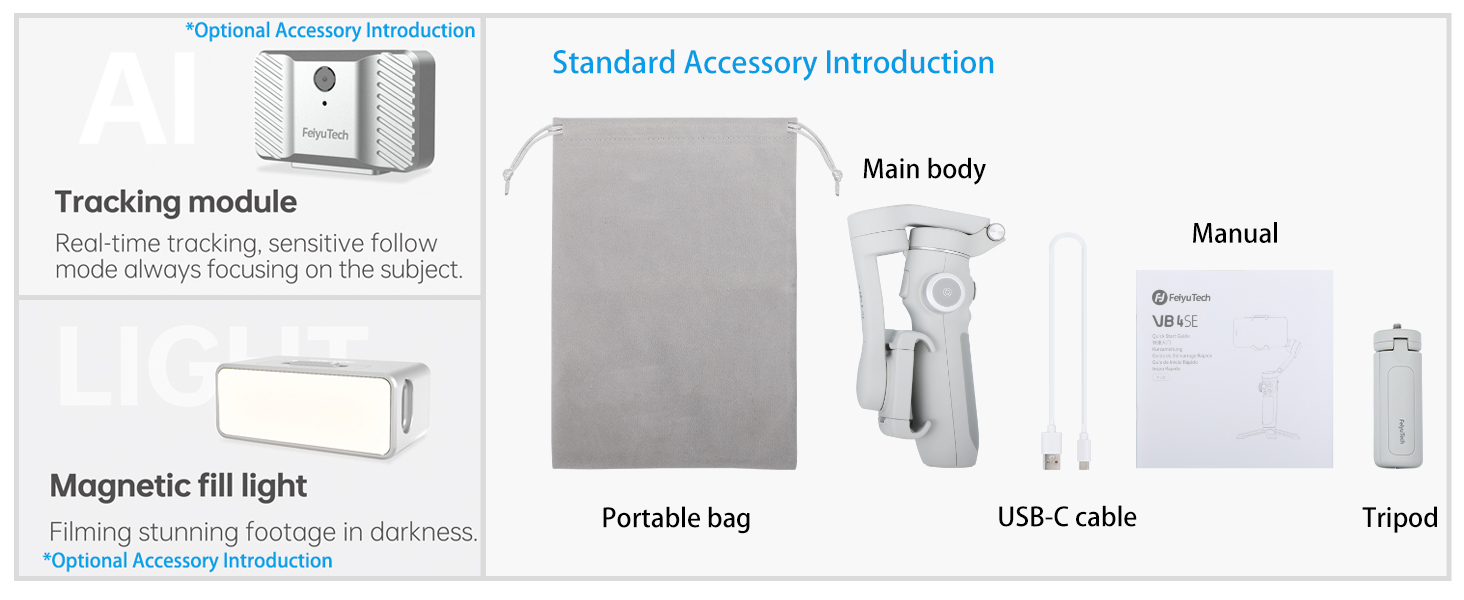
Таны багцад бүх зүйл байгаа эсэхийг шалгана уу:
- FeiyuTech VB4 SE Gimbal (Main body)
- Зөөврийн цүнх
- USB-C цэнэглэгч кабель
- Мини Tripod
- Хэрэглэгчийн гарын авлага

Image: FeiyuTech VB4 SE package contents. Includes the gimbal, a portable bag, a USB-C cable, and a tripod.
4. Бүтээгдэхүүн дууссанview
Familiarize yourself with the components of your FeiyuTech VB4 SE gimbal.

Зураг: Ойролцоогоор view of the FeiyuTech VB4 SE gimbal showing the control panel with joystick, multifunction knob, and buttons.
Гол онцлогууд:
- 3 тэнхлэгийн тогтворжуулалт: Ensures smooth and steady footage.
- Эвхэгддэг загвар: Авсаархан, зөөврийн, тээвэрлэхэд хялбар.
- Built-in Extension Rod: Extends for wider shots and selfies.
- Олон үйлдэлт бариул: Controls pan, tilt, focus, and zoom.
- Дохионы удирдлага: Start/stop recording or take photos with hand gestures.
- Объектыг хянах: Automatically follows a selected subject.
- One-Button Vertical Shooting: Quickly switch between horizontal and vertical modes.
- Батерейны урт наслалт: Удаан хугацааны хэрэглээнд зориулсан нэгдсэн 1300 мАч батерей.

Image: Diagram illustrating the key features of the FeiyuTech VB4 SE, including its foldable design, lightweight nature, magnetic expansion, gesture control, multi-functional knob, smart AI follow, one-button portrait/landscape switch, and album control.
5. Тохиргоо
5.1 Гимблийг цэнэглэх
Before first use, fully charge the gimbal. Connect the USB-C charging cable to the charging port located near the power button and plug the other end into a USB power adapter (not included). The indicator lights will show charging status.
5.2 Mounting the Smartphone
Утсаа сунгах clamp and carefully place your smartphone in it. Ensure the phone is centered and secure. The camera lens should be on the left side when facing the gimbal's front.
5.3 Гимблийг тэнцвэржүүлэх
The gimbal features an automatic balancing system. Once the phone is mounted, power on the gimbal, and it will automatically adjust to balance the phone. Manual adjustment may be needed if the phone is significantly off-center.
5.4 App Installation (Feiyu ON)
Download the Feiyu ON app from your smartphone's app store (iOS App Store or Google Play Store). The app unlocks advanced features and provides a better user experience.
5.5 Bluetooth холболт
Turn on the gimbal and enable Bluetooth on your smartphone. Open the Feiyu ON app and search for available devices. Select "VB4 SE" to connect. Once connected, the Bluetooth indicator light on the gimbal will turn solid blue.
6. Үйл ажиллагаа
6.1 Асаах/унтраах
- Асаах: Цахилгаан товчийг 3 секундын турш дарна уу.
- Унтраах: Цахилгаан товчийг 3 секундын турш дарна уу.
Video: This video demonstrates the basic power on/off function, joystick control, stabilization, and switching between horizontal and vertical modes of the FeiyuTech VB4SE gimbal.
6.2 Үндсэн удирдлага
- Жойстик: Controls the pan and tilt movements of the smartphone.
- Олон үйлдэлт бариул: Rotates to control focus or zoom, and can switch between three-axis rotation modes.
- Хөшигний товчлуур: Press once to take a photo, press and hold to record video.
- Горимын товчлуур (M): Cycles through different operating modes (Pan Follow, Tilt Follow, FPV, Lock Mode).
Зураг: Нарийвчилсан view of the gimbal's control panel, highlighting the indicator area for battery and connection status, the button area for various functions, and the multi-functional knob for sensitive control.
6.3 Үйлдлийн горимууд
Press the Mode button (M) to switch between the following modes:
- Pan Follow (PF): The camera pans left/right with your hand movements, while tilt and roll axes are locked.
- Хазайлтыг дагах (TF): The camera follows both pan and tilt movements, while the roll axis is locked.
- FPV горим: The camera follows all three axes (pan, tilt, and roll) for a first-person view туршлага.
- Түгжих горим: Гурван тэнхлэг бүгд түгжигдсэн тул камер тогтмол чиглэлд байрласан байна.
6.4 Дохионы удирдлага
Enable gesture control in the Feiyu ON app. Use specific hand gestures to initiate actions like taking photos, starting/stopping video recording, or activating object tracking.

Image: Visual guide for gesture control, showing hand signs for taking photos, recording video, starting face tracking, zoom function (iOS only), switching to vertical mode, horizontal mode, and stopping tracking.
6.5 Object Tracking
In the Feiyu ON app, select a subject on your screen, and the gimbal will automatically track its movement, keeping it in the frame.

Image: The gimbal tracking a dog in motion, with a green box indicating the tracked subject on the smartphone screen.
6.6 Vertical/Horizontal Switching
Press the dedicated button to quickly switch your smartphone between horizontal (landscape) and vertical (portrait) shooting orientations, ideal for social media content.

Image: The gimbal rotating a smartphone from horizontal to vertical orientation, demonstrating the quick switch feature.
6.7 Scenario Modes (via Feiyu ON App)
The Feiyu ON app offers various creative shooting modes:
- Хөнгөн зам: Capture stunning light trails in low-light conditions.
- Давхар өртөлт: Combine two images into one creative shot.
- Dolly Zoom: Create a dramatic cinematic effect where the background appears to zoom while the foreground remains constant.
- Цаг хугацаа алдах: Урт үйл явдлуудыг богино, динамик видео болгон нэгтгэ.
6.8 Өргөтгөх саваа ашиглах
The built-in extension rod can be pulled out to extend the gimbal's reach, allowing for wider angles, higher shots, and easier selfies.

Image: The FeiyuTech VB4 SE gimbal with a smartphone mounted, standing on its mini tripod with the extension rod partially extended.
7. Засвар үйлчилгээ
7.1 Цэвэрлэгээ
Гимбалыг зөөлөн, хуурай даавуугаар арчина. Шингэн цэвэрлэгч эсвэл уусгагч хэрэглэж болохгүй.
7.2 Хадгалалт
Store the gimbal in its portable bag in a cool, dry place away from direct sunlight. Avoid placing heavy objects on top of it.
7.3 Батерейны арчилгаа
Батерейны ашиглалтын хугацааг уртасгахын тулд тогтмол ашиглахгүй бол гимбалыг гурван сар тутамд дор хаяж нэг удаа цэнэглээрэй. Батерейг байнга бүрэн цэнэггүй болгохоос зайлсхий.
8. Алдаа засах
- Gimbal асахгүй байна: Батерейг цэнэглэсэн эсэхийг шалгаарай. Цэнэглэгчтэй холбогдоод дахин оролдоно уу.
- Гимбал тогтворгүй/чичиргээтэй: Check if the smartphone is properly mounted and balanced. Restart the gimbal.
- Bluetooth холболттой холбоотой асуудлууд: Ensure Bluetooth is enabled on your phone and the gimbal. Restart both devices and try reconnecting via the Feiyu ON app.
- Апп хариу өгөхгүй байна: Close and reopen the Feiyu ON app. Ensure your app and phone's operating system are up to date.
- Motors making noise: This can occur if the gimbal is not properly balanced or if the phone is too heavy. Re-balance the phone or check its weight compatibility.
9. Техникийн үзүүлэлтүүд
| Загвар | VB4 SE |
| Бүтээгдэхүүний хэмжээс | 7.87 x 3.94 x 7.87 инч (эвхээгүй) |
| Эвхэгдсэн хэмжээ | Ойролцоогоор 6 инч (урт) |
| Зүйлийн жин | 11.1 унц (315 грамм) |
| Зайны багтаамж | 1300 мАч лити ион |
| Цэнэглэх порт | USB-C |
| Холболт | Bluetooth |
| Тохиромжтой төхөөрөмжүүд | Smartphones up to 3.5" wide and 9.2 oz in weight |
10. Баталгаат хугацаа ба дэмжлэг
FeiyuTech products come with a standard manufacturer's warranty. For detailed warranty information, please refer to the warranty card included in your package or visit the official FeiyuTech website. For technical support, product inquiries, or service requests, please contact FeiyuTech customer service through their official channels.
Баталгаат заргад зориулж худалдан авалтаа нотлох баримтаа үлдээнэ үү.


