Танилцуулга
This manual provides essential information for the setup, operation, maintenance, and troubleshooting of your Star Micronics mC-Label3 MCL32CBI Direct Thermal Printer. Please read this manual thoroughly before using the printer to ensure proper and safe operation.
Багцын агуулга
Доор жагсаасан бүх зүйл таны багцад байгаа эсэхийг шалгаарай.
- mC-Label3 Multifunctional Printer
- Хувьсах гүйдлийн адаптер
- Цахилгаан кабель
- USB Cables (C-C 1.0m and C-A 1.8m)
- LAN кабель (1м)
- Simple Setup Sheet Safety Guide

Зураг: Урд view of the Star Micronics mC-Label3 printer, showcasing its compact design and label output slot.
Тохиргоо
1. Принтерийг холбох
The mC-Label3 MCL32CBI printer offers multiple connectivity options:
- USB-C: Connect the printer directly to your PC, Android, or iOS device using the provided USB-C to USB-C or USB-C to USB-A cables.
- Ethernet (LAN): For network connectivity, connect the printer to your router or network switch using the supplied LAN cable.
- Bluetooth: The MCL32CBI model supports Bluetooth connectivity for iOS and Android devices. Ensure Bluetooth is enabled on your device and pair with the printer.

Зураг: Ар талд view of the mC-Label3 printer, highlighting the LAN, USB, and power ports for various connection types.
2. Хэвлэл мэдээллийн хэрэгслийг ачаалж байна
The printer supports various media types, including linerless labels, die-cut labels, continuous labels, and thermal receipt paper.
- Open the top cover of the printer by lifting the latch.
- Place the media roll into the media compartment, ensuring the leading edge feeds out from the top.
- Pull a small amount of media past the print head and close the top cover securely.
- Ensure the media is properly aligned within the guides.

Зураг: дээрээс доош view of the mC-Label3 printer with its cover open, illustrating the internal mechanism for loading thermal paper or label rolls.
Ашиглалтын заавар
1. Асаах/унтраах
Connect the power cable to the printer and a power outlet. Press the power button located on the front of the printer to turn it on. The status indicator light will illuminate.
2. Printing Labels and Receipts
The mC-Label3 MCL32CBI printer is designed for efficient label and receipt printing. It supports various applications and cloud services.
- Програм хангамжийн нийцтэй байдал: Works seamlessly with PC, Android, and iOS applications.
- Үүлэн үйлчилгээ: Utilize Star Micronics Cloud Services to design and manage labels.
- One Touch Label: This feature allows storing pre-made receipts and labels for quick and easy printing directly from the printer.
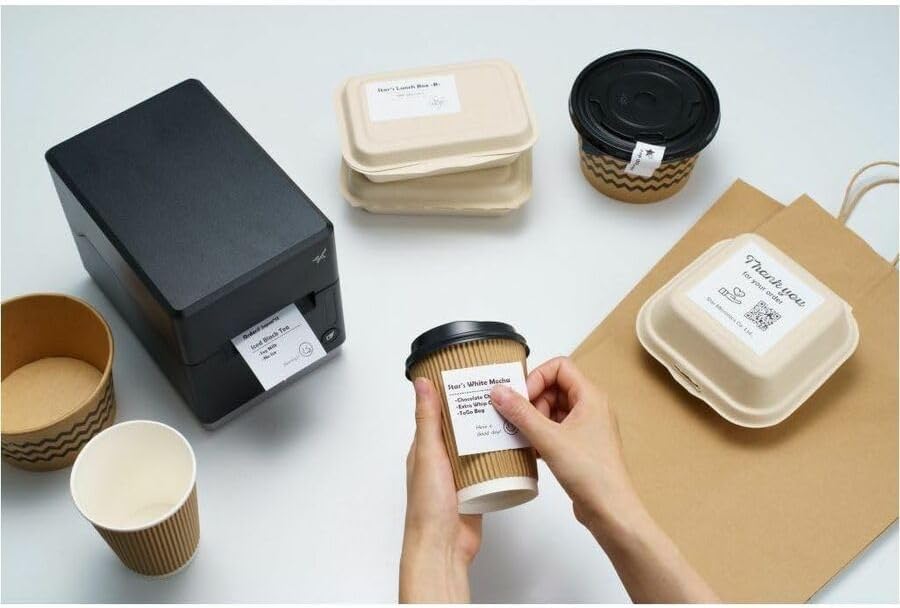
Image: A hand pressing the feed button on the mC-Label3 printer, demonstrating the printing of a 'Thank you' label.

Image: The mC-Label3 printer shown in a practical setting, printing labels for food containers and coffee cups, illustrating its versatility.
Засвар үйлчилгээ
1. Принтерийг цэвэрлэх
Regular cleaning ensures optimal performance and extends the life of your printer.
- Зөөлөн, хөвөнгүй даавуу хэрэглэх dampened with isopropyl alcohol to clean the print head.
- Wipe down the exterior of the printer with a soft, dry cloth.
- Зүлгүүрийн цэвэрлэгч, уусгагч хэрэглэхээс зайлсхий.
2. Хэвлэл мэдээллийн хэрэгслийг солих
When the media roll is depleted, follow the media loading instructions in the Setup section to replace it.
3. Effortless Repairs
The mC-Label3 is designed for effortless, no-tools-required repairs with minimal upkeep, simplifying any necessary component replacements.
Алдааг олж засварлах
Энэ хэсэг нь танд тулгарч болох нийтлэг асуудлуудын шийдлүүдийг өгдөг.
| Асуудал | Боломжит шалтгаан | Шийдэл |
|---|---|---|
| Принтер асахгүй байна | Цахилгаан кабель холбогдоогүй; Цахилгаан залгуурын асуудал | Цахилгааны кабель найдвартай холбогдсон эсэхийг шалгаарай; Өөр цахилгаан залгуурыг туршаад үзээрэй. |
| Хэвлэх гаралт байхгүй | Out of media; Media loaded incorrectly; Driver issue | Load new media; Re-load media correctly; Reinstall printer drivers. |
| Хэвлэх чанар муу | Dirty print head; Low quality media | Clean the print head; Use recommended thermal media. |
| Холболтын асуудал | Incorrect cable connection; Bluetooth not paired; Network configuration | Check USB/Ethernet cables; Re-pair Bluetooth; Verify network settings. |
Үзүүлэлтүүд
| Онцлог | Дэлгэрэнгүй |
|---|---|
| Загварын нэр | mC-шошго3 |
| Загварын дугаар | MCL32CBI |
| Хэвлэлийн технологи | Шууд дулаан |
| Принтерийн гаралт | Монохром |
| Хамгийн их хэвлэх хурд Monochrome | 23 ppm |
| Хар ба цагаан хэвлэх хамгийн дээд нягтрал | 203 DPI (203 x 203 DPI) |
| Хэвлэл мэдээллийн хэрэгсэл | Labels (Linerless, Die-Cut, Continuous), Thermal Receipt |
| Холболтын технологи | Bluetooth, Wired (USB, Ethernet) |
| Тоног төхөөрөмжийн интерфейс | USB-Ethernet |
| Тохиромжтой төхөөрөмжүүд | Компьютер, Андройд, iOS |
| Хянагчийн төрөл | iOS, Android |
| Бүтээгдэхүүний хэмжээс | 6.7"D x 5.6"W x 8.3"H (17.0 x 14.2 x 21.1 см) |
| Зүйлийн жин | 7.2 фунт (3.27 кг) |
| Санах ойн хадгалах багтаамж | 64 MB |
| Өнгө | Хар |
| Үйлдвэрлэгч | STAR MICRONICS |
| Гарал үүслийн улс | Хятад |
Баталгаат хугацааны мэдээлэл
The Star Micronics mC-Label3 MCL32CBI printer comes with a manufacturer's warranty. For specific terms and conditions, please refer to the warranty card included in your package or visit the official Star Micronics webсайт.
Баталгаат төрөл: Үйлдвэрлэгч
Дэмжлэг
For further assistance, technical support, or to download the latest drivers and firmware, please visit the official Star Micronics support webсайт эсвэл харилцагчийн үйлчилгээтэй холбогдоно уу.
Оддын Микроникс албан ёсны Webсайт: www.starmicronics.com
Дэмжлэгийн холбоос: www.starmicronics.com/support


