Танилцуулга
The SUNOL T16 Wireless Earbuds are designed for an active lifestyle, offering high-quality audio and convenient features. These Bluetooth headphones provide up to 48 hours of total playtime with their wireless charging case, featuring an LED power display for easy monitoring. With earhooks for a secure fit and water resistance, they are ideal for workouts, running, and various sports activities. The built-in microphone with noise cancellation ensures clear calls.
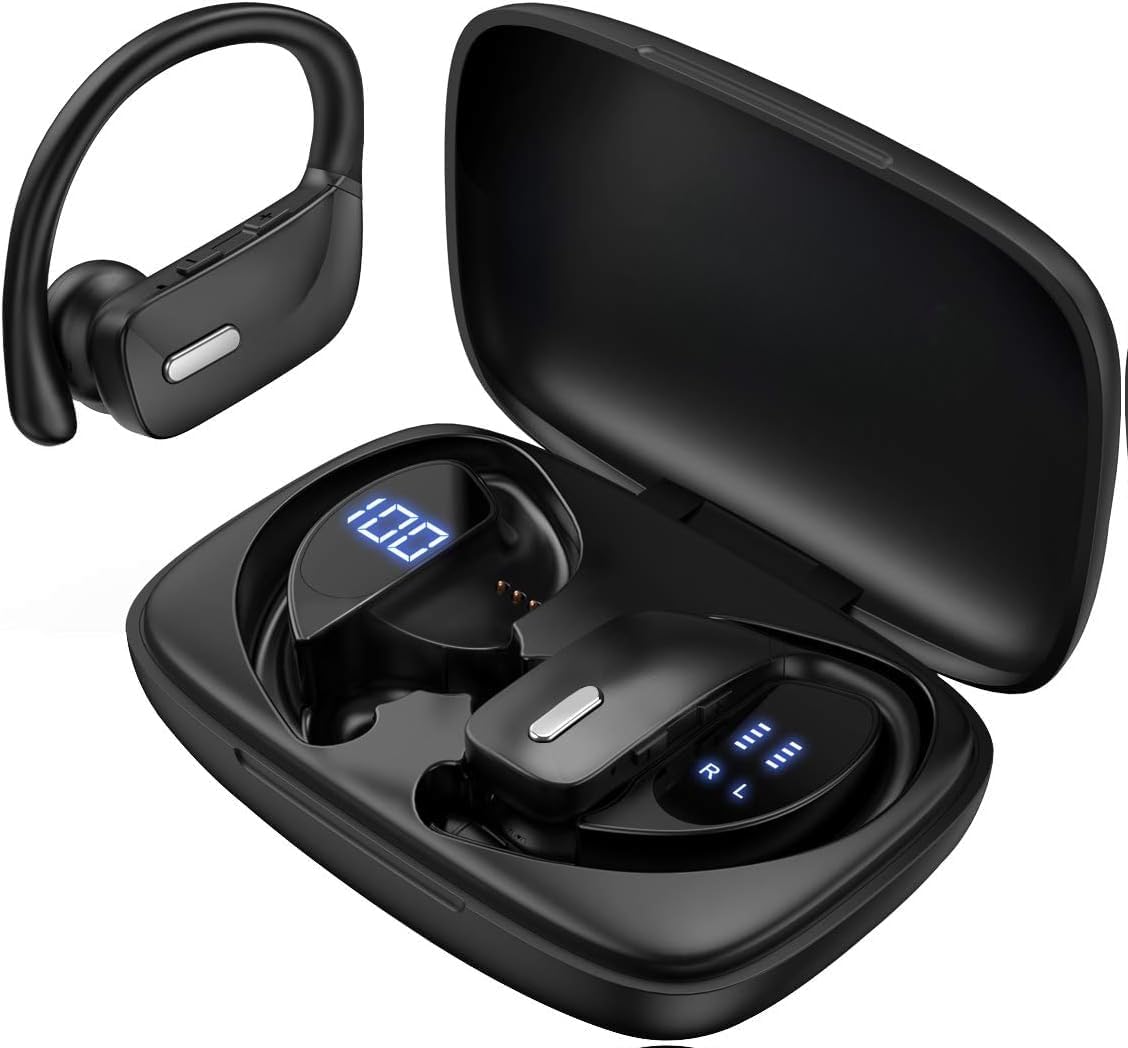
Image: The SUNOL T16 Wireless Earbuds with their charging case, showcasing the digital display.
Хайрцагт юу байна
- SUNOL T16 Wireless Earbuds (Left and Right)
- Утасгүй цэнэглэх хайрцаг
- USB-C цэнэглэгч кабель
- 3 Pairs of Ear Caps (S, M, L)
Үзүүлэлтүүд
| Онцлог | Дэлгэрэнгүй |
|---|---|
| Загварын нэр | T16 |
| Холболтын технологи | Утасгүй (Bluetooth 5.0) |
| Bluetooth хүрээ | 10 метр хүртэл |
| Чихэвчний батерейны ашиглалтын хугацаа | 9 цаг хүртэл (нэг цэнэглэлт) |
| Тоглуулах нийт хугацаа (цэргийн хамт) | 48 цаг хүртэл |
| Цэнэглэх сонголтууд | Wireless Charging, USB-C Charging |
| Аудио драйверын хэмжээ | 10 мм-ийн динамик драйвер |
| Давтамжийн хүрээ | 20 Гц - 20,000 Гц |
| Эсэргүүцэл | 40 Ом |
| Дуу чимээний хяналт | Идэвхтэй дуу чимээг арилгах |
| Микрофон | Built-in with Noise Cancellation |
| Усны эсэргүүцлийн түвшин | Усны хамгаалалттай |
| Хяналтын төрөл | Touch, Siri Voice Assistant |
| Чихний байрлал | Чихний дээгүүр (чихний дэгээтэй) |
| Материал | Акрилонитрил бутадиен стирол (ABS) |
| Зүйлийн жин | 6.4 унц |

Image: Diagram illustrating the premium stereo sound quality and Bluetooth 5.0 connectivity.
Тохиргоо
1. Чихэвч болон гэрийг цэнэглэж байна
The charging case supports both wireless charging and USB-C charging. The impressive 9 hours of listening time on a single charge for the sports wireless headphones are extended to a remarkable 48 hours of play time with the included charging case.
- To charge the case, connect a USB-C cable to the charging port on the back of the case, or place it on a compatible wireless charging pad.
- Place the earbuds into their respective slots in the charging case. Ensure they are properly seated to initiate charging.
- The smart LED digital power display on the case will show the remaining battery level of the charging case and the individual earbuds. The percentage in the middle indicates the case battery, while the battery icons on both sides indicate the left and right earbud charge levels.

Image: The charging case with its LED display showing battery levels for the case and individual earbuds.

Image: Diagram illustrating the battery life: 15 min charge for 1 hour playtime, 8 hours on a single charge, and 48 hours with the charging case.
2. Таны төхөөрөмжтэй хослуулах
The earbuds automatically enter pairing mode when removed from the charging case.
- Цэнэглэх хайрцгийг нээж, чихэвчийг хоёуланг нь салга. Тэд автоматаар асч, хослуулах горимд орно.
- On your mobile device (smartphone, tablet, laptop), go to the Bluetooth settings.
- хайх available devices. You should see "T16" or "S8" appear in the list.
- Select "T16" or "S8" to connect. Once connected, you will hear an audio prompt, and the earbuds will be ready for use.

Image: Diagram showing the earbuds automatically pairing with mobile phones.
Video: Official product video demonstrating the unboxing, charging, and Bluetooth pairing process of the SUNOL T16 Wireless Earbuds.
Ашиглалтын заавар
Чихэвч зүүж байна
The T16 earbuds are designed with flexible earhooks to ensure a secure and comfortable fit, especially during physical activity. Gently place the earbud into your ear canal and adjust the earhook over the top of your ear until it feels stable and comfortable. Experiment with the included ear cap sizes to find the best fit for optimal sound and comfort.

Image: A woman wearing the SUNOL T16 earbuds, demonstrating their secure fit for an active lifestyle.
Удирдлагад хүрнэ үү
The earbuds feature physical buttons for precise control of various functions:
- Тоглуулах/түр зогсоох: Аль нэг чихэвч дээр нэг товших.
- Дуудлагад хариулах/тасах: Дуудлагын үеэр аль нэг чихэвч дээр ганц товшино уу.
- Өмнөх дуу: Зүүн чихэвчийг давхар товш.
- Дараагийн дуу: Баруун чихэвчийг давхар товш.
- Active Voice Assistant (Siri): Аль нэг чихэвчийг гурав дахин товш.
- Дуудлагаас татгалзах: Ирж буй дуудлагын үеэр аль нэг чихэвч дээр удаан дарна уу.
- Дууны тохируулга: Use the dedicated volume buttons on the earbuds.

Image: Diagram detailing the physical buttons and their functions, including volume adjustment, play/pause, call management, and voice assistant activation.
Засвар үйлчилгээ
To ensure the longevity and optimal performance of your SUNOL T16 Wireless Earbuds, follow these maintenance guidelines:
- Цэвэрлэгээ: Regularly wipe the earbuds and charging case with a soft, dry, lint-free cloth. For ear caps, remove them and clean with mild soap and water, then dry thoroughly before reattaching.
- Усны эсэргүүцэл: While water-resistant, avoid submerging the earbuds in water. Dry them completely if they get wet from sweat or rain before placing them back in the charging case.
- Хадгалах: Ашиглаагүй үед чихэвчийг хамгаалж, цэнэгтэй байлгахын тулд цэнэглэгчдээ хадгалаарай. Хэт их температураас хол, сэрүүн, хуурай газар хадгална.
- Цэнэглэх порт: USB-C цэнэглэгч портыг тоос шороо, хог хаягдлаас цэвэр байлгаарай.
Алдааг олж засварлах
If you encounter any issues with your SUNOL T16 Wireless Earbuds, try the following solutions:
- Чихэвчийг хослуулахгүй байна:
- Хоёр чихэвч бүрэн цэнэглэгдсэн эсэхийг шалгаарай.
- Place earbuds back in the case, close the lid, wait a few seconds, then open and remove them again.
- Төхөөрөмжийнхөө Bluetooth-г унтрааж, дахин асаагаад дахин холбож үзнэ үү.
- Forget or remove the "T16" or "S8" device from your device's Bluetooth list and attempt to pair from scratch.
- Зөвхөн нэг чихэвч ажиллаж байна:
- Чихэвч хоёулаа цэнэглэгдсэн эсэхийг шалгаарай.
- Хоёр чихэвчийг цэнэглэгч хайрцагт буцааж хийж, тагийг нь хаагаад, дараа нь нэгэн зэрэг гаргаж авна уу.
- If the issue persists, try resetting the earbuds.
- Дууны чанар муу:
- Ensure the earbuds are properly seated in your ears and the ear caps provide a good seal.
- Check the audio source device's volume and sound settings.
- Move closer to your connected device to avoid interference or exceeding the 10-meter Bluetooth range.
- Clean the earbud speakers and ear caps.
- Цэнэглэх хайрцаг цэнэглэхгүй байна:
- USB-C кабелийг хайрцаг болон тэжээлийн эх үүсвэрт найдвартай холбосон эсэхийг шалгаарай.
- Өөр USB-C кабель эсвэл тэжээлийн адаптер ашиглаж үзнэ үү.
- Хэрэв утасгүй цэнэглэгч ашиглаж байгаа бол гэрийг цэнэглэгч дэвсгэр дээр зөв байрлуулсан эсэхийг шалгаарай.
Баталгаат болон дэмжлэг
For warranty information and technical support, please refer to the documentation included with your product or contact the manufacturer, SUNOL, directly through their official webсайт эсвэл хэрэглэгчийн үйлчилгээний сувгууд. Баталгаат хугацааны нэхэмжлэлийн хувьд худалдан авалтын баримтаа худалдан авалтын нотолгоо болгон хадгална уу.


