1. Танилцуулга
Thank you for choosing the MASINGO Cantando C2 Portable Karaoke Machine. This manual provides essential information for setting up, operating, and maintaining your device to ensure optimal performance and enjoyment. Please read this manual thoroughly before use and retain it for future reference.

Image 1.1: The MASINGO Cantando C2 Portable Karaoke Machine, showcasing its compact design, integrated LED ring light, and two wireless microphones.
2. Хайрцагт юу байна
Хайрцагнаас задлахад бүх бүрэлдэхүүн хэсгүүд байгаа эсэхийг шалгана уу:
- 1х МASINGO Cantando C2 Karaoke Machine
- 2х утасгүй микрофон
- 1х 3.5 мм-ийн AUX кабель
- 1x 3.5 mm AUX-RCA TV Cable
- 1x USB-C-ээс USB-A цэнэглэгч кабель
- 1x хэрэглэгчийн гарын авлага

Image 2.1: All items included in the MASINGO Cantando C2 package, laid out for inspection.
3. Тохиргоо
3.1 Анхны цэнэглэлт
Before first use, fully charge the karaoke machine using the provided USB-C to USB-A charging cable. The charging port is located on the rear panel. A full charge typically takes 3-4 hours.
3.2 Микрофоны батерей суурилуулах
Each wireless microphone requires 2x AA batteries (not included). Unscrew the bottom part of each microphone to insert the batteries, ensuring correct polarity. The microphones will automatically connect to the karaoke machine when powered on.
3.3 Attaching Microphone Holders
Insert the two plastic microphone holders into the designated slots on the sides of the karaoke machine for convenient storage.
4. Ашиглалтын заавар
4.1 Асаах/унтраах
Locate the power switch on the rear panel of the karaoke machine. Slide it to the 'ON' position to power on the device. To power off, slide the switch to the 'OFF' position.
4.2 Bluetooth холболт
Upon powering on, the machine will automatically enter Bluetooth pairing mode. Activate Bluetooth on your smartphone or other device and select 'MASINGO C2' from the list of available devices. A voice prompt will confirm successful pairing.
4.3 Микрофоны хэрэглээ
Press and hold the power button on each wireless microphone to turn it on. The microphones will automatically connect to the karaoke machine. Use the '+' and '-' buttons on the microphone to adjust its individual volume. To turn off a microphone, press and hold its power button until the indicator light turns off.

Image 4.1: Close-up of the two wireless microphones, highlighting their power and volume adjustment buttons.
4.4 LED гэрлийн шоу
The Cantando C2 features a mesmerizing ring light LED. Press the 'LED' button on the control panel to cycle through five pre-installed light patterns or turn them off.
4.5 Versatile Connectivity Options
The karaoke machine supports multiple input sources:
- Bluetooth: Ухаалаг утас эсвэл таблеттайгаа утасгүй холбогдоно уу.
- AUX: Use the provided 3.5mm AUX cable to connect external audio devices.
- USB: Хөгжимтэй USB дискийг оруулна уу fileUSB порт руу оруулна.
- MicroSD (TF Card): Insert a MicroSD card with music fileTF картны үүрэнд оруулна.
- FM радио: Switch to FM Radio mode to tune into local radio stations.
- ТВ холболт: Use the included Aux to RCA cable to connect to your TV for audio output.

Image 4.2: The top control panel of the Cantando C2, illustrating the various ports (USB, AUX, TF Card) and control buttons for mode selection, volume, and LED lights.
4.6 Дуу хоолой солигч болон цуурай эффектүүд
The karaoke machine offers voice distortion and echo effects. Experiment with the 'Voice' and 'ECH' (Echo) buttons on the control panel to modify your vocal output. The 'EQ' button allows for equalization adjustments.
4.7 Portable Design
The Cantando C2 is designed for portability with a removable handle and lightweight build. This allows for easy transport to various locations.

Image 4.3: The portable design of the Cantando C2, featuring a convenient carrying handle.
4.8 Dynamic Sound Output
The Cantando C2 delivers 25W of powerful sound through a 4-inch front speaker and dual 2-inch side speakers, ensuring clear audio for all performances.
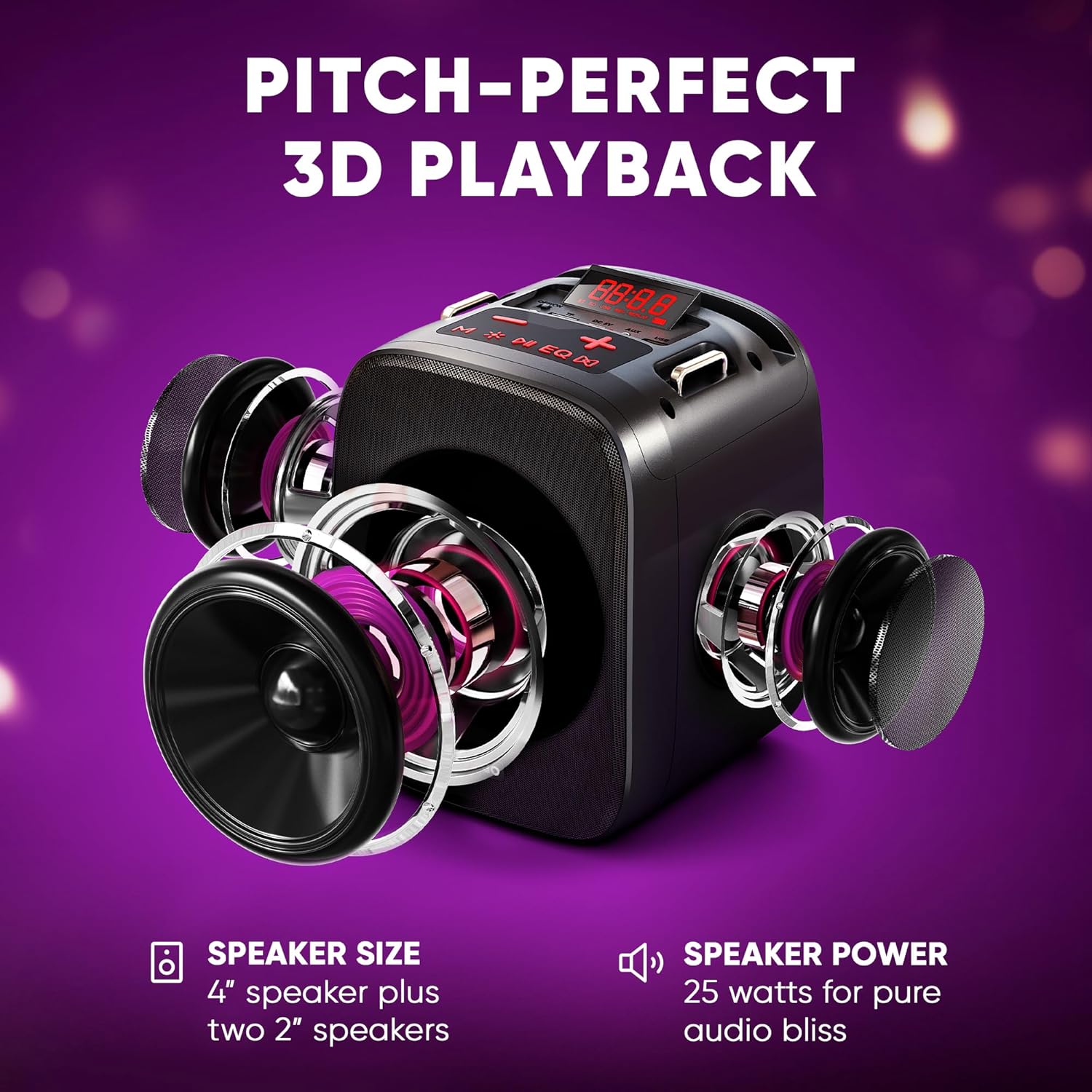
Зураг 4.4: Дэлбэрэв view illustrating the three-speaker system (one 4-inch, two 2-inch) for dynamic sound output.
4.9 ТВ-тэй холбогдож байна
The Cantando C2 can be connected to a TV via Bluetooth or the provided Aux to RCA cable. This allows for displaying lyrics on the TV screen while using the karaoke machine for enhanced audio.

Image 4.5: The Cantando C2 connected to a TV, demonstrating how lyrics can be displayed for a full karaoke experience.
4.10 Бүтээгдэхүүн дууссанview Видео
Video 4.6: An official product video from MASINGO, introducing the Cantando C2 karaoke machine and its key features.
5. Засвар үйлчилгээ
- Зөөлөн, хуурай даавуугаар арчиж төхөөрөмжийг цэвэр байлга.
- Төхөөрөмжийг ус эсвэл хэт их чийгэнд өртүүлэхээс зайлсхий.
- Store the karaoke machine and microphones in a cool, dry place when not in use.
- Хэрэв микрофоныг удаан хугацаагаар хадгалах бол гоожихоос сэргийлж батерейг нь салгаж аваарай.
6. Алдаа засах
| Асуудал | Боломжит шалтгаан | Шийдэл |
|---|---|---|
| Хүч чадалгүй | Батерей бага; Цахилгаан унтраалттай | Charge the machine; Turn on the power switch |
| Микрофон ажиллахгүй байна | Low microphone batteries; Microphone not paired | Replace AA batteries; Power on microphone and ensure it pairs automatically |
| Чанга яригчаас дуу гарахгүй | Дууны хэмжээ хэт бага; Буруу оруулах горим; Төхөөрөмж холбогдоогүй байна | Increase volume; Select correct input mode (Bluetooth, AUX, USB, TF); Ensure device is properly connected |
| Bluetooth холболт амжилтгүй боллоо | Device too far; Bluetooth not enabled on source device | Move device closer; Enable Bluetooth on source device and re-scan |
7. Техникийн үзүүлэлтүүд
- Барааны жин: 4.74 фунт
- Бүтээгдэхүүний хэмжээ: 10.24 x 6.93 x 10.63 инч
- Загварын дугаар: C2
- Батерей: 1 Lithium Ion battery required (included for machine), 2 AA batteries per microphone (not included)
- Өнгө: Хар мод
- Тохиромжтой төхөөрөмжүүд: Ухаалаг утас
- Холбогч төрөл: 3.5 мм Жак
- Илтгэгчийн тоо: 1 (main) + 2 (side)
- Зайны төрөл: Лити ион
- Медиа формат: WAV
- Эрчим хүчний эх үүсвэр: Батерейгаар ажилладаг
- Ботьtage: 3.7 вольт (ДС)
- Ватtage: 15 watts (total 25W dynamic output)
8. Баталгаат хугацаа ба дэмжлэг
For warranty information or technical support, please refer to the contact details provided in the packaging or visit the official MASINGO webсайт. Худалдан авалтын баримтаа худалдан авалтын баталгаа болгон хадгалаарай.


