1. Танилцуулга
The SMARTGEN HES9510-RM is a sophisticated hybrid energy monitoring system designed for remote management and oversight of various power generation and control units. It is compatible with single or multiple HGM9510N genset controllers, HGM9560 bus tie mains parallel controllers, and HES9510 hybrid energy controllers.
This system facilitates automatic start/stop, closing/opening operations, comprehensive data measurement, and real-time alarm display functions. Featuring an intuitive LCD display with touch screen capabilities, the HES9510-RM ensures ease of use and reliable operation. Built around a high-end ARM microprocessor, it communicates with connected controllers via network interfaces and RS485, allowing direct parameter reading and display on its screen for a clear overview of the system layout and branch parameters.
Гол онцлогууд:
- Remote monitoring for single or up to six HGM9510N genset controllers.
- Remote monitoring for a single HGM9560 bus tie mains parallel controller.
- Remote monitoring for a single HES9510 hybrid energy controller.
- High-end ARM microprocessor core with LCD backlight and touch screen for visual display and operation.
- Real-time display of genset parameters and alarm information detected by connected controllers.
2. Бүтээгдэхүүн дууссанview
The HES9510-RM unit features a robust design with a clear display for system monitoring and touch controls for interaction.
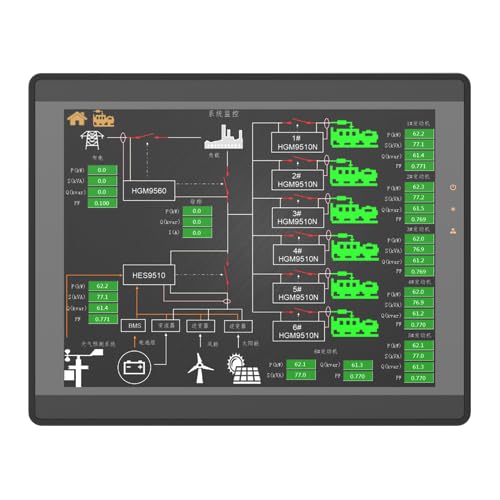
Зураг 2.1: Урд view of the HES9510-RM display, illustrating the system's graphical interface for energy monitoring.

Зураг 2.2: Ар талд view of the HES9510-RM, detailing the enclosure and mounting points.
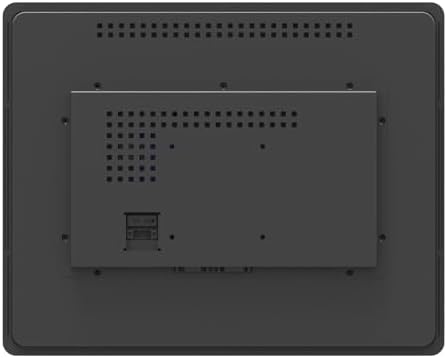
Зураг 2.3: Дэлгэрэнгүй арын хэсэг view of the HES9510-RM, showing communication interfaces and power input.
3. Тохиргоо
Proper installation and connection are crucial for the optimal performance of the HES9510-RM system. This section outlines general setup considerations.
3.1 Суурилуулалт
- Select a suitable location for mounting the HES9510-RM, ensuring it is protected from extreme temperatures, moisture, and direct sunlight.
- Ensure adequate ventilation around the unit to prevent overheating. Refer to Figure 2.2 for mounting points and rear panel layout.
- Secure the unit firmly using appropriate fasteners for the chosen mounting surface.
3.2 Цахилгааны холболтууд
- Эрчим хүчний хангамж: Connect the HES9510-RM to a stable power source as specified in the technical specifications. Ensure correct voltage ба туйлшрал.
- Сүлжээний интерфейс: For communication with HGM9510N genset controllers and HES9510 hybrid energy controllers, connect the HES9510-RM via its network interface ports. Use standard Ethernet cables.
- RS485 харилцаа холбоо: For communication with the HGM9560 bus tie mains parallel controller, utilize the RS485 communication port. Ensure proper wiring for data transmission and reception.
Always consult the detailed wiring diagrams provided with the product packaging for specific connection instructions. Incorrect wiring can damage the unit or connected equipment.
4. Ашиглалтын заавар
The HES9510-RM system is designed for user-friendly operation through its LCD touch screen interface.
4.1 Асаах
- Once all electrical connections are secure, apply power to the HES9510-RM.
- The system will initiate a self-test and boot-up sequence. The main monitoring screen should appear after a short period.
4.2 Интерфэйсийг удирдах
- The LCD is a touch screen. Use your finger or a stylus to interact with on-screen elements.
- The main screen typically displays a general system layout, showing the status of connected gensets, hybrid energy systems, and bus tie controllers.
- Tap on specific components or data points to access detailed information, branch parameters, or control options.
4.3 Хяналт ба хяналт
- Өгөгдлийн хэмжилт: Real-time parameters such as voltage, current, frequency, power, and energy consumption are displayed.
- Сэрүүлгийн дэлгэц: The system provides immediate visual and audible alerts for any detected alarms or abnormal conditions from connected controllers. Acknowledge alarms as required.
- Алсын удирдлага: Depending on the configuration and permissions, the HES9510-RM allows for remote auto start/stop, closing/opening of gensets, and other control functions for connected devices. Exercise caution when performing remote control actions.
4.4 Системийн тохиргоо
Access the system settings menu (usually via an icon on the main screen) to configure network settings, display preferences, alarm thresholds, and communication parameters. Refer to the advanced user guide for detailed configuration procedures.
5. Засвар үйлчилгээ
Regular maintenance ensures the longevity and reliable operation of your HES9510-RM system.
- Цэвэрлэгээ: Gently clean the LCD touch screen with a soft, lint-free cloth. Do not use abrasive cleaners or solvents.
- Агааржуулалт: Ensure that the ventilation openings on the unit are free from dust and obstructions to maintain proper airflow and prevent overheating.
- Програм хангамжийн шинэчлэлтүүд: Periodically check the SMARTGEN-America website for available firmware updates. Follow the provided instructions carefully for any update procedures.
- Холболтын шалгалт: Routinely inspect all cable connections (power, network, RS485) for secure fit and signs of wear or damage.
6. Алдаа засах
Энэ хэсэгт нийтлэг асуудлуудын үндсэн алдааг олж засварлах алхмуудыг өгсөн болно. Илүү төвөгтэй асуудлуудын хувьд техникийн дэмжлэгтэй холбогдоно уу.
6.1 No Power/Display
- Цахилгаан тэжээлийн холболтыг шалгаж, найдвартай залгагдсан эсэхийг шалгана уу.
- Цахилгаан тэжээлийн эх үүсвэр идэвхтэй бөгөөд зөв хэмжээг өгч байгаа эсэхийг шалгана ууtage.
- Цахилгааны кабельд харагдахуйц гэмтэл байгаа эсэхийг шалгана уу.
6.2 Харилцаа холбооны алдаа
- Ensure all network and RS485 cables are correctly connected and not damaged.
- Verify that the connected controllers (HGM9510N, HGM9560, HES9510) are powered on and functioning correctly.
- Check the communication settings on the HES9510-RM and the connected controllers to ensure they match (e.g., IP addresses, baud rates).
6.3 Мэдрэгчтэй дэлгэц хариу өгөхгүй байна
- Perform a soft reset of the unit if possible (refer to the advanced user guide for instructions).
- Ensure the screen is clean and free from debris or moisture that might interfere with touch detection.
7. Техникийн үзүүлэлтүүд
Technical specifications for the SMARTGEN HES9510-RM Hybrid Energy Monitoring System:
| Тодорхойлолт | Үнэ цэнэ |
|---|---|
| Брэнд | SMARTGEN |
| Загвар | HES9510-RM |
| ASIN | B0CJ586JBZ |
| Зүйлийн жин | 2.42 фунт (1.1 килограмм) |
| Материал | Зэс |
| Үйлдвэрлэгч | SMARTGEN |
| Харилцаа холбооны интерфейсүүд | Network Interface, RS485 |
| Дэлгэцийн төрөл | LCD with Touch Screen |
| Үндсэн процессор | High-end ARM Microprocessor |
8. Баталгаат хугацаа ба дэмжлэг
For detailed warranty information, please refer to the warranty card included with your product or visit the official SMARTGEN-America webсайт. Баталгаат нөхцөл нь ихэвчлэн худалдан авсан өдрөөс хойш тодорхой хугацаанд үйлдвэрлэлийн согогийг хамардаг.
For technical support, troubleshooting assistance beyond this manual, or inquiries regarding parts and service, please contact SMARTGEN-America customer service. Contact information can usually be found on the product packaging or the manufacturer's webсайт.
Онлайн нөөцүүд:
- Check more SMARTGEN products on the smartgen-america webсайт.


