1. Танилцуулга
Thank you for choosing the THOKWOK TK-X2 Motorcycle Bluetooth Headset. This manual provides detailed instructions for the proper installation, operation, and maintenance of your device. Please read this manual thoroughly before use to ensure optimal performance and safety.
Аюулгүй байдлын урьдчилан сэргийлэх арга хэмжээ:
- Always prioritize road safety. Do not operate the device in a manner that distracts you from riding.
- Унахаасаа өмнө төхөөрөмж дуулгадаа найдвартай бэхлэгдсэн эсэхийг шалгаарай.
- Adjust volume to a safe level that allows you to hear ambient traffic sounds.
- Төхөөрөмжийг задлах эсвэл өөрчлөх гэж бүү оролдоорой. Энэ нь баталгааг хүчингүй болгож, эвдрэлд хүргэж болзошгүй.
2. Хайрцагт юу байна
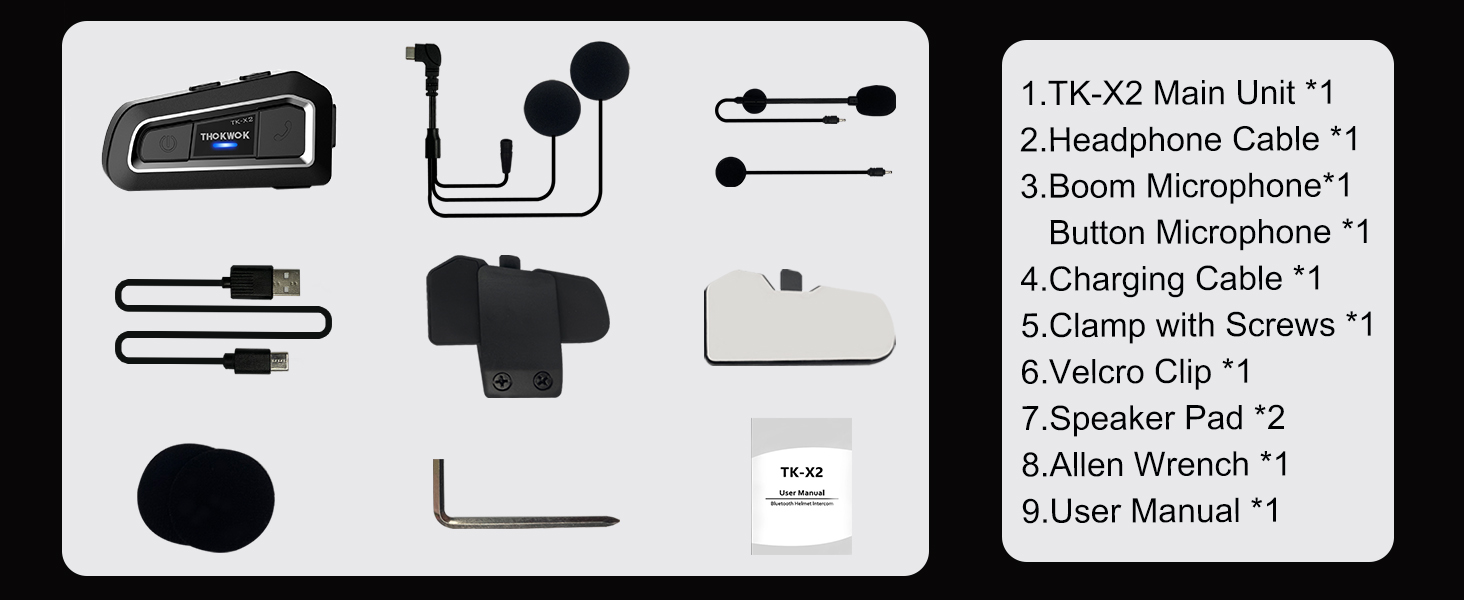
Суулгацыг үргэлжлүүлэхийн өмнө бүх бүрэлдэхүүн хэсгүүд байгаа эсэхийг шалгаарай.

TK-X2 Main Unit

Boom микрофон

Товчлуурын микрофон

Headphone Cable & Charging Cable
Clamp шураг бүхий
Velcro Clip
Чанга яригч дэвсгэр
Аллен эрэг чангалах түлхүүр
Хэрэглэгчийн гарын авлага
3. Бүтээгдэхүүн дууссанview
The THOKWOK TK-X2 features an intuitive button layout for easy operation even with gloves. Below is a diagram highlighting the main unit and its components.
Main Unit: Power Button (left), Function Button (middle), Phone Button (right).
Key Features: Bluetooth 5.0, 3 Riders' Group, FM Radio, Hi-Fi Stereo, DSP&CVC Noise Reduction, Voice Assistant, IP67 Waterproof, 650mAh Battery.
4. Суурилуулалт
The TK-X2 offers flexible installation options to suit various helmet types.
4.1. Үндсэн төхөөрөмжийг суурилуулах
Use either the clamp with screws or the velcro clip to attach the main unit to the side of your helmet. Ensure it is securely fastened and does not obstruct your vision or helmet functionality.
4.2. Microphone Options
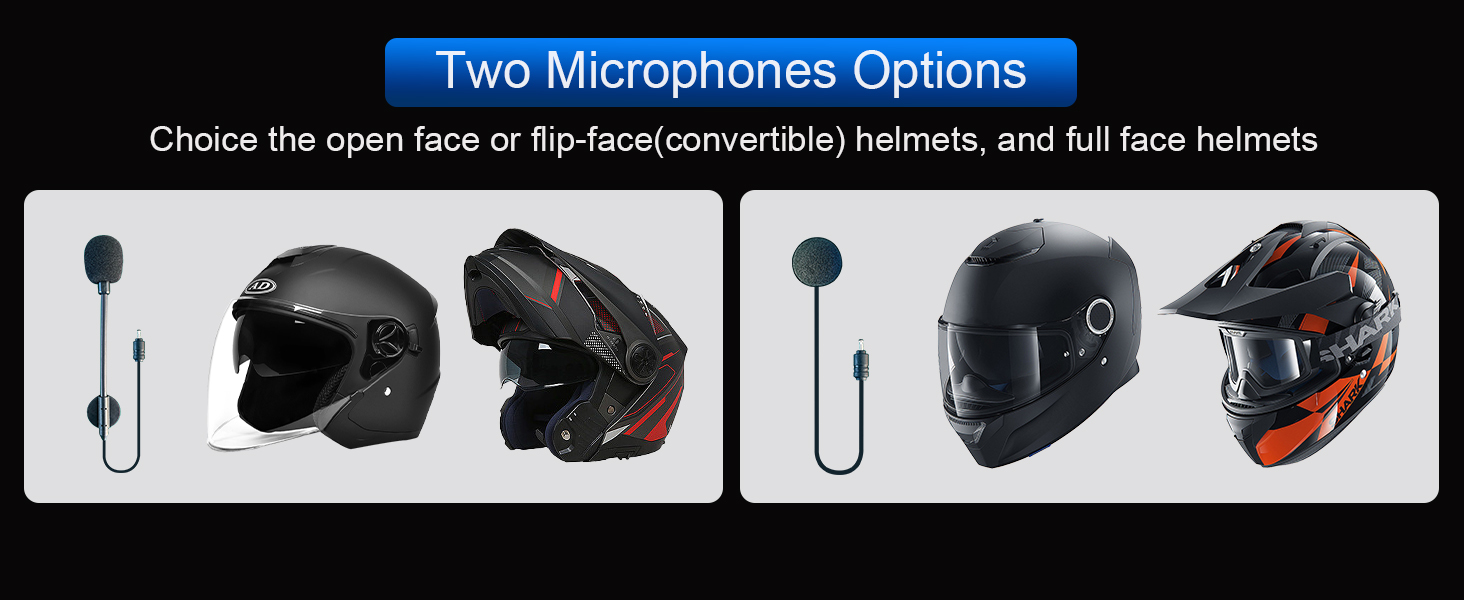
The TK-X2 includes two interchangeable microphones for different helmet styles:
- Boom микрофон: Ideal for open-face or flip-face (modular) helmets.
- Товчлуурын микрофон: Suitable for full-face helmets.

Choose the appropriate microphone for your helmet type.
5. Тохиргоо ба Хослуулах
5.1. Утастай Bluetooth холболт
To connect your TK-X2 headset to your smartphone:
- Ensure the TK-X2 is powered off.
- Long press the Power button for 4 seconds until the red and blue lights flash alternately. This indicates pairing mode.
- On your phone, turn on Bluetooth and search for "TK-X2".
- Select "TK-X2" to connect. Once connected, the blue light on the headset will flash slowly.
Video: Demonstrates pairing the TK-X2 with a smartphone for music and call functions.
5.2. Intercom Pairing (Multiple Units)
The TK-X2 supports intercom communication for up to 3 riders, with 2 riders talking simultaneously. Before pairing, ensure all units have their previous Bluetooth pairing records cleared by long pressing the Power and Phone buttons simultaneously for 8 seconds until pink lights flash twice.
5.2.1. Two-Way Intercom Pairing
- Turn on both TK-X2 units.
- On both units, long press the Power button for 4 seconds until red and blue lights flash alternately (pairing mode).
- Click the Power button on one of the units to initiate pairing.
- Once paired, the blue lights on both units will flash slowly, and you will hear "Intercom connected".
5.2.2. Three-Way Intercom Pairing
- Clear all previous pairing records on all three units (A, B, C) as described above.
- Turn on all three units.
- Pairing A and B: On units A and B, long press the Power button for 4 seconds until red and blue lights flash alternately. Click the Power button on unit A to pair. Once paired, blue lights flash slowly.
- Pairing B and C: On unit B, click the Power button to hang up the intercom. On units B and C, long press the Power button for 4 seconds until red and blue lights flash alternately. Click the Power button on unit B to pair. Once paired, blue lights flash slowly.
- Pairing C and A: On unit C, click the Power button to hang up the intercom. On units C and A, long press the Power button for 4 seconds until red and blue lights flash alternately. Click the Power button on unit C to pair. Once paired, blue lights flash slowly.
- Initiating 3-Way Intercom: Double-click the Power button on unit A to talk with C. Click the Power button on unit C to talk with B.
Video: Illustrates the process of pairing two and three TK-X2 units for intercom communication.
6. Үйл ажиллагаа
6.1. Үндсэн удирдлага
- Асаах/унтраах: Power товчийг 2 секундын турш удаан дарна уу.
- Хөгжим тоглуулах/түр зогсоох: Click the Function button.
- Дараагийн дуу: Click the Phone button.
- Өмнөх дуу: Click the Power button.
- Дууг нэмэгдүүлэх: Long press the Phone button. You will hear a "Di" sound when maximum volume is reached.
- Дууг багасгах: Power товчийг удаан дар.
- Дуудлагад хариулах/дуусах: Click the Phone button.
- Дуудлагаас татгалзах: Long press the Phone button for 2 seconds.
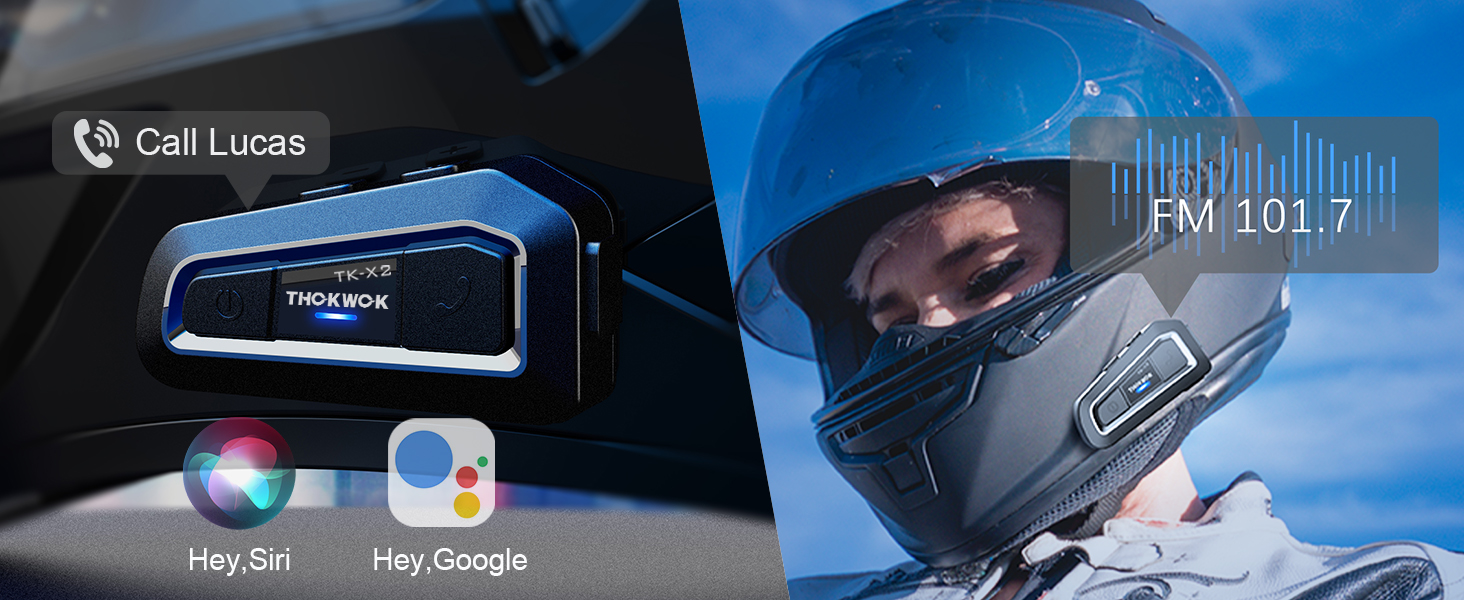
- Voice Assistant (Siri/S-Voice): Long press the Function button for 2 seconds. You will hear "Voice Dial".
- FM радио асаах/унтраах: Double-click the Function button. You will hear "Turn on radio" or "Turn off radio".
Access voice assistant and FM radio with simple button presses.
6.2. Дотуур холбооны хэрэглээ
- Домофоныг эхлүүлэх: Click the Power button (after successful pairing).
- Интеркомын төгсгөл: Click the Power button.
- When an intercom call is active, music playback will automatically pause. Music will resume when the intercom call ends.
7. Засвар үйлчилгээ
7.1. Цэнэглэх
The TK-X2 features a built-in 650mAh Lithium Polymer battery. Connect the charging cable to the Type-C port on the unit and a suitable USB power source. A full charge takes approximately 2.5 hours. The device will broadcast battery status upon power-on: "Battery full", "Battery medium", or "Battery low".

Enjoy up to 24 hours of music or intercom time and 280 hours of standby time.
7.2. Цэвэрлэгээ ба хадгалах
The TK-X2 has a waterproof design (IP67 rated), allowing use in various weather conditions. To clean, wipe the unit with a soft, damp cloth. Avoid using harsh chemicals or abrasive materials. Store the device in a cool, dry place when not in use.
The waterproof design ensures durability in various riding environments.
8. Алдаа засах
| Асуудал | Боломжит шалтгаан | Шийдэл |
|---|---|---|
| Асаах боломжгүй | Батерей бага | Төхөөрөмжийг дор хаяж 2.5 цаг цэнэглэ. |
| Утастай холбох боломжгүй | Device not in pairing mode / Phone Bluetooth off / Previous pairing conflict | Ensure TK-X2 is in pairing mode (red & blue flashing). Turn on phone Bluetooth. Clear previous pairing records on TK-X2 and try again. |
| Домофон холбоогүй байна | Units not in pairing mode / Previous pairing conflict | Ensure all units are in pairing mode. Clear all previous pairing records on all units and re-pair. |
| Poor sound quality / Noise | Microphone/speaker placement / Environmental noise | Adjust microphone and speaker position inside the helmet. Ensure microphone is close to your mouth. The device features DSP & CVC noise cancellation for high-speed clarity. |
| FM радио ажиллахгүй байна | Weak signal / Feature not activated | Move to an area with better signal. Double-click the Function button to activate FM radio. |
9. Техникийн үзүүлэлтүүд
| Онцлог | Дэлгэрэнгүй |
|---|---|
| Загварын нэр | TK-X2 Single |
| Bluetooth хувилбар | 5.1 |
| Домофон холбооны зай | Up to 1000m (no obstacles) |
| Макс Райдерс (Дотоод холбоо) | 3 (2 simultaneous talk) |
| Дуу чимээний хяналт | Active Noise Cancellation (DSP & CVC) |
| Зайны төрөл | Лити полимер (650 мАч) |
| Music/Intercom Time | 24 цаг хүртэл |
| Зогсоолын цаг | 280 цаг хүртэл |
| Цэнэглэх хугацаа | Ойролцоогоор 2.5 цаг |
| Усны эсэргүүцлийн түвшин | Усны хамгаалалттай (IP67) |
| Чихэвчний үүр | Төрөл-C |
| Хэмжээ | 3 x 1.6 x 0.83 инч |
| Зүйлийн жин | 8.4 унц |
| Материал | Акрилонитрил бутадиен стирол (ABS) |
10. Баталгаат хугацаа ба дэмжлэг
THOKWOK products are designed and manufactured to the highest quality standards. For warranty information, technical support, or customer service inquiries, please refer to the contact information provided on your product packaging or visit the official THOKWOK webсайт.
Баталгаат заргад зориулж худалдан авалтаа нотлох баримтаа үлдээнэ үү.


