1. Танилцуулга
This manual provides essential information for the safe and efficient operation of your Promethean UST-P1 DLP Projector. The Promethean UST-P1 is a WXGA Ultra Short Throw (UST) Projector designed for various applications, capable of displaying 3,300 Lumens at its brightest setting with a native resolution of 1280x800. It features DLP technology for higher contrast and reduced pixel visibility, and is 3D capable.
Хайрцагт юу байна
Савыг задлахдаа доор жагсаасан бүх зүйл байгаа бөгөөд сайн нөхцөлд байгаа эсэхийг шалгана уу.
- Promethean UST-P1 DLP Projector
- HDMI кабель
- Алсын удирдлага
- Цахилгааны утас
- Хэрэглэгчийн гарын авлага (энэ баримт бичиг)

Figure 1.1: Promethean UST-P1 Projector with its bundled accessories, including the projector unit, HDMI cable, remote control, and power cord.

Зураг 1.2: Дээд тал view of the Promethean UST-P1 Projector, showing the lens assembly and control panel area.
2. Тохиргоо
2.1 Проекторын байршил
The Promethean UST-P1 is an Ultra Short Throw (UST) projector, designed to project a large image from a very short distance. Place the projector on a stable, flat surface directly in front of the projection screen or wall. Ensure there are no obstructions between the projector lens and the projection surface.
2.2 Цахилгаан тэжээлд холбогдох
- Connect the supplied power cord to the AC IN port on the rear of the projector.
- Цахилгааны утасны нөгөө үзүүрийг газардуулсан цахилгааны залгуурт холбоно.
2.3 Видео эх үүсвэрүүдийг холбох
The projector offers multiple connectivity options. Refer to the rear panel diagram for port locations.
- HDMI: Connect an HDMI cable from your video source (e.g., laptop, Blu-ray player) to the HDMI port on the projector. The projector supports HDMI 1.4a.
- VGA: Connect a VGA cable from your computer to one of the VGA In ports (VGA In 1 or VGA In 2).
- Нийлмэл видео: Use an RCA cable to connect to the Composite Video port for standard definition video sources.
- Сүлжээ (RJ-45): For network control and monitoring, connect an Ethernet cable to the RJ-45 port.
- RS232 (DB-9pin): For serial control, connect a DB-9pin cable to the RS232 port.
- USB B: For service or specific control functions.
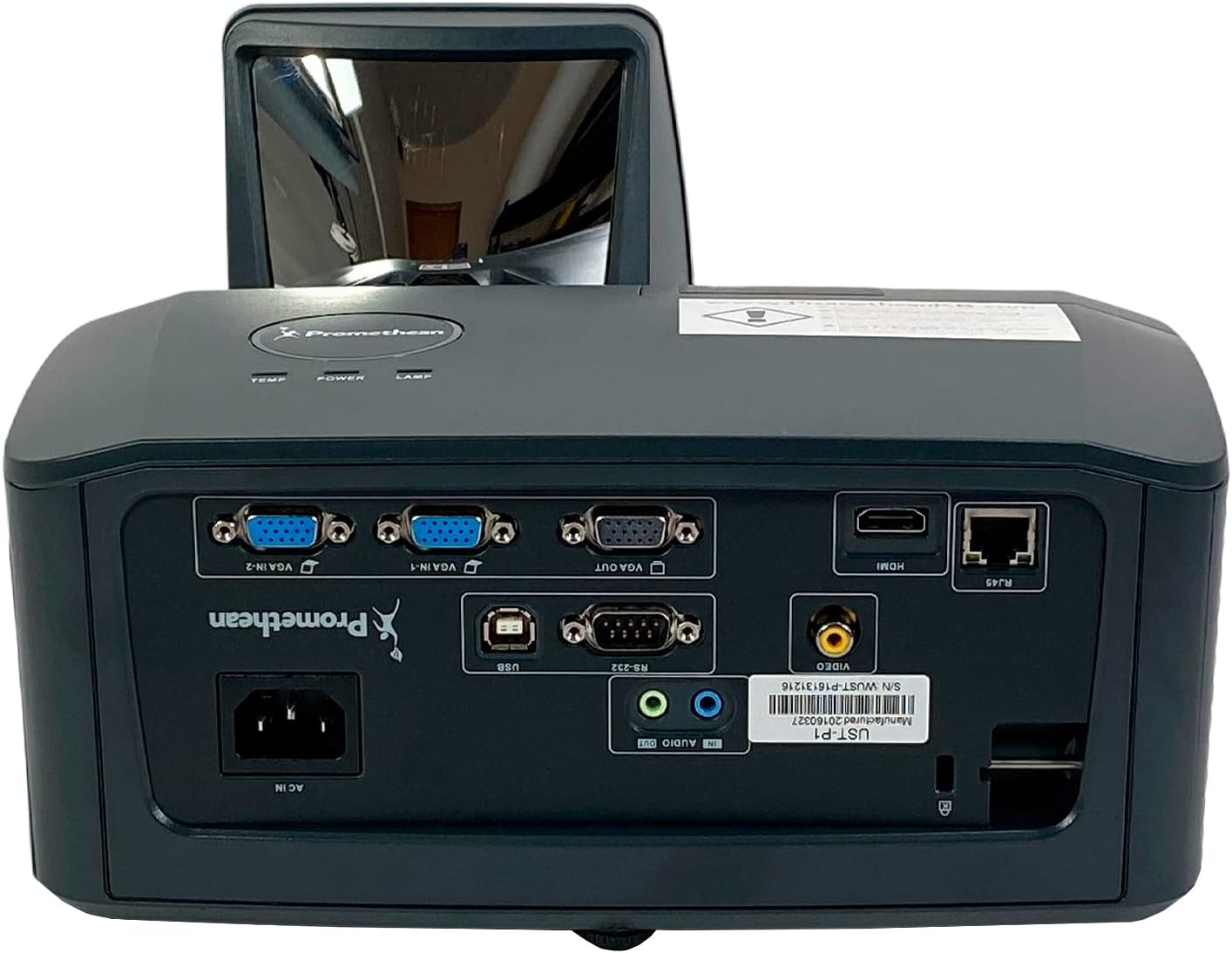
Зураг 2.1: Нарийвчилсан view of the Promethean UST-P1 projector's rear panel, highlighting the HDMI, VGA, Composite, Network (RJ-45), RS232, and USB B connectivity options.
3. Ашиглалтын заавар
3.1 Асаах/унтраах
- Асаах: Проекторын удирдлагын самбар эсвэл алсын удирдлага дээрх Асаах товчийг дарна уу. Асаах заагч гэрэл асна.
- Унтраах: Press the Power button again. A confirmation message may appear; press Power again to confirm shutdown. Allow the projector to cool down completely before unplugging it.
3.2 Оролтын эх үүсвэрийн сонголт
To switch between connected video sources, use the "Source" or "Input" button on the remote control or the projector's control panel. Cycle through the available inputs (HDMI, VGA1, VGA2, Video) until your desired source is displayed.
3.3 Зургийн тохируулга
- Фокус: Зураг тод, тод болтол проекторын линз дээрх фокусын цагиргийг тохируулна уу.
- Түлхүүр чулууны залруулга: If the image appears trapezoidal, use the keystone correction function (usually found in the projector's OSD menu or via dedicated buttons on the remote) to square the image.
- Харьцаа: The projector has a native aspect ratio of 16:10 (WXGA). You can adjust the aspect ratio settings in the menu to match your content (e.g., 4:3, 16:9) if necessary.
3.4 Supported Video Modes
The Promethean UST-P1 supports various video modes, including 720p, 1080i, 1035i, 575i, 576i, 480p, and 480i.
4. Засвар үйлчилгээ
Тогтмол засвар үйлчилгээ нь таны проекторын ашиглалтын хугацааг уртасгаж, оновчтой гүйцэтгэлийг баталгаажуулдаг.
4.1 Проекторыг цэвэрлэх
- Гадна: Зөөлөн, хөвөнгүй даавууг бага зэрэг хэрэглээрэй dampened with water to clean the projector's casing. Зүлгүүрийн цэвэрлэгч эсвэл уусгагчаас зайлсхий.
- Линз: Gently wipe the projector lens with a lens cleaning cloth or lens paper. Do not use abrasive materials or excessive force, as this can scratch the lens.
- Агааржуулалтын нүх: Periodically check and clean the air vents to prevent dust buildup, which can impede airflow and cause overheating. Use a soft brush or compressed air to remove dust.
4.2 лamp Солих
The Promethean UST-P1 is a lamp-based projector. The lamp has a finite lifespan and will eventually need replacement. The projector will typically display a warning message when the lamp is nearing the end of its life. Refer to the projector's on-screen display (OSD) menu for lamp цагийн мэдээлэл.
Анхааруулга: Lamp replacement should only be performed when the projector is completely cool and unplugged from the power source. Consult a qualified technician if you are unsure about the replacement procedure.
5. Алдаа засах
This section addresses common issues you might encounter with your projector. If the problem persists after trying these solutions, please contact customer support.
| Асуудал | Боломжит шалтгаан | Шийдэл |
|---|---|---|
| Дэлгэц дээр зураг алга |
|
|
| Зураг бүдэг эсвэл фокусгүй байна |
|
|
| Image is trapezoidal (not square) |
|
|
| Алсын удирдлага ажиллахгүй байна |
|
|
6. Техникийн үзүүлэлтүүд
| Онцлог | Дэлгэрэнгүй |
|---|---|
| Загвар | UST-P1 |
| Дэлгэцийн технологи | DLP |
| Гэрэлтүүлэг | 3,300 ANSI люмен |
| Төрөлхийн тогтоол | 1280x800 (WXGA) |
| Харьцаа | 16:10 (Уугуул) |
| Ялгаатай харьцаа | 10,000:1 |
| 3D чадвар | Тиймээ |
| Connectivity Inputs | HDMI 1.4a, Composite (RCA), Network (RJ-45), RS232 (DB-9pin), VGA In (Dsub-15pin x 2), USB B |
| Дэмжигдсэн видео горим | 720p, 1080i, 1035i, 575i, 576i, 480p, 480i |
| Онцлог шинж чанарууд | Крестроны өрөөView™ |
| Бүтээгдэхүүний хэмжээс | 14.5 x 11.4 x 6.3 инч |
| Зүйлийн жин | 10.6 фунт |
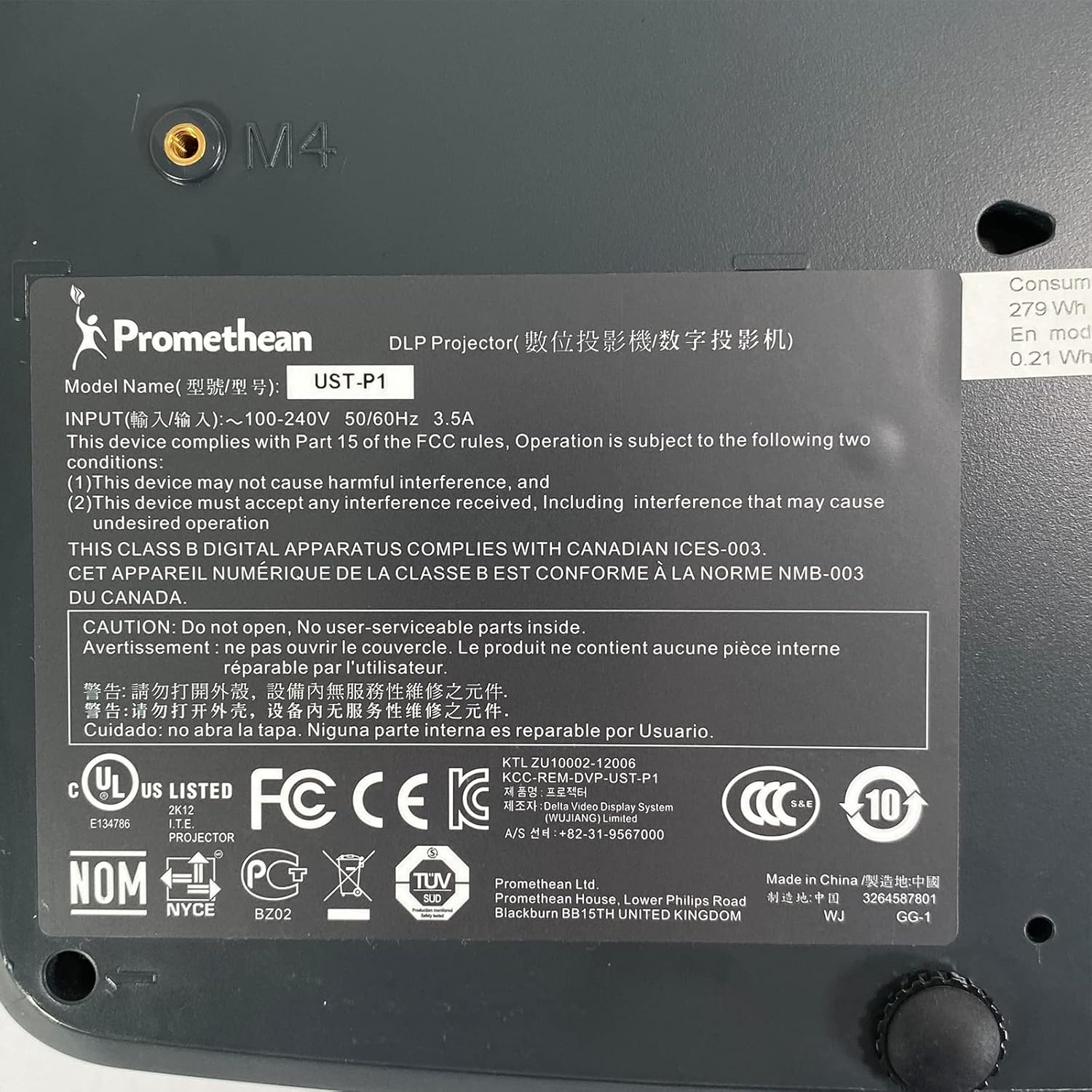
Figure 6.1: The bottom label of the Promethean UST-P1 projector, displaying the model number, input power requirements, and various regulatory compliance marks.
7. Баталгаат хугацаа ба дэмжлэг
For specific warranty information regarding your Promethean UST-P1 DLP Projector, please refer to the documentation provided at the time of purchase or contact the seller directly. Warranty terms and conditions may vary.
For technical support, troubleshooting assistance beyond this manual, or inquiries about replacement parts (such as lamps), please contact the seller, Tekswamp, or the official Promethean support channels.
хаягаар зочилж болно Тексвamp Амазон дээр дэлгүүр хэсэх for more information or to contact their support.