Танилцуулга
This manual provides detailed instructions for the installation, operation, and maintenance of your Daytech Freezer Door Alarm, Model USR-1. This device is designed to alert you when a refrigerator or freezer door is left open, helping to preserve food and save energy. Please read this manual thoroughly before using the product to ensure proper function and safety.
Бүтээгдэхүүн дууссанview
The Daytech Freezer Door Alarm consists of a main unit and a magnetic sensor. When the magnetic sensor is separated from the main unit (indicating an open door), the alarm will activate after a set delay. The device features adjustable volume and multiple delay modes.

Figure 1: Main Unit Components and Dimensions
- Буззер: Emits the alarm or chime sound.
- LED үзүүлэлт: Provides visual feedback for status and mode selection.
- Chime/Alarm/OFF Switch: Selects between chime mode, alarm mode, or turns the device off.
- Дууны хяналт: Дууны түвшинг тохируулна.
- Work Mode Set Key: Selects the delay duration before the alarm activates.
Багцын агуулга
Таны багцад бүх зүйл байгаа эсэхийг шалгана уу:
- Бүтээгдэхүүний сав баглаа боодлын хайрцаг
- Refrigerator Door Alarm (Main Unit and Magnet)
- Хэрэглэгчийн гарын авлага
- AAA batteries (quantity depends on the set purchased)
- Screws (quantity depends on the set purchased)
Video 1: Product Unboxing and Package Contents. This video demonstrates the items included in the package, such as the alarm units, user manual, and batteries.
Суурилуулалт
The alarm can be installed on various types of refrigerators and freezers. Ensure the installation surface is clean and dry.
Суулгах алхамууд:
- Clean the desired installation area on your refrigerator or freezer door frame.
- Peel off the protective film from the double-sided adhesive tape on the back of the main unit and the magnet.
- Attach the main unit to the door frame and the magnet to the door, ensuring the triangular markings on both parts are aligned. The gap between the main unit and the magnet should be less than 0.98 inches (2.5 cm) when the door is closed.
- Press firmly for a few seconds to secure.

Зураг 2: Суулгах үйл явц
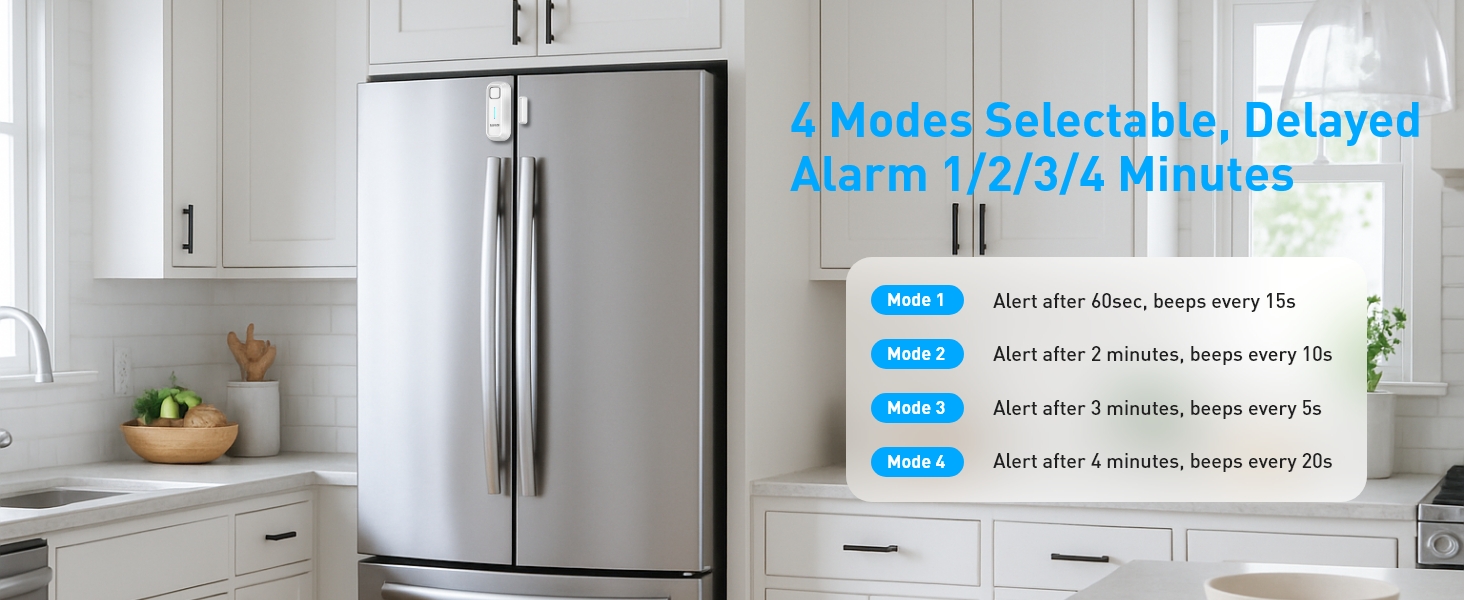
Figure 3: Recommended Installation Positions and Gap Requirements
Ашиглалтын заавар
1. Ringtone and Mode Selection:
Use the 'Chime/Alarm/OFF' switch on the side of the main unit to select the desired sound mode:
- Хонхны горим: A gentle reminder sound.
- Сэрүүлгийн горим: A loud alert sound.
- Унтрааж байна: Turns the device off, no sound will be made.
2. Дууны тохируулга:
The alarm features 5 adjustable volume levels (0-120dB). Use the 'Volume' button on the side to cycle through the volume settings until you reach your preferred level.

Figure 4: Adjustable Volume Levels
3. Delay Mode Selection:
The alarm offers four delay modes, allowing you to choose how long the door can remain open before the alert sounds. Press the 'SET Key' button to cycle through the modes.
Video 2: Functional Adjustment Demonstration. This video illustrates how to switch between chime and alarm modes, adjust volume, and select different delay modes.
Ажлын горимууд
The Daytech Freezer Door Alarm offers four distinct working modes, each with a different delay duration and alert pattern:
| Горим | Саатуулах хугацаа | Alert Pattern |
|---|---|---|
| Горим 1 | 1 minute (60 seconds) | Alarm/Chime sounds for 5 seconds every 15 seconds. |
| Горим 2 | 2 минут (120 секунд) | Alarm/Chime sounds for 10 seconds every 10 seconds. |
| Горим 3 | 3 минут (180 секунд) | Alarm/Chime sounds for 15 seconds every 5 seconds. |
| Горим 4 | 4 минут (240 секунд) | Alarm/Chime sounds for 20 seconds every 15 seconds. |

Зураг 5: Илүүview of Working Modes
Зай солих
The Daytech Freezer Door Alarm requires 2 AAA batteries. When the batteries are low, the alarm's performance may be affected. Replace batteries as follows:
- Slide the battery cover on the back of the main unit downwards to open.
- Хуучин AAA батерейг салга.
- Зөв туйлшралыг (+/-) баталгаажуулж, хоёр шинэ AAA батерейг оруулна уу.
- Батерейны тагийг найдвартай товших хүртэл нь шургуулна уу.

Figure 6: Battery Replacement Steps
Алдааг олж засварлах
If you encounter issues with your Daytech Freezer Door Alarm, refer to the following troubleshooting guide:
| Асуудал | Боломжит шалтгаан | Шийдэл |
|---|---|---|
| Alarm does not sound when door is open. | 1. Device is OFF. 2. Batteries are low or incorrectly installed. 3. Magnet and main unit are too far apart. | 1. Ensure the 'Chime/Alarm/OFF' switch is set to Chime or Alarm mode. 2. Батерейг сольж, туйлшралыг шалгана уу. 3. Re-position the main unit and magnet to ensure the gap is less than 0.98 inches (2.5 cm) when the door is closed. |
| Alarm sounds too frequently or falsely triggers. | 1. Magnet and main unit are too close or misaligned. 2. Delay mode is set too short. | 1. Adjust the position of the magnet and main unit to ensure proper alignment and a slight gap when the door is closed. 2. Select a longer delay mode using the 'SET Key'. |
| Volume is too low or too high. | Дууны тохиргоо оновчтой биш байна. | Adjust the volume using the 'Volume' button on the side of the main unit. |
Үзүүлэлтүүд
| Онцлог | Дэлгэрэнгүй |
|---|---|
| Загварын дугаар | USR-1 |
| Хэмжээ | 3.9 x 1.6 x 0.86 инч (100 x 40 x 22 мм) |
| Зүйлийн жин | 3.34 унц |
| Эрчим хүчний эх үүсвэр | Батерейгаар ажилладаг |
| Батерей шаардлагатай | 2 AAA батерей (дагсан) |
| Зайны төрөл | Шүлтлэг |
| Дуу чимээний түвшин | 120 децибел хүртэл |
| Суурилуулах төрөл | Хаалганы бэхэлгээ |
| Мэдрэгч технологи | Холбоо барих мэдрэгч |
| Тохиромжтой төхөөрөмжүүд | Home Security System (general) |
| Өнгө | Цагаан |
Баталгаат болон дэмжлэг
Daytech products are manufactured to high-quality standards. For warranty information or technical support, please refer to the contact details provided with your purchase or visit the official Daytech webсайт. Худалдан авалтын баримтаа худалдан авалтын баталгаа болгон хадгалаарай.


